

If you publish kids’ puzzle books, the age on your cover is a promise. A parent searching for puzzle books for kids age 6, or for 8 year olds, buys for one child, opens Look Inside, and checks the pages against that child. When the pages do not match, the review says so: too easy, too hard, too small to read.
This guide sorts puzzle books for kids by age into three bands, 4 to 6, 6 to 8 and 8 to 12, and turns each into settings you can hold for a whole book: grid size, word length and maze density. Shoppers also type ranges such as ages 4-7; pick one band and hold it. The bands are our editorial guidance, not a standard, and make no claim about what a child learns. The examples use Puzzle Maker Pro, our Windows software for puzzle pages and print-ready puzzle books.
Why age labels drive reviews
Readers judge the pages against the advertised age. One December 2025 post on the Sparkling Book Reviews blog, a positive review of a maze book, noted it was “advertised as being for kids ages 8-12” and said “some of the puzzles really challenged me”. That is one adult reviewer’s experience, not a rule, but the advertised age was the yardstick.
The other failure is sameness. A 2024 roundup of kids’ activity books in New York magazine’s The Strategist described “a collection of 150 mazes on newsprintlike paper” and said that “after one or two pages they get frustrated and bored.” The books it rated higher won on “illustration style and the variety and quality of the activities.”
So every page must fit the band, and the pages must vary; kids activity book interiors for KDP covers mixing page types. “Too small to read” is a print-size problem: start with one puzzle per page and large cells, and print a test page at your trim size.
Ages 4 to 6: what fits
In puzzle books for 5 year olds, lead with pages that explain themselves: many children here are not reading yet. Age 6 sits in two bands: readers get the 6 to 8 book, non-readers this one.
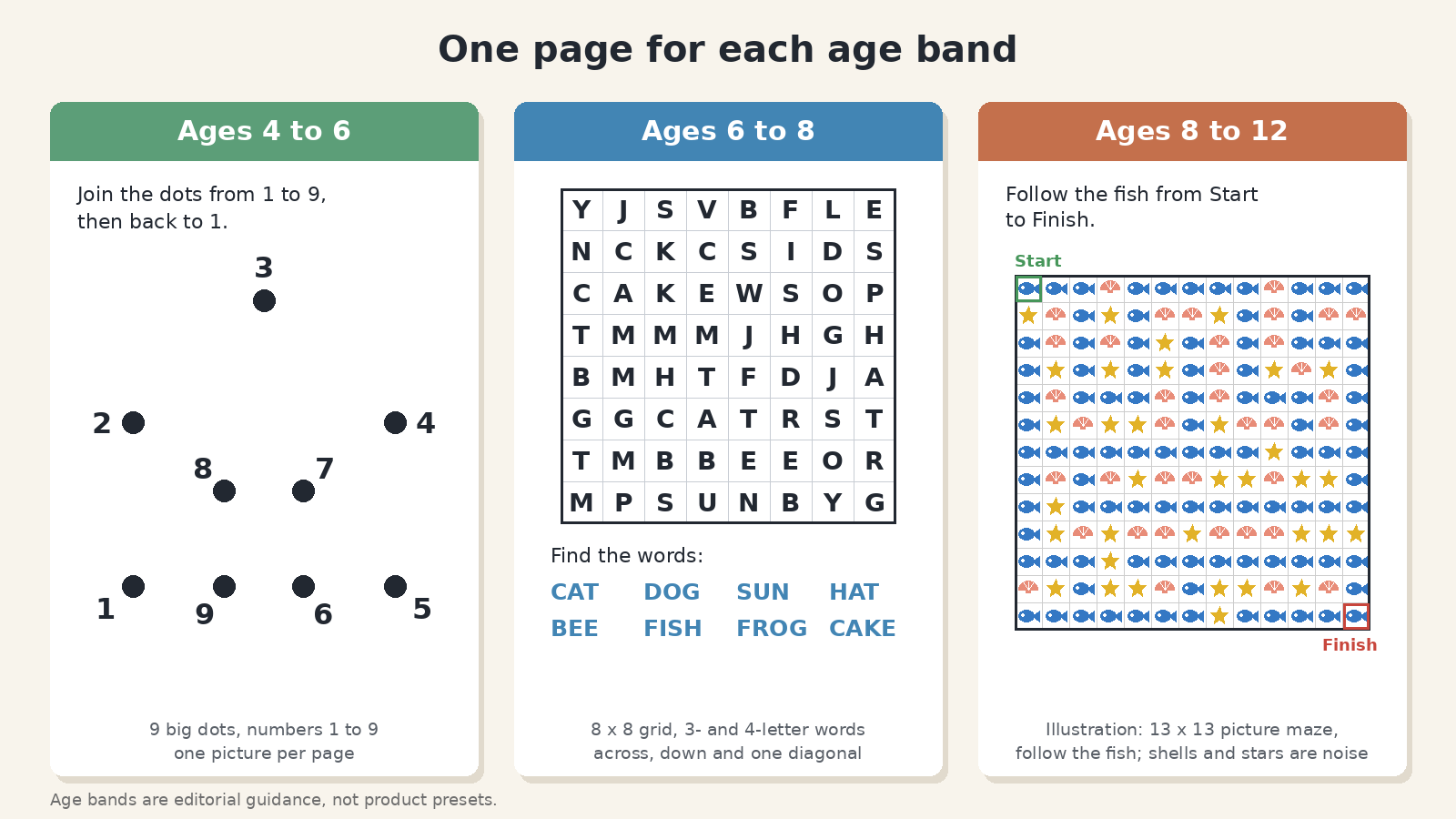
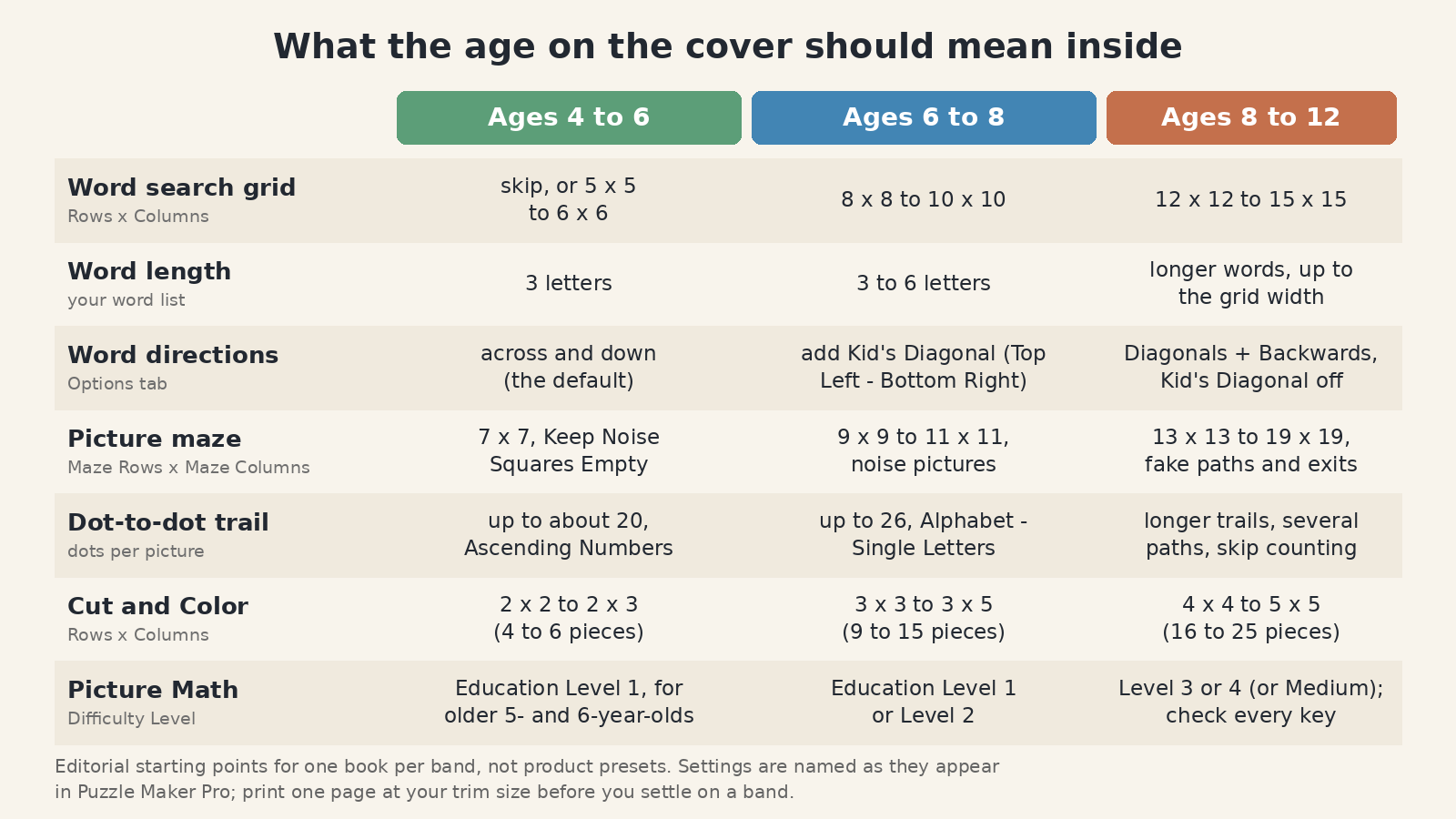
- Picture mazes. In Picture Mazes, Maze Rows and Maze Columns run from 7 to 19, odd numbers only; 7 by 7 is the shortest walk. Tick Keep Noise Squares Empty and leave Add Distractor (Fake) Paths and Add Distractor (Fake) Exits off, so the child follows one line of pictures with no wrong turns. More in picture maze books.
- Dot-to-dot pages. Connect the Dots SVG Edition has no dot-count box. The number of dots is how many points you place, or, when you import an SVG file, the Details setting (5 to 100; more detail means more dots). Use Ascending Numbers under Tag Type and keep the trail short; our starting point is about 20 dots.
- Cut-and-color pages. Cut and Color splits your picture into a grid of pieces, set by Rows and Columns (1 to 20 each, default 3 by 5, so 15 pieces). For this band, 2 by 2 or 2 by 3 is plenty. Cutting ruins whatever is on the back of a bound page, so give each cut page a blank back, or sell them as a printable pack (see cut and paste worksheets).
- Word searches and picture math. Mostly skip word searches; for early readers, use three-letter words on a 5 by 5 or 6 by 6 grid, words running across and down only. Picture Math’s Level 1 (below) can suit older 5- and 6-year-olds; picture math worksheets for kindergarten covers those pages.
Ages 6 to 8: what fits
This is the band where word pages start to work.
- Word searches. In Standard Word Search, Rows and Columns each run 5 to 200 and both open at 10. An 8 by 8 to 10 by 10 grid fits this band. There is no word-length setting; your word list decides, and a word longer than the grid cannot fit. Keep words to about six letters. Kid’s Diagonal (Top Left – Bottom Right) cuts placement to right, down and down-right; Backwards is its own checkbox, so leave it clear. To cap the list, clear Unlimited Words and set Max Words (1 to 50); eight to ten words is a comfortable page.
- Picture mazes. 9 by 9, the default, or 11 by 11, with noise pictures in the other squares. Now the child has to pick the path pictures out from the noise; keep fake paths off.
- Picture math. In Picture Math, each picture stands for a number that makes every equation true. Under Difficulty Level, the Education buttons set the ranges but leave Symbol Minimum Value alone, so set it to 1 first. Level 1 gives two pictures, a Symbol Maximum Value of 5 and an Equation Maximum Value of 10, with Allow Subtraction off. Level 2 keeps two pictures and raises those to 10 and 30.
- Cut and Color. 3 by 3 up to the default 3 by 5.
- Dot-to-dot. Alphabet – Single Letters runs A to Z, so a letter trail holds 26 dots.
Ages 8 to 12: what fits
Puzzle books for 8 year olds and up can push back.
- Word searches. 12 by 12 to 15 by 15, with longer words and a longer list. Tick Diagonals and Backwards, and clear Kid’s Diagonal, which limits diagonals to one direction even when Diagonals is ticked.
- Picture mazes. 13 by 13 up to 19 by 19. Turn on Add Distractor (Fake) Paths, which fills the grid with branches of path pictures that lead nowhere, and Add Distractor (Fake) Exits for extra openings on the edge. Look-alike noise pictures slow the solver down.
- Picture math. Level 3 gives three pictures, values up to 20 and totals up to 50, with subtraction on; Level 4 raises those to 50 and 100. Medium under Recreational / Social Media is another start. Kids (Easy Subtraction) gives gentler minus equations at two or three pictures. Solve every key.
- Dot-to-dot. Numbers – Formula builds tags from a formula, so n*2 gives 2, 4, 6 for skip counting. Split a big picture into several paths, and tick Restart numbering for this path where each trail should start at 1.
- Cut and Color. 4 by 4 to 5 by 5, 16 to 25 pieces.
One theme, three age versions
Three bands make three books, not one book with three sections, because a parent shops for one child. Keep the theme and change the settings:
- Build the content once. One ocean image folder feeds the mazes and cut pages. One ocean word list feeds the word searches, with longer words added for the older books.
- Save one preset per band. Use the preset buttons at the top of the module and name each preset by band, such as “Ocean 4-6”.
- Run each band on its own. Load the preset, set Quantity, and create the pages. Connect the Dots has no Quantity: you design each picture by hand, so save each finished design as a preset.
- Build each book. Instant Puzzle Books, the built-in book builder that comes with every paid edition, lays one module’s run out as a PDF or PowerPoint interior at your trim size. Its default, Print Solutions With Puzzles, puts each key right after its puzzle. Choose Puzzles First, Then Solutions to put the keys at the back, and check every key against its puzzle before you upload.
Several page types in one book go through Puzzle Book Studio, the workspace for arranging a finished book. A book made from one puzzle set works on every edition. A book with more than one puzzle set, whether mixed types for one band or two runs of the same module, needs Productivity, or an older Time Saver purchase, on every module whose puzzles go into it. Not every module sells a Productivity edition, so check each module’s shop page before you plan a mixed book.
Every paid edition lets you sell the finished books, worksheets and packs you make to your own readers and customers. Productivity adds the right to sell or supply the puzzles you generate to other publishers and sellers. You can move up to any higher edition at any time after you buy. Neither right replaces Amazon’s content rules for children’s books.
The demo makes watermarked output, one puzzle at a time, which is enough for a test page per band. Get the free Puzzle Maker Pro demo now
Other puzzles you might like
- How to make an activity book for preschoolers: tracing, pattern and maze pages, ages 3 to 5.
- Kids and adult versions of the same puzzle type: one module, two listings.
- Seek and Find puzzles for every age group: Seek and Find pages by age.
- Puzzle books for teens: ages 13 to 17.
- Tents and trees puzzle books: two logic types in one book.