

Last checked: 19 November 2026.
A color nonogram maker (or color nonogram generator) turns a picture into a grid of empty cells with colored numbers along the top and left side. Each number is a run of cells in the color it is printed in, and the solver fills the runs until the picture appears. For the solver’s side, how color nonograms work walks through a full example.
This guide covers the publisher’s side: pictures, colors, grid size per buyer, and sizes and clue numbers that are right on paper. The tool is Color Nonogram, a module in Puzzle Maker Pro, a Windows desktop program for making puzzle pages and puzzle books. For black-and-white picross books aimed at adult solvers, see nonogram puzzle books for adults.
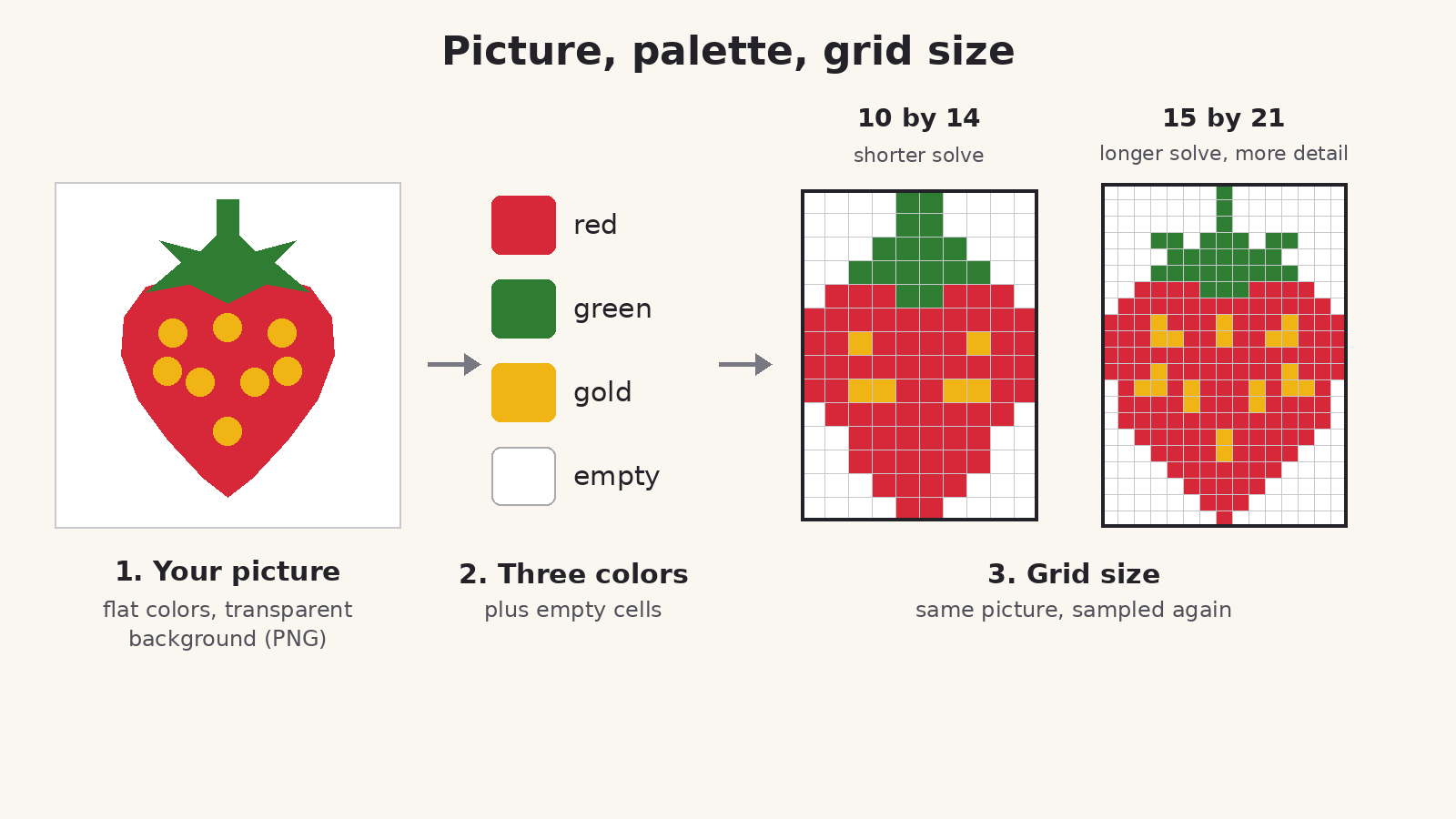
Which pictures make good color nonograms
The module matches each cell of your picture to a palette color, then writes the clues and the answer key from that same result. So the picture decides how good the puzzle is.
Flat color and bold shapes. The shop page names cartoons, icons, flags and simple illustrations. A strawberry in three flat colors gives clean runs. A photo with soft shading gives scattered single cells, and the clues turn into long strings of 1s.
Transparent background. Only transparent pixels become empty cells. A white background does not stay empty: white is matched to the nearest palette color. Save your art as a PNG with a transparent background.
Shape that fits the grid. The module crops your picture from the center to the shape of the grid. A wide picture on a square grid loses its sides, and a tall one loses its top and bottom. Set Rows and Columns separately to match the picture’s shape; they don’t have to be equal.
Details at least a cell wide. A thin stem or an outline narrower than one cell can break up or vanish. Image sampling (Low, Medium, High or Very high) sets how many spots in each cell the module looks at before it picks a color; the setting’s own help says more samples “read thin lines more reliably”.
Pictures you own. Use art you drew, commissioned or bought with the right to sell it in your store. The 50 built-in color pictures are handy for testing settings first.
Palette size per picture
On the Colors tab, Number of colours runs from 2 to 8, with 6 as the default.
With Take the colours from each image ticked (the default), every picture gets its own palette: a parrot comes out green and orange, a sunset red and gold. The count is a target, not a promise; an automatic palette can come back with more colors than the number you set. Turn the box off and the swatches you pick apply to every picture in the run, in exactly that number. That is how a twelve-puzzle pack or a book chapter shares one palette.
Fewer colors make a bolder, easier puzzle; three or four suit kids and newcomers. More colors give adults more to track, but each one is another number color to tell apart on paper. Two near shades, such as yellow and gold, are the first to cut.
Grid size by audience, and labeling it correctly
The grid runs from 10 by 10 to 90 by 90, square or not, with 25 by 25 as the default.
- Kids: start at the 10 by 10 minimum, with bold pictures and three or four colors. To hold a kids’ book to exactly that number, turn off Take the colours from each image and pick the swatches yourself.
- Adults: adult nonogram books usually run from 15 by 15 up to 25 by 25 or 30 by 30.
The shop page says pictures with a few bold colors at grid sizes up to about 25 by 25 give the most dependable one-solution boards. Above that, a clean, simple picture matters more.
Only uniquely solvable puzzles is on by default. It looks for a version of each picture with exactly one solution, and image puzzles may change the grid by a row, a column, or one of each to get there. Trim blank rows/columns at edges (off by default) can make a grid smaller still. Both mean a puzzle can come out at a different size than the one you typed.
That matters to buyers. One Amazon reviewer of a nonogram book wrote: “Often the part that says ’13 x 13 grid’ at the bottom of the puzzle will just be wrong.” Solvers count every cell, so they notice a wrong size label straight away.
Two ways to keep labels right:
- Let the module write them. The Layout tab’s smart titles include a grid-size option that prints each puzzle’s size as it was made, so a puzzle that came out a row, a column or both off carries its real size. It prints rows first, so a puzzle 11 columns wide and 15 rows tall reads 15 × 11; write your subtitle the same way.
- Hold one exact size. Set Grid-size retries on the Advanced tab to 0 and leave Trim off. Each picture then keeps the size you asked for. If a picture can’t be shown to have one solution at that size, the module still makes the puzzle but shows a notice naming the picture; swap that picture or try a smaller grid before it goes in a book.
Check any size you type into a subtitle against the finished pages.
Clue legibility on the printed page
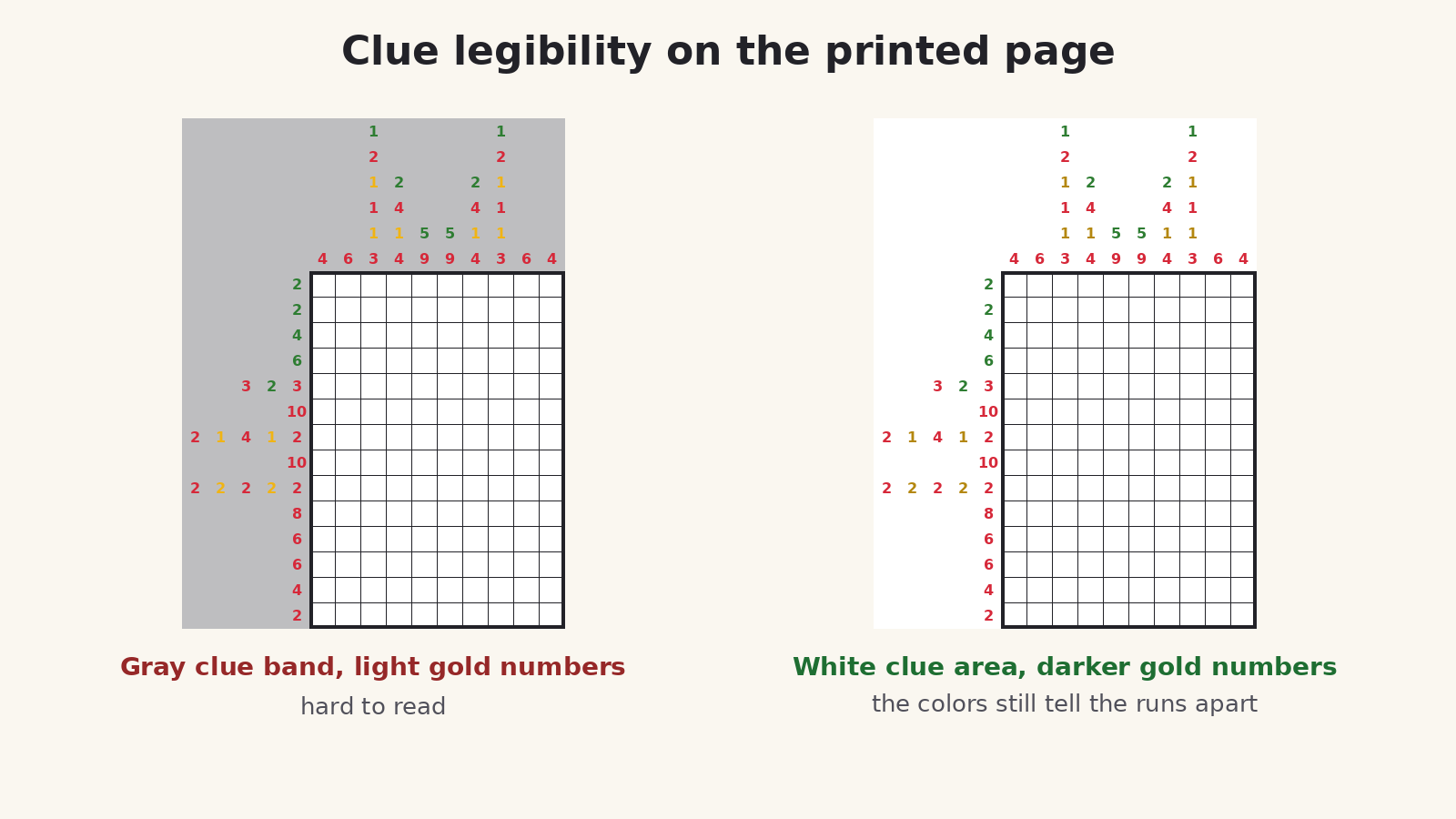
Another Amazon reviewer, of a book of 45 by 45 nonograms, wrote that it “could be so much better, if they hadn’t printed the numbers along the sides on a gray background.”
In Color Nonogram the clue numbers sit on the Canvas color from the Style tab, which is white by default, with no boxes around them. Leave Canvas white or very pale for print.
The bigger risk in color is the number color itself. Each clue prints in its run’s color, and the Colors tab warns: “Light colours make light clue numbers.” The module darkens a too-light color in the clue numbers until it stands out against the page, while the answer key keeps the true color. Even so, choose mid and dark colors: they read best, and the solver can still tell them apart.
Set the Clues font on the Style tab, print one page at your real trim size, and solve a few lines with a pencil before you make the rest.
Book vs printable pack
A KDP book. The clues carry the colors, so a color nonogram book needs a color interior. Every edition builds books two ways: Instant Puzzle Books, the quick book builder in Puzzle Maker Pro, and Puzzle Book Studio, the book editor for page layout, titles and numbering. The book default is Print Solutions With Puzzles, each solution right after its puzzle. For keys at the back, choose Puzzles First, Then Solutions.
In Puzzle Book Studio, a book made from one puzzle set works on every edition. A book with more than one puzzle set, even two sets from this module, needs the Productivity edition (the one for whole books and series), or an older Time Saver purchase, on every module whose puzzles go into it.
Don’t title a puzzle with its answer. The Image File Name title prints the file name, so a file called “strawberry” gives the picture away. Pick Custom or the grid-size title instead.
An Etsy pack. Each puzzle and its answer key come out as PNG, JPG, SVG or PDF files; gather a pack’s pages and keys into one PDF before you list it. Print clues in solution image is off by default, so the key shows the finished picture on its own. The guide to selling puzzle printables on Etsy says page one has to read as a puzzle in a small crop and the keys go in the file. Use a small grid with bold colors for the listing photo; a 10 by 14 page reads in a thumbnail far better than a 40 by 40. Say in the listing that the pages need a color printer, and that clue colors print best on plain white paper.
Batches. Productivity adds Time Saver: one row per chapter or pack, each with its own pictures, grid size and colors, run together. Every row writes into the same output folder; sorting the files into packs is up to you.
Every edition lets you sell the finished books, worksheets and packs you make to your own buyers, on KDP, Etsy, Teachers Pay Teachers or your own store. Productivity adds the right to sell or supply the generated puzzles to other publishers and sellers. You can move up to any higher edition at any time after you buy.
Other puzzles you might like
Nonogram makes the black-and-white version from your pictures, and the Nonogram Bundle includes both products. Picture maze books are another way to turn a themed folder of images into a book. For more puzzles that need little reading, see visual and matching puzzles for publishers.