

Tents and Trees puzzle books (with Skyscrapers)
A tents and trees puzzle book is easy to picture: grids dotted with small trees, a number at the end of every row and column. The harder question is what sits beside it. Pair it with Skyscraper and you get a two-type logic book where one puzzle reads as pictures and the other as numbers, yet both are solved from counts printed at the edge of the grid.
Puzzle Maker Pro, a Windows program that generates puzzles and assembles them into print-ready books, makes both types, and the Tents and Skyscrapers bundle sells the two together.
Logic puzzle books for KDP points out that clean single-mechanic titles usually sell better than a grab-bag. A two-type book works when the cover says two types and the interior delivers both in a clear order.
Why pair Tents and Trees with Skyscrapers
Tents and Trees is a placement puzzle. Every tree gets one tent on a square directly beside it (above, below, left or right), no two tents touch, not even at a corner, and the numbers along the top and left edges say how many tents each column and row holds.
Skyscraper is a number fill. Every row and column holds each height once, from 1 up to the grid size. The numbers on all four sides say how many buildings you can see from that side, because a taller building hides the shorter ones behind it.
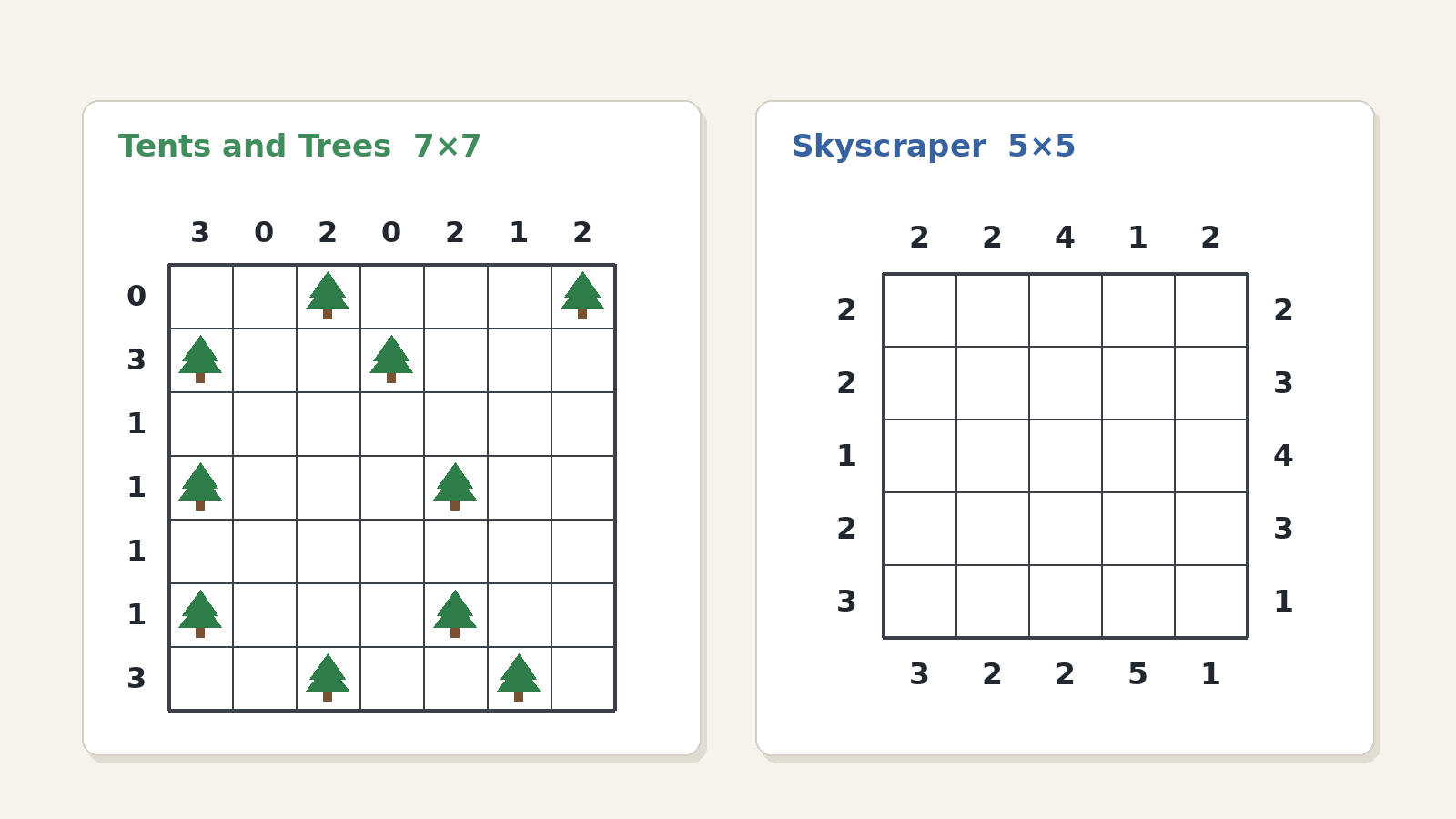
The two share one habit: read a number at the edge, then count along that row or column. That makes the pair feel like one book. The difference keeps it fresh: after a block of placing tents, writing digits is a real change of pace.
Alternating Tents and Trees and Skyscraper logic puzzles
Alternate by block, not by page. A solver who switches rules at every page-turn spends the book relearning. One who gets ten or fifteen puzzles of a type settles in, and then the switch feels like a new chapter. Mixing logic types in one KDP book makes a related point for bigger mixes: section order is the pacing.
Explain both rules before the first puzzle. Logic puzzles for publishers argues for a worked-example page inside the preview, because “no instructions, could not get started” keeps turning up in low-star reviews of logic titles. Puzzle Book Studio, the book editor inside Puzzle Maker Pro, offers a How-to-play page in a set’s Add page menu, one per puzzle type. Each starts with a title and a blank body, so you write the rule and the worked example yourself. Sets made in the main window share one page layout and form one puzzle section, so both rules pages print together before puzzle 1. On the Skyscraper page, say that a blank edge cell is not a clue: Easy prints every edge number, while Hard can leave some out.
Build the book in reading order. In the main window, create the first Tents and Trees set with New Book selected, switch to Skyscraper and create the next set with Current Book, and keep going. Each Create adds one puzzle set to the end of the book. Time Saver, the batch table in the main window, can hold rows for both types, each with its own settings and quantity; one run makes a puzzle set per row, in row order, and writes every row into one output folder. In Puzzle Book Studio, the Within Sets shuffle adds variety inside a block, while Entire Book mixes every set together and undoes the alternation.
What a two-type book needs:
- More than one puzzle set needs the higher edition (the one that includes Time Saver), or an older Time Saver purchase, on every module whose puzzles go into it: here, both Tents and Trees and Skyscraper. That holds even for one module, so a Tents and Trees book with an easy set and a hard set needs it too.
- In Puzzle Book Studio, a book made from one puzzle set works on every edition, so the bundle’s base edition can publish a Tents and Trees book and a separate Skyscraper book. Instant Puzzle Books, which assembles a book straight from your current settings, comes with every paid edition.
A grid-size ramp across the book
Both modules set Grid Size and Difficulty (Easy or Hard) on their Settings tab. The ranges differ. Tents and Trees runs from 5×5 to 10×10. Skyscraper runs from 3×3 to 9×9, and its grid size is also the tallest building, so a 5×5 Skyscraper uses heights 1 to 5. Give each type its own track and interleave the two.
The rule from puzzle book difficulty progression carries over: generate one batch per level, not one batch at mixed settings, and keep each step one level tall. Here, each new block of a type changes one setting by one step: a grid one size bigger, or Hard instead of Easy, not both.
One way to lay out a 100-puzzle book (an editorial starting point, not a preset in the program):
| Block | Type | Grid Size | Difficulty | Puzzles |
|---|---|---|---|---|
| 1 | Tents and Trees | 6×6 | Easy | 15 |
| 2 | Skyscraper | 4×4 | Easy | 10 |
| 3 | Tents and Trees | 7×7 | Easy | 15 |
| 4 | Skyscraper | 5×5 | Easy | 15 |
| 5 | Tents and Trees | 7×7 | Hard | 15 |
| 6 | Skyscraper | 5×5 | Hard | 10 |
| 7 | Tents and Trees | 8×8 | Hard | 10 |
| 8 | Skyscraper | 6×6 | Hard | 10 |
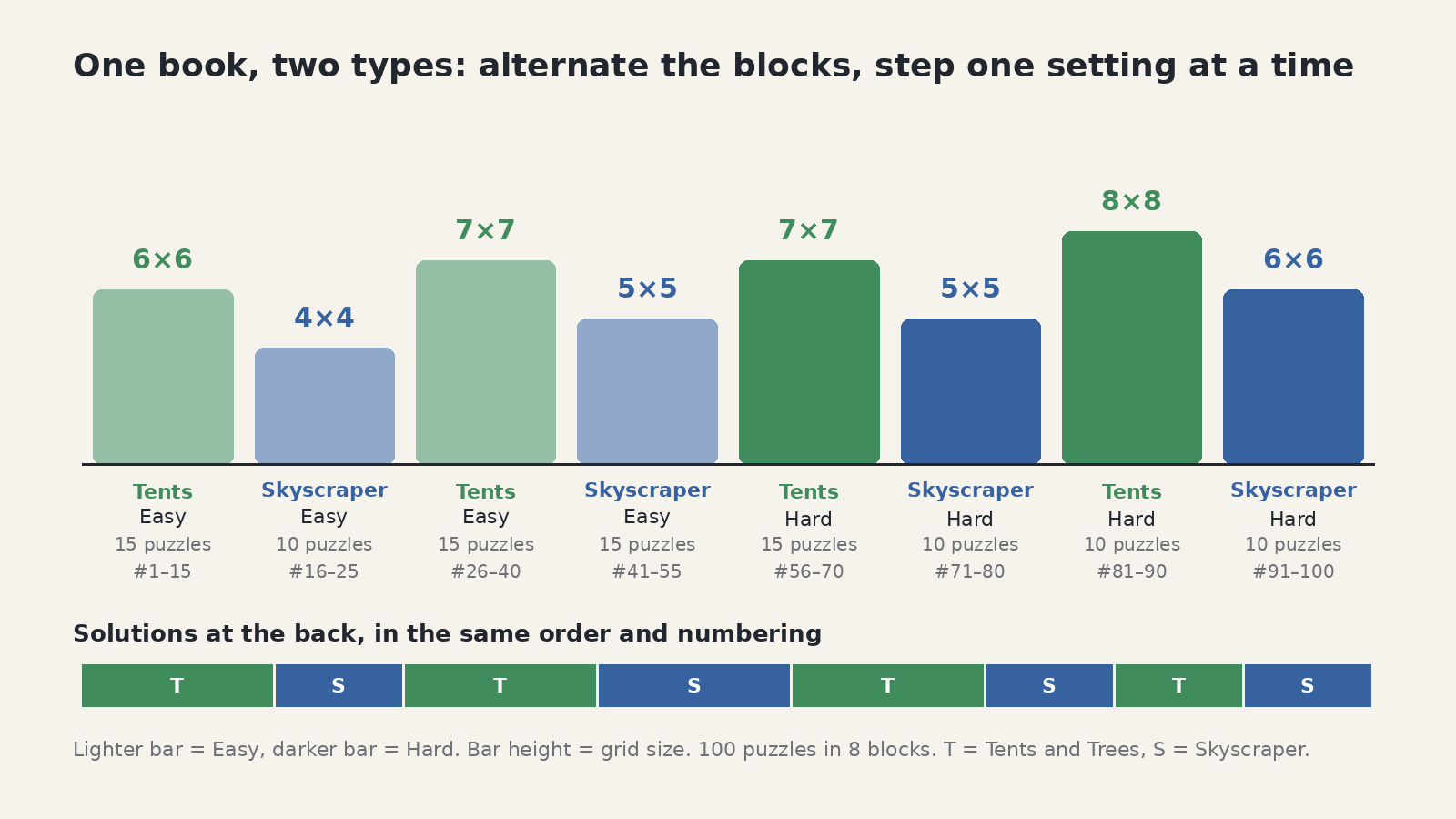
Skyscraper’s Hard is a big step even at the same size: Hard grids can leave out edge clues and can start with a few heights filled in. Test-solve a few before you fix the block lengths. A challenge volume keeps the alternation and pushes both types further up their ranges.
Opening on Tents and Trees puts a page of trees, not a page of digits, at the front of the Look Inside preview. State the shape in one front-matter line a shopper can see before buying: “100 puzzles, two types in alternating blocks, easy to hard, solutions at the back.”
Key layout for two types
Puzzle Maker Pro’s book layout starts on Print Solutions With Puzzles, which puts each solution right after its puzzle. For one key section at the back, choose Puzzles First, Then Solutions under Content Collation for Instant Puzzle Books. The solutions then follow the set order of the puzzles, so the key section alternates as the book does, and puzzle numbers run straight through. That fits the convention the mixing article sets: every key in one back section, in puzzle order, with the puzzle number on every key.
One KDP publishing guide shares its author’s notes on complaints about competing puzzle books, and one of them is “solutions in the back would be nice.” A back section answers that, if the keys are readable.
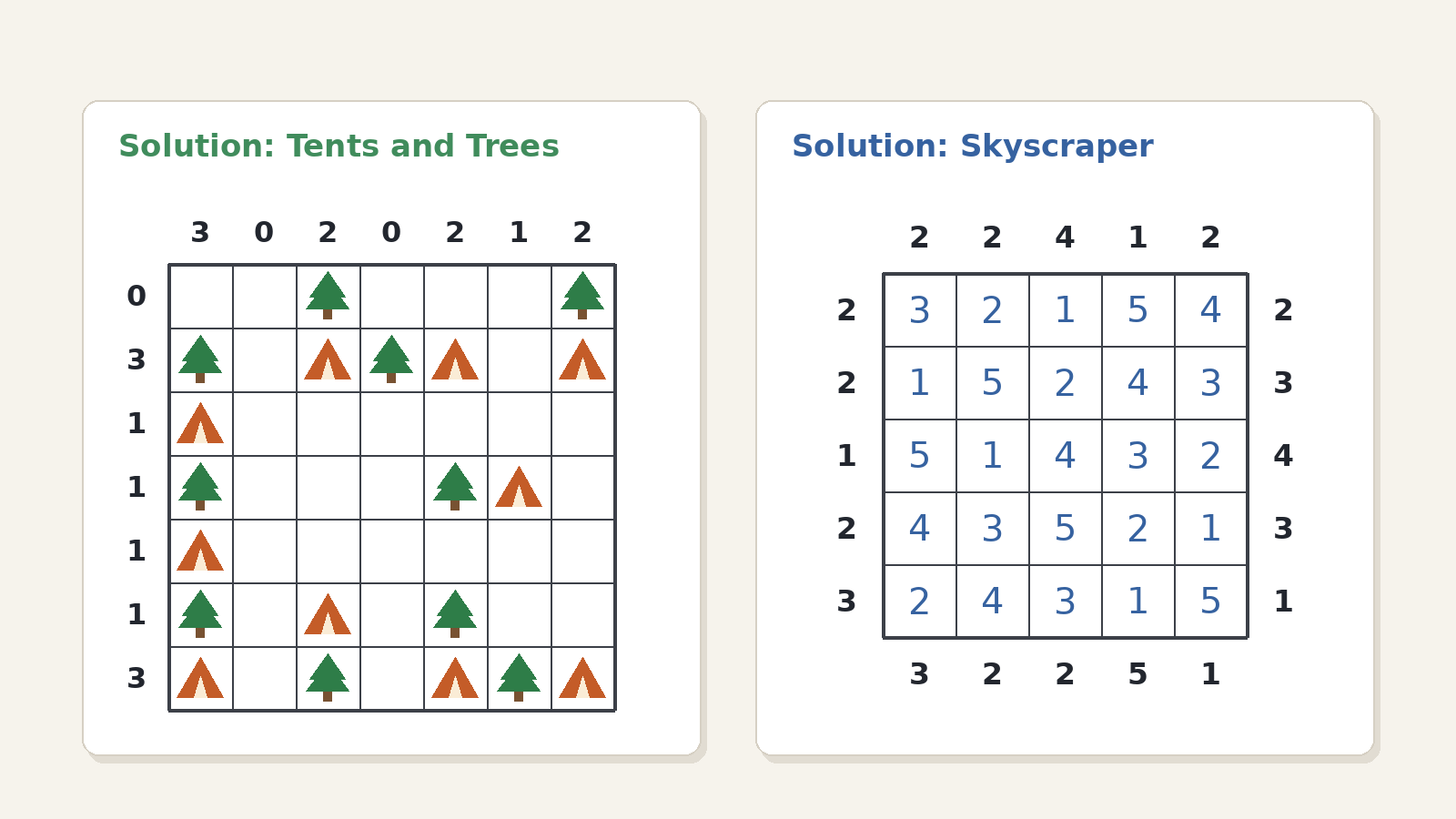
A Tents and Trees key shows where each tent stands; a Skyscraper key fills every cell with a digit. Three settings keep them working together:
- Use Puzzles Layout for Solutions. Untick it on the Grid Layouts tab and set the solutions grid to 2 rows and 2 columns, so four keys fit on a page while puzzles stay one to a page. Check the largest grid first: an 8×8 key needs room for its tents to stay visible.
- Show page cross-references. Off by default. When on, each puzzle names the page of its solution, and each solution points back to its puzzle.
- The Style tab in both modules. Use the same font and similar border widths in both, so the two types read as one book.
At one puzzle per page and four keys per page, the plan above comes to 100 puzzle pages, 2 rules pages and 25 key pages, plus the title and contents pages. Before you publish, check the puzzle titles on a Hard page: a Tents and Trees title that shows the difficulty can print “Tricky” rather than “Hard”.
When the sets share a page layout, the table of contents gives each block its own line under the puzzle section, so the alternation shows there too. A solutions section holding both types gets a single Solutions line.
Rights and editions
Every paid edition of both modules lets you sell the finished books, worksheets and packs you make to your own readers and customers. The higher edition of each adds the right to sell or supply the puzzles you generate to other publishers and sellers. You can move up to any higher edition later, so start with the one that fits the book you are making now.
The demo makes real puzzles of both types, watermarked and one at a time, so you can see the pages before you buy.
Get the free Puzzle Maker Pro demo now
Other puzzles you might like
- Logic puzzle books for KDP: six logic interiors that do not look like sudoku.
- Mixing logic types in one KDP book: section order in a bigger logic mix.
- Puzzle book difficulty progression: designing the easy-to-hard ramp.
- Logic puzzles for publishers: explaining a logic rule to buyers who have never solved one.
- Puzzle books for kids by age: matching grid size and difficulty to the age on the cover.
- Tents and Trees and Skyscraper on their own.