

Cut and paste worksheets
A cut and paste worksheet asks a small child to do three things in order: cut along a line, find where a piece belongs, and glue it down. Three things make that easy: few pieces, clear cut lines, and enough picture on every piece to show where it goes.
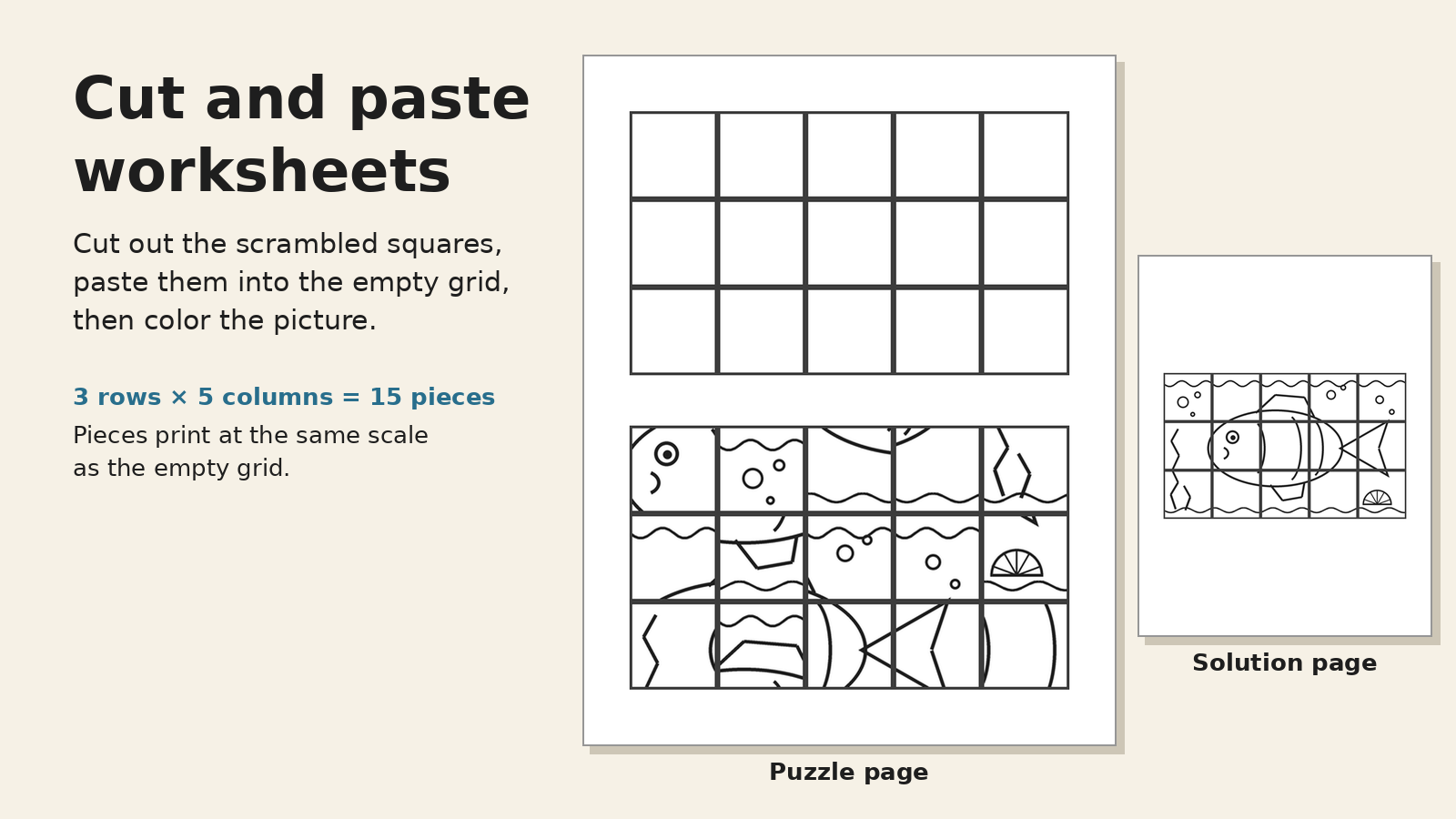
The examples here come from Cut and Color, a module of Puzzle Maker Pro, the Windows desktop software that generates puzzles for print. Cut and Color splits a picture into a grid of pieces and scrambles them, with an empty grid to glue them onto. A solution page shows the finished picture.
What makes a cut and paste page work for small hands
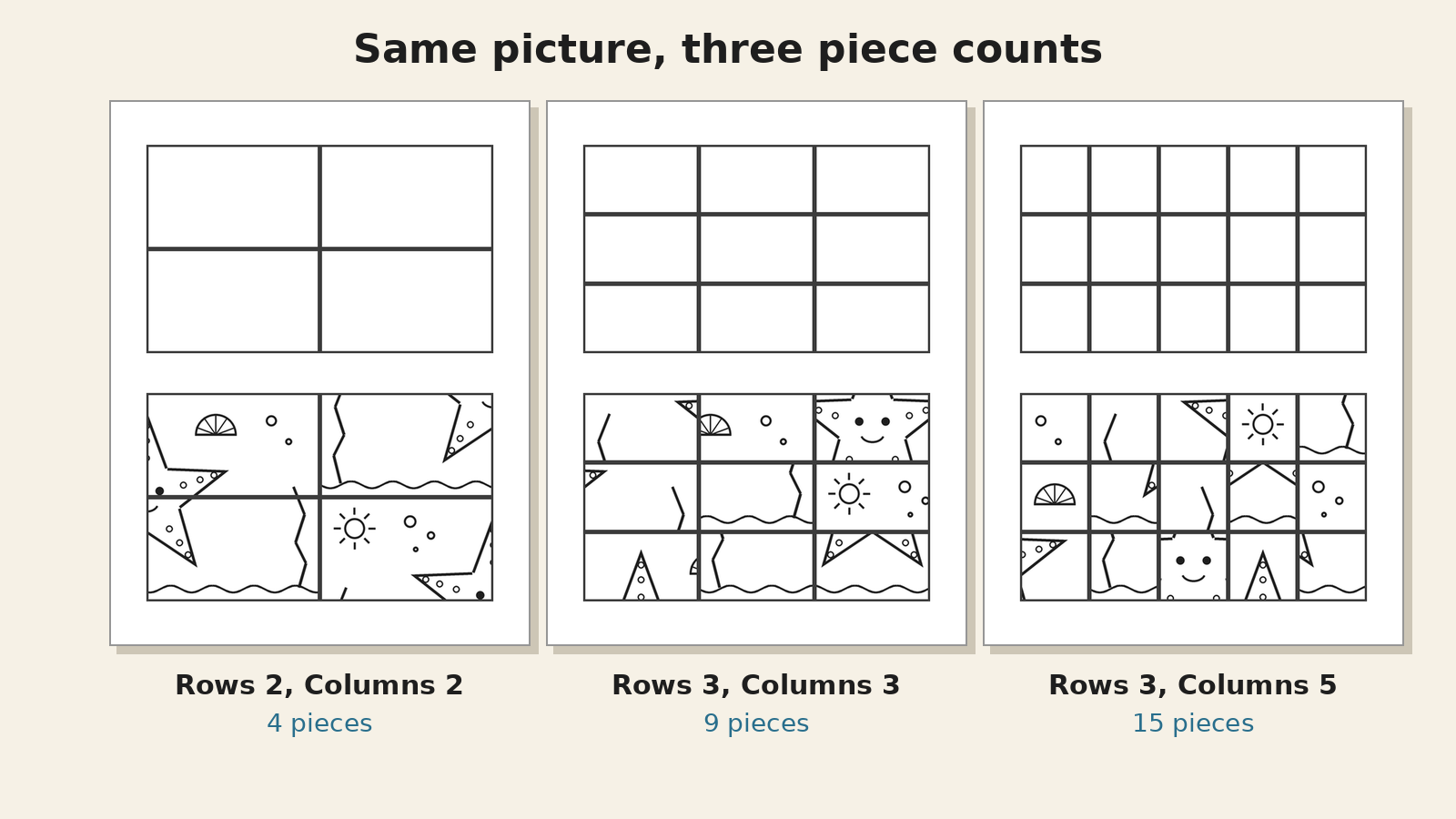
Piece count is the difficulty. On the Layout tab you set Rows and Columns (each 1 to 20), and the page has Rows × Columns pieces. Out of the box that is 3 rows by 5 columns: 15 pieces. Starting points to test with a child of that age:
| Age | Grid to try first | Pieces |
|---|---|---|
| Preschool | 2 × 2 | 4 |
| Kindergarten | 3 × 3 | 9 |
| 1st grade | 3 × 5 | 15 |
These are editorial starting points, not presets: cut and paste worksheets for preschool need the fewest, biggest pieces, while cut and paste worksheets for kindergarten and 1st grade can take more. Print one, hand it over with scissors and glue, and adjust.
Pieces fit the target. With Content set to Scrambled and Blank (the default), the pieces print at the same scale as the empty grid, so each cut piece fits one cell. They are shuffled, not turned, so each is already the right way up.
Cut lines have to survive the copier. The grid lines are the cut lines. Set their weight and color under Line Style on the Style tab. A thin gray line looks neat on screen and can fade on a school copier; a bolder line gives scissors something to follow.
Every piece needs a clue. A piece that is plain white could go in any empty cell, and pieces that show only the same wavy ground line could swap places. A ground line tells the child which row a piece belongs in; bubbles, plants, a sun or a border corner tell them which cell.
Layout options. Position Scrambled / Pieces moves the pieces to any side of the empty grid (Bottom by default), and Scrambled Only drops the empty grid. Export Parts, a checkbox in the What to Generate? box above the tabs, also saves the empty grid, the pieces and the solution as separate image files. They are saved at your picture’s pixel size, while pieces on a page are scaled to fit it, so print the empty grid at the same width as the pieces or they won’t fit its cells.
One warning carried over from the kids activity book interiors guide: a cut-out page in a bound book destroys whatever is printed on its back. Cut and paste pages suit printables, where each page is a single sheet. Jigsaw Squares, named in that guide, is a separate product with optional piece connectors (square, triangle or curved tabs); Cut and Color cuts along a plain grid.
Cut and Color vs Copy and Color
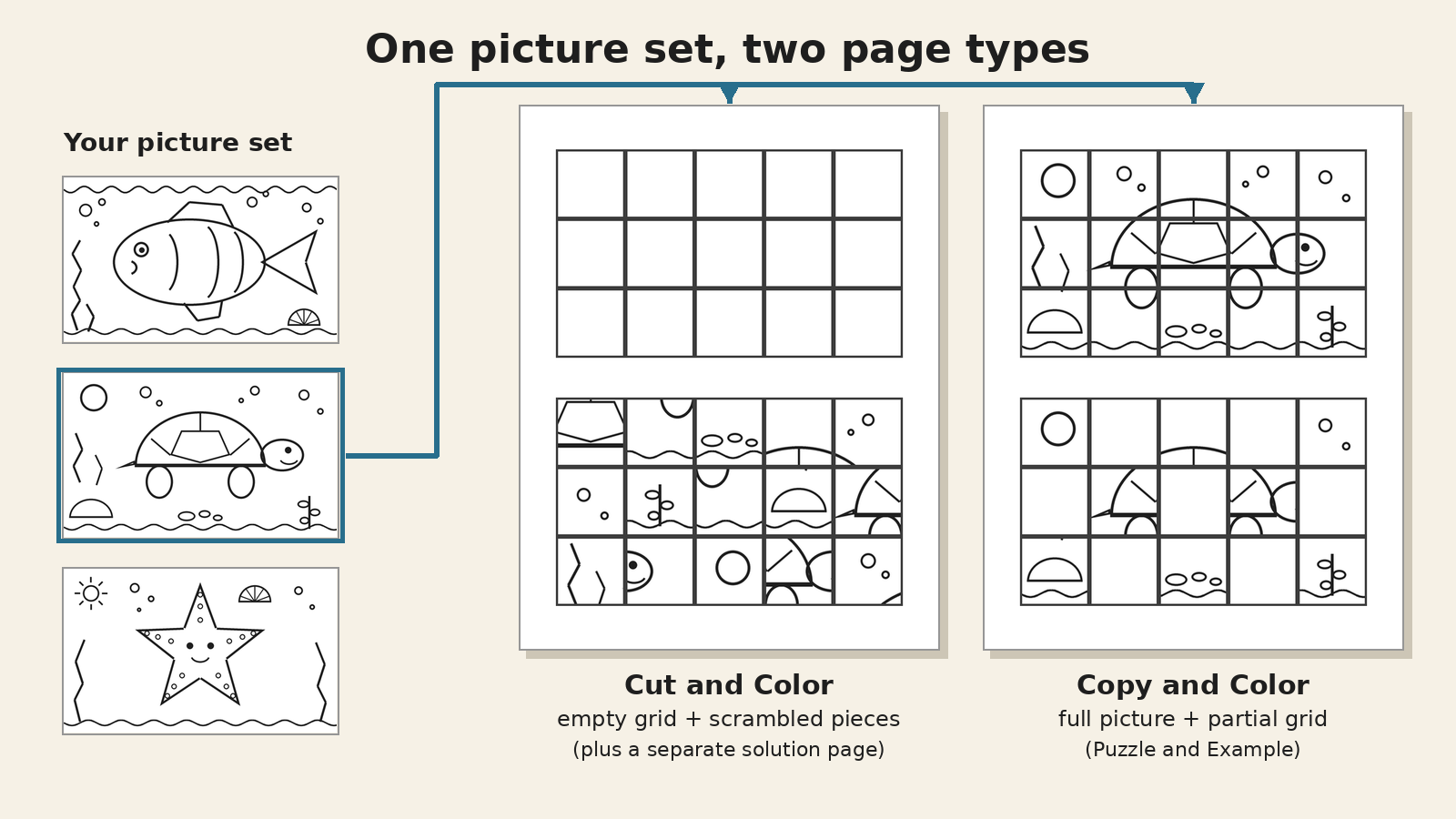
Copy and Color is the no-scissors partner. It splits a picture into a grid and prints only some of the squares. The child draws the missing squares, then colors the picture. By default the full picture prints on the same page as a guide.
| Cut and Color | Copy and Color | |
|---|---|---|
| The child | cuts, pastes, then colors | draws the blank squares, then colors |
| Page | empty grid + scrambled pieces | full picture + partial grid (Puzzle and Example), or Puzzle Only |
| Difficulty | Rows × Columns | Rows × Columns, plus which squares show |
| Answer | separate solution page | the full picture |
On Copy and Color’s Clues tab you choose which squares print: a Squares checkerboard (the default), striped rows or columns, a strip from one side, Random Squares (%), or a random pick. Variations for each Image (1 to 10) gives several hide patterns per picture.
Sell them as two listings, not one mixed file: a teacher looking for cut and paste wants scissors in the thumbnail, and a teacher planning a quiet table wants a pencil page.
Themed packs from one picture set
Both modules read a list of pictures you choose. On the Images tab, drag files onto the panels or click a panel to pick one; the built-in Kids Animals pictures are there to test a layout first. In the box above the tabs (What to Generate? in Cut and Color, Grid Setup in Copy and Color), Entire List uses every picture in the list; with it off, Quantity (1 to 1000) sets how many are used. Random Order shuffles them.
That makes a theme easy to carry across both page types. One folder of ocean line art becomes a cut and paste pack and a copy and color pack, each with the same animals. Cut and Color and Copy and Color are separate products, so the pair needs both.
A few rules for the picture set:
- Line art colors best. Black outlines on white leave the coloring to the child and go easy on a parent’s ink.
- Keep one drawing style. Mismatches get noticed. In an r/EtsySellers thread on Reddit about a Pre-K printable, a commenter pointed out that two numerals on one page were drawn in different styles, and said details like that “make me think ai was used…even if it wasnt.” Pictures in a set can clash the same way, so use one artist or one drawing style.
- The pictures must be yours. Your own drawings, or art whose terms allow it in products you sell.
For larger runs there is Kids Color Productivity, the batch edition for Cut and Color and Copy and Color. It adds the Time Saver for whichever of the two you have open. Its Images tab takes whole folders, and its Puzzles Setup tab takes one row per grid size. Keep All ticked (it is on by default for a new row) on three rows set to 2 × 2, 3 × 3 and 3 × 5, and every picture comes out at three piece counts in one run. Every row writes into the same Puzzles and Solutions folders, with no folder per row or grid size, so sort the files before you build each pack.
Pack size and keys
There is no set page count for a pack. Say the count, the piece count and the theme in the title. “Ocean cut and paste, 12 pages, 9 pieces, with answer pages” tells a buyer what the thumbnail can’t show.
Instant Puzzle Books, the book builder that comes with every paid edition, compiles the pages into a PDF at the trim size you set. For Cut and Color, every puzzle page has its own solution page. The book default, Print Solutions With Puzzles, puts each solution right after its puzzle. For a pack with the answer pages together at the back, choose Puzzles First, Then Solutions. Instant Puzzle Books can also put more than one puzzle on a page in every edition, and two small grids fit on one sheet.
Copy and Color has no separate solution file: the full picture is the answer, and Puzzle and Example already prints it on the page. If you use Puzzle Only, Export Parts saves the full picture as its own file for an answer page you place yourself.
Cut and Color and Copy and Color each let you sell the finished worksheets, books and packs you make to your own readers and customers, on Teachers Pay Teachers, Etsy or your own store. You can add Kids Color Productivity at any time after you buy.
The demo makes real pages, watermarked, one puzzle at a time, so you can check piece size and line weight on your own printer first.
Get the free Puzzle Maker Pro demo now
Other puzzles you might like
- TPT visual puzzle worksheets compares hex spot-and-count pages with Jigsaw Squares cut-out pages for Teachers Pay Teachers.
- Kids activity book interiors for KDP plans a bound book for one age band, cut-and-color pages included.
- How to make an activity book for preschoolers covers page types and order for ages 3 to 5.
- Picture math worksheets for kindergarten makes picture equations where each picture stands for a number, with keys, one picture set per theme.
- Puzzle books for kids by age matches grid sizes and word lengths to the age on the cover.