

Last year’s Halloween pack already sold. This year you can make it better in an afternoon: update the word list, regenerate the pages with the same settings, reshoot the photos, and decide whether to edit the old listing or open a new one. The grid style, page size and answer key layout stay as they are, so buyers recognize your shop.
If you are planning a full year of themed packs from scratch, start with seasonal holiday puzzle printables. This guide is for the pack you already have.
Step 1: fix the word list
Buyers notice dated theme words. One teacher reviewing a Thanksgiving pack on TPT wrote that she “ended up using some white-out” on themed words, because “the content is a little outdated, and not quite appropriate anymore.” A refresh fixes that before a buyer has to.
- Open last year’s list file. Cut words that aged badly or never fit the audience, and add a handful of new ones.
- For a classroom range, band the list: a short-word list for K to 2 and a longer one for grades 3 to 5.
- Name the file by season and level (“Halloween Grade 3.txt”). On Standard Word Search the file name becomes the puzzle title, so the season shows on every page.
To keep next year’s refresh just as quick, see word lists for puzzle books on naming and storing lists.
Step 2: regenerate with last year’s settings
Load last year’s preset so this year’s pages match last year’s look, then generate new grids. Keys come out with the puzzles, so nothing is solved by hand. You are refreshing content, so there is no new format to design and no new instructions to write: the season comes from your words.
Step 3: edit the old listing or open a new one
Pick by what changed:
- Edit last year’s listing when it is the same product with fresher words: same puzzle type, same page count, same level. The listing keeps its reviews and sales history, and returning buyers find it where they left it. Update the photos, the title year if you use one, and the description so it matches the new pages.
- Open a new listing when the product is genuinely different: a new puzzle type, a new grade band, or twice the pages. A buyer should be able to tell the two apart from the thumbnail and title alone.
If both stay up, make the titles and previews show the difference.
Timing. List seasonal packs a few weeks before the season starts, so they are live when buyers and teachers begin planning. Halloween packs go up in early fall, Christmas packs before Thanksgiving.
Step 4: add a second puzzle type from the same list
The refreshed list can feed more than one listing. Say forty Halloween words a third grader knows: BATS, SPIDER, CAULDRON, LANTERN, COSTUME, NIGHTMARE. That one file can become:
- an Etsy word search pack: square grids with the word bank beside each one, keys at the back
- a separate Etsy listing of the same words on honeycomb grids
- a TPT class set of Halloween cryptograms: the same phrases printed three ways, with Kids’ Puzzles as support, a few given letters on-level, and a cold cipher for early finishers
- a small Wordoku pack from the words in the list that qualify
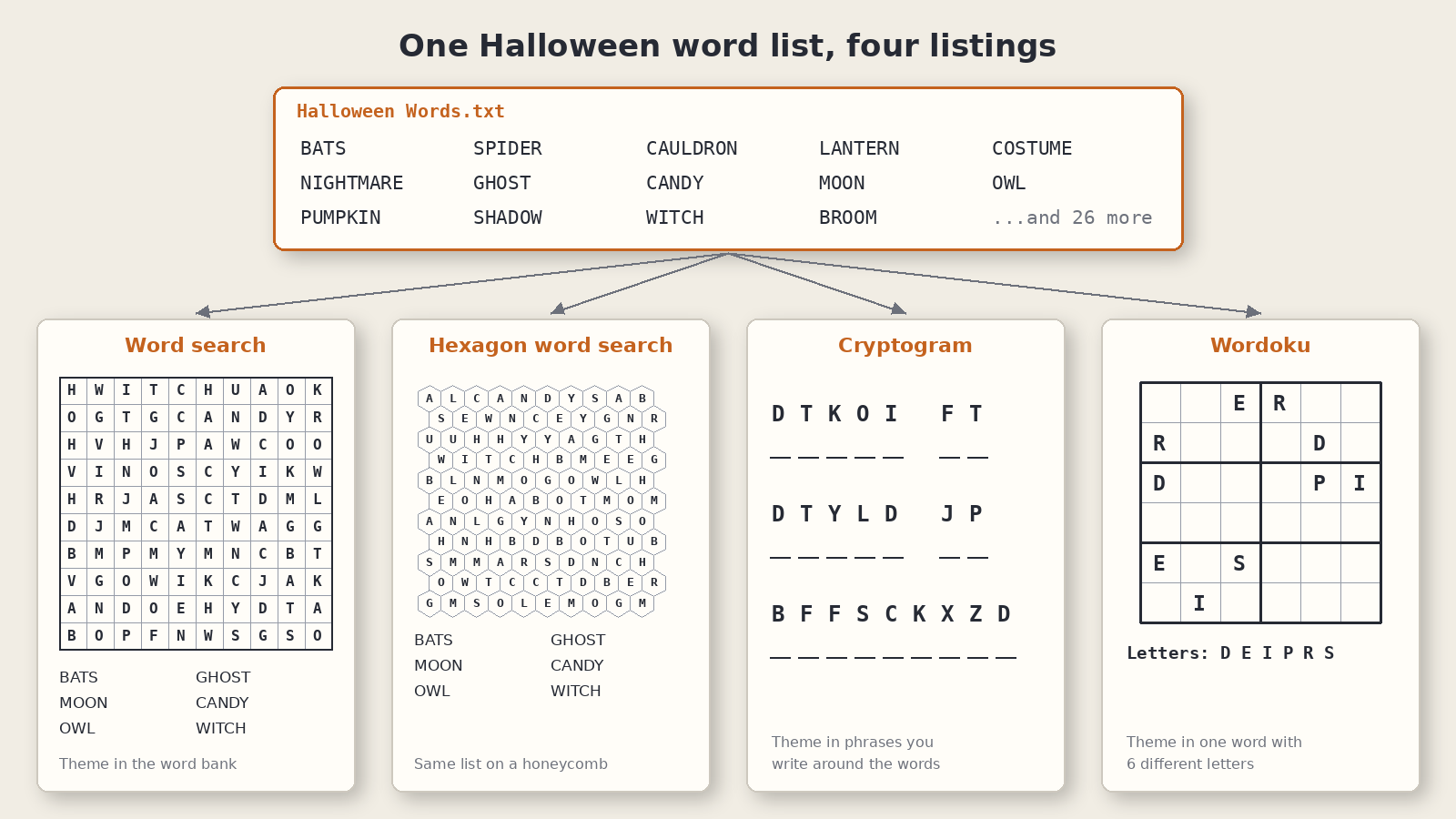
Each earns its own listing because the solve differs. The general version of this idea is in one word list, multiple puzzle products.
Which types carry a theme well
Four types take a seasonal list directly. Each carries the theme in a different place, which is why they make different listings.
Standard Word Search. The theme sits in the word list. Paste it or load it from a text file. The puzzle image is the grid; you lay the word bank beside it when you assemble the pack. It is the seasonal listing buyers recognize fastest.
Hexagon Word Search. The same list on a honeycomb, with three axes and no diagonals. A shape mask confines the board to a silhouette, so a pumpkin or a fir tree carries the season on the page itself. Shape masks start at Creative, and you can move up to any higher edition later.
Easy Cryptograms. The theme travels in quotes and short phrases. You paste or load the quotes yourself; the AI Word Assistant helps with themed single-word lists. Turn on Kids’ Puzzles to print every hint on the page for a younger class, or give a few letters for regular solvers. Write your own seasonal lines or use text you have the right to sell.
Wordoku. The theme lives in one word per puzzle. A classic Wordoku needs a word with exactly 4, 6, 8 or 9 different letters: BATS works on a 4×4, SPIDER on a 6×6, CAULDRON on an 8×8, NIGHTMARE on a 9×9. PUMPKIN does not, because the P repeats. Verify Word List reports which entries cannot make a valid puzzle, and Auto-Fit picks a grid when one fits, so you can load the whole seasonal list and see what survives.
Refreshing several seasons in one sitting
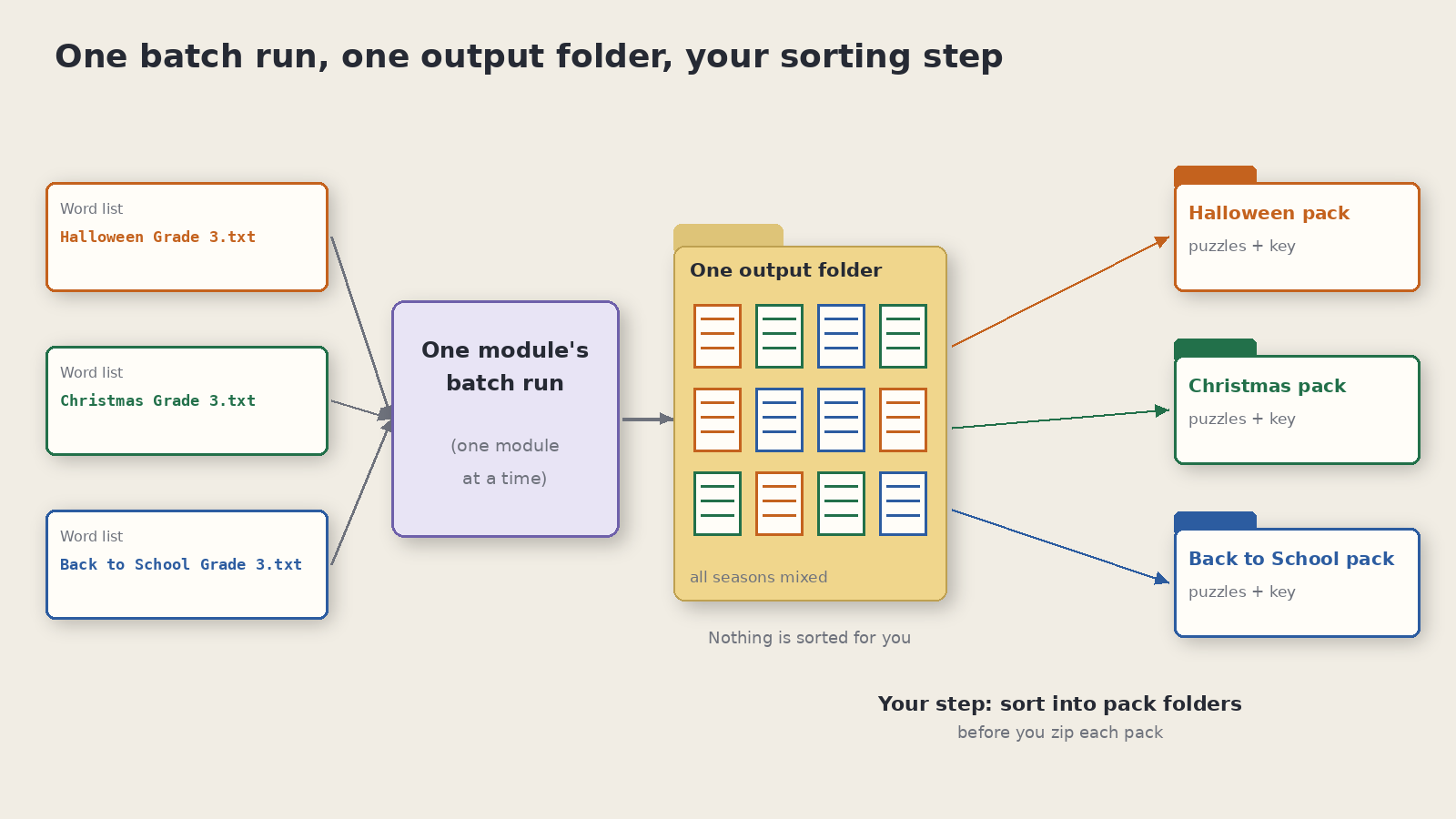
Time Saver is the batch tool: a grid of rows, each with its own list and settings, run in one go. It comes with Productivity on most modules (on Wordoku, the higher of its two editions) and as an add-on for Easy Cryptograms. On Standard Word Search you select several list files at once and get one puzzle per list. On Hexagon Word Search each row carries its own settings.
Plan around two things:
- Where the run happens. On Standard Word Search and Easy Cryptograms, Time Saver works one module at a time, so your word search batch and your cryptogram batch are separate runs. Hexagon Word Search and Wordoku rows can share one batch with other modules.
- Where the files land. Every row in a run goes to one output folder. The simplest habit is one season per run, moved into its own folder before the next run. If you mix seasons in one run, the season in each file name makes sorting quick before you zip each pack.
Without Time Saver, run one list after another. Same pages, a few more clicks.
Keeping seasonal listings consistent with your main catalog
A seasonal pack should look like the rest of your shop, not like a one-off. Keep these the same as your year-round listings:
- The look. Same grid style, fonts and page size. A buyer who bought your spring pack should recognize the fall one from the thumbnail.
- The file layout. Same order of puzzle pages and keys, same file names. Answer keys inside Etsy printable packs covers where keys go in a download.
- The title pattern. If your year-round listing reads “Ocean Word Search, 20 Pages, Answer Key,” the seasonal one reads “Halloween Word Search, 20 Pages, Answer Key.” Same pattern, new theme.
- The level. A grade 3 to 5 Thanksgiving pack matches your grade 3 to 5 year-round pack. Thanksgiving word search for TPT shows a grade-banded seasonal listing in full.
A book made from one puzzle set works on every edition in Puzzle Book Studio; a book that mixes puzzle sets needs Productivity (or an older Time Saver purchase) on every module in it, and you can move up anytime (which edition should I get). On TPT, a combined PDF built that way can be one seasonal listing.
Puzzle Maker Pro lets you sell the finished printables, worksheets and packs you make to your own readers and customers, on Etsy, TPT or your own store. Your themed words, quotes and images still need to be yours or licensed for where you sell.
Get the free Puzzle Maker Pro demo now
Other puzzles you might like
- Seasonal holiday puzzle printables: a year of themed packs on one calendar.
- Thematic word products from one theme: what the first preview page has to show.
- Word lists for puzzle books: building a list library that lasts.
- Thanksgiving word search for TPT: a grade-banded seasonal listing, start to finish.
- Answer keys inside Etsy printable packs: where the key goes in a download.