

Last checked: 19 November 2026. Puzzle Maker Pro is our own product: Windows software that makes puzzle pages, printables and print-ready puzzle books.
If you are searching for a connect the dots maker or dot to dot maker software, you probably already have the art: an icon set, a vector logo, a sketch. What you need is the numbered dot page, a lined key that matches it, and a way to turn a stack of those into a book, a printable pack or a classroom worksheet.
Be clear about the work. Our own Connect the Dots Bundle 1 page says the module is not a “single click book publishing solution”. You decide which lines go in, the order they connect in, and how many dots sit on each line. The software places, tags and styles the dots and draws the key. If your buyer is an adult who wants long, detailed trails, read dot to dot books for adults as well.
SVG import or manual tracing
The two editions differ in how the art gets in.
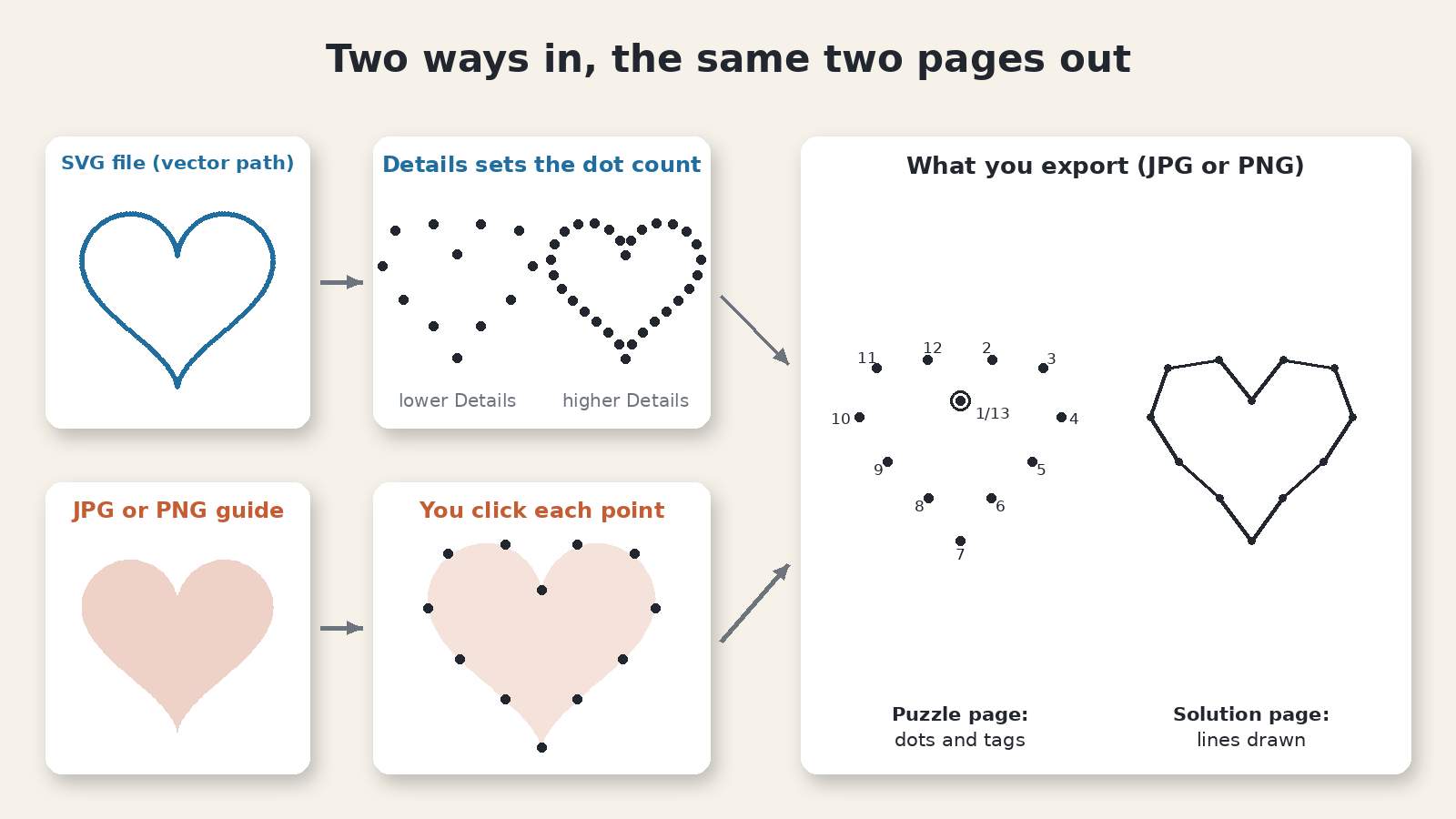
Connect the Dots Manual Edition is hand tracing. Click Open Path Editor, pick your JPG or PNG under Image File, and it shows as a faded guide that never prints. Click each point in the order the solver should follow; move, delete or add a point between two others, so you can rough out the outline first and add detail later. It suits drawings, scans and photos.
Connect the Dots SVG Edition adds vector import. In the Path Editor, the SVG button (tooltip Go to SVG Importer) opens it. Pick the SVG File, set Details (5 to 100; more detail means more dots), mark each path Include Path, Illustration or Hide, and click Use Paths. Every imported dot can still be edited by hand. The tutorial How to use SVG files in Connect the Dots walks through it.
You import SVG art; you export JPG or PNG pages. Start on Manual and you can upgrade to the SVG Edition later when your art moves to vector files. Either way, your source art must be yours or cleared for the store you sell in; the puzzle tool cannot grant rights to someone else’s illustrations.
Multiple paths on one picture
A single trail is the classic page for young solvers. A picture with a body, a face and a background often reads better as several trails, and both editions build them: right-click in the Path Editor’s Navigate tree for Add Path, Add Group, Move Item to Group and Delete Item.
Each path keeps its own sequence. Tick Restart numbering for this path on a trail and that trail starts again at 1; leave it off and it carries on from the previous trail’s last number. Two trails that both start at 1 can confuse a young solver, so give each its own look: a different Start Symbol or Dot Color, or Letter + Number tags, so one trail reads A1, A2 and the next B1, B2.
- Illustration draws a path as a finished line with no tags, for a border or background shape beside the numbered solve.
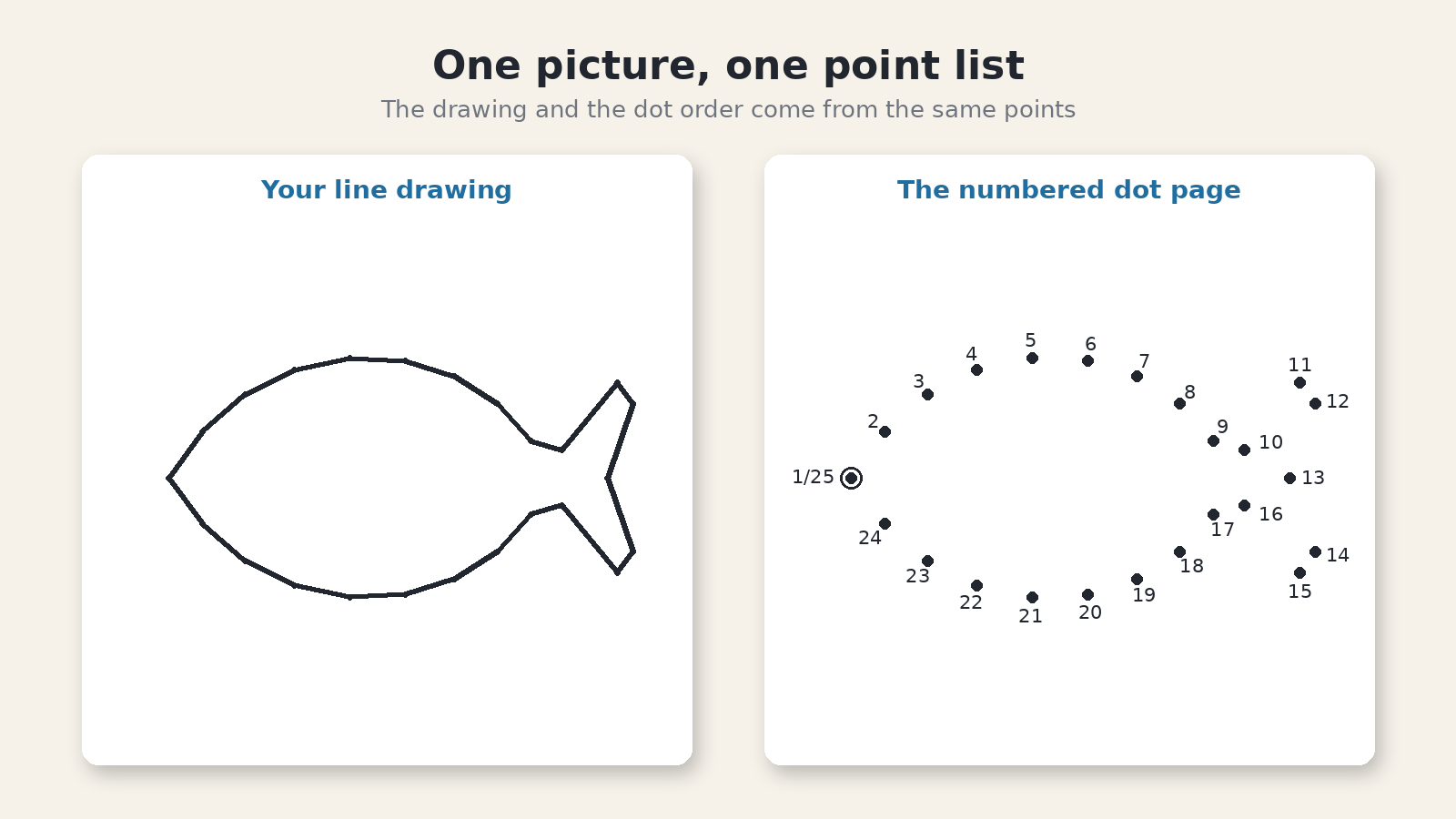
- Closed Path marks a trail that returns to its start. The first tag then reads 1/N, the way the fish above starts at 1/25.
- Cascade and Override Style push one group’s look onto every path inside it, so four holiday icons match without styling each one.
Number or letter sequences by age
Treat the age band on your cover as page rules you keep from first page to last; kids activity book interiors for KDP explains why. One kids activity book publisher put the tension well on Reddit: “An adult is usually the person buying the book, but the child is the person actually using it.” The tag on each dot is where you serve the child.
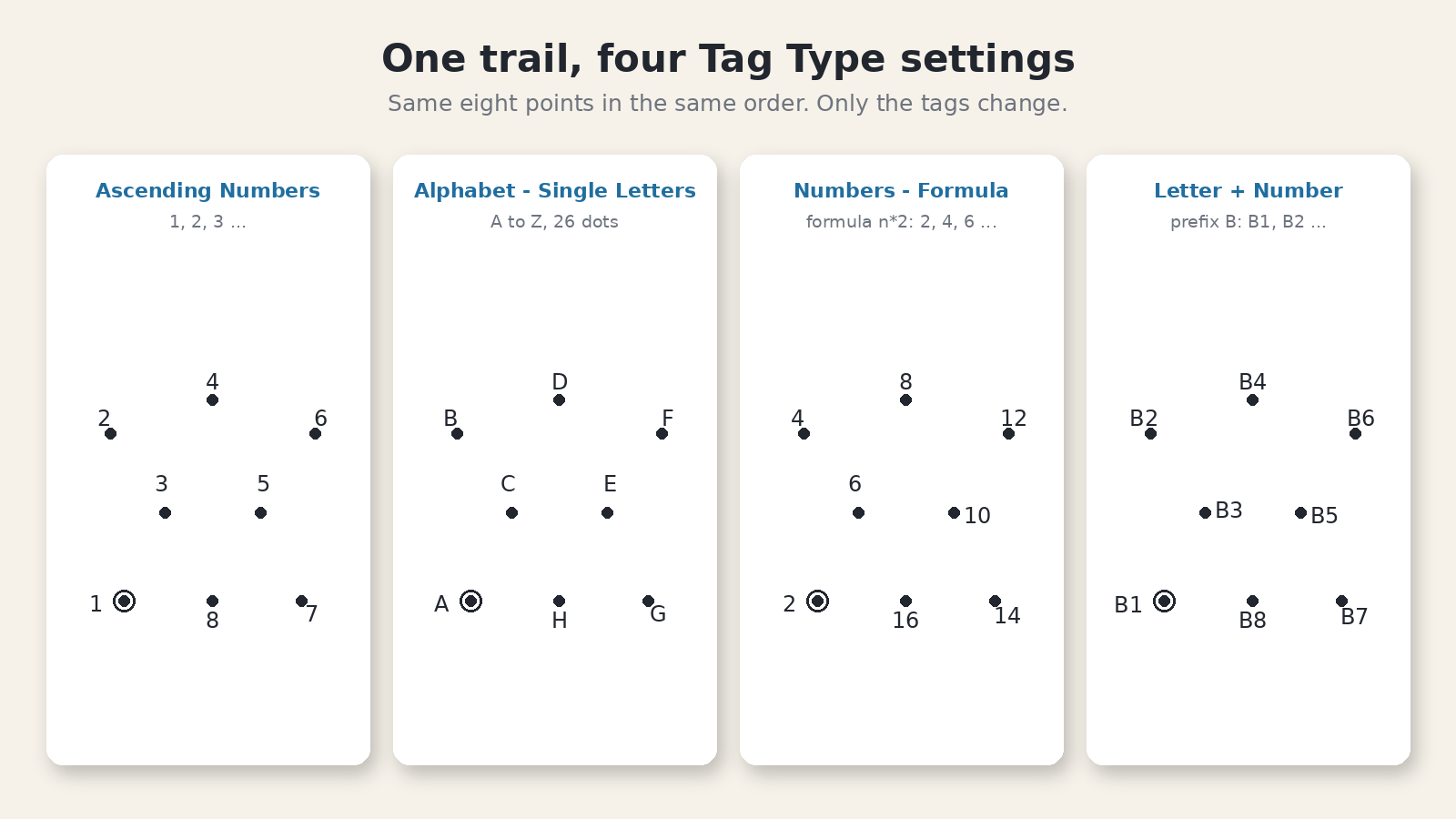
Tag Type offers seven options on every path: Ascending Numbers, Alphabet – Single Letters, Alphabet – Double Letters, Letter + Number, Words – List, Numbers – Formula and Phrase. Which age gets which is your call, but some limits are fixed:
- Ascending Numbers fits counting practice and adult books. Trail length is the difficulty dial.
- Alphabet – Single Letters runs A to Z, so a letter trail holds 26 dots; past Z the tags fall back to numbers. Split a bigger picture into paths and restart the count on each.
- Numbers – Formula builds tags from a formula in n: n2 gives 2, 4, 6 and n5 gives 5, 10, 15, which turns a picture into skip-counting practice.
- Phrase puts one character of a phrase on each dot, spaces dropped. Words – List puts one word from your list on each dot, in list order.
Page density and print size
Density is the number of dots on a picture. When tracing, it is how many points you click. When importing, it starts with Details, set for the whole file or per path. The SVG Edition page’s own example is a classroom pair from one file: a short-path sheet for the group still working, a denser sheet for early finishers. On TPT, that pair is a ready-made differentiation set.
Readability is set per path: dot shape, color and Size, a distinct Start Symbol, an X at the end (End Symbol is X), and the tag font and distance from the dot. Where one tag lands badly, in the Path Editor, right-click the point in Path Data to place it by hand or push it out with Tag Distance 2x or 3x.
The Bundle 1 page lists puzzle output up to 3000 pixels, 10 inches at 300 DPI. Size is where pages fail. One TPT teacher’s review of a Super Bowl puzzle packet said the maze was “so tiny that it is too difficult to complete”, and the preview too small to spot it before buying; the same failure waits for a dot page whose tags are too small to read. Print one page at its real size, solve it with a pencil, and check the same page in your Look Inside preview or listing images.
Book, pack or worksheet
Every Create writes two images from one design: the puzzle page with dots and tags, and the solution page with the lines drawn, as JPG, PNG or transparent PNG.
A worksheet is one design and its key. Name one skill in the title, such as counting to 20, or skip-counting by 5 with Numbers – Formula. Used as a connect the dots worksheet maker, Puzzle Maker Pro gives the teacher the lined page as the key. For other picture-based worksheets, see TPT visual puzzle worksheets.
A printable pack is several designs on one theme, and the Manual Edition is enough for one. Save each design as a preset, export each puzzle and its lined key, and use transparent PNG when the buyer will drop the page onto their own background. State the count in the listing, for example 12 pages plus 12 keys, and make the first listing photo a full dot page at a size where the tags read in a thumbnail. More on pack sizes and keys in the download: selling puzzle printables on Etsy.
A book depends on the edition. Instant Puzzle Books builds a print-ready book from your page settings, with a title page, a table of contents and footers that point each puzzle to its solution. Puzzle Book Studio is the page-by-page editor for the same book. The default order is Print Solutions With Puzzles; for keys at the back, choose Puzzles First, Then Solutions.
In Puzzle Book Studio, a book made from one puzzle set works on every edition. A book with more than one puzzle set needs Productivity, or an older Time Saver purchase, on every module whose puzzles go into it, even when every set is Connect the Dots. Each picture is its own puzzle set, so on the Manual Edition alone a book, from Instant Puzzle Books or Puzzle Book Studio, holds one design: one puzzle page and its key.
So a book of many pictures needs the SVG Edition, or an older Time Saver purchase, and is a batch job. Time Saver runs your saved designs, one per row, and writes every page into one output folder. It builds only from designs you made. The SVG Edition, which includes Time Saver, is the Productivity edition, and you can move up to it from Manual at any time. Bundle 1 lists the SVG Edition and Time Saver for Connect the Dots as its contents.
The Manual Edition lets you sell the finished books, worksheets and packs you make to your own readers and customers, on KDP, Etsy, Teachers Pay Teachers or your own store. The SVG Edition includes that, plus selling or supplying the puzzles you generate to other publishers and sellers. See puzzle maker with commercial rights for the fuller wording.
Other puzzles you might like
For adult buyers who want detailed pictures and several trails, read dot to dot books for adults. If your art folder could also feed mazes, see picture maze books. For pictures revealed by shading clue grids, try the color nonogram maker for puzzle books. For counting and matching pages that need almost no reading, start with visual and matching puzzles for publishers.
Want to see the dots land on your own picture first? The demo makes watermarked output, one puzzle at a time, enough to judge tag size and path editing on Windows. Get the free Puzzle Maker Pro demo now