

Someone shopping for a dementia activity book is usually buying the interior, not the therapy. They open Look Inside for legible type, familiar puzzle shapes, and pages that do not spoil themselves. The title on Amazon may say dementia, Alzheimer’s, or memory care; your job as the publisher is to make those words true on the page without turning the listing into a medical product.
This guide is for publishers who make these books for KDP, and for activity staff who later bind the same pages into a handout. If you are a caregiver looking to buy one, the four checks in the next section are the ones to run on any Look Inside sample.
What this buyer is checking in the sample (no health claims)
The shopper is often a relative or staff member checking whether the book will work in the room. They scroll for concrete layout facts:
- Type size on the grid, the word list, the clues, and the page title, not just the cover words “Large Print.”
- Grid density: how tightly cells pack on a page, and whether corridors or digits stay wide when enlarged.
- Puzzle shape: a word search that still reads as a word search, a sudoku that still reads as a 9×9 grid, a maze with corridors a pen can follow.
- Answers: whether filled grids or keyed lines appear on the same spread as the puzzle.
- Tone: adult themes and adult styling. Cartoon art and kids’-book layouts read as patronizing to an adult solver and to the family member buying for them. Familiar adult topics (gardens, kitchens, music, travel, the decades they lived through) respect the reader.
None of that requires a health promise. You are selling readable puzzle pages. Do not say the book treats, slows, prevents, or improves dementia, Alzheimer’s, memory, or cognition. Do not cite clinical studies. Do not describe Puzzle Maker Pro as a care product. If the interior delivers large type and gentle composition, the preview makes the pitch for you.
Page rules that keep the promise: large print, forward word directions, keys away from the puzzle
Four choices move together, the same way they do on any large-print interior:
- Fewer, bigger cells. A word search that would be 20×20 in a regular book belongs on something like 12×12 here, with shorter words, so each letter stays large on the page. A 9×9 sudoku stays 9×9; the whole grid grows to fill the page instead of sharing a spread. One puzzle per page is the safe default.
- Type grows everywhere. Word lists, cryptogram keys, titles, and instruction lines need the same scale as the puzzle content. A big grid over a tiny word list breaks the promise halfway. Print a test page and read it at arm’s length before you commit the series.
- Words run forward on word searches. Standard Word Search lets you choose directions. Turn off Backwards and Diagonals, and the module places words only left to right (→) and top to bottom (↓).
- Keys live away from the puzzle page. Retail books usually collect solutions in a rear section, or on a facing page the buyer can skip in Look Inside. Puzzle Book Studio is where you separate puzzle spreads from solution spreads when you bind a PDF for KDP: puzzle pages first, keyed pages after, with matching titles or page numbers.
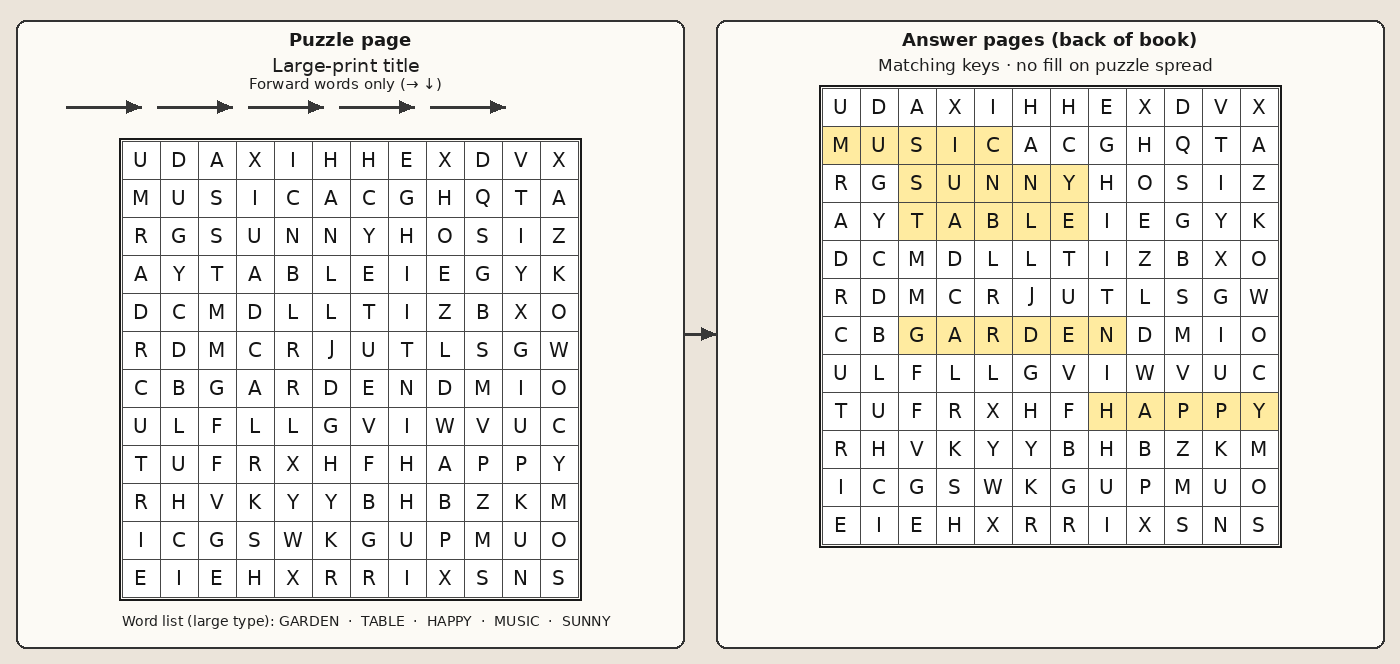
Set those rules in presets per puzzle type so every interior in the series looks the same. Consistency is part of what the buyer is checking: page ten should resemble page two.
Puzzle types that enlarge cleanly
Four Puzzle Maker Pro modules can carry a large-print preset without becoming a different puzzle. Word search and simple mazes are the safer core for most memory care buyers; cryptograms and sudoku suit earlier-stage solvers who already enjoyed them, so use them as a smaller section rather than the whole book.
- Standard Word Search: themeable lists, adjustable grid size, font controls, and direction options. Pair a modest grid with a short, familiar word list and place the bank in large type under the grid.
- Geometric Mazes 2D: sparse routes on hexagon, triangle, or circle cells. Small grid settings widen corridors for a pen; circle layouts can use a low ring count for a gentle silhouette on the page.
- Easy Cryptograms: quote pages that people read aloud when solved. Cipher letters, key table, and optional starter letters are all on-page controls; keep the quote short, the type tall, and give generous starter letters.
- Sudoku 9×9 Creative: the grid buyers already recognize. Difficulty is a ladder; a dementia-titled book lives at the easy end. Line-weight controls help the 3×3 boxes read at arm’s length.
For how each type behaves when type grows, before you commit to a whole book, see which puzzle types still work in large print.
You need to own every module whose puzzles go into the book. A single-type book works on any paid edition. A book that mixes puzzle types needs Productivity (or a legacy Time Saver grant) on every module in it; start on any paid edition and move up to any higher edition anytime after you buy.
How this differs from a retail large-print book and from a weekly coordinator packet
The overlap is styling; the product shape is not.
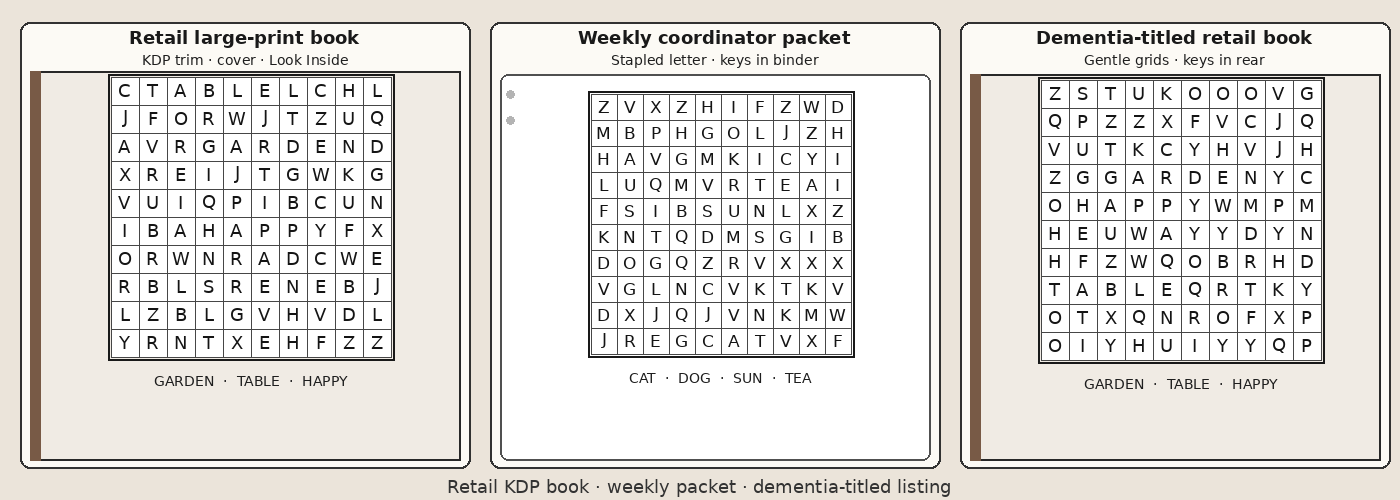
Versus a general large-print book. The large-print KDP guide covers trim, page count, and the regular-versus-large-print twin export. A dementia-titled listing adds buyer language on the cover and usually commits to gentler grids, forward-only word directions, and keys filed at the back. The type-size discipline is the same; the title sets expectations the sample must satisfy.
Versus a weekly coordinator packet. Printable puzzle packets for senior activity coordinators describes stapled letter sheets, fresh content every week, and answer pages kept in the coordinator’s binder rather than bound into the handout. A retail dementia activity book is a priced paperback with a cover, spine, and Look Inside. You may reuse the same presets across both channels, but you do not ship the same file.
What not to claim, and what not to put on the page
In the listing and on the page
- No therapeutic or cognitive-benefit copy: not in the subtitle, not in the introduction, not in a bullet list on page one.
- No “doctor recommended” or “clinically proven” language. Puzzle Maker Pro is publishing software, not a medical device.
- No filled solution sitting beside the unsolved grid in the Look Inside sample. Buyers notice immediately.
In the interior design
- Do not shrink two puzzles onto one page to save print cost. Legibility is the product you are selling.
- Do not run the same long word list you would use for an expert word search. Short, concrete words match the gentle promise better than obscure vocabulary.
- Do not hide answers in tiny type at the bottom of the puzzle page. Collect them in a solution section the shopper can see you planned for.
- Do not borrow kids’-book art or nursery styling. The reader is an adult.
Commercial rights for books you sell to your own readers are part of the Puzzle Maker Pro license as stated on the homepage. Your word lists and quotes must still be yours to print.
Next step
If you already publish large-print interiors and want a dementia-titled edition, start from saved large-print presets on the four modules above, turn off backwards and diagonal word-search directions so only forward → and ↓ runs remain, and lay out keys in a rear section before you design the cover.
Get the free Puzzle Maker Pro demo now
Other puzzles you might like
Large print puzzle books for KDP: trim, twin layouts, and page-count economics for the general large-print buyer.
Which puzzle types still work in large print: per-type scaling before you pick the whole interior mix.
Printable puzzle packets for senior activity coordinators: weekly in-house packets for care settings.
Which puzzle type fits your audience: cross-type picking when you are still choosing the mix.