

Put your wedding, travel and classroom listings side by side. If the trim, the fonts, the grid lines and the answer pages match, a buyer who liked one knows what the next one will feel like in their hands. If each was set up from scratch, the three look like three different sellers. The focus here is one design system across puzzle niches: which page decisions to fix, where each is set, and where it is saved.
A design system is the short list of page decisions you make once and then reuse for every niche. How to file wedding, travel and classroom content in folders is covered in niche puzzle catalog architecture. Keeping Volume 1 and Volume 4 of one title alike is covered in puzzle book series for KDP.
What a design system means for puzzle pages
On a puzzle page the design is mostly practical. One puzzle book publisher on Reddit, who said they started with random sudoku books, put it this way: “Books that do sell are heavily planned”, then listed “font, size of the numbers in the grid, separation space between puzzles, labelling of the puzzles, solutions page indication, good distance from the book spine (inside margin).” Every item on that list is a page decision. None of them is a topic.
That is why they can be shared across niches. A wedding word search and a classroom word search need different words. They do not need different margins.
One warning before you start. A KDP publisher’s 2025 roundup of what is saturated on Amazon named “‘Same interior, different cover’ books.” A design system is not that. The frame repeats; every puzzle inside is new, built from a word list that belongs to the niche.
Four puzzle book decisions to fix once
In Puzzle Maker Pro, a Windows puzzle maker, the book side of these decisions is shared by both book builders: Instant Puzzle Books, which builds a whole book from your settings in one pass, and Puzzle Book Studio, where you edit the book page by page. You find them in Project Settings in the main window, or in Book Settings inside Puzzle Book Studio.
If you sell printable packs rather than bound books, the module preset is most of your design system: grid lines, letter font and answer key marks all live there. Mirror Margins and Bleed are book settings you can leave off. On Etsy your first preview image does the job Look Inside does on Amazon, so show the same page layout in every niche’s preview.
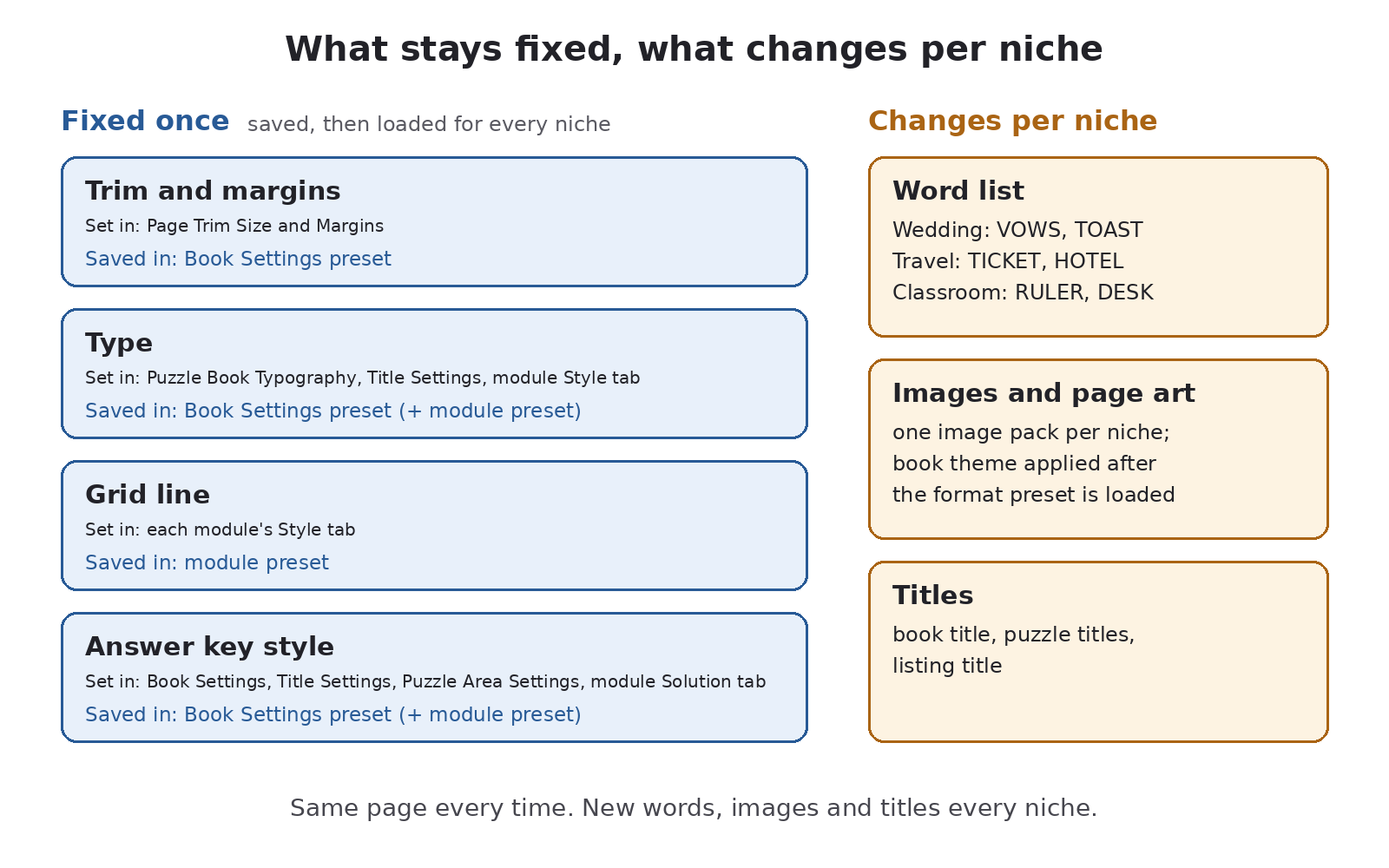
1. Trim and margins. Set in Page Trim Size and Margins: page width and height in inches, Bleed, and the four margins. Set the inside margin once, with Mirror Margins on, so no niche’s puzzles drift toward the spine. Tick Bleed only if your page art runs to the edge. Fix trim first, because everything else depends on it: the Instant Puzzle Books product page notes that puzzles on a 6″x9″ page come out smaller than on an 8.5″x11″ page. Pick the trim that suits the most demanding puzzle you plan to sell; puzzle book trim size and page count walks through that choice.
2. Type. The Puzzle Book Typography section holds the book’s eight fonts. Puzzle Title Font is the source; the solution title, puzzle description, word list and page number fonts each have a Use Puzzle Title Font box. Tick all four and every puzzle and solution page follows one font choice; set the title page, contents and text page fonts to match by hand. In Title Settings, the Puzzle Title: and Solution Title: templates (“Puzzle #” and “Solution #” by default) fix how every page is labeled. The letters inside the grid are drawn by the puzzle module, so set their font in the module’s Style tab and keep it the same across niches.
3. Grid line. The grid lines are part of the puzzle image, so they are set per module, in its Style tab. On Standard Word Search the outer Border starts at width 5 and the inner cell line at 0, which means no cell lines at all unless you add them. Decide once whether your word searches have cell lines, and how heavy the border is. Then check a printed page at final trim, because the image scales with the page. Faint lines get books returned: one Amazon reviewer of a nonogram book wrote, “The boxes are so faint (if there at all) that you can’t really count them… I am returning mine.”
4. Answer key style. Decide where answers live and how they are labeled. In Book Settings, choose Print Solutions With Puzzles or Puzzles First, Then Solutions. In Puzzle Area Settings, Show page cross-references prints “Solution 12 on page 87” under each puzzle and “Puzzle 12 on page 5” under each solution. Some modules also style the key image itself: Standard Word Search marks found words with Circle or Line on its Solution tab. Pick one and keep it.
Saving and reusing the look across projects
Once the four decisions are right, save them in two places.
- The book settings. Book Settings has a preset bar at the top. Its note reads “Instant Puzzle Books Presets will save all layout and style settings related to puzzle books”: trim, margins, page layout, numbering, titles, typography, collation, content pages and the book theme travel together. Loading a preset replaces the theme too, so save each format preset, such as “Letter” or “6×9”, from a book with no theme and no niche text pages. Then apply the niche’s theme after you load it.
- The module settings. Each puzzle module has its own preset bar at the top of its window. Save the module’s settings there (style, grid size and solution marks), one preset per module, and give the presets matching names so the right one is easy to find.
For a new niche, load the module preset first and the niche’s word list second, because the preset also remembers the list it was saved with. Load the book preset, generate, then open the book in Puzzle Book Studio and apply the niche theme with Book Themes…. The pages come out with the same frame and new puzzles.
Puzzle Book Studio also saves a whole finished book as a project file, with your own pages and the book’s theme. Use it for reprints and second trims, as keep the puzzle project, not just the PDF explains. A new niche needs new puzzles, so start it from the presets, not from last month’s project. Puzzle Book Studio vs Instant Puzzle Books compares the two builders.
In Puzzle Book Studio, a book made from one puzzle set works on every edition. If you plan one book that combines your wedding and travel word search sets, that is two puzzle sets: it needs Productivity or an older Time Saver purchase on every module whose puzzles go into it, even when both sets come from the same module. Not every module sells a Productivity edition, so check its shop page first. You can move up to any higher edition after you buy.
Where niches should differ (word lists, images, titles)
Three things should change with every niche, and each one gives the listing something new to show.
- Word lists. The theme lives in the words: VOWS and TOAST for a wedding, TICKET and HOTEL for travel, RULER and DESK for a classroom. A thin list is the real limit of a niche, which is where word lists for puzzle books helps.
- Images and page art. Picture puzzles take a niche image pack. In Puzzle Book Studio, Book Themes… puts your own art on the pages, and each theme can be saved to your theme library. Keep one theme per niche, with the art in the same place on the page, and apply it after loading the format preset.
- Titles. The book’s title page, the puzzle titles and the listing title change. The templates stay. On Standard Word Search the word list’s file name (or a #TITLE: line) becomes the puzzle’s title by default; to print it in the book, change the Puzzle Title: template to “Puzzle # %TITLE%”, so name the file the way you want the title to read. For the listing itself, see a listing title that names the pencil job.
One exception to the rule: audience can change the system. A large print line or a line for young children needs bigger type and bigger cells, and that is a second design system, not a niche variant. Save it under its own preset names. Niche drill-down as a build spec shows how an audience turns into settings.
Selling what you make
Every paid Puzzle Maker Pro edition lets you sell the finished books, worksheets and packs you make to your own readers and customers, on KDP, Etsy, Teachers Pay Teachers or your own store. Productivity adds the right to sell or supply the generated puzzles to other publishers and sellers. Your word lists and images still need to be yours, or cleared for use where you sell.
Get the free Puzzle Maker Pro demo now
Other puzzles you might like
- Niche puzzle catalog architecture: wedding, travel, classroom and holiday content as folders under one design.
- Puzzle book series for KDP: keeping every volume of one title alike.
- Puzzle book trim size and page count: choosing the trim the rest of the design depends on.
- Keep the puzzle project, not just the PDF: what a saved book project restores.
- A listing title that names the pencil job: titles that say what the solver does.
- Niche drill-down as a build spec: from a niche phrase to a list of settings.