

Last checked: 19 November 2026.
A color by number maker turns a picture into a grid of numbered cells, a legend that says which color each number means, and the colored answer. Getting a page out is easy. Getting a page whose numbers a buyer can still read once it is printed and colored is the real job.
This guide covers choosing a picture, the settings that change the printed page, and what a KDP interior, an Etsy pack and a classroom worksheet each need. The tool is the Color by Number module in Puzzle Maker Pro, a Windows desktop program for making puzzle pages and puzzle books. If you are planning a full adult coloring title, the color by number books for adults guide covers what that buyer expects inside.
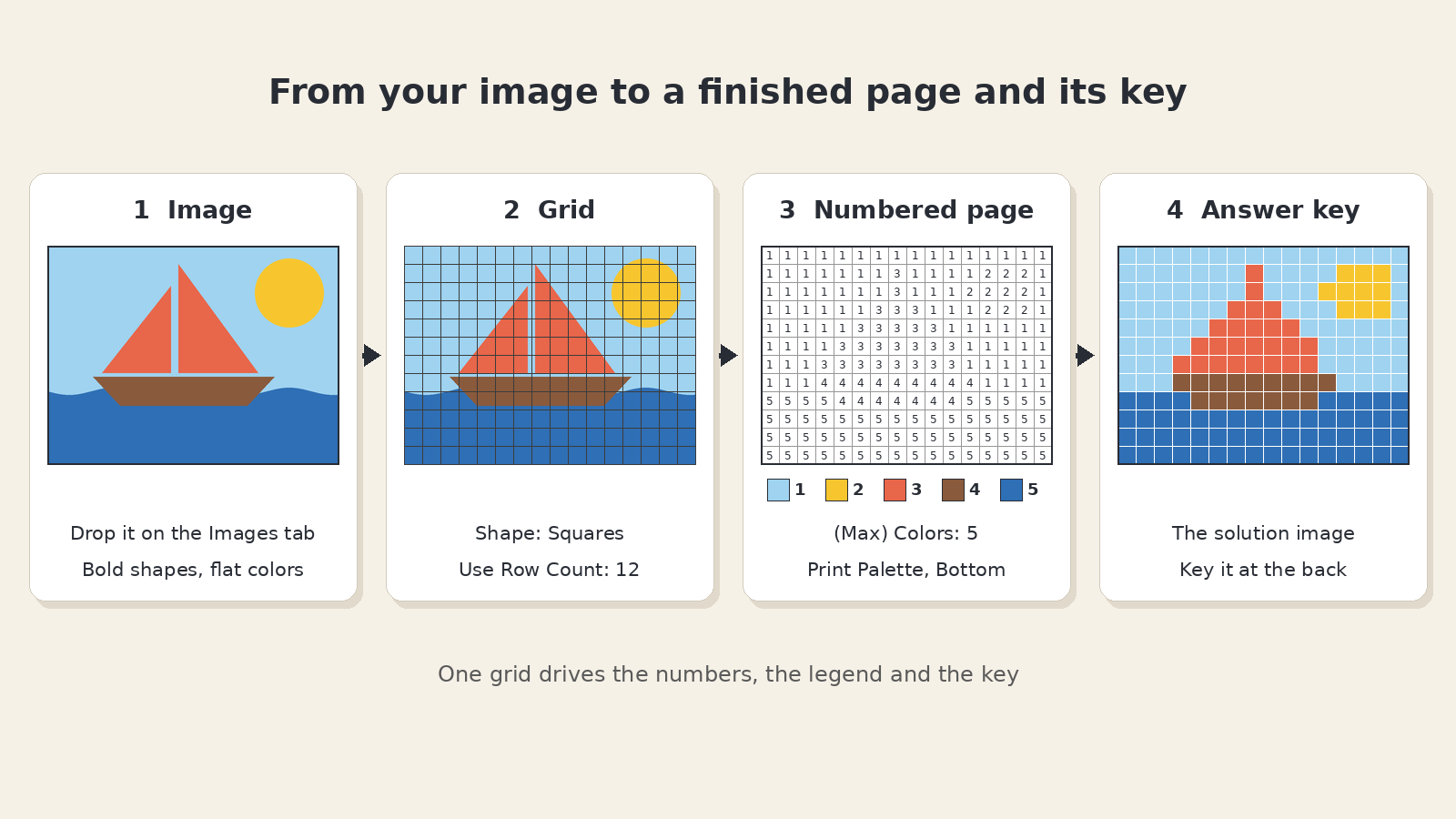
What makes a picture work as color by number
The module samples your picture onto a grid. Each cell takes the nearest color in the palette and prints that color’s number. So the picture decides almost everything before you touch a setting.
Bold shapes and flat color areas convert best. A sailboat or a fruit bowl drawn in solid fills becomes clean blocks of the same number. A photo with soft shadows does the opposite: every shade wants its own color, and the page fills with scattered single cells that look like noise when finished.
Details need to be a cell wide. A mast, a whisker or lettering disappears when it is narrower than one cell. In the sailboat example, the gap between the two sails vanishes on a 12-row grid.
Transparent backgrounds give you empty space. Transparent parts of a PNG become empty cells, and Hide Empty Cells on the Style tab leaves them off the page. That is how you get a shape on white paper instead of a filled rectangle.
Use art you own. Draw it, commission it, or buy commercial print rights to it. Famous characters and look-alikes are a risk for any seller.
You add pictures on the Images tab by dropping JPG or PNG files on “Drop Image Files Here to Get Started”. Each picture gives one numbered page and one solution image; set Quantity to the number of pictures you dropped.
Grid style and color count decide readability
Two tabs do most of the work. On the Grid tab you pick the shape and the row count; on the Settings tab you pick the colors.
Shape. The grid can be Squares, Rounded Squares, Circles, Triangles, Hexagons, Staggered Circles, Octagons or Diamonds. Squares give the clearest box for a printed number; rounded and circular tiles look softer but leave less room for the digit, and they rule out region outlines.
Use Row Count (10 to 100 rows, default 30). Columns follow the shape of your picture. More rows mean more detail, smaller cells and smaller numbers. The alternative, Use Row Height, sets the row height instead and lets the picture’s height decide the row count.
(Max) Colors (2 to 30). Choose Auto and the module reads the palette from your picture; Auto can return fewer colors than you ask for if the picture has fewer. Choose Custom and you set every swatch yourself.
Small print can send a puzzle book back. One Amazon reviewer of a kakuro book wrote that they “had to squint with my glasses on to make out the numbers” and returned it. A color by number page fails the same way when 60 rows of hexagons meet a 6 x 9 inch trim. Set the Numbers Font on the Style tab, then print one page at true size before you make the rest of the set.
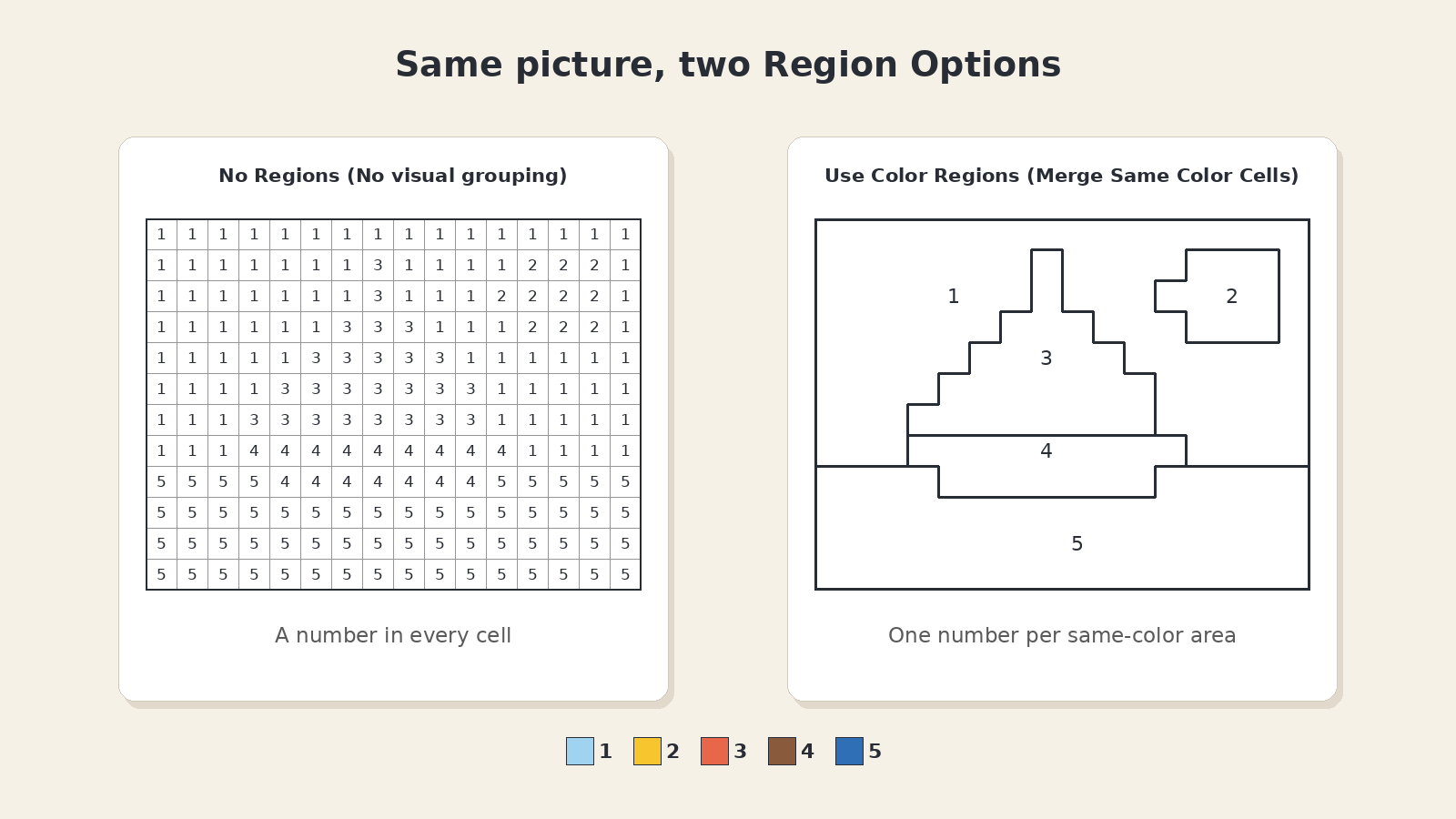
Fewer numbers also help. Under Region Options (Merge or Outline Same Color Cells), also on the Grid tab, the default No Regions (No visual grouping) prints a number in every cell. Outlined Regions keeps those numbers and draws a border around each same-color area. Use Color Regions (Merge Same Color Cells) merges each same-color area into one shape with one number, which reads more like a classic coloring page. Outlined and merged regions are not available with Rounded Squares, Circles, Staggered Circles or Octagons.
Auto colors and manual refinement
Auto is the fast start; Scan Quality (Auto, Low, Medium or High) sets how closely it samples the picture.
Switch to Custom when the palette has to stay the same across a set. A twelve-page animal pack reads as one product when “1” is the same green on every page. Custom also lets you match a box of crayons the buyer already owns.
The Content tab changes what prints in each cell, not which color it means. Default prints the number. Math prints a short equation whose answer is that color’s number in the legend; set the range of answers under Math Options. Letters prints a letter for each color, and Words prints a word from your own list. That is how one picture becomes a number page for a younger class and a math practice page for an older one.
KDP interior vs Etsy pack vs worksheet
The steps are the same for all three; the packaging changes.
KDP interior. Each picture gives you the numbered puzzle and its colored solution as 300 DPI PNG or JPG files. Book PDFs come from Instant Puzzle Books, the quick book builder included with every paid Puzzle Maker Pro edition, or from Puzzle Book Studio, the book editor in Puzzle Maker Pro for titles, numbering and page layout. The legend only works in color, so plan a color interior and order one printed proof before you publish.
In Puzzle Book Studio, a book made from one puzzle set works on every edition. A book with more than one puzzle set, even two sets from this module, needs Productivity, or an older Time Saver purchase, on every module whose puzzles go into it. For Color by Number, that is the Color by Number bundle, which includes the Time Saver add-on.
Etsy pack. A short themed ZIP of puzzle pages and their solution images. The selling puzzle printables on Etsy guide says page one has to read as a puzzle in a small crop and that the keys go in the file. For color by number, show the colored solution next to the numbered page in the listing photos, so the buyer sees the finished picture. Say in the listing that the legend needs a color printer, and state the page count.
Classroom worksheet. Used as a color by number worksheet maker, the module gives you the page and its answer page; the TPT visual puzzle worksheets guide sets the format: one page, one clean answer page, US letter. Keep the palette short and the cells large for young hands. Most school copiers print in black and white, which turns every legend swatch grey. Print the legend in color, or write the color names beside the swatches on your master copy before you copy it. With Math, the legend lists the answers, so students check their sums against it.
Batch work is what the Time Saver adds. With the bundle you queue several rows of settings in one run, and every row writes into the same output folder; sorting the files into packs is up to you.
Color by Number lets you sell the finished books, worksheets, and packs you make on KDP, Etsy, Teachers Pay Teachers, or your own store. The bundle also adds the right to sell or supply the puzzles you generate to other publishers, businesses and sellers. You can move up to any higher edition at any time after you buy, so start with what fits the pages you make today.
Answer pages and legends
Print Palette adds the legend to the puzzle page. Place it Top, Left, Bottom or Right, and tick Print Centered to center it. Check that it is on before a batch: a page without its legend cannot be solved.
The colored solution image is the answer key. Number each solution to match its puzzle; puzzle book answer keys covers placement.
On the Titles tab, each page title can come from the Image File Name or Image Folder Name, or be a Custom title. Name your files well (“Sailboat”, “Hot Air Balloon”) and each puzzle and its solution take the picture’s name.
Other puzzles you might like
Copy and Color hides cells of your picture so the solver draws the missing parts and then colors them. Cut and Color turns a picture into pieces to cut, assemble and color. Jigsaw Squares cuts your picture into a printable jigsaw with a pieces sheet and a solution. For more low-reading puzzles, see visual and matching puzzles for publishers. Planning the listing? A listing title that names the pencil job and one design system across puzzle niches cover the title and the look of the set.