

Two books a week for 52 weeks is 104 titles. That is also the ceiling: KDP lets you create and submit up to 2 new titles per book format each week, so 104 new paperbacks a year means using every weekly slot with no headroom (KDP publishing limit for puzzle books has the details). Treat 104 as a planning frame, not a target: if you intend to stay active on KDP all year, you need a calendar that names what ships in week 12 and what you are still proofing in week 40. Without that grid, you get a pile of one-offs that share a puzzle type but not a buyer promise.
Catalog planning for puzzle books is that grid. It decides which series advance, which trim sizes stay fixed, which seasons get a dedicated run, and how much one person can check before anything goes live. How to scale and diversify your puzzle book catalog is the wider playbook for adding types and channels. This guide covers one thing: pacing a KDP backlist you can maintain without skipping the proof pass.
A year of titles, not a pile of one-offs
A catalog plan starts with rows, not with whatever finished PDF is on your desktop today.
Each row should name a product line a shopper can recognize on your author page: a numbered sudoku series, a large-print word search line, a kids maze band, a logic volume set. The row carries the promise. The week you upload is just when that promise ships again.
One-offs still happen. A strong niche idea can jump the queue. The plan exists so those jumps are visible. When everything is urgent, nothing is sequenced, and you cannot tell whether you are building depth in one line or scattering singles that compete with each other on the same browse page.
Sketch the year as a simple table before you touch art files. Down the side, list the rows you are willing to maintain. Across the top, mark the quarters or school-year beats that matter to your buyers. Drop a working title into each cell you intend to fill. Empty cells are honest gaps. They beat surprise slots filled because a folder of exports had no home.
How many KDP books a year is realistic?
For most solo publishers, fewer than 104. The weekly limit allows two new paperbacks a week, but the number you can sustain is set by how many interiors you can proof, cover and list properly. One title a week (about 50 a year) is a demanding but workable pace for one person; one or two a month in a single strong series is enough to build a line buyers recognize. Start from your proof time, then fill the grid.
Size the plan to what one publisher can check and list
104 slots on a spreadsheet is easy. One hundred and four interiors you have opened, page by page, is a different job.
Your real cap is the proof pass, not the generator. For each title you need time to confirm puzzle counts, answer keys, ordering, bleed on large-print trims, and that Look Inside shows the same difficulty you promised on the cover. If that pass takes an evening per book, two live titles a week is already a full-time rhythm before you count covers, metadata, and fixes after a first review.
Right-size the grid to your desk, not to a forum brag. A solo publisher might run one series row at two releases a month and still finish the year with a deep line buyers recognize. Another might alternate two rows so odd weeks ship search books and even weeks ship number grids. The arithmetic only has to be sustainable through November, not impressive in January.
Leave buffer weeks in the plan for reprints, typo fixes, and the title that needs a second generation pass because the first batch drifted from the preset. A calendar with zero slack becomes a backlog of half-checked uploads the first time a holiday week interrupts you.
Make every title earn its slot. A catalog of near-identical books with only the cover changed is weak for buyers and invites quality problems. Give each volume a real difference a shopper can see: a new theme or word list, a different difficulty band, a different trim for a separate row.
Track what you actually submitted, not what you exported. A folder of ready PDFs is inventory. A live ASIN is a commitment. Your plan should separate “generated,” “proofed,” and “listed” so you do not confuse motion with progress.
Series, trim sizes, and seasons as the units of the plan
Plans stay readable when every slot names three anchors: series, trim, and season window.
Series is the promise a returning buyer can trust without re-deciding layout each volume. Puzzle book series for KDP covers volumes 1 through N; on the calendar, that means one row whose only change is content and the volume number on the cover. Plan the whole row before you upload volume 3, not after volume 2 surprises you with a trim change you forgot to forbid.
Trim size is a row decision too. Large-print lines, compact travel sizes, and standard 8.5×11 interiors are different products even when the puzzle type matches. Pick one trim per row for the year unless you deliberately fork a second row for the alternate size. Mid-year trim hops read as a different book, not the next installment.
Seasons are when themed buyers shop, not a reason to rebuild your design system. A winter window might schedule cozy word lists; a back-to-school window might schedule classroom-friendly packs. The puzzles still come from the same presets and the same book project. Seasonal and holiday puzzle printables maps a year of themed packs for Etsy-style drops. Borrow the calendar idea, not the product shape, when you are planning KDP spines instead of ZIP folders.
Together, those three anchors turn “I should publish more” into “Week 18 ships Large-Print Search Volume 4 in the spring window.” That sentence is short enough to paste above your desk and specific enough to audit when you fall behind.
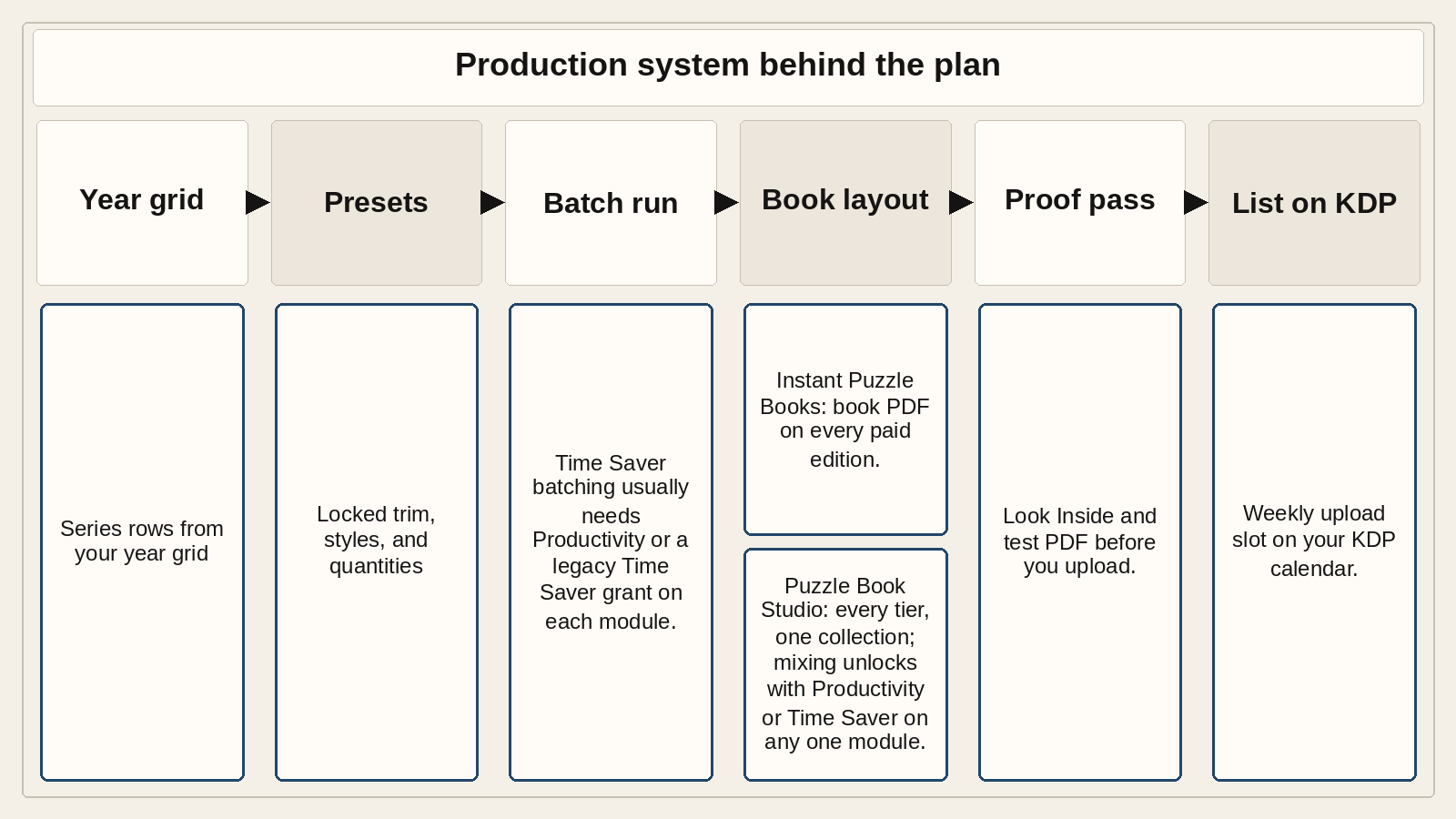
The production system that makes the plan doable
A calendar you cannot execute is wallpaper. The workable plan ties each row to a saved preset, a book assembly project, and a batch habit you repeat every cycle.
Presets hold the puzzle side: grid size, style, difficulty, quantity per run. When week 22 is the same row as week 6, you reload the same preset and run a fresh batch; on list-driven puzzles, swap the word list before you generate. Each run gives fresh puzzles, so volume 7 never repeats volume 6.
Book assembly holds the print side: trim, typography, page numbers, and where solutions land. Instant Puzzle Books is on every paid edition (Standard, Creative, and Productivity; see Puzzle Maker Pro editions): a book PDF assembled from your current settings, which fits a row you want live quickly. Puzzle Book Studio works on every edition for a book built from one puzzle collection, and keeps trim, numbering, and solutions fixed volume to volume. A book that mixes puzzle types needs Productivity (or a legacy Time Saver grant) on every module in it; you can move up to any higher edition anytime after you buy. Time Saver batching for volume runs is per module too. Until every module in a mixed book has it, give each puzzle type its own row and keep each upload single-purpose.
The weekly rhythm that matches a 104-title frame is boring on purpose, with both of the week’s titles moving through each step together: generate Monday, proof Tuesday, cover and metadata Wednesday, upload Thursday, fix Friday. Boring survives holidays.
If you are still proving volume 1, do not pre-schedule twelve volumes on the public plan. Earn the row first. The calendar grows from a book that passed Look Inside and reviews, not from optimism.
What this plan doesn’t cover
If your question is really about upload limits, niche folders or holiday printables, these guides go deeper.
The weekly cap. Amazon’s counters on new title creation and first-time submission per format are policy facts, not a production philosophy. KDP publishing limit for puzzle books and publishing puzzle books under KDP’s 2-titles-per-week limit explain those counters, resets, and what counts as a new title. Use them when your blocker is “why did upload reject this week,” not when you are deciding which series row deserves March.
A niche-folder system. Niche puzzle catalog architecture is about wedding, travel, classroom, and holiday content folders under one design system across KDP, Etsy, and TPT. That is content organization, not a 104-slot release calendar. Your year plan can point at the same folder, but the calendar still names upload weeks.
A holiday printable calendar. Seasonal packs timed for Etsy or classroom PDFs can follow a different cadence than paperback spines. The seasonal article above covers that shape. Do not merge “104 KDP books” with “52 weekly printables” in one grid unless you honestly have proof bandwidth for both channels.
Get the free Puzzle Maker Pro demo now
Other puzzles you might like
How to scale and diversify your puzzle book catalog: widen types, channels, and languages after the year grid has a steady row.
Puzzle book series for KDP: volume numbering, trim lock, and solutions convention for repeat buyers.
Niche puzzle catalog architecture: themed content folders under one design system when the calendar needs new lists, not new layouts.
KDP publishing limit for puzzle books: official counter mechanics when upload timing is the blocker, not catalog shape.