

A printable escape room is a set of puzzles where every answer is the key to the next one. The puzzles can be ordinary: a coded message, a math maze, a letter grid. The chain makes it an escape room, and the chain is where a kit breaks: if one answer does not match what the next lock expects, the group stalls on page two.
This is how to build that kind of kit for Etsy or Teachers Pay Teachers from puzzles you generate yourself with Puzzle Maker Pro, a Windows desktop app that makes puzzle pages and a matching solution page for each. The example kit uses four of its modules, each a separate purchase.
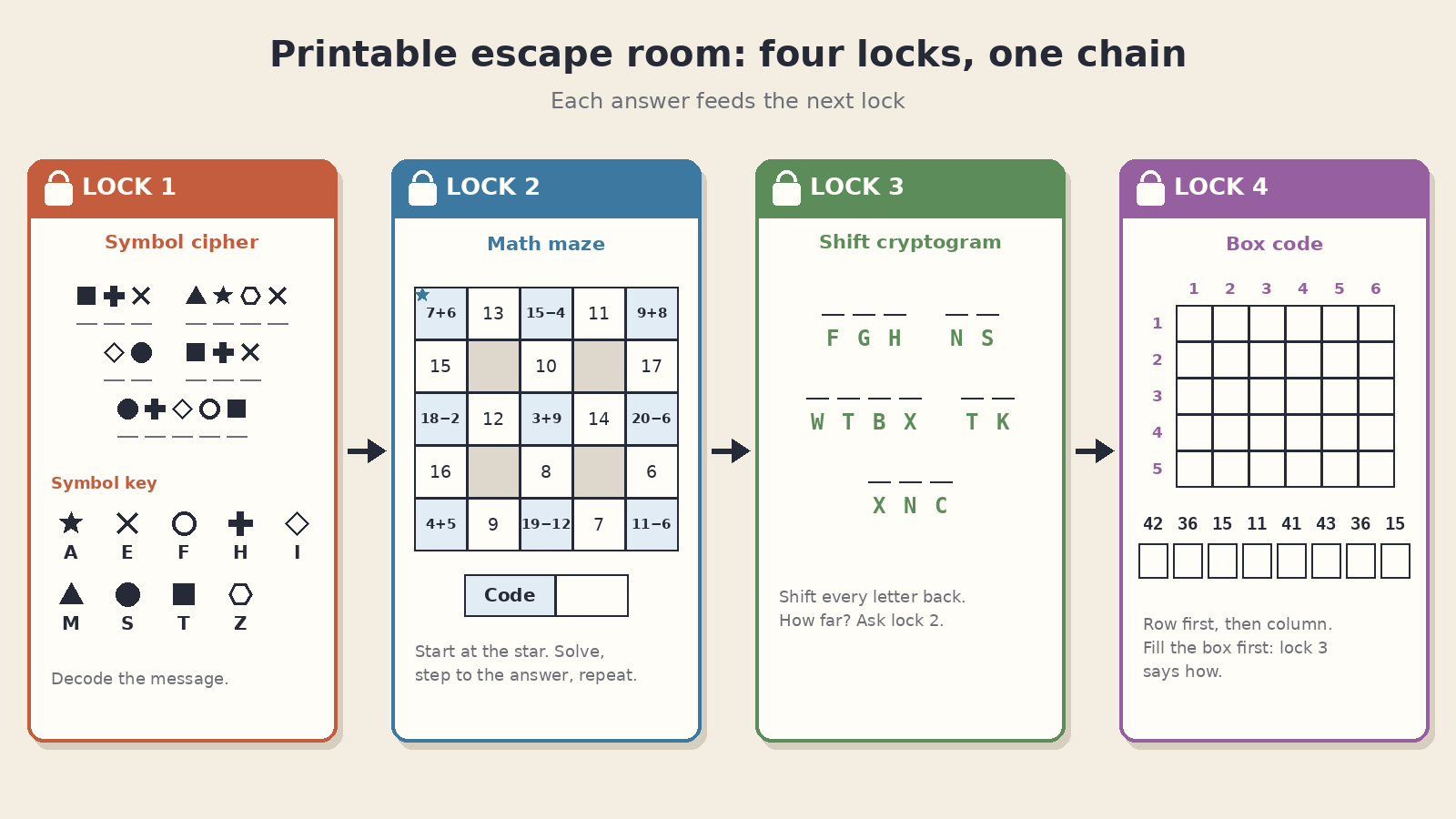
How a printable escape room chains its puzzles
Every lock has a puzzle, an answer, and a job for that answer: open a sealed envelope, pass a facilitator check, or, best, carry what the next puzzle needs. In the example above:
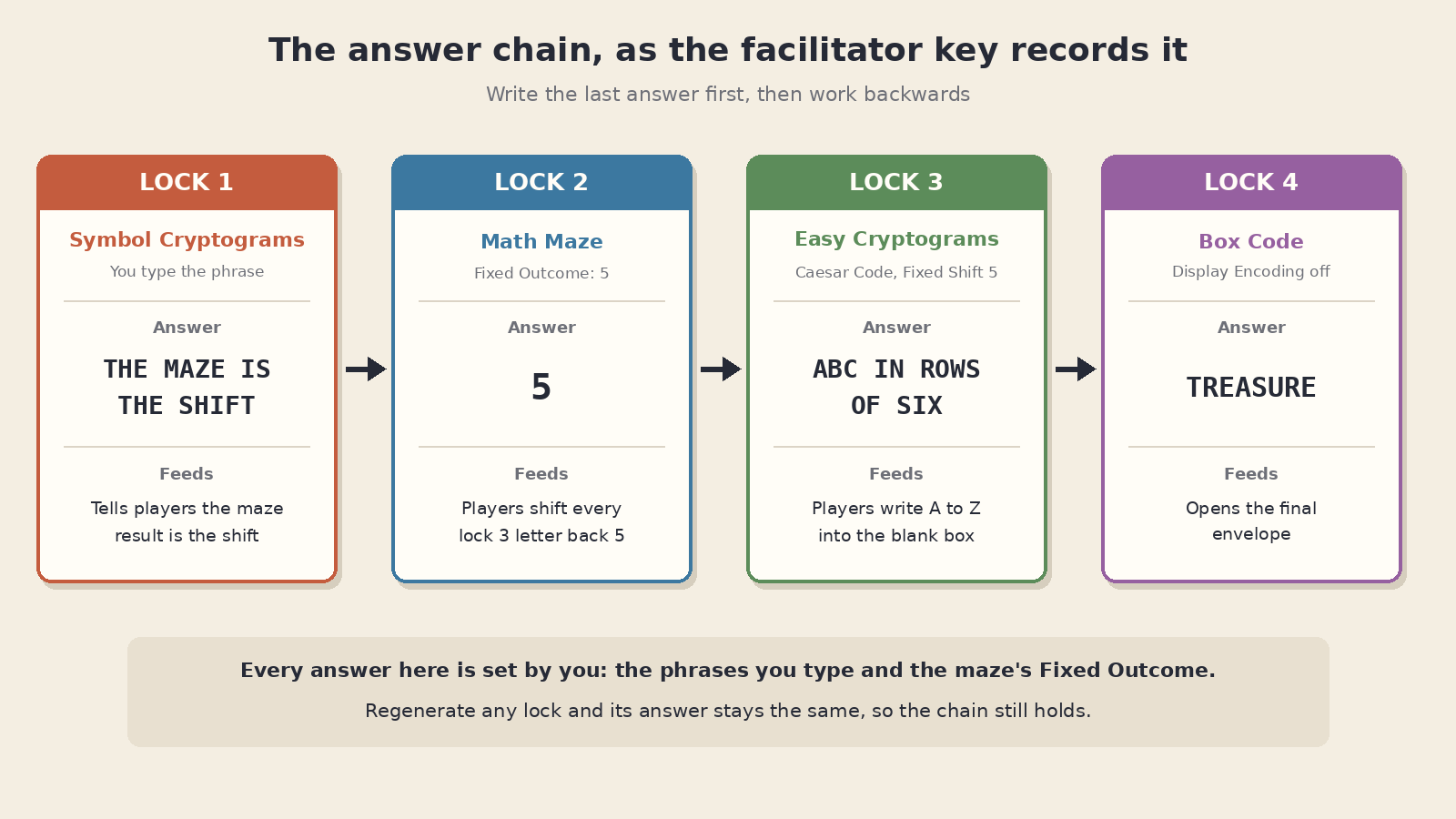
- Lock 1 is a symbol cipher. It decodes to THE MAZE IS THE SHIFT.
- Lock 2 is a math maze whose final answer is 5.
- Lock 3 is a shifted-letter cryptogram. Shift every letter back 5 and it reads ABC IN ROWS OF SIX.
- Lock 4 is a box code with a blank grid. Write A to Z into it in rows of six, look up the coordinate pairs, and the final word is TREASURE.
Locks 3 and 4 are built to need the answers before them. A quick group could still brute-force a shift or guess that the blank box is alphabetical, which is why the teen kit keeps the key table off. Nobody has to take the facilitator’s word for an answer either: each one visibly makes the next puzzle work.
Pick one story and word every lock instruction in it; the instruction lines on the cards (“Start at the star”, “How far? Ask lock 2”) are yours to add in your layout.
Choosing a puzzle for each lock
A good kit changes the kind of thinking at every lock. These four modules each ask for something different:
- Symbol Cryptograms turns a phrase into pictures. Each letter becomes one of 26 symbols, assigned at random; use the built-in Abstract – Color or Abstract – B/W sets, or 26 of your own images to match the theme. Abstract – B/W keeps lock 1 printable on a home black-and-white printer.
- Math Maze gives a grid of equations. The solver steps from each equation to the cell holding its answer until the last equation fills the result box. It is the lock that produces a number.
- Easy Cryptograms prints a phrase as a substitution code with a row to write the answer in. Caesar Code (shift letters n positions) moves every letter the same distance, the natural partner for a number found elsewhere in the kit.
- Box Code prints a legend grid and a word written as coordinate pairs. With Display Encoding off the legend ships blank, so the players rebuild it first.
Easy Cryptograms vs Box Code compares those two in depth. Easy Cryptograms and Symbol Cryptograms put up to 15 words or phrases on one image, so set Multiple Words Per Image to 1. Box Code defaults to five phrases per puzzle; set Words Per Puzzle to 1.
Making answers feed the next lock
A chain only holds if you decide the answers, not the generator. All four modules let you.
The cipher answers are yours. All three cipher modules encode exactly the words you type or load, so lock 1 decodes to your phrase however the symbols are assigned. In Easy Cryptograms, pick Caesar Code, choose Fixed Shift, and set it to the number your maze produces. In Box Code, leave Randomize off so the letters sit in alphabetical order. Then “rows of six” is a real instruction: the default box is five rows by six columns.
The maze answer is yours too. On the Math Maze Meta tab, set Select Type to Fixed Outcome and enter the number you need. The value only applies when it falls inside the Outcome Min and Max range on the Settings tab; a value outside it falls back to the Min, so check that range first. Result Text relabels the result box, for example to Code. The box prints empty on the puzzle page; the number appears on the solution page.
Work backwards: decide the final word, then what each earlier lock has to hand over.
Meta Puzzles for Math Maze is a separate add-on that requires Math Maze, and its product page names escape room designers among the people it is for. In Chain mode the result of one maze becomes the missing number in the first equation of the next; Boss Level combines two to five maze results into one final maze. In Chain and Boss Level the results are generated, not chosen. Generate the math room first, read the final number off the solution page, then set the next cipher to match. Fixed Shift runs from −25 to 25, so if the next lock is a shift code, keep the final maze’s Outcome Max at 25 or below.
Escape room printables for kids and teens
The same chain can ship at two levels, mostly by changing settings.
For younger players:
- In Symbol Cryptograms, Print All Hints in Puzzle (Kids’ Puzzles) fills the symbol key in letter order (only the message’s letters with Only print used letters ticked, as on the lock 1 card), so the job becomes matching.
- In Easy Cryptograms, keep Print Key Table on for working space and switch on Add Clues to give a few letters away, or fill the whole table with Kids’ Puzzles.
- Keep the Box Code legend filled (Display Encoding on), and give lock 3’s message a different job, such as naming the next envelope.
- Make the maze small, with + and − only and a low number range.
For teens:
- Leave Kids’ Puzzles and clues off, and ship the Box Code legend blank.
- Keep lock 3 on Caesar Code with Print Key Table off, so lock 2’s number is the way in, not the page.
- Use the larger maze sizes (Equation Rows and Equation Columns go up to 5) with multiplication and division switched on.
Test each level with someone of the right age before you list it. One TPT teacher’s review of a digital team-building escape room bundle names the risk: “some kids gave up on this one very quickly.” A one-line lock needs help from somewhere: a key, a few clue letters, or a shift handed over by an earlier lock.
For a classroom, print one set per team of three or four, put each lock in its own envelope, and keep one hint card per lock at the teacher’s desk. Note your test group’s time in the listing.
To start smaller, a two-lock kit (a maze feeding a shift code) needs only Math Maze and Easy Cryptograms.
Packaging the kit with a facilitator key
Deliver the kit as one printable PDF: export each puzzle and solution image as PNG or JPG (all four modules offer both), lay out a story cover, one page per lock, envelope labels and a facilitator key at the back, and save it as a PDF.
Build the facilitator key from the solution pages in lock order, plus a one-page chain map like the diagram above, so a teacher running the room can check any answer in seconds. Puzzle book answer keys covers key placement in packs and books.
For a kit that mixes modules, lay the pages out in your own document. Puzzle Book Studio, the book editor in Puzzle Maker Pro, needs Productivity, or an older Time Saver purchase, on every module in a book with more than one puzzle set, and Symbol Cryptograms does not sell a Productivity edition.
For the listing itself:
- Name the age band and the number of locks in the title.
- Show one real lock page in the preview, never a solution page.
- Say whether the kit needs envelopes or color printing.
- Check every chain link against the solution pages before you upload.
Selling puzzle printables on Etsy covers the rest of the listing.
On rights: every paid Puzzle Maker Pro edition lets you sell the finished books, worksheets and packs you make to your own readers and customers. Productivity adds the right to sell or supply the generated puzzles to other publishers, businesses and sellers. Where a module sells more than one edition, you can move up to any higher edition later. Any images you add, such as your own 26 symbols, must be yours or cleared for the store you sell in.
Other puzzles you might like
TPT secret code and cryptogram worksheets covers single-page cipher worksheets and their keys. Etsy cryptogram and secret code printables sizes a themed cipher pack. Cryptogram puzzles for publishers compares the cipher products. For other kinds of thinking, try pentomino puzzles printable, or math maze worksheets for more on the maze used in lock 2.