

Math maze worksheets
A math maze checks itself while the student works: every right answer opens the next step, and a wrong one usually leads nowhere. A good math maze sells on Teachers Pay Teachers the way a warm-up does: it fills a slot in the day and is quick to check.
The examples here come from Math Maze, a module of Puzzle Maker Pro, the Windows desktop software that generates printable puzzles. Math Maze hides the arithmetic inside a route.
How a math maze checks itself
The page is a grid of equations with number boxes between them. The student starts in the marked equation, solves it, and draws a line into the neighboring box that holds the answer. That box leads to the next equation. The route ends when every equation has been used, and the last equation’s answer goes in the result box, even if the same number also sits in a box next to it. That box is a decoy.
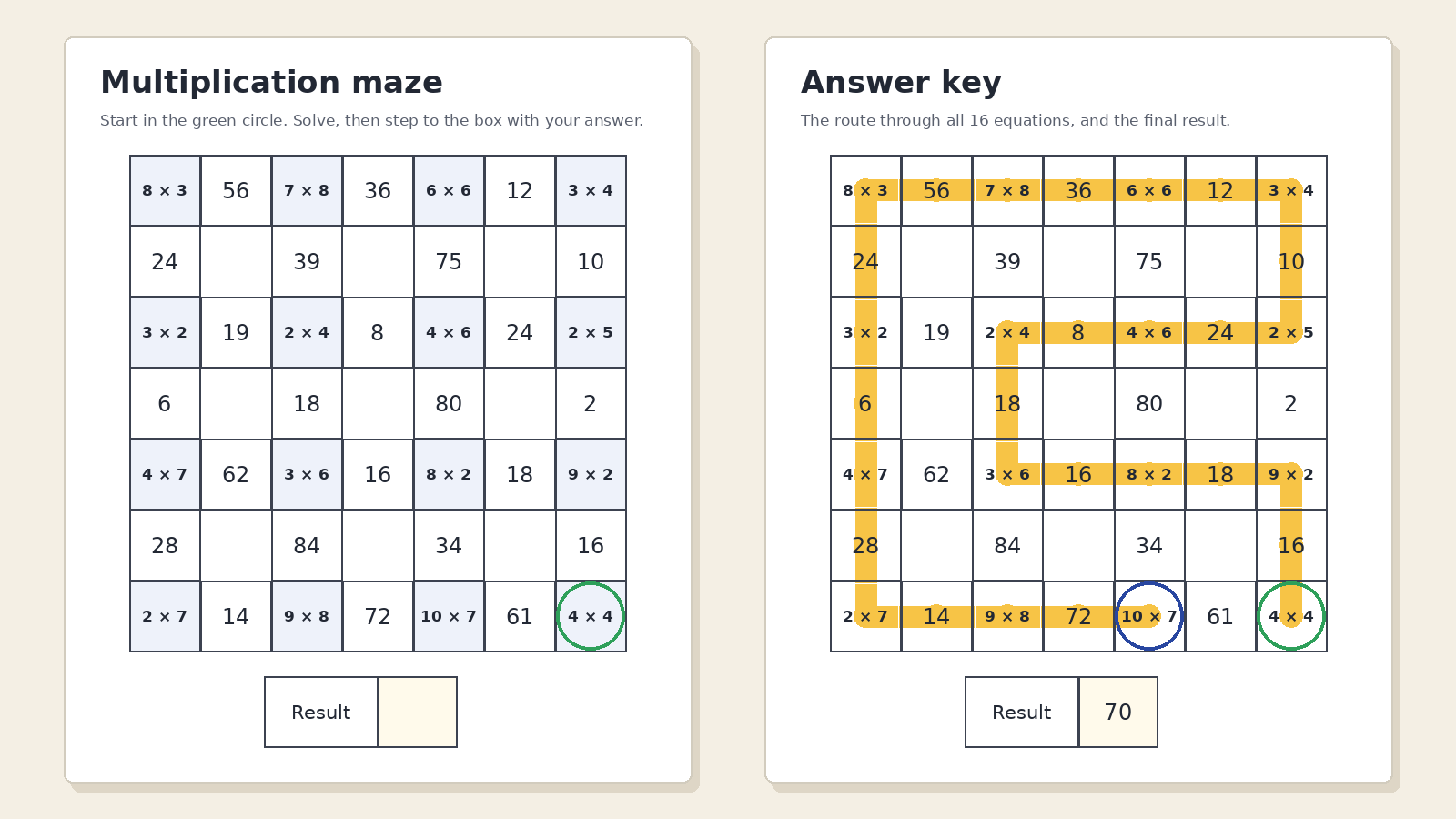
Two things make it self-checking:
- The route passes through every equation. A student who finishes with equations left over has gone wrong somewhere.
- A wrong answer usually has no box to step into. The route goes on through the box that matches the right answer, so a slip tends to leave the student stuck, which is the cue to check the sum again.
For the teacher, checking starts with one number: the result box. A matching result says the student reached the true end; a different one says check the route against the key.
Operations and number range by grade
Math Maze gives you the settings the product page lists: the operators (+, −, ×, ÷), number ranges, and the size of the grid. In the software there are two ranges. Equation sets the numbers inside the equations, and Outcome sets the answers. Equation Rows and Equation Columns each run from 2 to 5, and since every equation sits on the route, a 4×4 grid is 16 problems and a 5×5 grid is 25. Out of the box, plus and minus are on and both ranges run from 1 to 20. Both ranges stop at 100, so no answer goes past 100: facts and arithmetic within 100, not three-digit work.
Starting points by grade:
| Grade | Operators | Equation | Outcome | Grid |
|---|---|---|---|---|
| 1 | + − | 1 to 10 | 1 to 20 | 2×2 or 3×3 |
| 2 (within 20) | + − | 1 to 20 | 1 to 20 | 3×3 |
| 2 (within 100) | + − | 1 to 50 | 1 to 100 | 3×3 or 4×4 |
| 3 | × | 2 to 10 | 1 to 100 | 4×4 |
| 3 (mixed review) | + − × | 2 to 10 | 1 to 100 | 5×5 |
The mix follows from how problems are made. Each one draws its two numbers from the Equation range and is kept only if the answer fits the Outcome range. With 2 to 10 and up to 100, plus, minus and times come out at roughly a third each. Widen the Equation range on a mixed page and multiplication gets rarer, because more of the products go over 100.
Math maze worksheets for grade 3
For grade 3, the common US target is multiplying and dividing within 100. A multiplication-only maze with factors from 2 to 10 is exactly that, and it titles cleanly as times-table practice. The page prints * and / by default, so before you make a grade 3 page, type × and ÷ into the symbol boxes beside the Operators checkboxes.
Division needs its own page. Adding ÷ to a mixed page gives only a few small division problems. On a division-only page, both numbers come from the Equation range, so a page within 100 also lets in problems like 90 ÷ 45. Look at a page before you call it “division facts”.
Size on the page matters as much as the number of equations. One TPT teacher’s review of a Super Bowl puzzle packet said: “The maze is so tiny that it is too difficult to complete.” A 5×5 grid squeezed onto half a page fails the same way. Give younger grades fewer equations and a full page.
Chained pages for a review day
Meta Puzzles for Math Maze is a separate add-on that requires Math Maze, and it is a separate purchase whichever Math Maze product you own. It adds Chain and Boss Level to the Select Type list on the Meta tab.
With Chain, set Quantity to the number of stations you want and click Create. Each page gets a result box with a small index number. The next page’s first equation has a question mark with the same index, and the student fills it with the previous result.
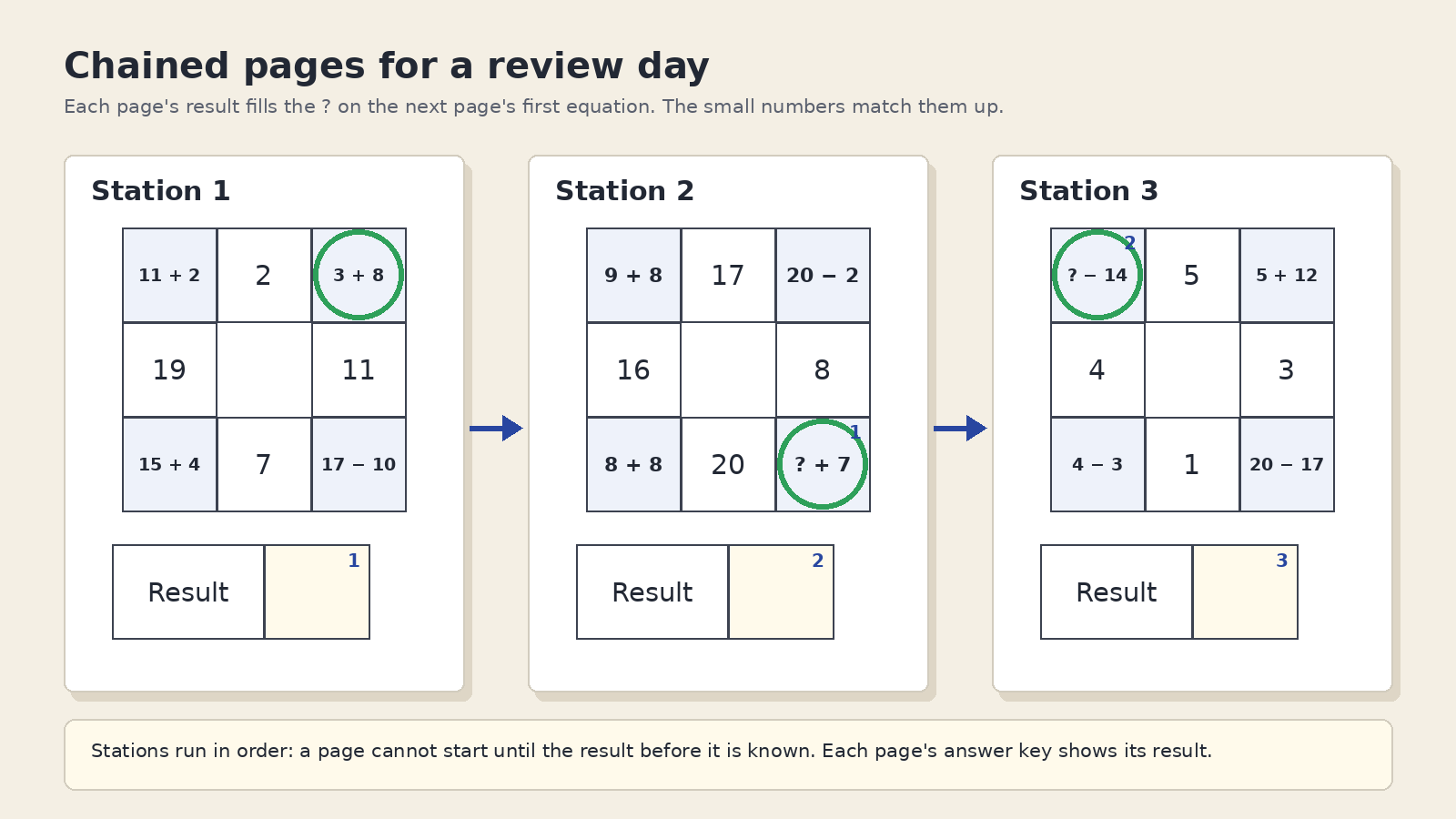
That turns a stack of mazes into a review day. Put the stations around the room or staple them as a packet. Nobody can start station 3 before station 2 is done, and each page’s key shows its result, so you can check a group at any station.
One setting decides whether the chain holds. The question mark can only carry the previous result if that number fits inside the Equation range. If it does not, that page gets an ordinary first equation and the link is gone. The tell is an index number on the first equation with no question mark. For a chain, set the Equation range at least as high as the Outcome range, and check every chained page before you print.
Boss Level works the other way round: the product page says it combines 2 to 5 puzzle results into one final puzzle, and the index numbers show which earlier puzzle fills which gap.
The result box itself comes with Math Maze. You can rename it with Result Text, and the product page’s own example is “Unlock Code”. Fixed Outcome, on the same Select Type list and included with Math Maze, lets you choose the final result, as long as it sits inside the Outcome range; otherwise it uses the Outcome minimum. Together they suit a classroom escape day, which printable escape room puzzles covers.
Keys and packaging for TPT
Every maze comes with its key: the same board with the route traced, the finish marked and, when the page has a result box, the result filled in. For a 12-page file, set Quantity to 12. You can export pages as PDF, PNG, JPG or SVG. For a multi-page file, Instant Puzzle Books, the book builder inside Puzzle Maker Pro, lays pages out as a PDF or PowerPoint file. Its default order is Print Solutions With Puzzles, which puts each key straight after its page. For keys at the back, choose Puzzles First, Then Solutions under Content Collation for Instant Puzzle Books in Book Settings.
Before you upload:
- Title the specification. Operation, range and grade: “Multiplication Math Mazes, Facts to 10 × 10, Grade 3, 12 Pages + Keys” tells a teacher everything in one line.
- Preview a page and its key together. The key is what lets a teacher trust a page they check at a glance.
- Solve one page from each batch yourself against its key. If an equation’s answer appears in two of its neighboring boxes, make that page again, because the route should never offer a choice.
- For a chain, check the question marks and the order. If you title the pages as stations, make the station numbers you type match the indexes.
- Keep one grade and one skill per listing. Classroom warm-up vs homework packet covers the choice between one page plus its key and a packet with one key section at the back.
Math Maze lets you sell the finished worksheets, books and packs you make to your own readers and customers, Teachers Pay Teachers included. The Math Maze bundle adds the right to sell or supply the generated puzzles to other publishers and sellers, and you can move up to it later.
The demo makes one watermarked puzzle at a time, which is enough to try operators, ranges and grid sizes on a real page before you buy.
Get the free Puzzle Maker Pro demo now
Other puzzles you might like
- TPT math puzzle worksheets: Ikura, Smart Numbers and Number Blocks, short reasoning boards that are not another drill sheet.
- TPT maze worksheets: mazes with no arithmetic at all, in three looks a buyer can tell apart in a thumbnail.
- Math puzzles for publishers: picture math, geometry, math sudoku and cross sums, and how to label a page by operation, range and grade.
- Printable escape room puzzles: a kit where each lock is a puzzle whose answer opens the next.
- Pentomino puzzles printable: shape puzzles for the same classroom, with no numbers in sight.