


Tetromino Puzzle Generator: Printable Puzzles for Kids That Come With Their Own Pieces
A child snips three pieces off the cut-out sheet. The L slides into the bottom corner. The I stands up along the left edge. The T drops into the last gap, the board is full, and the next words out of their mouth are “Is there another one?”
That is a tetromino puzzle: a small board, a bank of pieces made of four squares each, and one job, which is to cover every square using every piece. Tetromino makes those pages for you. Every printable puzzle arrives with its answer key and a sheet of pieces to cut out, printed at the board’s own square size. Behind it sits a tetromino puzzle generator built into Puzzle Maker Pro for Windows.
If you have ever tried to make one by hand, you know why so few activity books carry them. Draw the board. Draw the pieces. Check they fit. Check they fit only one way. Draw the answer. Then draw the pieces again, big enough to cut. Tetromino does all six for you, in one run.
Quick edition guide: Tetromino (Standard) makes rectangle-board puzzles, answer keys, cut-out sheets and books. Creative adds drawn board shapes, picture pieces, Puzzle Book Studio and Puzzle Slides, so themed books start there. Productivity adds Time Saver batches, multi-collection books and JSON export. Add Interactive to Creative or Productivity and readers play your puzzles on your own site. Try it free with the demo, or read on for the full comparison.

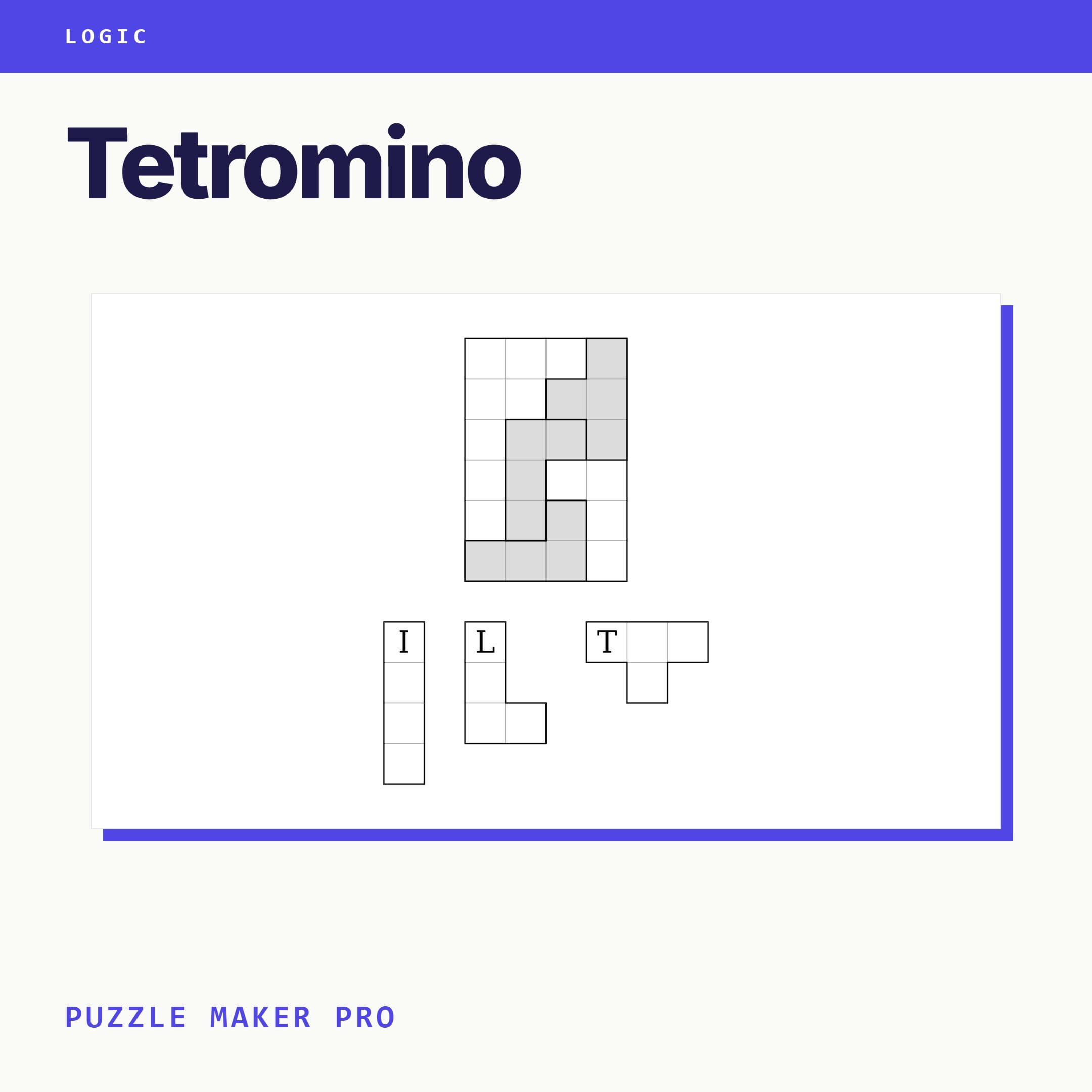
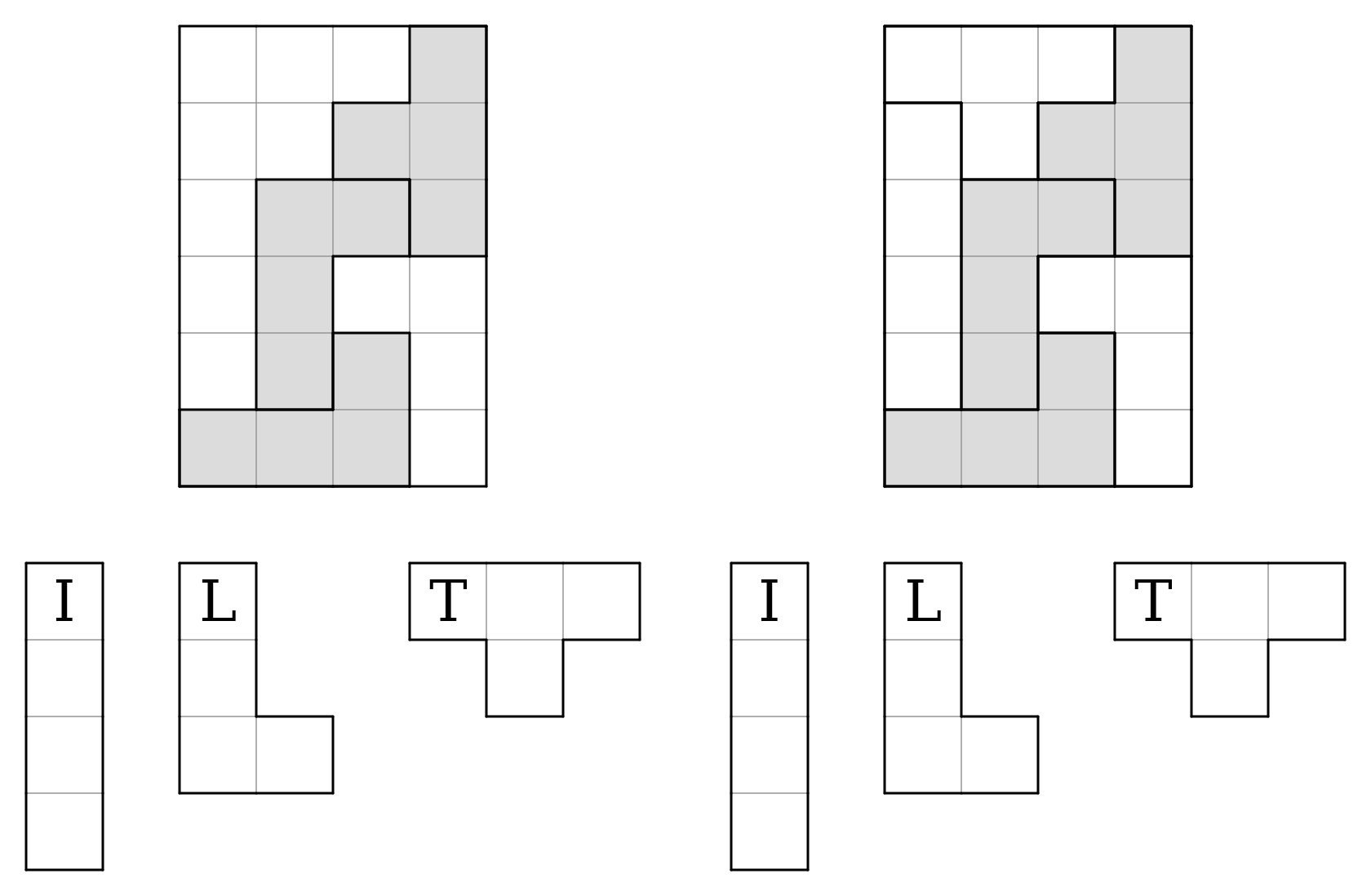
Three pieces to place, three already in: a gentle first page with its bank printed right underneath.
What Is a Tetromino? Five Shapes Kids Already Know
Join four squares edge to edge and you get exactly five shapes: a straight I, an L, a square O, a zigzag S and a T. They look like the blocks children already build with, so the first page needs no lesson, and every page after it quietly practises area, turning and mirror images without a single sum.
The rule fits on a line. Cover the board, use every piece, no gaps, no overlaps. Grey pieces already sitting on the board give a beginner a foothold, and every piece in the bank wears its letter by default, so a young solver can tell you “the T goes in the corner” while they work it out.
Here is a lesson hook that costs nothing: count the squares on the board and divide by four. A 4×6 board has 24 squares, so it needs six pieces, and the child knows that before they look at the bank. How Tetromino Puzzles Work walks through the rules and a full solve.
No words on the board. No sums either. That makes it the page in an activity book that asks a child to fit shapes instead of finding words, and a welcome change of pace after the maze, the word search and the colouring page.
The Pieces Come With the Page: Tetromino Cut-Outs at True Scale
The hard part of a shape puzzle was never the puzzle. It was the pieces.
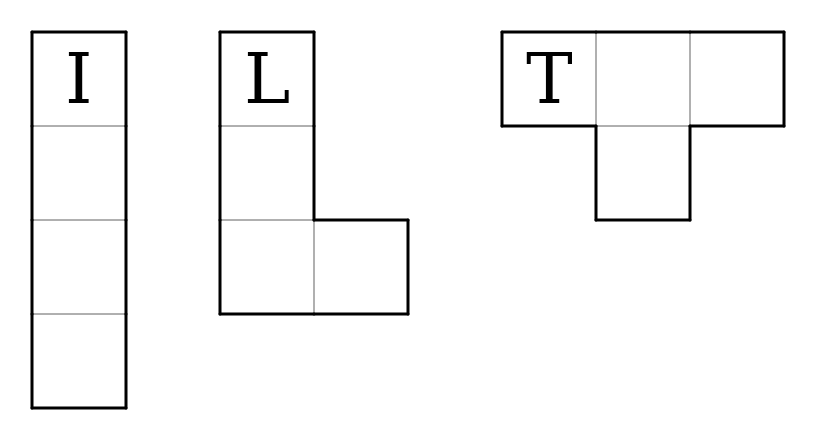
Every Tetromino run writes five sheets for each puzzle: the puzzle with its piece bank, the answer, a clean copy of the board alone with its own answer, and a cut-out sheet that prints the pieces at exactly the board’s square size. Snip out the L and it covers four squares of the board, not three and a half. Nobody has to measure, redraw or resize anything.
Little fingers and safety scissors need room, so set Smallest printed square to whatever your solvers can cut, say 15 mm. If the board and its pieces cannot fit your page at that size, the run halts with a message instead of printing them smaller.
Prefer pencils to scissors? The same puzzle works both ways. The [Activity Book] preset asks solvers to draw the piece outlines straight onto the board, and [Cut and Place] asks them to cut out the bank and lay it down.

The cut-out sheet for the puzzle above, printed to the board’s own scale. Snip, place, done.
Only One Way to Finish: One-Answer Boards by Default, With the Key Already Made
A child who finds a different answer from the one in the back of the book does not think “two answers”. They think “I got it wrong”.
So you never print that page. Leave Exactly one solution switched on, which it is by default, and the generator keeps adding grey starter pieces until only one way to finish the board remains. The answer key comes out of the same pass, so the key in the back is the answer, not an answer.
Making open-play sheets instead, where any full covering counts? Switch the setting off and every board is still guaranteed to have a solution.

The page they solve and the answer that belongs in the back. Generated together, every time.
Grab the free demo and lay a set of cut-out pieces on a board yourself before you choose an edition.
First Pages That Feel Like Wins, Last Pages That Make Them Think
Open a kids’ book on a puzzle that is too hard and the book goes back on the shelf. Your first pages have to be wins.
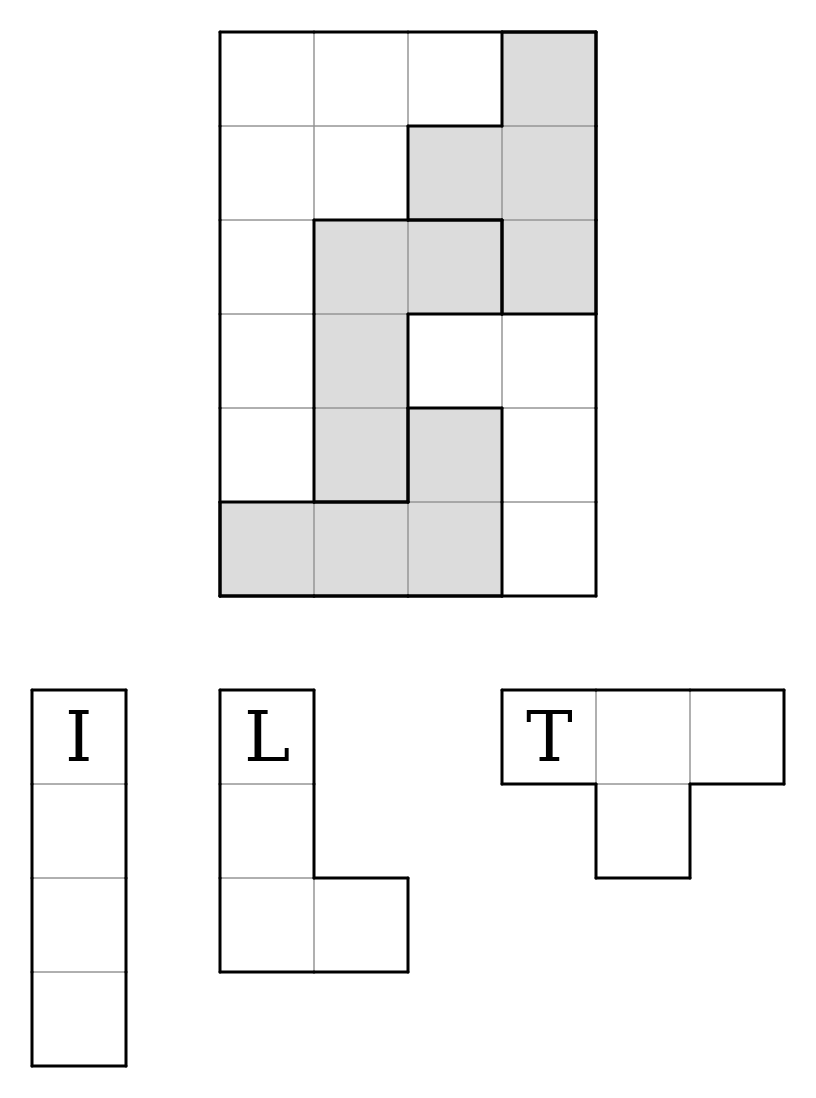
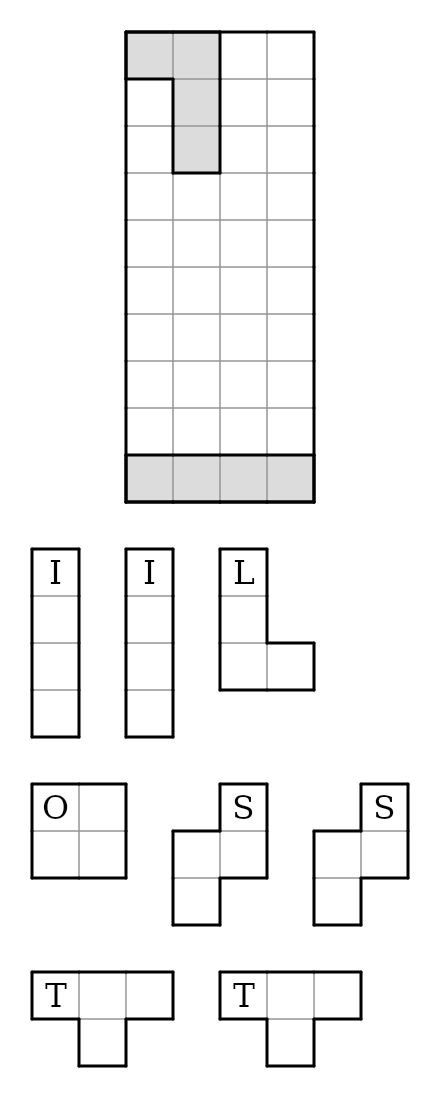
[Easy] gives you a 4×6 board with six pieces, at least three of them already placed, so the solver has two or three left to fit. [Medium] stretches the board to 4×8 with eight pieces. [Hard] runs a 4×10 board with ten pieces and a stricter rule: pieces can be turned but never flipped, so the L and the S can no longer become their mirror images. That move rule is what makes Hard hard.
You can set each dial yourself: a longer board, a stricter turning rule (turned and flipped, turned only, or kept as printed), and a minimum number of grey starters, which the one-answer setting may top up. Every preset writes a one-line instruction on the page, and that line is yours to edit, so type “Pieces may be turned but not flipped” onto your Hard pages before you print and solvers know the rule in plain words.

A [Hard] page: a longer board, ten pieces in all, and pieces that turn but never flip.
One Laminated Piece Set, a Whole Class of Different Puzzles
Every teacher who has tried a shape centre knows where the time goes. Not the puzzles. The cutting: half a planning period at the paper cutter before every new sheet, every week.
Choose the [Reusable Classroom Set] preset, or tell any run to use Same pieces in every puzzle, and every card in that run shares one piece set while the puzzle itself changes from card to card. Laminate one set per table, hand out a stack of different tetromino worksheets, and each card has its own answer page for self-checking. The cutting happens once.
Need two levels in one room? Make a second run on the longer Medium board. Easy cards use six pieces and Medium cards use eight, so each level gets its own laminated set, and every card in each stack still shares it. On Productivity, Time Saver makes both stacks in a single run.
Draw the Board, Dress the Pieces (Creative)
A four-wide rectangle makes a gentle first page. By page twenty, a child wants a staircase, a house or a cat.
With Creative, the board-shape editor lets you paint the board square by square: a stepped outline, an animal, a board with a gap cut out of it that solvers leave empty. The editor keeps the square count a multiple of four, so the board always matches whole pieces.
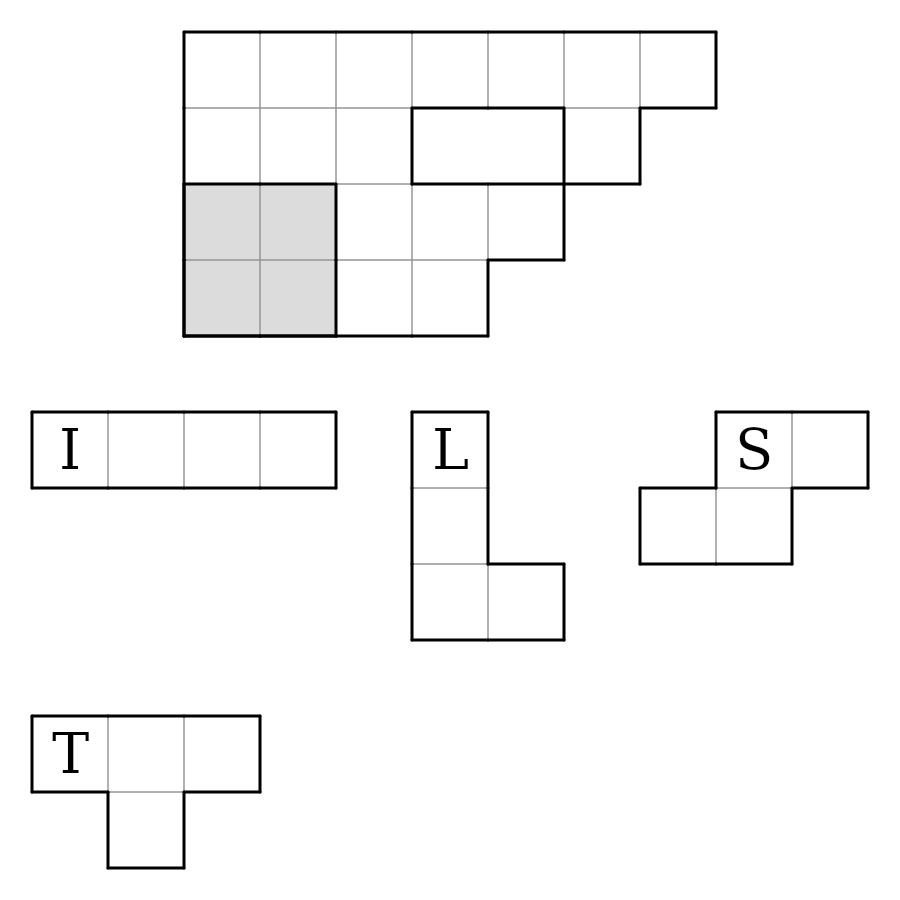
And you pick the pieces, so today’s lesson can be all Ls and Ts. One of each shape uses different shapes with no repeats, up to five pieces. Full set puts all five shapes on the board exactly once, on a drawn 20-square board. I choose lets you type how many of each shape the puzzle uses.
Then dress the pieces: trade the letters for your own pictures, colour shapes, numbers or other letters, at least five different ones, one per shape. With Creative’s colour shapes, young solvers can name a piece by its colour shape instead of reading a letter. Pumpkins and acorns make an autumn edition. Change the faces and the fit stays put: an acorn-labelled L still covers the same four squares.

A drawn board with a gap in it: the five shapes once each, one already placed.
Every edition lets you set the look of the page: the weight of the bold outlines, the grey of the starters, the colours and the label font, so a whole series shares one look.
What You Can Make From One Tetromino Run
- A cut-and-place shape section for a kids’ activity book on KDP or another print-on-demand platform, answer key in the back
- Pencil-only “draw the pieces” pages for travel, waiting-room and quiet-time books
- Classroom centre cards and tetromino worksheets that all share one laminated piece set
- Early-finisher and homeschool printables for Etsy or Teachers Pay Teachers, as PNG, JPG, SVG or PDF files with matching answer pages
- An Easy-to-Hard workbook that lengthens the board and tightens the rule as the child improves
- Themed editions with picture pieces and animal-shaped boards, with Creative
- Screen lessons where young solvers move the pieces before they are ready for scissors, with Creative
- Playable tetromino puzzles on your own website, with the Interactive editions
- Mixed activity books that put your tetromino collection beside your other Puzzle Maker Pro puzzles, with Productivity
From a Stack of Tetromino Pages to a Finished Activity Book
One tetromino puzzle fills a rainy afternoon. Put sixty in a row, Easy at the front and Hard at the back, with the answers waiting at the end, and you have something a parent buys for the whole summer.
Every edition includes Instant Puzzle Books, Standard too. It reads your current page settings, the margins, trim size and layout, and binds the run into a book PDF with no extra setup. Every book gets a title page, a contents page, and a footer under each puzzle saying which page its answer is on, with a footer under each answer pointing back.
Scissors and a bound paperback do not mix, so pick your route. Print the cut-out sheets separately as a companion pack, or build the book from [Activity Book] pages, where solvers draw the piece boundaries on the board and never need to cut. By default the starters are grey and the outlines black, so the pages need no colour and suit a black-and-white interior.
Puzzle Book Studio lets you edit the book while you look at it. The Creative editions build one puzzle collection with full control over fonts, titles, page numbers, layout, margins and trim size. With Productivity, several collections go into one book, so your tetromino section sits beside your other puzzle collections between the same covers.
Time Saver (Productivity) is where a whole book happens at once. Add a row from the Easy preset, one from Medium and one from Hard, give each row its own quantity, and run them together. One setup gives you every puzzle and every answer page for the whole ramped interior, and the next volume starts from the same rows.
Already a Puzzle Maker Pro customer? A Tetromino licence unlocks it inside the app you already have, with its own Tetromino presets. From Creative up, its pages go straight into Puzzle Book Studio; on Productivity, it gets its own rows in the Time Saver grid.
Practise on Screen With Puzzle Slides (Creative)
Some solvers are not ready for scissors yet. Give them the pieces on a screen first.
Turn a run into Puzzle Slides and each puzzle gets its own PowerPoint slide: a clean board, with each piece still to place shown beside it as a picture. In edit mode, a young solver drags the L across, turns it and nudges it over its four squares by hand. The grown-up beside them checks each fit against the solution slide, so every move becomes a conversation about turning and flipping.
It opens in the PowerPoint you already use, so the same deck works at the homeschool kitchen table, on a classroom projector, on a tutoring call or at a library activity session. When the screen version clicks, print the paper one and the same pieces are waiting on the cut-out sheet.
Play Tetromino on Your Website (Interactive editions)
Parents decide whether a puzzle book is worth buying by watching their child try one. Put a few tetromino puzzles on your own site and that try costs them nothing.
Upload the export to our free WordPress plugin, or put the HTML on your own hosting, and your visitors play in the browser like a set of building blocks. Drag a piece from the tray and it snaps onto the squares. Rotate (R) and Flip (F) switch off when the puzzle’s rule forbids them, so a turned-only puzzle never flips. Undo a wrong move, or send a piece back To tray. Prefer not to drag? Select a piece, then tap a square or use the arrow keys.
You choose how visitors meet the puzzles:
A puzzle list. Choose a handful of puzzles, publish, and visitors open whichever one they like from a dropdown. It is the fastest way to let a parent see a child try one.
A leveled game. The same set turns into a path of levels, each one opening when the one before it is solved, with progress and stars kept in the visitor’s own browser, so nobody signs up for anything. When they clear the last level, a finish screen shows your message and a button you choose, such as “Get the full activity book”, that sends them straight to your book.
Teaching at home? Rename “Level” to “Lesson” and a week of shape practice lives on one page: the young solver clears today’s lesson at the kitchen table and the next one unlocks, while the finish screen points the parent to your printed book.
Who This Is For
Kids’ activity-book publishers. You already know which pages parents expect. Tetromino adds the one they do not: a hands-on shape page with its own cut-out pieces and an answer key in the back, made in one run instead of an afternoon of drawing. If every book in your catalogue opens on the same three page types, this is the fourth.
Teachers and Teachers Pay Teachers sellers. Tetromino worksheets for early finishers, maths centres and quiet-time packets, each with an answer page for self-checking, plus one laminated piece set that serves a whole stack of different cards. A free tetromino sheet is one puzzle. Tetromino gives you a fresh one-answer board for every card, cut-outs that match it square for square, its answer key, three levels from Easy to Hard, and pages you are licensed to sell. Area, turning and mirror images, practised by children who think they are playing. With Creative, the same puzzles go on the screen.
Homeschool parents and tutors. A puzzle that asks a young solver to turn, flip and fit shapes, starting gentle and getting longer as they grow. Print it, cut it, or, with Creative, move the pieces on screen.
Existing Puzzle Maker Pro customers. A new page type for the books you already publish, with no sums and nothing to read on the board, that a Tetromino licence unlocks inside the app you already run. From Creative up it joins your Puzzle Book Studio books, and on Productivity it joins your Time Saver runs.
Site owners and course creators. A page of drag-and-drop puzzles gives young visitors a reason to stay and parents a reason to come back, and the finish screen puts your book in front of the parent while the child is still asking for one more puzzle.
Which Edition Should You Choose?
All five editions make real tetromino puzzles, with answer keys and cut-out sheets, ready to print. The higher you go, the more you can shape, teach and produce from them, and nothing disappears on the way up.
Tetromino (Standard). Best if you want a shape page in your next book, with nothing to design. Random mixes of the five shapes on rectangle boards, from a first 4×6 page to the 4×10 Hard board and well beyond (see “How big can a board get?” below). The Easy, Medium, Hard and three activity presets, all three move rules, one-answer puzzles, grey starters, full styling, the classroom-set batch option, JPG, PNG, SVG and print PDF export, and Instant Puzzle Books to turn a run into a book PDF.
Creative. Best if the look is the point, or you teach on a screen. Drawn board shapes, a bank you pick yourself, picture, colour-shape, number or letter labels, Puzzle Book Studio Creative for one fully designed collection, and Puzzle Slides.
Productivity. Best if you produce books, not pages. A whole Easy-to-Hard book from one Time Saver run, Puzzle Book Studio Productivity for combining several collections in one book, and JSON files of every puzzle for your own apps and tools.
| What you need | Standard | Creative | Productivity |
|---|---|---|---|
| Generate tetromino puzzles from a random mix of the five shapes on rectangle boards | Yes | Yes | Yes |
| Answer key, clean board copies and true-scale cut-out pieces with every puzzle | Yes | Yes | Yes |
| Easy, Medium, Hard, Activity Book, Cut and Place and Reusable Classroom Set presets | Yes | Yes | Yes |
| Three move rules, Exactly one solution, a minimum of pieces already placed | Yes | Yes | Yes |
| JPG, PNG, SVG and print-ready PDF files | Yes | Yes | Yes |
| Instant Puzzle Books: title page, contents and answer cross-references included | Yes | Yes | Yes |
| Style outlines, starter shading, colours and label font | Yes | Yes | Yes |
| Drawn board shapes, holes allowed | Yes | Yes | |
| Pick the bank yourself: no repeats, all five shapes once, or exact counts | Yes | Yes | |
| Picture, colour-shape, number or letter labels on the pieces | Yes | Yes | |
| Puzzle Book Studio Creative: design a whole book from one collection | Yes | Yes | |
| Puzzle Slides, a PowerPoint deck for solving on screen | Yes | Yes | |
| Time Saver batch production | Yes | ||
| Puzzle Book Studio Productivity, several collections in one book | Yes | ||
| JSON export of the puzzle data for your own apps and tools | Yes | ||
| Licence to sell finished books, worksheets and packs to your own readers and customers | Yes | Yes | Yes |
| Licence to sell or supply the generated puzzles to other publishers and sellers | Yes |
Add Interactive to Creative or Productivity and the same puzzles reach your website: you publish them and readers play them in the browser, as a puzzle list or a leveled game.
Not sure yet? Start where you are. Any edition upgrades to any higher one after you buy: climb the ladder for more production power, or add Interactive on top of Creative or Productivity. Choose for the pages you are making now, using the switcher at the top of this page.
Ready for the twelve-piece challenge as well? The Pentomino Bundle pairs Tetromino with Pentomino, at Creative or at Productivity, so the shape section grows with your readers from first page to last.
Try It Free First
Hand one to a child and watch what happens. Download the free Puzzle Maker Pro demo, generate a tetromino puzzle and print its cut-out sheet. The demo watermarks its output and makes one puzzle at a time; every paid edition lifts both limits.
Get the free demo first. The edition switcher at the top of this page will still be there when you come back.
Licensing and Commercial Use
Tetromino and Tetromino Creative carry the same right: sell the finished books, worksheets and printable packs you make to your own readers and customers, whether that is on KDP, Etsy, Teachers Pay Teachers or your own shop. It is a one-time commercial-use licence, and nothing you print carries a watermark.
Tetromino Productivity keeps that right and adds a second one: you may also sell or supply the generated puzzles to other publishers and sellers.
So every edition can sell what it makes; the higher editions add design, batch production and, with Productivity, the right to supply the puzzles themselves. Your download and licence land in your member area the moment the order completes, so the first puzzle can be on the printer the same day.
Product Details
| Product | Puzzle Maker Pro – Tetromino |
| Editions | Tetromino (Standard), Tetromino Creative, Tetromino Creative + Interactive, Tetromino Productivity, Tetromino Productivity + Interactive |
| Platform | Windows desktop app |
| Internet required | No for creating puzzles; web publishing is optional |
| Puzzle rule | Fill the whole board with the pieces from the bank, each used once, no gaps or overlaps |
| Pieces | The five tetrominoes I, L, O, S and T, four squares each; a shape can repeat in the bank |
| Boards | Rectangles up to 30 squares a side and 120 squares in all (a random mix reaches 60 squares at the default three copies of a shape; raise Maximum copies of one shape for more); drawn board shapes with holes from Creative up |
| Difficulty dials | Board size, move rule (turned and flipped, turned only, kept as printed) and a minimum number of starters. Presets: Easy, Medium, Hard |
| Answers | Exactly one solution by default, with the answer key generated alongside every puzzle |
| Every run writes | Puzzle + bank, answer, clean board, clean answer, true-scale cut-out sheet |
| Output formats | JPG, PNG, SVG, print PDF |
| Piece labels | Letters by default; numbers, other letters, colour shapes or your own pictures from Creative up |
| Puzzle books | Instant Puzzle Books (all editions) and Puzzle Book Studio (Creative up), each with a title page, contents and answer-page cross-references |
| Puzzle Slides | PowerPoint deck with movable piece pictures on a clean board (Creative and up) |
| Batch creation | Time Saver, in Productivity and Productivity + Interactive |
| JSON export | Productivity and Productivity + Interactive |
| Web play | HTML output and the free WordPress plugin, played as a puzzle list or a leveled game (Interactive editions) |
| Upgrades | To any higher edition, any time after purchase |
| Commercial licence | All editions: sell the finished books, worksheets and packs you make to your own readers and customers. Productivity also covers supplying generated puzzles to other publishers and sellers |
| Free demo | Yes |
| Delivery | Immediate, in your member area |
Questions Before You Buy
Can I try Tetromino before I buy?
Yes, free. Download the Puzzle Maker Pro demo, make a puzzle and its cut-out sheet, and judge both before paying. Demo pages carry a watermark, one puzzle at a time.
Which Tetromino edition is right for me?
Tetromino (Standard) if you want rectangle-board puzzles, answer keys, cut-out sheets and books. Creative when you want drawn boards, your own bank and picture labels, Puzzle Slides or the Puzzle Book Studio editor. Productivity if you are producing whole books with Time Saver and multi-collection assembly. Add Interactive to Creative or Productivity to publish playable puzzles on your site. The whole ladder explained: Puzzle Maker Pro Editions Explained.
Am I allowed to sell the books and worksheets I make?
Yes, on every edition. Tetromino and Tetromino Creative cover selling your finished books, worksheets and printable packs to your own readers and customers. Productivity also lets you sell or supply the generated puzzles to other publishers and sellers.
Does every puzzle have one answer?
Yes, unless you decide otherwise. With Exactly one solution switched on, as it is from the start, the generator adds starter pieces until only one way to finish remains, and the matching answer key comes out with the puzzle. Switch it off for open-play sheets; every board can still be solved.
Do I have to make the cut-out pieces myself?
No. Every run prints a cut-out sheet with the puzzle’s pieces, drawn to the board’s own scale. Set a smallest printed square, such as 15 mm, and the pieces stay big enough to cut. For a bound book, print the cut-out sheets as a separate pack, or use the [Activity Book] pages, where solvers draw the piece boundaries instead of cutting.
How do I make the puzzles easier or harder?
Use the Easy, Medium and Hard presets, or set the dials yourself: a longer board, a stricter move rule, and a minimum number of grey starters (the one-answer setting may add a few more). Edit the instruction line on the page to tell solvers which move rule applies. Step-by-step: Create Tetromino Puzzles.
Can one set of pieces serve a whole class?
Yes. The Reusable Classroom Set preset gives every card in a run the same pieces while the puzzle changes, so one printed or laminated set works with the whole stack. A second level, such as Medium, gets its own run and its own set.
How big can a board get?
Up to 30 squares on a side and 120 squares in all, which is 30 pieces. A random mix uses at most three copies of each shape by default, which covers boards of up to 15 pieces; raise Maximum copies of one shape for bigger boards.
Can I upgrade later?
Yes. Every edition upgrades to any higher one after purchase, whether that means more production power further up the ladder or Interactive added to Creative or Productivity. Buy for the pages you are making now; nothing locks you in.
Tetromino or Pentomino?
Tetromino is the gentler one: five shapes of four squares, small boards and quick solves, a natural first shape puzzle for young solvers and beginners. Pentomino uses twelve shapes of five squares each, a bigger bank for solvers who want a longer puzzle. Many publishers will want both: Tetromino for the opening chapters, Pentomino for the back of the book. They are two products, each with its own licence, that share the same Creator layout, the same kind of presets and the same true-scale cut-out sheets, so what you learn on one carries straight over.
Give Your Next Activity Book the Page Kids Reach Scissors For
A parent flicks through your next activity book in ten seconds. Give them one page that stops the flicking.
Picture it. An Easy page up front that a young solver finishes alone, a Hard page at the back where the S refuses to flip, and a child at the kitchen table holding up the last L and asking for the next puzzle.
Choose your edition in the switcher at the top of this page. Or test it on the toughest critic you know: get the free demo, print a puzzle and its pieces, and hand them to a child.


