
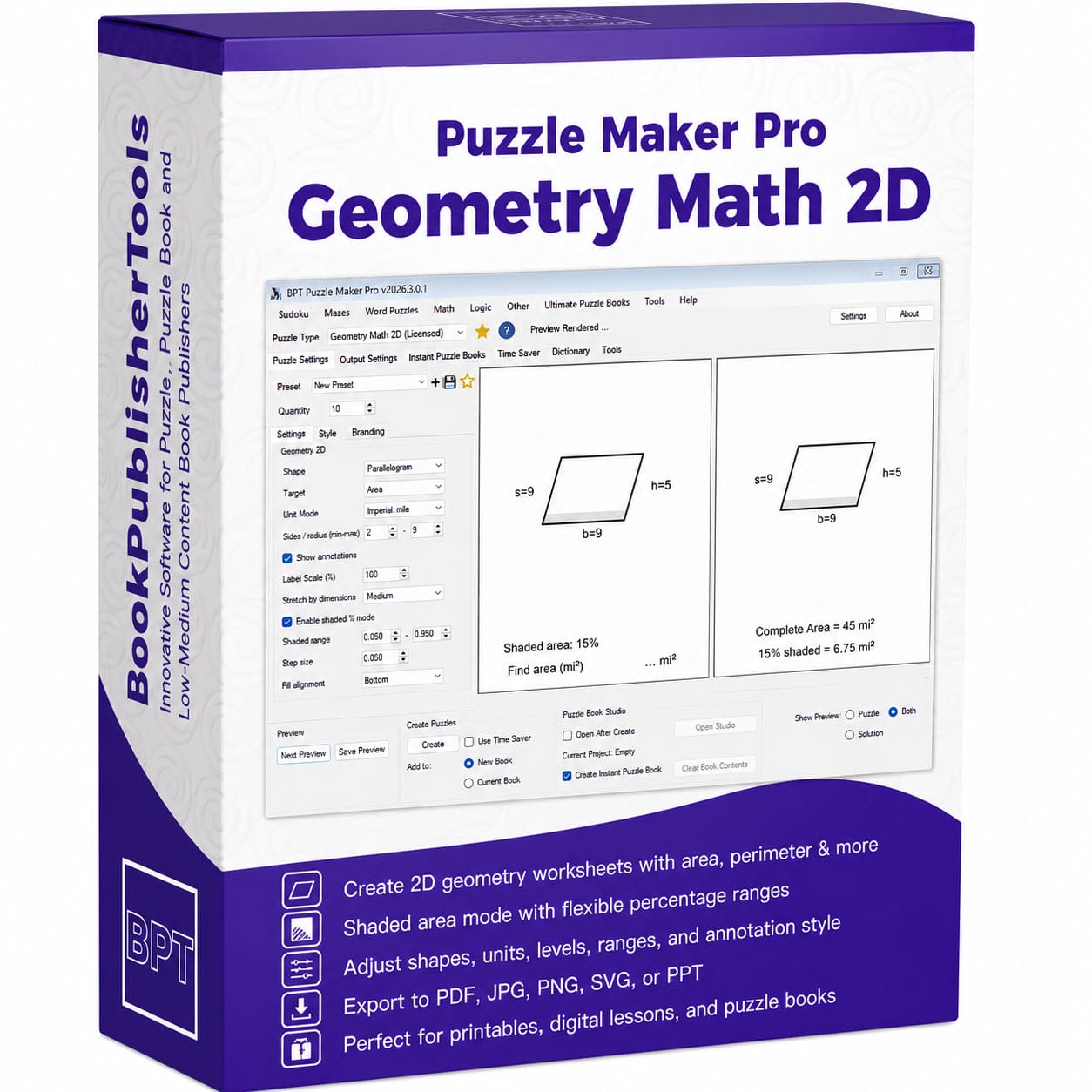


Puzzle Maker Pro – Geometry Math 2D
Create Geometry Worksheets, Review Packs, and Printable Workbooks Faster
Geometry worksheets are useful, but building them by hand can quickly become repetitive. You choose a shape, create a diagram, label the dimensions, calculate the answer, format the worksheet, make a solution page, and then repeat the same process again for the next variation.
Puzzle Maker Pro – Geometry Math 2D helps you turn that process into a reusable worksheet workflow.
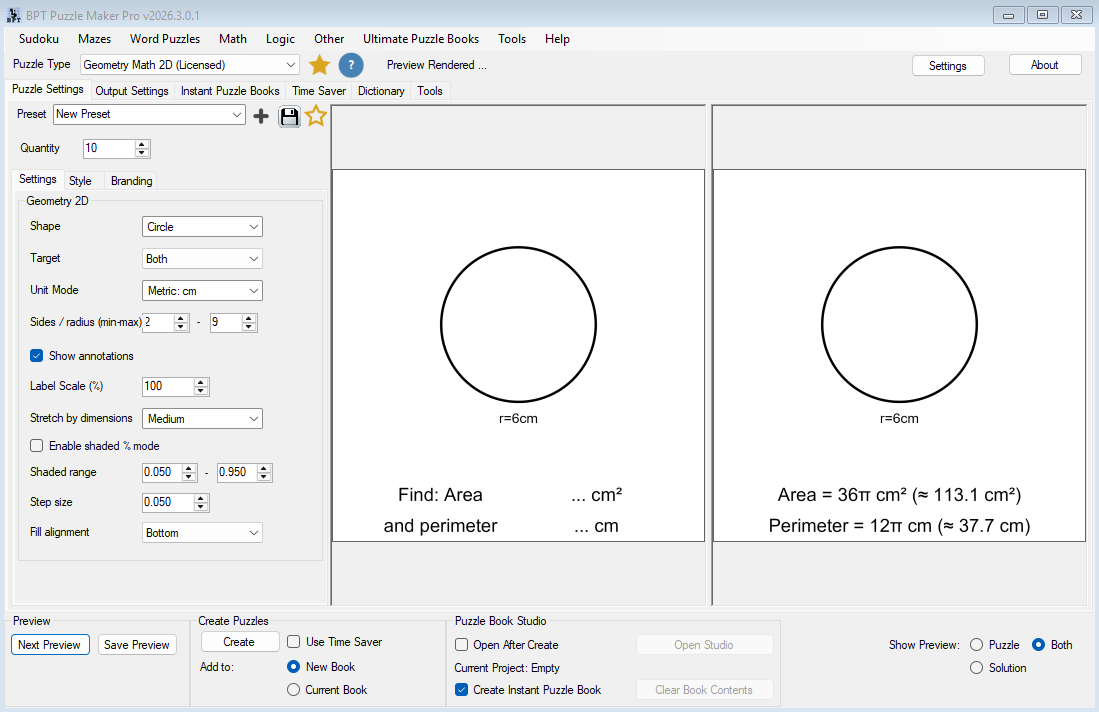
Create printable 2D geometry activities where students calculate area, perimeter, or both. Generate labeled shape diagrams, automatic answer pages, shaded-region activities, mixed-shape worksheet sets, and full workbook-style collections for classroom use, homeschool lessons, KDP books, Etsy printables, or TPT resources.
Instead of rebuilding every worksheet from scratch, you can create repeatable geometry practice systems that scale from a single activity to a complete educational product.
Start Creating Geometry Worksheets

Geometry Practice That Turns Into Real Teaching Products
Geometry Math 2D is designed for creators who need more than one quick worksheet.
You can create a single area worksheet for a lesson, a perimeter review sheet for homework, a mixed-shape quiz, a shaded-area challenge page, or a full workbook with dozens of printable activities.
That makes it useful for:
- Classroom worksheets
- Homeschool math practice
- Printable geometry packs
- TPT resources
- KDP math workbooks
- Etsy educational downloads
- Review activities
- Skill-building puzzle books
- Mixed math activity collections
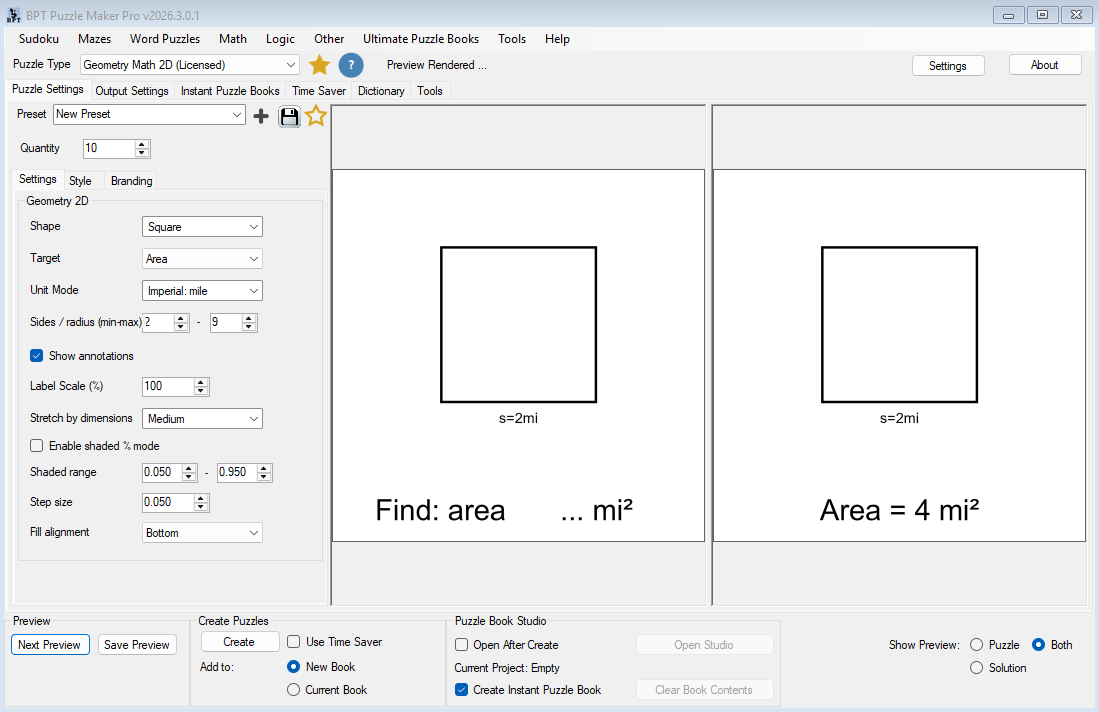
Each puzzle includes a clear geometry diagram with labeled dimensions. The solution version shows the calculated answer, so you can create student pages and answer keys without manually redrawing or recalculating each activity.
For teachers, that means faster prep.
For publishers, it means a more scalable way to build geometry workbook content.
For printable sellers, it means you can create focused educational products without hand-designing every page.
Built for Area, Perimeter, and Mixed Geometry Practice
Geometry Math 2D lets you choose what students should solve for:
- Area
- Perimeter
- Area and perimeter together
This makes it easy to create worksheets for different stages of learning.
A beginner worksheet might focus only on area for squares and rectangles. A review worksheet might ask students to calculate both area and perimeter. A more advanced collection might combine circles, trapezoids, triangles, rhombuses, and shaded-area problems.
Because the target can change from worksheet to worksheet, you can build progression into your resources instead of creating isolated pages.
You can start with simple shapes, add more shape types, increase the dimension range, switch from area to perimeter, add shaded percentages, and then assemble the results into a workbook or printable pack.
That is where the workflow becomes useful: one module can support many different geometry practice products.
Choose From 11 Shape Types
Geometry Math 2D supports a wide range of common 2D shapes:
- Square
- Rectangle
- Triangle
- Circle
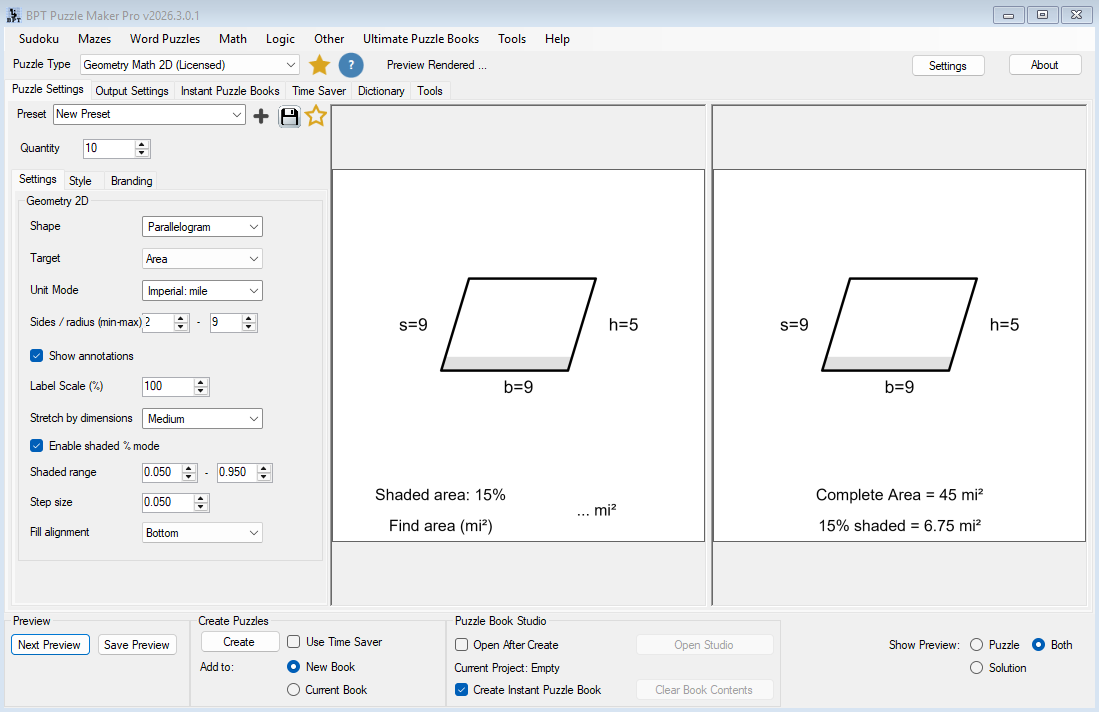
- Parallelogram
- Trapezoid
- Rhombus
- Kite
- Pentagon
- Hexagon
- Octagon
This variety gives you more flexibility when building complete worksheet collections.
You are not limited to one basic shape style. You can create a square area worksheet, a rectangle perimeter worksheet, a circle radius activity, a trapezoid review page, or a mixed-shape challenge set.
That matters when you are creating educational products. A full workbook needs variety. A classroom review pack needs progression. A TPT resource needs enough depth to feel useful. A KDP math workbook needs more than repeating the same format for every page.
Shape variety helps you create products that feel more complete.

Create Metric and Imperial Geometry Worksheets
Geometry worksheets often need to match the curriculum, country, grade level, or intended marketplace.
Geometry Math 2D includes multiple unit modes, so your worksheets can use:
- Meters
- Kilometers
- Centimeters
- Millimeters
- Inches
- Miles
- Yards
This makes it easier to adapt the same worksheet workflow for different audiences.
A teacher may want centimeters for classroom practice. A homeschool creator may need inches. A publisher may want both metric and imperial editions of a workbook. A printable seller may create separate versions for different regions or grade expectations.
Instead of rebuilding the whole activity, you can change the unit mode and generate a new version with the same basic worksheet structure.
That is a practical advantage when you want to reuse a good worksheet idea across multiple products.
Add Visual Shaded-Area Challenges
Basic area and perimeter worksheets are useful, but shaded-region activities add another layer of learning.
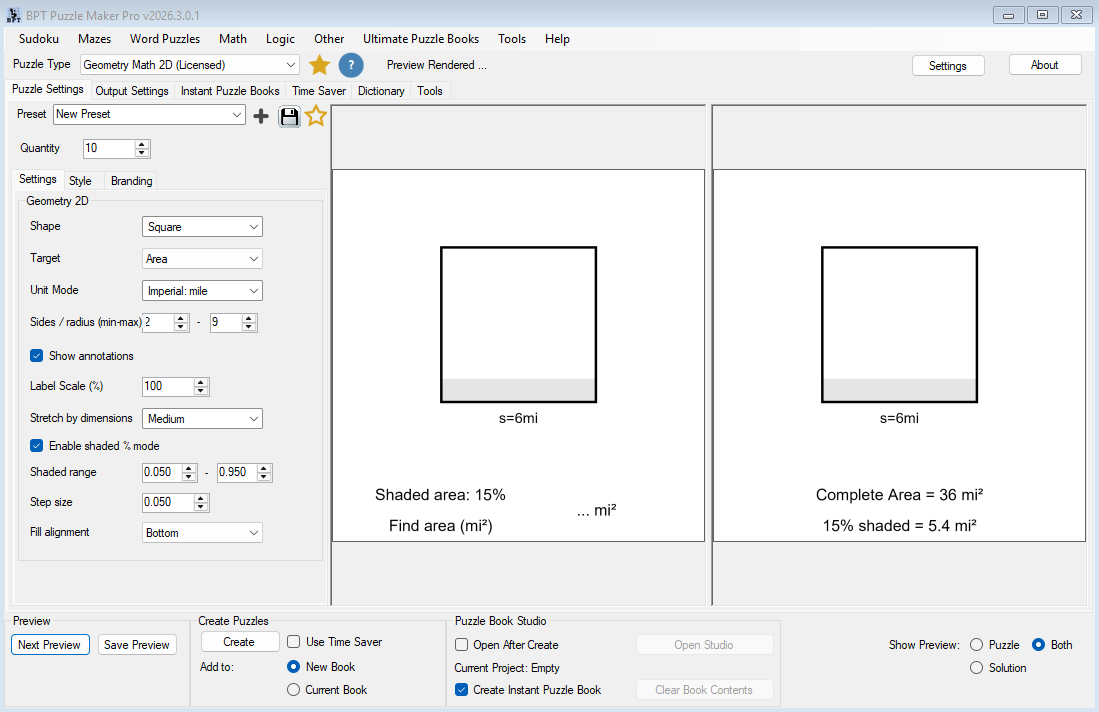
Geometry Math 2D includes an optional shaded percentage mode. When enabled, part of the shape is shaded, creating activities where students work with fractional or percentage-based regions.
This is useful for:
- Shaded area practice
- Visual percentage activities
- Review worksheets
- Challenge pages
- Mixed geometry workbooks
- Differentiated student practice
- More visually interesting printable products
Shaded geometry problems help worksheets feel less repetitive. They also give students a more visual way to apply area knowledge.
For publishers and printable sellers, shaded-area pages can make a geometry product feel more distinctive. Instead of offering only standard area and perimeter pages, you can include visual problem types that create a stronger workbook experience.

Create Worksheets With Automatic Solutions
Every useful math resource needs reliable answer pages.
Geometry Math 2D creates both the puzzle image and the solution image. The student version shows the labeled shape and the target prompt. The solution version shows the calculated result.
That gives you:
- Student worksheets
- Teacher answer keys
- Printable puzzle pages
- Workbook-ready solution pages
- Faster checking and review materials
This is especially important when you are creating more than a few worksheets. Manual answer creation is one of the easiest places to lose time or introduce mistakes.
With automatic solution output, you can focus on the structure of the resource instead of repeatedly creating answer keys by hand.
From One Worksheet to a Full Geometry Workbook
You can use Geometry Math 2D in a simple way: generate one worksheet, export it, and use it.
But the bigger value appears when you build repeatable worksheet systems.
A practical workflow might look like this:
- Create a simple square area worksheet.
- Generate a rectangle perimeter worksheet.
- Add triangle and circle activities.
- Increase the side or radius range for harder pages.
- Create shaded-area versions for review.
- Generate answer pages.
- Assemble the pages into a printable pack or workbook.
- Reuse the same structure for another grade level, unit system, or theme.
That progression is important.
You are not just making one geometry page. You are building a reusable workflow that can become many different products.
For educators, that might mean a full unit review pack.
For KDP publishers, it might mean a complete geometry practice book.
For Etsy or TPT sellers, it might mean a bundle of printable worksheets with answer keys.
Use Time Saver to Build Larger Sets Faster
For small worksheet needs, single generation may be enough.
For larger publishing workflows, Time Saver becomes the multiplier.
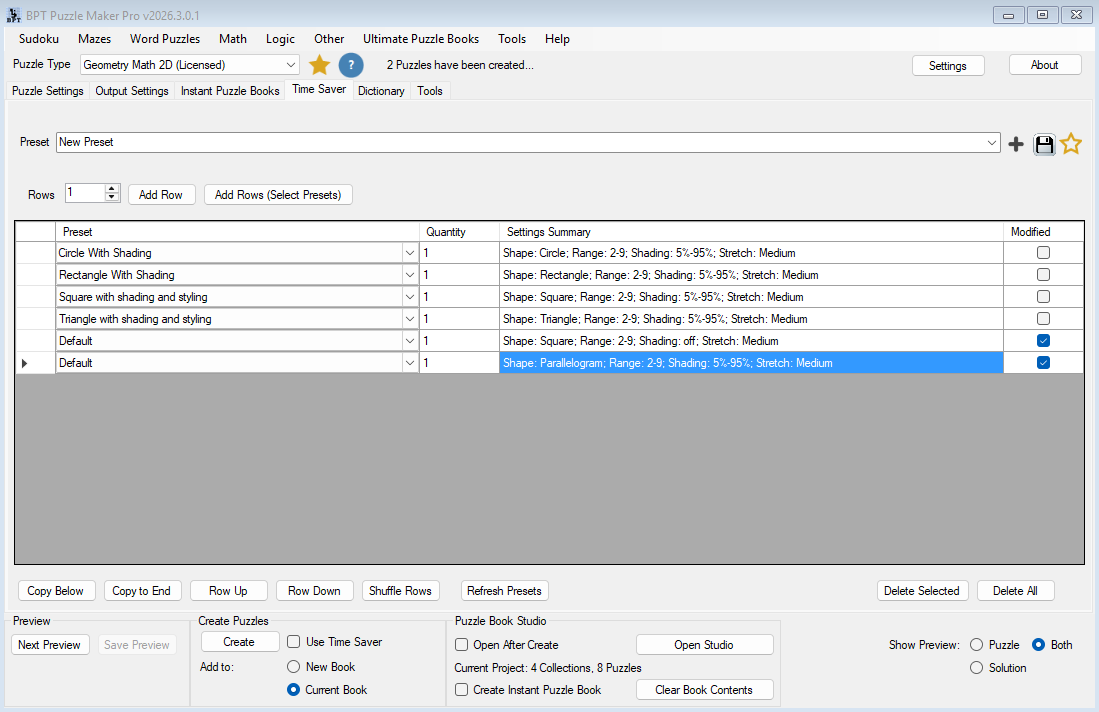
With the Productivity Edition, Geometry Math 2D supports Time Saver batch generation. This lets you create rows of geometry worksheet instructions, where each row can use its own settings such as shape type, target, unit mode, side range, annotations, shaded percentage options, and quantity.
That means you can plan a larger resource more intentionally.
For example, one Time Saver setup could include:
- 10 square area worksheets
- 10 rectangle perimeter worksheets
- 10 triangle area and perimeter worksheets
- 10 circle radius worksheets
- 10 shaded-area review pages
- 10 mixed advanced shapes
Instead of manually changing settings again and again, you can structure the worksheet collection and generate a larger set more efficiently.
This is especially useful for workbook creators, TPT sellers, and anyone producing repeatable educational resources.

Build Mixed-Shape Puzzle Books and Printable Packs
Geometry Math 2D works especially well when you think in collections.
A single worksheet can support one lesson. A set of worksheets can support a full review week. A mixed-shape collection can become a printable product. A structured sequence can become a full workbook.
You can create pages for different shape types, combine them with answer pages, and organize them into a larger printable resource.
Examples include:
- Area and Perimeter Practice Workbook
- 2D Geometry Review Pack
- Shaded Area Challenge Worksheets
- Metric Geometry Practice Book
- Imperial Units Geometry Workbook
- Mixed Shapes Math Activity Pack
- Homeschool Geometry Review Pages
- TPT Geometry Worksheet Bundle
This is where Geometry Math 2D becomes more than a generator. It becomes part of a content production workflow.
You can create the pages, reuse the structure, adjust the difficulty, and build multiple products from the same core workflow.

Assemble Geometry Workbooks Before You Publish
Creating worksheets is only part of the job. A finished educational product also needs structure, review, organization, and output control.
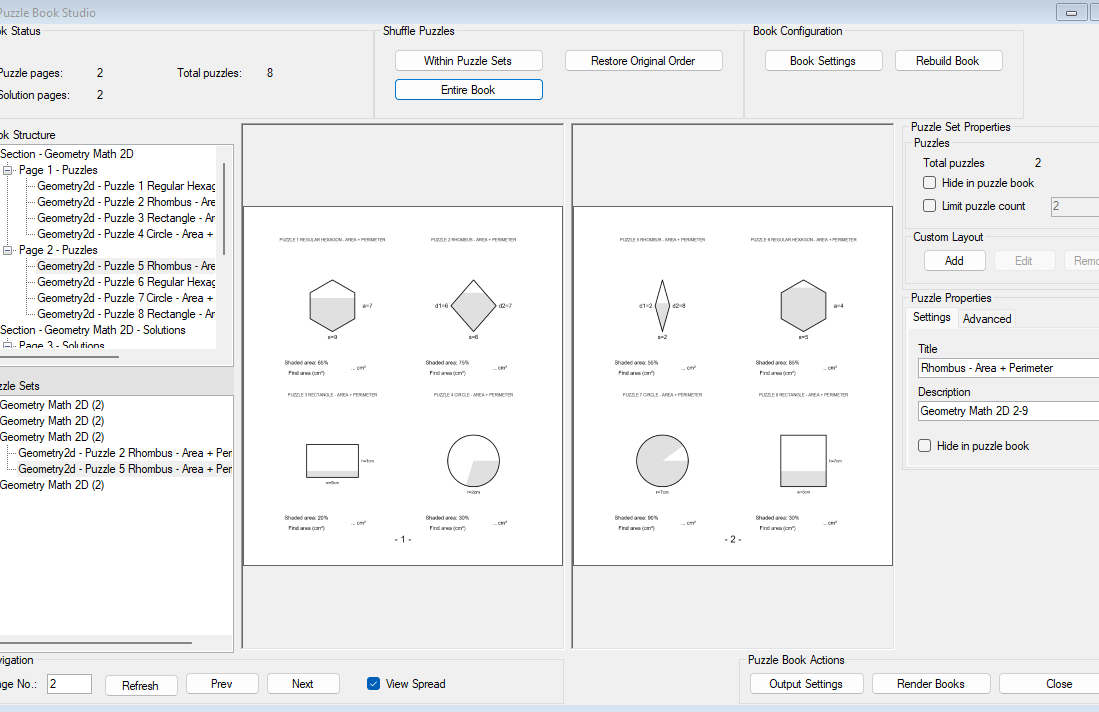
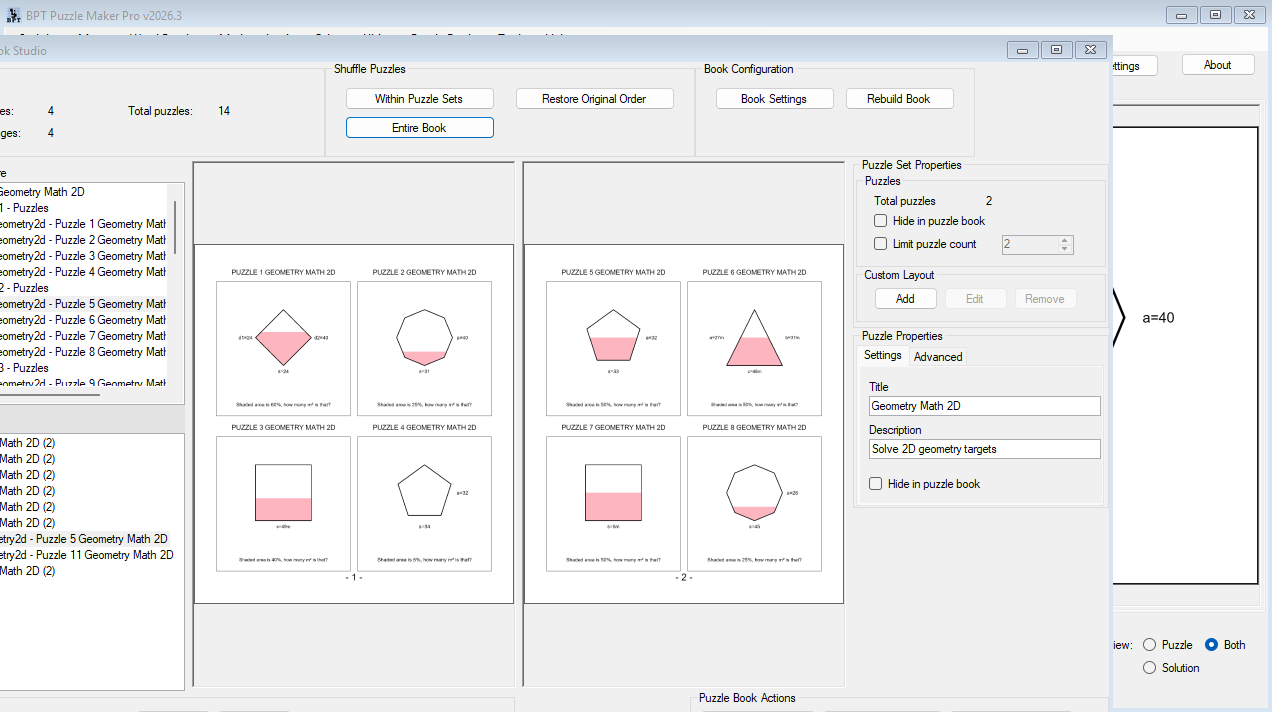
Puzzle Book Studio gives you a workspace for reviewing generated pages, navigating the book structure, organizing puzzle sets, hiding pages or collections when needed, rebuilding the book after changes, and rendering the final product.
For Geometry Math 2D creators, this means a set of area, perimeter, shaded-area, and mixed-shape worksheets can become a more coherent workbook instead of a folder of disconnected files.
Smart Titles and Branded Worksheet Output
When you create many worksheets, naming and organization matter.
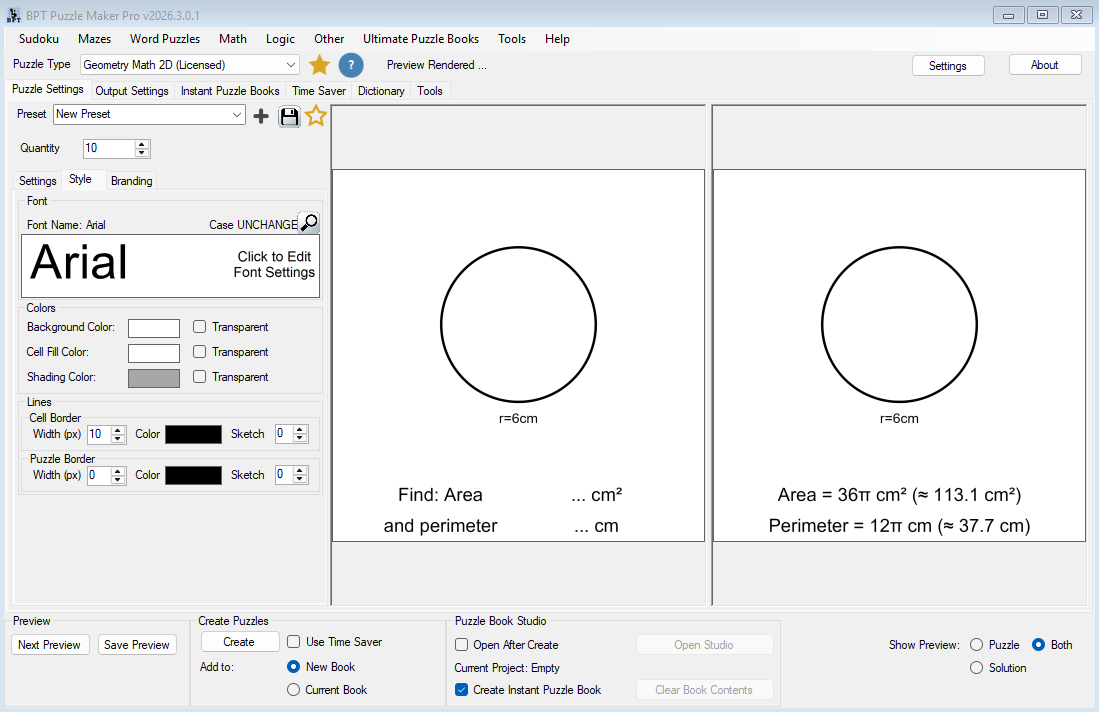
Geometry Math 2D includes Smart Title and branding options that help label your generated pages. You can use title mappings such as module name, difficulty, shape and target, or custom text.
This helps when you are creating structured resources like:
- Square – Area
- Rectangle – Perimeter
- Circle – Area + Perimeter
- Geometry Math 2D 2–9
- Custom worksheet titles for your own product
These titles help organize your output and make pages feel more finished.
For teachers, clear titles help students understand what they are practicing. For publishers, titles help create a more professional interior. For printable sellers, consistent naming helps worksheets feel like part of a polished resource pack.
Real-World Ways to Use Geometry Math 2D
Create a Classroom Review Pack
Build a set of geometry worksheets for a unit review.
Start with square and rectangle area. Add perimeter practice. Include a few triangle, circle, and trapezoid pages. Finish with answer keys so students can review independently or teachers can grade faster.
- Best for: teachers, tutors, homeschool parents
- Output: printable review pack with student pages and solutions
Publish a KDP Geometry Workbook
Create a structured workbook with increasing difficulty.
Use simple shapes in the early pages. Add more complex shapes later. Include mixed area and perimeter prompts, shaded-area challenges, and a complete solution section.
- Best for: KDP publishers and educational workbook creators
- Output: publish-ready geometry practice book
Build a TPT Worksheet Bundle
Create a reusable worksheet bundle around a specific math topic.
You might build one product for area, one for perimeter, one for mixed review, and one for shaded-area practice. Each can include student worksheets and answer keys.
- Best for: TPT sellers and educational printable creators
- Output: downloadable math resource bundle
Create Metric and Imperial Versions
Generate one worksheet structure, then adapt it for different unit systems.
This is useful when selling to different audiences or creating alternate versions for classroom needs.
- Best for: printable sellers, homeschool creators, international publishers
- Output: multiple product versions from one worksheet workflow
Built for Teachers, Publishers, and Printable Sellers
For Teachers and Tutors
You need worksheets that match what students are learning now.
Geometry Math 2D helps you create targeted practice for area, perimeter, and mixed geometry skills without designing every diagram by hand. You can create quick worksheets for class, extra practice for struggling students, or review sheets before a test.
The main benefit is control. You choose the shape, target, unit mode, and difficulty range, then generate the worksheet and solution.
For Homeschool Creators
You may need flexible math practice that can adjust as the student improves.
Create easier pages with smaller dimensions, then generate harder versions as the learner progresses. Use shaded-area activities for more visual practice. Build small printable sets that support your own curriculum flow.
The result is a reusable geometry practice system instead of a pile of disconnected worksheets.
For KDP Publishers
Geometry workbooks need enough variation to feel complete.
Geometry Math 2D helps you create structured worksheet content for area, perimeter, mixed shapes, and shaded-region practice. With Time Saver in the Productivity Edition, you can build larger worksheet sets more efficiently and assemble them into book-style collections.
The main value is repeatable production: create a workflow once, then reuse it for different difficulty levels, unit systems, and workbook concepts.
For Etsy and TPT Sellers
Educational printables need to look useful, organized, and ready to use.
Geometry Math 2D helps you create finished worksheet pages with solutions, making it easier to build printable packs around specific geometry skills. You can sell your own finished resources with the Creative Edition, including KDP, Etsy, and TPT products.
If you create finished puzzle products for other sellers, clients, or businesses to resell, choose Productivity Edition for reseller rights.
How Geometry Math 2D Fits Into Puzzle Maker Pro
Geometry Math 2D is one module inside the broader Puzzle Maker Pro workflow.
The module creates the geometry worksheets. Time Saver helps scale repeated generation. Puzzle Book Studio helps assemble pages into larger printable products and workbook-style layouts.
That means your workflow can move from:
one worksheet → several variations → a full review pack → a workbook → a reusable publishing system
This is the core advantage of Puzzle Maker Pro.
You are not limited to creating isolated puzzle pages. You can build repeatable workflows that help you create more consistent educational products over time.
Review and Assemble in Puzzle Book Studio
After generating geometry worksheets and answer pages, Puzzle Book Studio helps turn those outputs into a real workbook-style product. You can review pages, switch between single-page and spread views, browse the book structure, organize puzzle sets, hide individual puzzles or collections, rebuild the book after changes, and render the final output.
This matters when you are building more than a few worksheets. Instead of exporting disconnected pages and organizing everything manually, you can review the collection as a structured product before publishing.
Creative or Productivity Edition?
Choose the edition based on how you plan to use the finished puzzle products.
| Edition | Best For | Rights and Workflow |
|---|---|---|
| Creative Edition | Teachers, homeschool creators, KDP publishers, Etsy sellers, and TPT sellers creating their own finished products | Create and sell your own worksheets, workbooks, printable packs, and educational resources |
| Productivity Edition | Larger batch workflows, client work, wholesale content, and reseller-rights products | Includes Creative rights, plus Time Saver where available and reseller rights for finished puzzle products |
Choose Creative Edition if you want to:
- Publish your own geometry workbooks on KDP
- Sell your own printable worksheets on Etsy
- Sell your own educational resources on TPT
- Create classroom or homeschool materials
- Make finished products under your own brand
- Sell directly to end users
Choose Productivity Edition if you want to:
- Use Time Saver batch workflows
- Create larger worksheet sets faster
- Create puzzle products for clients
- Create wholesale puzzle content
- Create finished puzzle products that another person or business can resell
- Produce geometry resources for other sellers or publishers
Important: Productivity reseller rights apply to finished puzzle products only. The Puzzle Maker Pro software itself may not be resold, redistributed, shared, repackaged, or transferred.
What You Can Create and Sell
With the appropriate edition, you can create finished puzzle products such as:
- PDF worksheet packs
- Printable geometry activities
- Classroom review sheets
- Homeschool math resources
- KDP geometry workbooks
- Etsy printable products
- TPT educational resources
- Puzzle images
- Answer-key collections
- Client-ready puzzle files, with Productivity Edition
Creative Edition is enough when you are creating and selling your own finished products.
Productivity Edition is required when you are creating finished products that other people, clients, businesses, publishers, or wholesale buyers can resell.
Publishing Workflows for Geometry Worksheets
Geometry Math 2D supports more than single printable worksheet output. You can use it to create student pages, solution pages, worksheet packs, workbook-style products, and structured output workflows for larger publishing systems.
Depending on your selected workflow and output settings, Geometry Math 2D can support:
- Printable worksheet and solution pages
- PDF-style workbook products
- Interactive PDF-style products
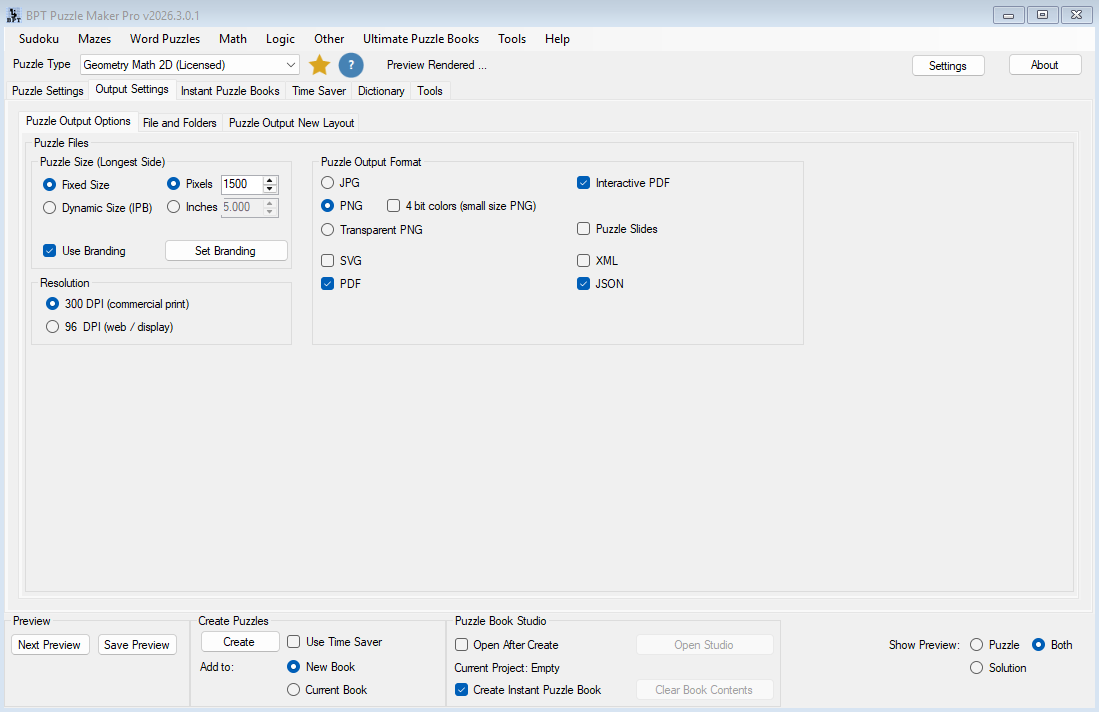
- JSON export for structured puzzle data workflows
- Puzzle Slides exported as PowerPoint files
- Google Slides-style products after converting PowerPoint output
This gives creators more than a worksheet generator. It gives them a reusable geometry content workflow that can support classrooms, printable shops, KDP workbooks, and presentation-style teaching products.
Technical Details
| Detail | Information |
|---|---|
| Software type | Windows desktop software |
| Internet required | Works offline after installation |
| Demo | Free demo available |
| Demo behavior | Includes all puzzle modules and almost all functionality; unlicensed modules create watermarked outputs |
| Delivery | Download available from your member area after purchase |
| Updates | Lifetime updates included |
| Refunds | No refunds; use the free demo before purchasing |
| Creative Edition rights | Personal, classroom, print-on-demand, and end-user sales rights |
| Productivity Edition rights | Includes reseller rights for finished puzzle products |
| Software resale | Not allowed |
Frequently Asked Questions
What does Geometry Math 2D create?
Geometry Math 2D creates printable 2D geometry worksheets where students calculate area, perimeter, or both. Each activity includes a labeled shape diagram, and the solution version includes the calculated answer.
Which shapes are included?
The module supports square, rectangle, triangle, circle, parallelogram, trapezoid, rhombus, kite, pentagon, hexagon, and octagon.
Can I create answer keys?
Yes. Geometry Math 2D creates solution output along with the puzzle worksheet, so you can include answer keys in classroom resources, printable packs, or workbooks.
Can I create shaded-area worksheets?
Yes. The module includes shaded percentage mode, which lets you create visual shaded-region geometry activities.
Can I choose metric or imperial units?
Yes. Geometry Math 2D includes multiple unit modes, including metric and imperial options.
Can I sell the worksheets or workbooks I create?
Yes. Creative Edition includes rights to sell your own finished puzzle products directly to end users, including KDP books, Etsy printables, TPT resources, and similar products.
Do I need Productivity Edition for KDP, Etsy, or TPT?
Not if you are selling your own finished products directly to end users. Creative Edition is sufficient for that use case.
You need Productivity Edition if you want reseller rights for finished puzzle products, or if you want to create finished products that other people, clients, businesses, or publishers can resell.
What does Productivity Edition add?
Productivity Edition adds Time Saver workflow access for supported modules and includes reseller rights for finished puzzle products. It is the better choice for batch production, client work, wholesale puzzle content, and larger publishing workflows.
Can I resell the software?
No. Reseller rights apply only to finished puzzle products created with the software. The software itself may not be resold, redistributed, shared, licensed, repackaged, or transferred.
Is there a free demo?
Yes. The free demo includes all puzzle modules and almost all functionality. Unlicensed modules generate watermarked puzzle outputs, so you can test the software before purchasing.
Does the software work offline?
Yes. Puzzle Maker Pro is Windows desktop software and works offline after installation.
How do I get the software after purchase?
After purchase, the download is available from your member area.
Are updates included?
Yes. Lifetime updates are included.
Do you offer refunds?
No. There are no refunds. Please use the free demo before purchasing to confirm that the software works for your needs.
Why Geometry Worksheets Need a Better Workflow
Geometry worksheet creation looks simple until you need to create a lot of it.
One page is manageable. A full worksheet pack takes longer. A workbook with answer keys, mixed shapes, different units, difficulty variation, and shaded-area activities becomes a much bigger production task.
The problem is not just drawing a shape.
The problem is creating consistent, reusable, publish-ready geometry practice without rebuilding the same kind of worksheet over and over.
Geometry Math 2D was built to make that workflow easier. It gives creators a practical way to generate labeled geometry diagrams, answer pages, unit variations, shaded-region activities, and larger worksheet sets through a repeatable process.
That helps teachers prepare faster.
It helps publishers build more complete workbooks.
It helps printable sellers create focused educational products with less manual formatting.
And when combined with Time Saver and Puzzle Book Studio, it becomes part of a scalable worksheet production workflow instead of another isolated worksheet tool.
Build Your Geometry Worksheet Collection
Geometry Math 2D gives you a practical way to create area, perimeter, shaded-area, and mixed-shape geometry worksheets for teaching, publishing, and printable product creation.
Use it for one worksheet when you need something quickly.
Use it with Time Saver when you want to generate structured worksheet sets.
Use it with Puzzle Book Studio when you want to assemble full workbook-style products.
Create geometry practice once. Reuse the workflow. Build better worksheet collections faster.


