
Puzzle Maker Pro – Bingo

Price range: $ 57 through $ 97

Create Classic or Thematic Bingo Games in Minutes
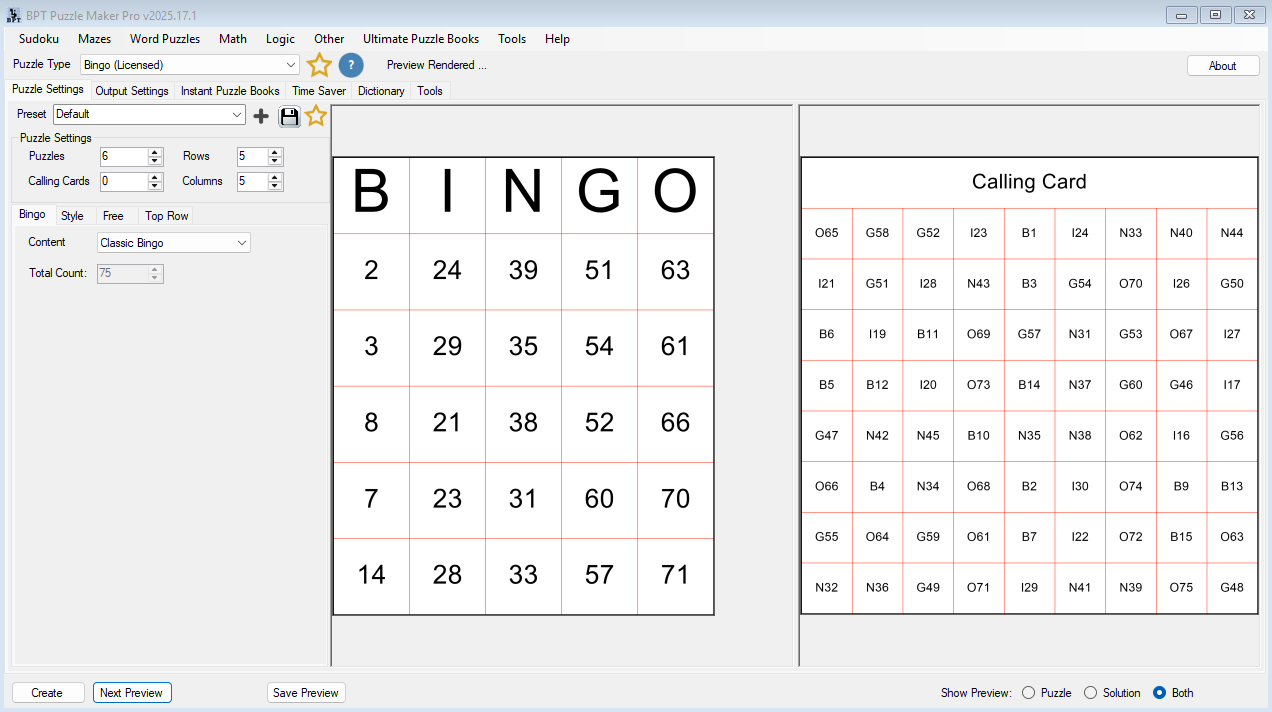
Puzzle Maker Pro – Bingo helps you design and generate custom Bingo sheets for classrooms, events, printables, and puzzle books — with total control over layout, content, and style. Choose from text, numbers, or images, add optional “Free” cells, and export professional-quality pages ready for print or publishing.

Create Puzzles Immediately - on Your Own Computer

  • Secure Payment with FastSpring
  • Many Tutorials and Videos Available
  • Immediate Download from the Member Area
  • Customer Support Facebook Group
  • Windows Exclusive (Use Virtual Windows on Mac)

Create Bingo Games That Work for Any Audience—In Minutes

From classroom vocabulary drills to party icebreakers, generate custom Bingo cards with text, numbers, or images—ready for print, KDP, or digital use.

No design skills. No templates. Just fast, professional Bingo creation with unlimited variations.

Why Bingo Puzzles Are Timeless

Bingo is one of the most recognizable game formats in the world.

It works for every age group, every setting, and every purpose:

  • Universal appeal — Everyone knows how to play
  • Infinitely adaptable — Works with numbers, words, images, or mixed content
  • Instant engagement — Gets students, guests, and customers involved immediately
  • Easy to customize — Theme it for any occasion, lesson, or market
  • Multiple variations — Create dozens of unique cards without repetition

The challenge? Creating professional Bingo cards traditionally requires graphic design software, manual randomization, and hours of tedious work.

Puzzle Maker Pro – Bingo solves that.

Type your content (or load a list), customize the look, and generate unlimited unique cards with matching calling sheets—all in minutes. Whether you’re publishing Bingo books, creating classroom activities, or designing party games, you get publication-quality results without the design hassle.

Who Creates with Bingo Maker

📚 Teachers & Educators

“I need engaging activities that reinforce learning without feeling like worksheets. My students love Bingo, but I don’t have time to design cards for every unit.”

With Bingo Maker, you can:

  • Create vocabulary Bingo for spelling, history, science, or foreign language lessons
  • Generate math drills with numbers, fractions, or equations
  • Use images for visual recognition activities (shapes, animals, landmarks)
  • Mix text and pictures for multi-sensory learning
  • Print calling cards automatically so you can run games smoothly
  • Save presets for each subject and reuse them all year

The outcome: Students stay engaged with game-based learning that feels fun, not forced. You save hours on activity prep and can adapt Bingo for any topic in minutes.

📖 KDP Publishers & Activity Book Creators

“I want to add Bingo to my puzzle book lineup, but creating hundreds of unique cards manually would take forever. I need variety without repetition.”

With Bingo Maker, you can:

  • Generate complete Bingo books with 50, 100, or 200+ unique cards
  • Create themed editions (holidays, animals, inspirational quotes, travel)
  • Export ready-to-publish PDFs that meet KDP specifications
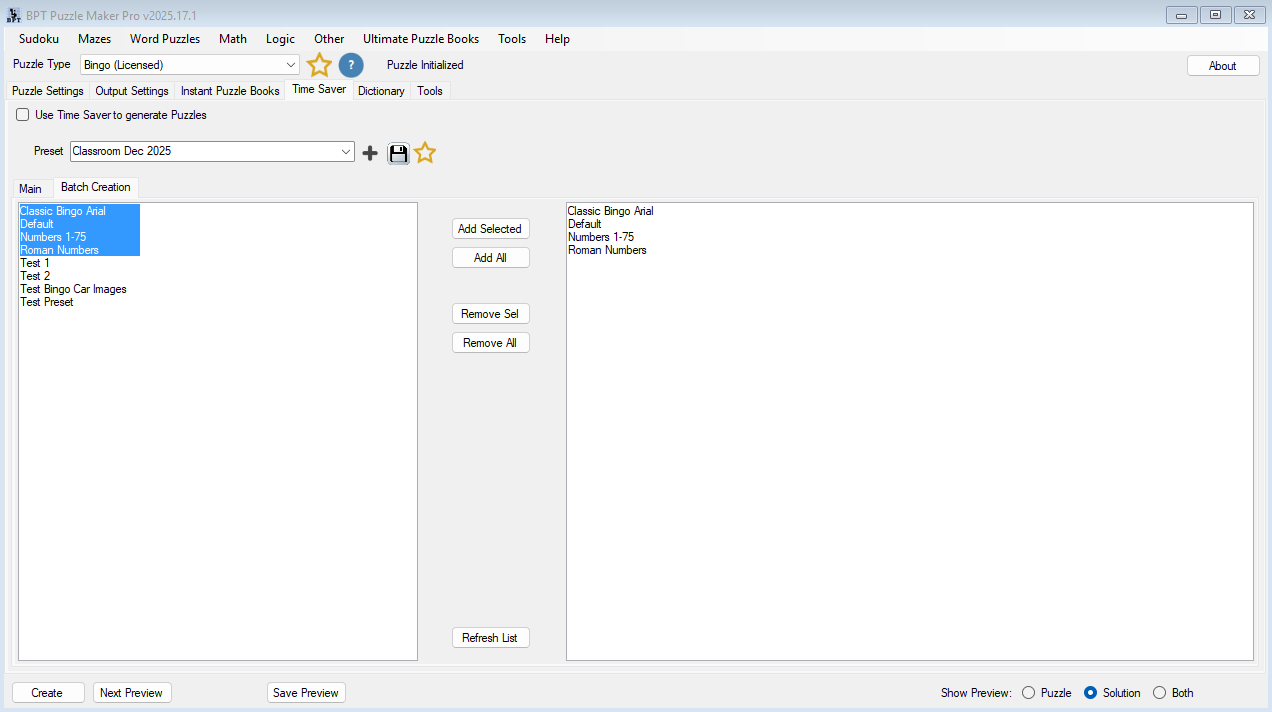
  • Batch-create multiple variations with saved styling presets
  • Include calling sheets or solutions pages automatically
  • Publish seasonal Bingo packs faster than competitors

The outcome: Launch Bingo books in hours instead of weeks. Stand out with themed content that’s fresh, randomized, and professionally formatted—all while scaling your publishing business.

🎨 Etsy Sellers & Printable Creators

“My customers want unique, high-quality printables they can’t get anywhere else. I need to create custom Bingo games for weddings, baby showers, and holidays—but design tools are too slow.”

With Bingo Maker, you can:

  • Design boutique Bingo games with custom colors, fonts, and themes
  • Create bridal shower Bingo, baby Bingo, holiday party games
  • Add your logo or watermark to protect your designs
  • Generate multiple card variations for group events
  • Export in 300 DPI for crisp, professional printing
  • Bundle themed sets (e.g., “Christmas Party Pack – 20 Cards”)

The outcome: Offer premium, one-of-a-kind Bingo printables that justify higher prices and earn rave reviews. Create new products in minutes and dominate seasonal markets.

🎉 Event Planners & Corporate Trainers

“I organize events and training sessions where Bingo is the perfect icebreaker—but I need cards customized for each group. Generic templates don’t cut it.”

With Bingo Maker, you can:

  • Create networking Bingo with prompts like “Met someone from Sales”
  • Design trivia Bingo for team-building events
  • Generate family reunion Bingo with inside jokes and memories
  • Make branded Bingo cards with company colors and logos
  • Print exactly the number of cards needed—no waste
  • Adjust difficulty by changing grid sizes (3×3, 4×4, or 5×5)

The outcome: Deliver memorable, engaging events with personalized games that attendees actually enjoy. No more boring icebreakers—just customized fun that people remember.

Unlimited Creative Freedom

One format. Infinite possibilities.

Choose Your Content Type

  • Classic number Bingo — Traditional 1-75 format or custom number ranges
  • Text-based Bingo — Vocabulary words, phrases, trivia questions
  • Image Bingo — Perfect for visual learners and young children
  • Mixed content — Combine text and images in one card
  • Custom symbols — Roman numerals, fractions, emojis, shapes

Control Every Visual Element

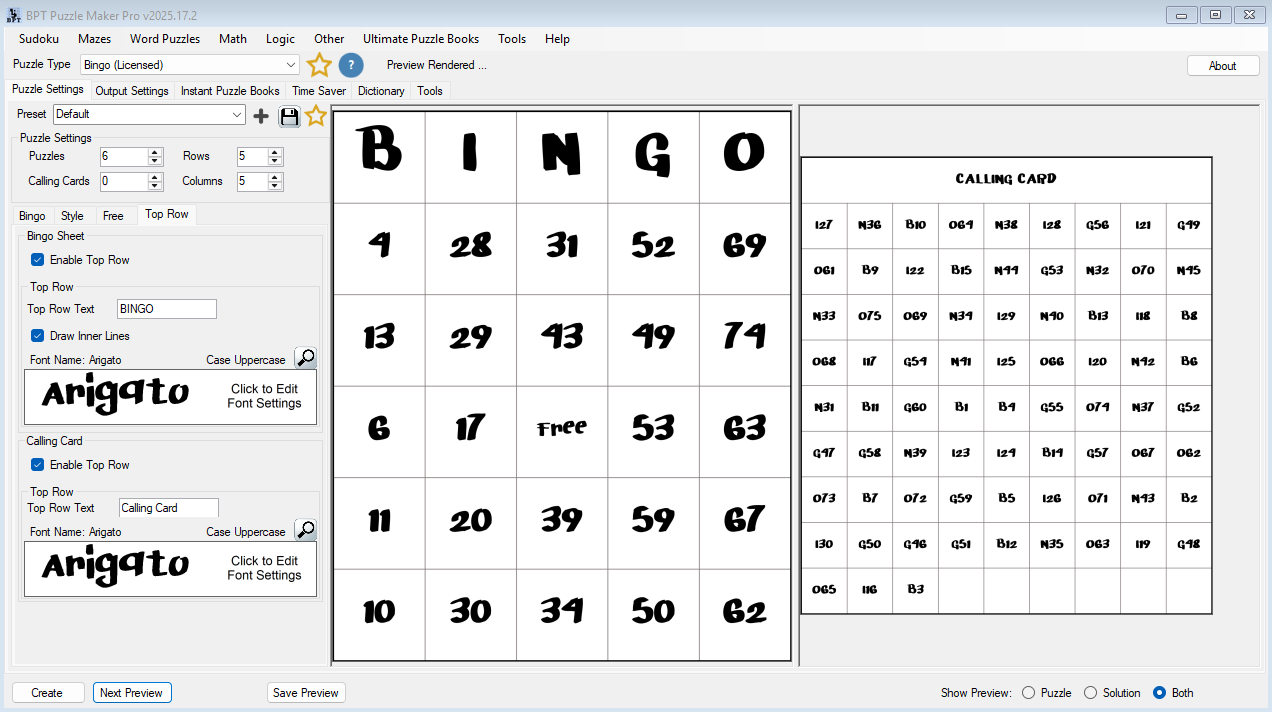
  • Choose from any font installed on your computer
  • Set custom colors for grid lines, cell backgrounds, and text
  • Adjust cell spacing, borders, and padding
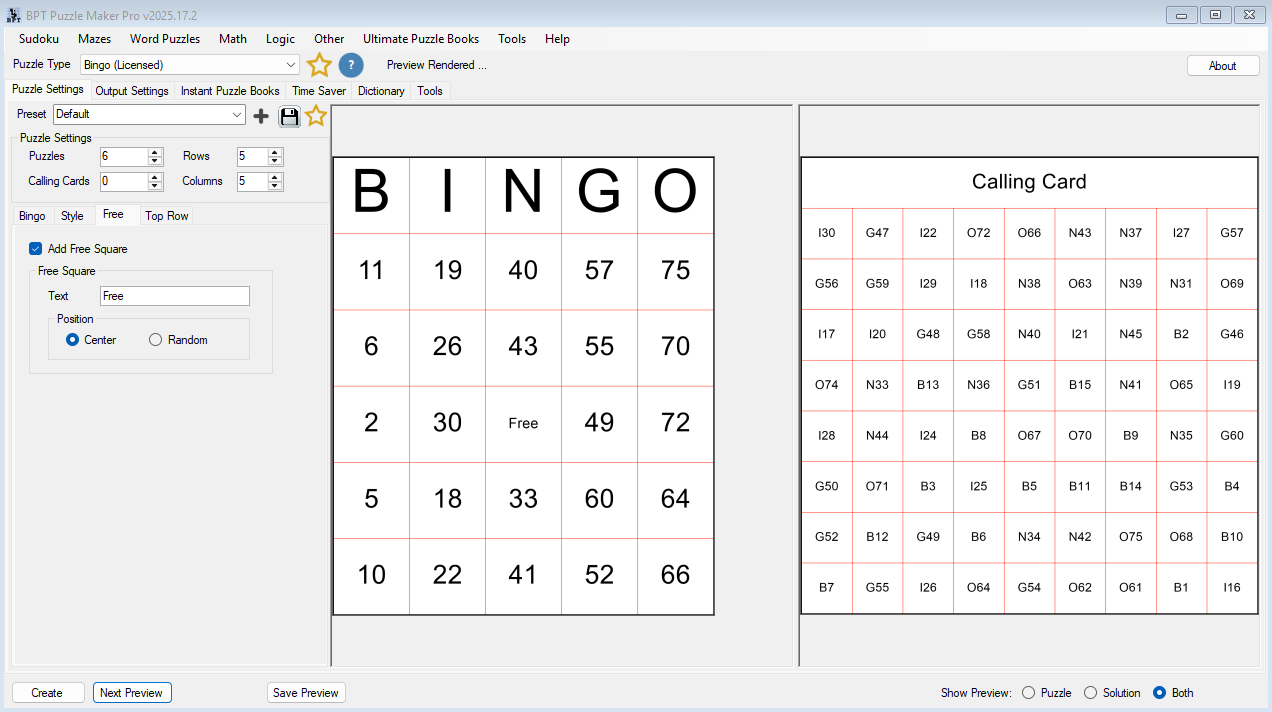
  • Position the “Free” space anywhere—or remove it entirely
  • Customize the top-row title (B-I-N-G-O or your own text)
  • Add logos, watermarks, and branding elements

Flexible Grid Options

  • 3×3 grids — Quick games for young kids or short activities
  • 4×4 grids — Medium difficulty, faster gameplay
  • 5×5 grids — Classic Bingo format with optional Free space

Generate Calling Materials

  • Automatic calling cards for every Bingo game
  • Printable call sheets with all items in random order
  • Master lists for checking winners

Pro Tip: Save your styling as a preset, then generate 100 unique Bingo cards in seconds—all with the same professional look.

What Makes Bingo Maker Professional

Feature What You Can Do Why It Matters
Content Flexibility Use numbers, text, images, or mixed content in any combination Create Bingo for any purpose—education, entertainment, or marketing
Automatic Randomization Every card is unique—no duplicate patterns across hundreds of cards Fair gameplay, professional quality, ready for publishing
Live Preview See exactly what your Bingo cards look like before exporting No surprises, no wasted prints, perfect results every time
Preset System Save styling configurations and reuse them with one click Maintain consistent branding across multiple projects effortlessly
Multiple Export Formats Export as JPG, PNG, SVG, or PDF—choose what fits your workflow Print, publish digitally, or post to social media—all from one tool
Instant Puzzle Books Generate complete Bingo books in PDF or PowerPoint format Upload to KDP in minutes—ready for immediate publishing
Print Quality Professional 300 DPI output that meets KDP and print standards Crisp, clear prints—no quality complaints from customers
Calling Cards Automatically generate matching calling cards for every game Run games smoothly without manual tracking or preparation

Works with Your Entire Publishing Workflow

Bingo Maker is part of the Puzzle Maker Pro family—which means you get a consistent, professional workflow across every puzzle type.

📁 Stay Organized

  • Automatic folder structure with custom naming
  • Date stamps and sequential numbering
  • Batch export with consistent file organization

🎨 Reuse Your Style

  • Saved presets work across all Puzzle Maker Pro modules
  • Font library accessible in every generator
  • Color schemes transfer between puzzle types

📚 Build Complete Books

  • Generate full books in PDF or PowerPoint format
  • Standard KDP sizes built in (6×9, 8×10, 8.5×11)
  • Automatic card numbering and calling sheet matching

💻 Work Anywhere

  • No internet required once installed
  • Complete privacy—files stay on your computer
  • Create Bingo games anywhere, anytime

Learn once, create everywhere. Master Bingo Maker, and you’ll be comfortable with every other Puzzle Maker Pro module—they all share the same intuitive interface and workflow.

Two Editions for Different Needs

Standard Edition

$57

Best for: Teachers, event planners, small-scale creators

What’s Included:

  • ✅ Complete Bingo generator
  • ✅ Text, numbers, images, or mixed content
  • ✅ 3×3, 4×4, and 5×5 grid options
  • ✅ Automatic calling cards
  • ✅ Font, color, and layout controls
  • ✅ Export as JPG, PNG, SVG, or PDF
  • ✅ Save and reuse presets
  • ✅ Instant Puzzle Books (basic)
  • ✅ Personal + Print-on-Demand rights
  • ✅ Works offline
  • ✅ Free lifetime updates

Choose this if: You create Bingo games occasionally or need cards for classroom/event use

MOST POPULAR

Productivity Edition

$97

Best for: KDP publishers, Etsy sellers, professional creators

Everything in Standard, PLUS:

  • Time Saver Add-On
  • ✅ Batch generation from multiple presets
  • ✅ Flexible page layouts (multiple cards per page)
  • ✅ Advanced book creation options
  • ✅ Custom card-per-page configurations
  • ✅ Streamlined high-volume workflow

Choose this if: You publish Bingo books regularly, need batch creation, or create large sets for sale

Quick Comparison

Feature Standard
$57
Productivity
$97
Bingo generator (text, numbers, images)
Export as JPG, PNG, SVG, PDF
Automatic calling cards
Save and reuse presets
Generate puzzle books Basic Advanced
Time Saver Add-On
Batch creation from multiple presets
Flexible page layouts

Real-World Scenarios

📚 Scenario 1: Vocabulary Bingo for 5th Grade Science

What you’re creating: A set of 30 unique Bingo cards for your science unit on ecosystems

How you do it:

  1. Type your 24 vocabulary terms (ecosystem, habitat, producer, consumer, etc.)
  2. Choose 5×5 grid with center Free space
  3. Set your class colors (green theme for nature)
  4. Generate 30 unique cards + calling sheet
  5. Print on school copier

Total time: 10 minutes from word list to printed cards

Result: Every student gets a different card, the game runs smoothly, and your lesson engagement doubles

📖 Scenario 2: Holiday Bingo Book for Amazon KDP

What you’re creating: “Christmas Bingo for Kids” — a 100-page activity book

How you do it:

  1. Load your Christmas word list (50 festive terms)
  2. Set holiday colors (red, green, gold) and fun fonts
  3. Add snowflake borders and your publisher logo
  4. Generate 90 unique Bingo cards
  5. Create Instant Puzzle Book in 8.5×11 format
  6. Export as PDF and upload to KDP

Total time: 2 hours from concept to upload-ready book

Result: Professional Christmas activity book ready for holiday sales season

🎨 Scenario 3: Bridal Shower Bingo Printables for Etsy

What you’re creating: Custom bridal shower Bingo with elegant styling for digital download

How you do it:

  1. Create content list (wedding gifts, traditions, romantic phrases)
  2. Choose elegant fonts and blush pink/gold colors
  3. Generate 20 unique cards for group play
  4. Add watermark with your shop name
  5. Export as high-res PNG files
  6. Package as instant download on Etsy

Total time: 30 minutes for complete listing

Result: Premium printable product that sells for $8-12 with 5-star reviews

🎉 Scenario 4: Corporate Networking Bingo

What you’re creating: Ice-breaker Bingo for company all-hands meeting (150 attendees)

How you do it:

  1. Type 24 prompts (“Met someone from Marketing”, “Shares your hobby”, etc.)
  2. Use company brand colors and logo
  3. Generate 150 unique cards so every attendee has different content
  4. Export as PDF for professional printing
  5. Print calling sheet for event coordinator

Total time: 20 minutes including customization

Result: Branded, engaging activity that gets people talking and builds connections

Technical Details

Platform Windows 10/11 (64-bit)
Mac users: Can use via Parallels, VirtualBox, or other Windows virtualization
Export Formats JPG, PNG, SVG, PDF
Puzzle books: PDF, PowerPoint (PPTX)
Grid Sizes 3×3, 4×4, 5×5 (customizable Free space position)
Content Types Numbers, text, images (JPG, PNG), or mixed content
Maximum Resolution Professional 300 DPI output for print quality
Book Sizes Standard KDP sizes: 6×9, 8×10, 8.5×11 (and custom sizes)
Your Rights Both editions: Create and sell Bingo games on KDP, Etsy, Teachers Pay Teachers, and other platforms
Internet Required No — works completely offline after installation
Try Before You Buy Yes — Free demo with watermarked outputs (test before purchasing)
Refund Policy No refunds — Please test demo version first to ensure compatibility
Updates Free updates included for life of software

What You Can Do with Your Bingo Games

✅ You Can:

  • Create Bingo games for personal use and enjoyment
  • Share with family, friends, students, or team members
  • Publish Bingo books on Amazon KDP, IngramSpark, or other platforms
  • Sell printable Bingo packs on Etsy, Teachers Pay Teachers, or your website
  • Use Bingo games in classroom materials or homeschool curriculum
  • Create Bingo games for social media content or lead magnets
  • Design branded Bingo for corporate events or marketing campaigns

❌ You Cannot:

  • Resell or redistribute the software itself
  • Share your license with others or install on multiple computers beyond personal use
  • Claim the software as your own creation

Ready to Create Professional Bingo Games?

Stop wrestling with design tools. Start creating custom Bingo in minutes.

✅ Download immediately after purchase

✅ Create your first Bingo game in 5 minutes

✅ Free lifetime updates

✅ Access to tutorials and support

Choose your edition above and get started today!

Not sure yet?
Try the free demo version — test all features with watermarked output before purchasing.

Common Questions

Will this work on my Mac?

Bingo Maker is designed for Windows 10/11. Mac users can run it using Windows virtualization tools like Parallels Desktop, VMware Fusion, or VirtualBox. We recommend testing the free demo version first to ensure it works with your setup.

Can I try it before buying?

Yes! The demo version has full functionality—the only limitation is watermarked outputs. This lets you test with your own content and styling to make sure it’s right for you. Download the demo here.

Do I need design or technical skills?

Not at all. If you can type a list or upload images, you can create professional Bingo games. The interface is point-and-click simple, with visual previews of every change. Most people create their first publication-quality game within 5 minutes—no design background required.

What’s different between Standard and Productivity editions?

Standard ($57): Create individual Bingo cards and basic puzzle books. Perfect for teachers, event planners, and occasional creators.

Productivity ($97): Adds Time Saver Add-On with batch creation, flexible page layouts, and advanced book generation. Perfect for KDP publishers and high-volume creators who need efficiency.

Can I sell the Bingo games I create?

Yes! Both editions let you sell your Bingo games on platforms like Amazon KDP, Etsy, Teachers Pay Teachers, and your own website. You can publish books, sell printables, or use them in paid products. You cannot resell the software itself.

Do I need internet to use this?

No. After installation, Bingo Maker works completely offline. You don’t need an internet connection to create, preview, or export games. All files stay on your computer.

Can I use images in my Bingo cards?

Yes! You can use images (JPG, PNG) instead of or alongside text. This is perfect for visual learners, young children, or themed Bingo games. You can also mix text and images in the same card.

How many unique cards can I generate?

You can generate unlimited unique Bingo cards from your content list. The software automatically randomizes placement so no two cards are identical—perfect for large classes, events, or publishing books with hundreds of cards.

Can I upgrade later?

Yes! You can upgrade from Standard to Productivity edition anytime by paying the difference. Contact support with your order details, and we’ll send you an upgrade link. Your existing games and settings will work in the upgraded version.

What’s your refund policy?

Sales are final. Because you get immediate access to downloadable software, we can’t offer refunds after purchase. That’s why we strongly encourage testing the free demo first to make sure it works for you.

Why Choose Puzzle Maker Pro?

🎯

Professional Quality

300 DPI print-ready output that meets Amazon KDP standards. Every export is publication-quality.

Lightning Fast

Generate unique Bingo cards in seconds, not hours. Create complete books while competitors are still designing layouts.

🔒

Complete Privacy

Works offline. Your games, content, and designs stay on your computer—no cloud storage or data sharing.

🎨

Unlimited Creativity

Use any font, color, or content type. Create Bingo games that match your brand perfectly with complete visual control.

📚

Full Tutorials

Comprehensive video guides and documentation. Get support when you need it from our active user community.

🔄

Lifetime Updates

Free updates for life. As we add features and improvements, you get them automatically at no extra cost.

Start Creating Professional Bingo Games Today

Join hundreds of creators who have transformed their workflow with Puzzle Maker Pro.

Select your edition above or try the free demo first.


Product

Bingo, Bingo Productivity Edition

Shopping Cart
Puzzle Maker Pro - BingoPuzzle Maker Pro – Bingo
Price range: $ 57 through $ 97Select options