




Poisson or Poison? Vocabulary Quizzes Your Students Hear, Play Online and Print, in Six Languages
Click the speaker beside one answer and a natural voice says poisson. Click the next one and you hear poison. One letter apart, one sound apart, and the student who only skimmed the list is about to order the wrong thing for dinner.
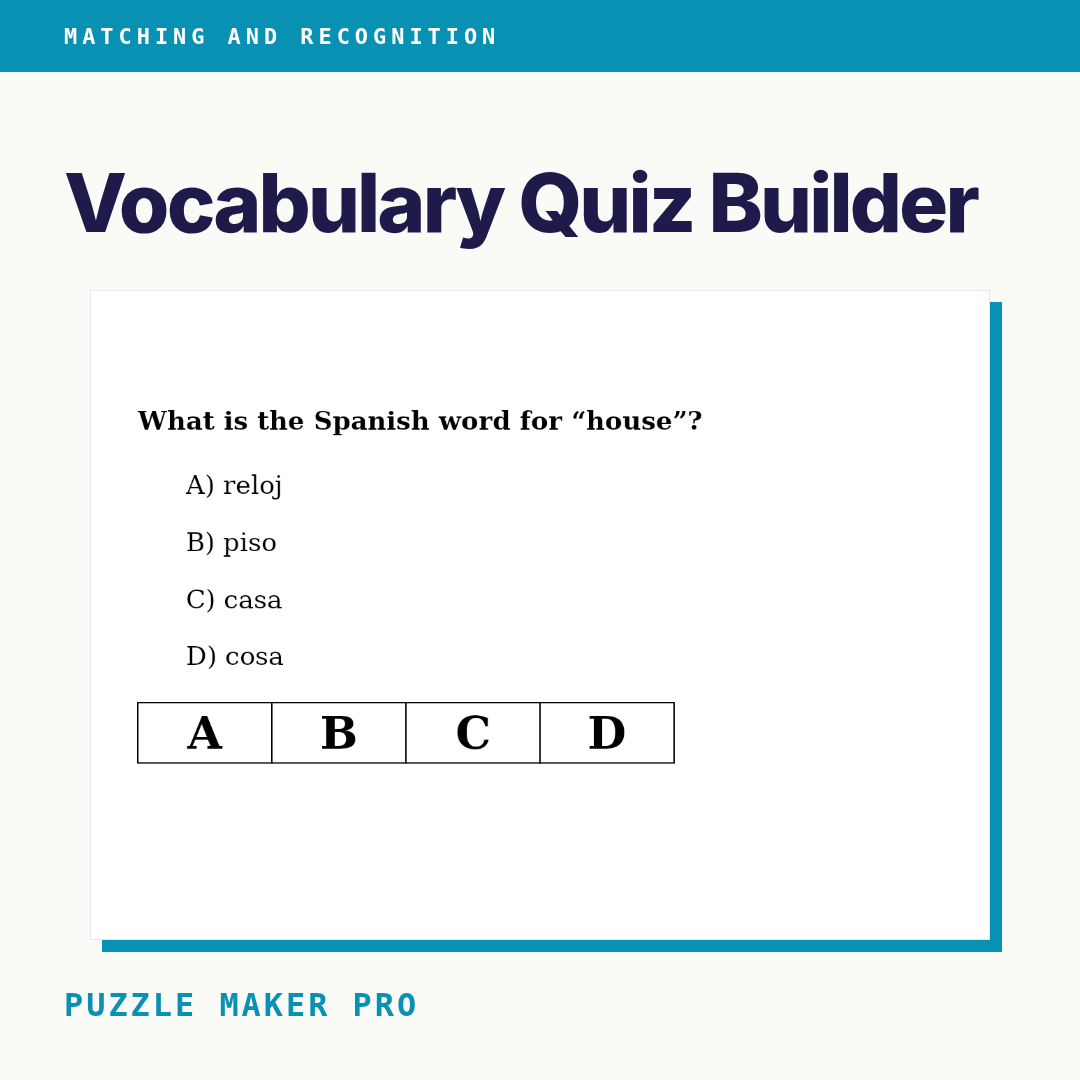
That is the quiz I wanted for a language class, so I built it. Vocabulary Quiz Builder makes multiple-choice vocabulary quizzes in Spanish, French, German, Italian, Portuguese and Dutch, and the wrong answers are look-alikes picked to fool a half-learned eye: agua (water) beside aguja (needle), Haus (house) beside Hals (neck). A two-column word list lets students cover one side and peek. These quizzes make them choose, and one look at the answers shows you who knows the word and who fell for the trap.
Then you decide how the class meets it:
- Online, with audio and/or text (Creative + Interactive and Productivity + Interactive). Students play it on your own website. Record the words with your own ElevenLabs key or credits, and a speaker button says each one aloud. Keep the text on screen, open in listen mode, or record every word and run a listening-only test where the text never appears.
- On the big screen (Creative and up). Export the set as Puzzle Slides, put one question up, and let the whole room argue over the look-alike before you click to the answer.
- On paper (every edition). Printable worksheets with an answer key behind every question, ready for the copier or for the interior of a language-exercise book on KDP.
Make a set for this week’s lesson. Or, on Interactive, publish a free sample quiz on your site that sends learners on to your course, your tutoring or your workbook.
Nine ready word lists come with it, 262 word pairs: the numbers 1 to 20, the tens and the hundreds in all six languages, plus three short starter lists (Spanish Travel, French Food and German Everyday). Pick one, choose how many questions you want, and your first set is ready.
Play a vocabulary quiz in your browser to see how it plays, then try the free demo and make your first questions from the built-in lists or a short list of your own, one at a time, before you decide anything.
The Wrong Answers Do the Teaching
A vocabulary quiz lives or dies on its wrong answers, which is why I made this its own product, for language teachers and language publishers. Anyone can write the right answer. The other three are the hard part: three words that are real, plausible, not secretly correct, and not so silly that the class laughs them off.
Here they come already shaped. Ask for the translation, and each wrong option has its own job:
- The near-miss is a letter or two away from the right word: pain (bread) beside bain (bath), libro (book) beside libre (free). It catches the student who half-remembers the spelling.
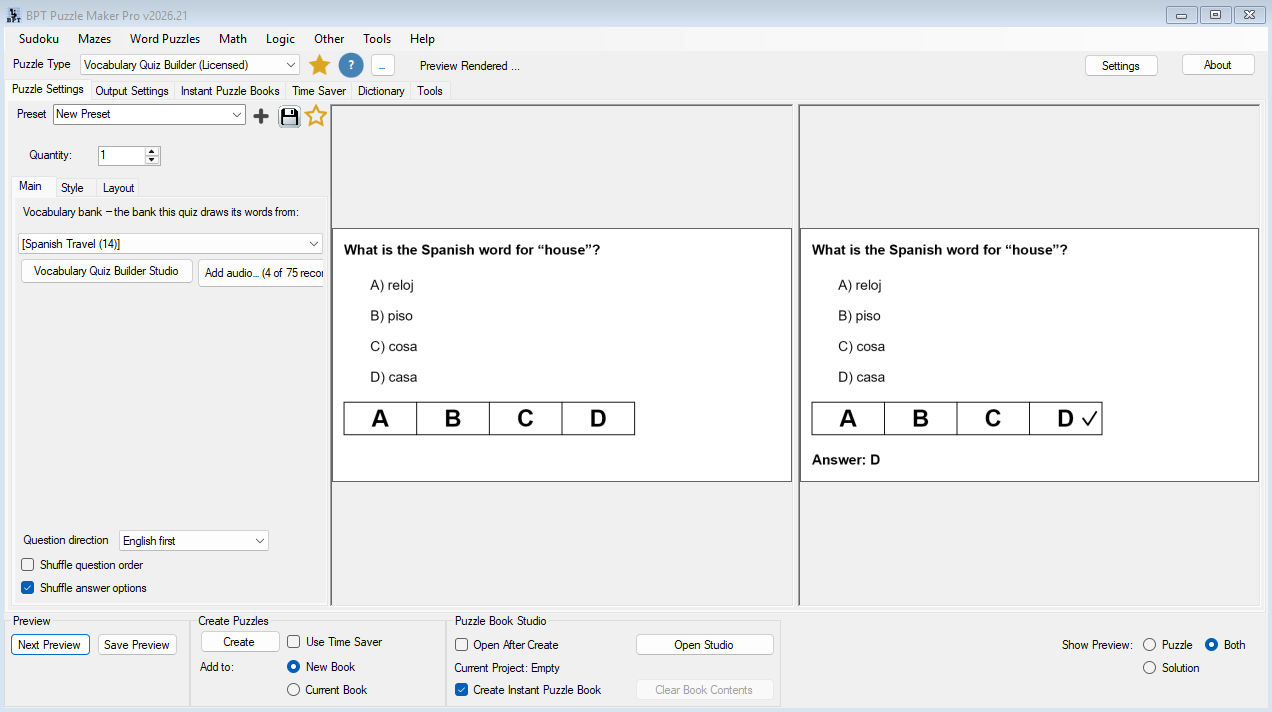
- The neighbour comes from the same topic: piso (flat) beside casa, beurre (butter) beside pain. It catches the student who remembers the subject but not the word.
- The clear miss comes from somewhere else entirely, so a student can discard it on sight and feel the question narrow.
Flip the question around, giving the word in Spanish or German and asking for the English, and one English option is planted to look like the answer: house beside horse, book beside boot, with the other wrong answers drawn from the rest of the run. The quiz also keeps out English words that share the same translation, so a list holding both house and home never puts both under casa.
Four options per question. On English-first questions that means one right and three wrong in three different ways, so a wrong pick shows you how the student went wrong: the spelling, the topic, or a guess.
One Letter Between the Answer and the Trap


Online Vocabulary Quizzes with Audio: The Class Hears the Word, Then Chooses
Reading dieciséis and saying it are two different skills, and a worksheet only trains the first. On Creative + Interactive and Productivity + Interactive, the same quiz goes online with its voices attached, and your students practise both.
The audio is built in. Use your own ElevenLabs key or credits, pick a voice per language (starter voices come filled in for English and all six built-in languages), pick a list and click Add audio…. Before a single word is recorded, the window shows how many new words still need a voice and what they will cost. Each word is recorded once and reused, so publishing the set again costs nothing more. When you build a list, you can also set how a tricky word is spoken without changing how it prints.
Then publish the set through the free Puzzle Maker Pro Online plugin to a WordPress site you run. Students click a letter to answer, and a speaker button plays the question word and each recorded option. You choose how the class meets the words:
- Text first, with a speaker button on every recorded word.
- Listen first: the set opens in listen mode and the text is one click away.
- Listening only: a true listening test, where the text cannot be revealed.
You also choose when an answer is marked: the moment a letter is clicked, or only when the student presses Check. A wrong pick is marked and the student tries again. Publish one set listen-first for practice on Monday and the same set as listening only for the end-of-unit check on Friday.
Publish it as a puzzle list and the whole set sits behind one dropdown, any question a click away. Publish it as a leveled game and the set turns into a path each student walks at their own pace, every step named the way your course names it (Lesson or Step, say), with progress kept in their own browser. You write the words that greet them at the end of the path and where its link goes, so a free Spanish Travel sample on your site can send learners on to your course, your lessons or your full workbook. That is a lead magnet that teaches.
Play a vocabulary quiz in your browser, or see how students play puzzles online.
Make Spanish, French and German Vocabulary Worksheets from Your Own Word Lists
Your unit has its own words: the kitchen, the airport, the twenty verbs on this week’s board. In every edition the quiz can be built from exactly those; from Creative up, AI does the translating.
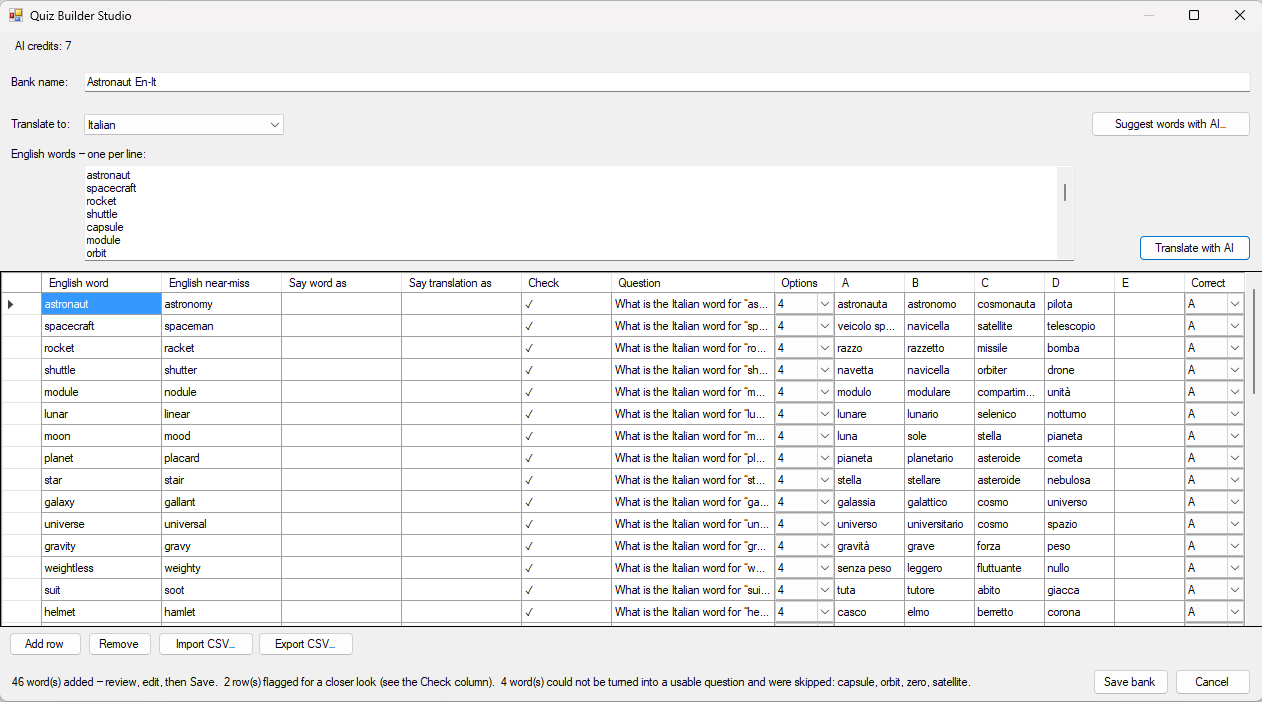
Type or paste an English word list, up to 100 words at a time, pick the language, and press Translate with AI. Every word comes back with its translation and three wrong answers already shaped into the near-miss, the neighbour and the clear miss. Stuck for words? Suggest words with AI fills the list from its name, so a list called “Kitchen Spanish” starts itself.
Then the run checks its own work. Each translation is turned back into English, and the review grid marks every row: ✓ when it came back as your word, ⚠ with the word it came back as when it did not, and a plain dash when the row could not be checked. Your eye goes straight to the rows worth a second look. A ⚠ is advice, not a verdict, because a perfectly good synonym can trip it, so you stay the teacher: edit any word, add an article (la casa, der Hund), and save when the list reads right to you.
Save, and the new list appears selected and ready, so the next click makes your questions. Prefer to skip the AI? Type the word, its translation and your own three wrong answers, and the question wording fills itself in, or import them from a CSV file.
The nine built-in lists involve no AI at all. I read all 262 word pairs by hand, across all six languages, before they shipped.
From This Week’s Word List to Friday’s Quiz
Three levels from one list
A mixed class needs the same words at different heights. Ask in Translation first for students who need support: they read casa and pick its meaning, which is recognition, the easier skill. Ask in English first for the core group: they see house and must find casa among its look-alikes, which is recall. Ask in Mixed for the students ready to be kept on their toes, with each page choosing its own direction. (Mixed needs a longer list, because each word must work in both directions.) One list, three runs, and each group works at its own level.
Counting worksheets in six languages, on day one
The built-in counting lists run 1 to 20, the tens to 100 and the hundreds to 1000, and they skip the in-between numbers like 21 or 345 that trip a beginner. Italian, Portuguese and Dutch get their own counting lists too, so every one of the six languages has a set ready to print. Switch Shuffle question order off for a gentle counting workbook in sequence, or leave it on so the numbers stop marching in order and every page is a fresh check.
Several word lists in one job with the Time Saver
A big topic rarely fits one list. Split Spanish food into starters, mains and desserts, or a term’s vocabulary into weekly lists, and let Productivity build them together. The Time Saver gives every list its own row: click Add banks…, tick your lists, and each row gets its own quantity, direction and style. Shuffle the pages into one book in Puzzle Book Studio and the whole topic becomes a single workbook.
Teaching a seventh language?
Add a language such as Polish by entering its code and the name your learners read, and build lists for it by hand in any edition; from Creative up, AI translation works for it straight away. On an Interactive edition, give it a voice and its words get audio too. Languages written in the Latin alphabet print cleanly, and the app warns you if the print font cannot draw a language’s name.
Pages that look like your course
Whatever edition you choose, give every page your course colours and font, down to the tick on the answer pages, so a pack from you looks like it came from you. A list’s name heads every question drawn from it, so “Spanish Travel” or “Unit 4: Kitchen” labels itself.
Try the free demo on a Dutch counting question or a Spanish travel question before you choose an edition.
Teach It Live with Puzzle Slides (Creative and Above)
Put poisson and poison on the board and thirty students will have an opinion. From Creative up, export the set as Puzzle Slides, a PowerPoint deck that puts each question on the big screen, followed by its answer.
Project the question, let the class argue it out, take a vote, then click to the next slide and let the answer page settle it. It runs in PowerPoint on the classroom computer, in the room or shared on a video call for a remote lesson.
From One Question to a Full Vocabulary Workbook
A single question is a bell ringer. Fifty of them is a unit, and a few hundred is a workbook.
Set Quantity to 50 and you get 50 questions, each with its answer page. Keep Quantity at or below the size of your list and every question is a different word. Ask for more and words come back only after every word has been asked once, with the options reshuffled: 50 questions from the 37-word Spanish counting list gives you 37 distinct questions and 13 reruns.
Then lay them out. Each question is its own image, so the book builders place as many to a page as you set, with the answer pages matched. Put four to a page and a 60-question run becomes 15 pages of questions and 15 pages of answers, a worksheet pack with its key already lined up. On any edition, Instant Puzzle Books assembles the whole run from the settings you already have and adds the title page, the contents and a footer on each question page naming the page its answer sits on. From Creative up, Puzzle Book Studio gives you the live book editor for one collection, and Productivity combines several collections into one book, such as a workbook with its own styled section for each language.
Printable Vocabulary Worksheets as PDF, PNG, JPG and SVG
Print it, project it, or lay it into a KDP interior: every edition exports each question and its answer page as PNG, JPG, SVG and PDF. The PDF goes to the copier, the PNG drops into a slide or a class website you build yourself, the SVG scales for a vector layout, and Instant Puzzle Books turns the set into a print-ready interior without redrawing anything.
Who This Is For
Language teachers. You want a quiz on the words you taught this week, and you want your students to hear those words, not just see them. Print the set with a key for the folder on any edition, project it as slides for a live round from Creative, and on Interactive put it online with audio and/or text. Three directions give you three levels from one list. AI translation of your own lists starts at Creative; add Interactive and the listening-only mode turns the same list into a listening check.
ESL teachers. If your students grew up speaking Spanish, French, German, Italian, Portuguese or Dutch, run the quiz Translation first: they read a word they already know and hunt for the English, with an English look-alike planted beside it (house beside horse). On Interactive, they hear the English word spoken too.
Course creators and tutors. A short set before each lesson, a counting quiz for a beginner, and, on Interactive, a free sample quiz on your website that ends on a link to your course, your lessons or your book. The answer page lets a learner check their own work.
Language-workbook publishers on KDP. Language-exercise books that do not read like filler: every built-in and AI-translated question carries a deliberate look-alike trap, every question page names the page its answer sits on, and in every edition each title in a series can run off your own word list.
Teachers Pay Teachers and Etsy sellers. From Creative up, one English list can become a pack in each of the six languages, titled and styled as a series. Lay four or more questions to a page with the key on the matching pages, and you have a print-and-go packet with its answer key built in.
Puzzle Maker Pro customers. It opens in the Puzzle Maker Pro you already run, and its question pages drop straight into Instant Puzzle Books, and from Creative up into Puzzle Book Studio, beside your word searches and sudoku. That is a second shelf: language workbooks and classroom packs in six languages.
If you have been typing quizzes by hand and inventing three wrong answers per word, or handing out a two-column list and hoping for the best, here is what changes: start from the nine built-in lists, type or import your own, or from Creative up hand your own list to AI translation, and the questions, the traps and the answer key come back together.
Which Edition Should You Choose?
Start with the words you need to teach this term.
Vocabulary Quiz Builder (Standard): you want numbers practice in six languages and three short starter lists (Spanish Travel, 14 words; French Food and German Everyday, 13 each) on paper today, styled your way, with answer keys, all four export formats and a finished workbook from Instant Puzzle Books, several questions to a page. Add your own word lists by typing them in or importing a CSV.
Creative: you want quizzes on your own units without the typing. AI suggests the words and translates your list, look-alike traps included (20 AI credits included to get you started), design books in Puzzle Book Studio, and run whole-class rounds with Puzzle Slides. Already selling puzzle books? Creative makes one book per language, one at a time.
Productivity: you publish a series or supply other sellers. Build several word lists in one job with the Time Saver, one row per list (a term’s weekly lists, say), combine several collections into one book, each in its own styled section (a workbook with a section per language, say), feed the quiz data into your own tools with JSON export, or sell and supply the generated puzzles to other publishers and sellers, such as done-for-you language workbook interiors for clients.
Creative + Interactive / Productivity + Interactive: you want the quizzes online. Your students play them on your own website with audio and/or text, in listen-first or listening-only mode, and a sample set can bring new learners to your course or book.
| Standard | Creative | Productivity | + Interactive | |
|---|---|---|---|---|
| Nine built-in word lists: counting in six languages plus three themed starters | ✓ | ✓ | ✓ | ✓ |
| English first, Translation first and Mixed questions | ✓ | ✓ | ✓ | ✓ |
| PNG, JPG, SVG and PDF, question and answer pages | ✓ | ✓ | ✓ | ✓ |
| Full design control: page and text colours, the font, the answer-box borders and the answer tick | ✓ | ✓ | ✓ | ✓ |
| Instant Puzzle Books, several questions to a page, with title page, contents and solution cross-references | ✓ | ✓ | ✓ | ✓ |
| Your own word lists: typing or CSV import | ✓ | ✓ | ✓ | ✓ |
| Add your own languages | ✓ | ✓ | ✓ | ✓ |
| AI translation and word suggestions for your own lists | ✓ | ✓ | ✓ | |
| AI credits included | 20 | 50 | Matches your edition | |
| Puzzle Book Studio | One collection | Multiple collections | Matches your edition | |
| Time Saver: several word lists in one job, each row with its own quantity and style | ✓ | With Productivity | ||
| Puzzle Slides for whole-class rounds | ✓ | ✓ | ✓ | |
| JSON export, carrying your recorded word audio on Productivity + Interactive | ✓ | With Productivity | ||
| Licence to sell finished books, worksheets and packs to your own readers and customers | ✓ | ✓ | ✓ | ✓ |
| Licence to sell or supply generated puzzles to other publishers and sellers | ✓ | With Productivity | ||
| Online play on your own WordPress site (free plugin), as a puzzle list or a leveled game | ✓ | |||
| Spoken word audio (your own ElevenLabs key or credits), listen-first and listening-only modes | ✓ |
Interactive is an add-on that stacks on Creative or Productivity and keeps everything that edition has.
Pick the edition that fits what you are making today. You can move up to any higher edition later, so starting with the built-in lists is never a dead end.
Try It Before You Buy
Make a vocabulary quiz yourself before you spend anything. The free demo covers every puzzle module in Puzzle Maker Pro, Vocabulary Quiz Builder Studio included, and makes real questions from the built-in lists or a short list you type in yourself, so you can see exactly what your students will see. Demo questions come one at a time and carry a watermark; any paid edition lifts both.
When you are ready, choose your edition at the top of this page.
Licensing and Commercial Use
Vocabulary Quiz Builder and Vocabulary Quiz Builder Creative both let you sell the finished books, worksheets and packs you make to your own readers and customers, on KDP, Etsy, Teachers Pay Teachers or your own store. That includes classroom resources sold to teachers who print them for their students. One-time commercial-use licence. Watermark-free.
Vocabulary Quiz Builder Productivity includes that, plus you may sell or supply the generated puzzles to other publishers and sellers.
The editions below Productivity differ in what you can make, not in permission to sell.
Product Details
| Product | Vocabulary Quiz Builder |
| Editions | Vocabulary Quiz Builder (Standard), Creative, Creative + Interactive, Productivity, Productivity + Interactive |
| Platform | Windows desktop, as a module of the Puzzle Maker Pro app |
| Internet required | Only for the AI tools (word suggestions and translation), recording word audio and publishing online play; making, styling and printing quizzes work offline |
| Languages | English to Spanish, French, German, Italian, Portuguese and Dutch; add your own in any edition (Latin-alphabet languages print cleanly) |
| Built-in content | Nine word lists, 262 word pairs: 1 to 20, the tens and the hundreds in all six languages (37 numbers each), plus Spanish Travel (14 words), French Food and German Everyday (13 each) |
| Question directions | English first, Translation first, Mixed |
| Word lists per run | One word list, and its language, per run in every edition; the Time Saver (Productivity editions) builds several lists in one job, one row per list |
| Answer options | Four per question as standard (fewer only when a list cannot supply them), with a lettered answer strip |
| Build your own lists | Every edition: typing or CSV import. Creative and up: AI translation (up to 100 words per run) and word suggestions |
| AI credits | 20 included with Creative, 50 with Productivity |
| Design control | Every edition: page and text colours, the font, the answer-box borders and the answer tick |
| Outputs | PNG, JPG, SVG, PDF, question and answer page |
| Puzzle books | Instant Puzzle Books on every edition, Puzzle Book Studio from Creative; each book gets a title page, contents and answer-page cross-references |
| Puzzle Slides | Creative and up |
| JSON export | Productivity editions |
| Online play | Creative + Interactive and Productivity + Interactive, published through the free Puzzle Maker Pro Online plugin to a WordPress site you run, as a puzzle list or a leveled game |
| Word audio | Interactive editions, recorded with your own ElevenLabs key or with credits; the app shows the cost before anything is recorded |
| Commercial licence | Sell finished books, worksheets and packs to your own readers and customers; Productivity adds selling or supplying the generated puzzles to other publishers and sellers |
| Free demo | Yes |
| Delivery | Immediate, in your member area |
Questions Before You Buy
Is there a free demo?
Yes. One download covers every puzzle module in Puzzle Maker Pro, including Vocabulary Quiz Builder and its word-list studio. It makes real, watermarked questions one at a time, so you can judge the quizzes before you buy. You can also type or import a short word list of your own and quiz it.
Can I upgrade later?
Yes. You can move up to any higher edition at any time after you buy: further up the ladder when you want AI translation, or a book of several collections with a styled section for each, or add Interactive on top of Creative or Productivity when you want online play and audio. Start with the edition that fits what you are making today; you are never locked into it.
Does it run on a Mac or a Chromebook?
Vocabulary Quiz Builder runs in Puzzle Maker Pro, a desktop app for Windows. What you make travels: the PDFs print from any computer, and online quizzes play in a web browser, so students on Chromebooks and Macs can play them.
Is it a separate app, or part of Puzzle Maker Pro?
It is its own puzzle module inside the Puzzle Maker Pro desktop app, sold as a separate product with its own licence. If you already run Puzzle Maker Pro, it sits beside your other puzzle types and uses the same book builders. Your download and licence arrive in your member area the moment you order.
I own Quiz Builder. Do I need this too?
They make different material. Quiz Builder makes trivia and general-knowledge quizzes; Vocabulary Quiz Builder makes translation questions, with look-alike wrong answers, three question directions, nine built-in language lists and, on Interactive, spoken word audio. They are licensed separately, so owning one does not include the other.
Do I need AI to use it?
No. The nine built-in lists need nothing at all, and in every edition you can type your own rows or import a CSV. AI is there to save you time: it can suggest words for a list and translate a list you supply. Creative includes 20 AI credits to start with, Productivity 50. After that, use your own OpenAI or Anthropic key, paid directly to your provider, or Puzzle Maker Pro AI credits: a translation run costs one credit for a list under 50 words and two for 50 to 100, and a word-suggestion run is billed as a run of its own.
How accurate are the AI translations?
Every AI row is translated back into English and marked, so you see at a glance which words came back different and which could not be checked. That points your eye at the rows to read twice; it does not replace reading them, and nothing in any software can prove a translation is right. Read the list, fix anything you disagree with, and save. The nine built-in lists involve no AI at all.
I publish on KDP. Where do the words come from?
You always know. The built-in lists were made without AI: I checked every word pair before they shipped, and the wrong answers on the counting lists were chosen by a fixed rule. The rows you type or import are your own, and AI (word suggestions or translation) is a step you choose, then review and edit before you save the list. That tells you exactly which lists in a book went through AI when KDP asks about AI content.
Can my students hear the words?
Yes, on Creative + Interactive and Productivity + Interactive. The audio step is built in: use your own ElevenLabs key or credits, click Add audio…, and before anything is recorded the app shows how many new words still need a voice and what they will cost. On credits, recording costs one credit per 50 words, so the credits included with your edition cover up to 1,000 recorded words on Creative + Interactive (20 credits) or 2,500 on Productivity + Interactive (50). The audio plays in the online quiz, with a speaker button for the question word and each option you have recorded.
Do I need my own website for online play?
Yes. Online play comes with the Interactive editions and publishes to a WordPress site you run. The Puzzle Maker Pro Online plugin that shows the quizzes there is free, and students play in their browser. The printed worksheets need no website at all.
Can I use a quiz to bring new students to my course?
Yes, on Creative + Interactive and Productivity + Interactive. Publish a free sample set as a leveled game and write your own message and link for the end of it, so a learner who finishes your Spanish Travel sample lands on your course, your lessons or your workbook.
How do I check their answers?
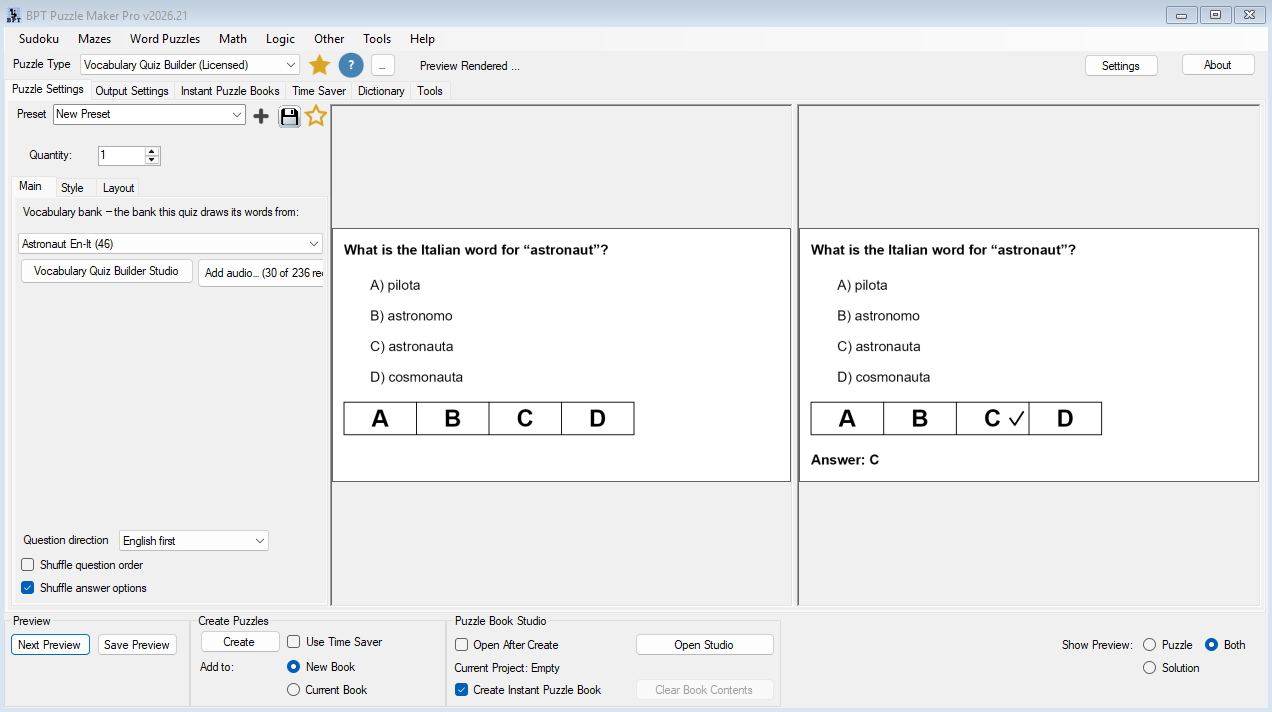
On paper, the answer page ticks the right box and prints the letter, so you or your students can mark a sheet in moments. Online, each pick is marked right or wrong (as it is clicked, or when the student presses Check), and progress through a leveled game saves in the student’s own browser.
Can I make Spanish, French or German vocabulary worksheets, or other languages?
Spanish, French, German, Italian, Portuguese and Dutch are built in, all from English. You can add your own language in any edition and build lists for it by hand, with AI translation from Creative up and audio on Interactive, and pages print cleanly in languages written in the Latin alphabet.
Is the Portuguese Brazilian or European?
The built-in Portuguese counting list uses Brazilian forms (dezesseis, dezessete, dezenove). In any edition you can build lists with exactly the forms your learners use.
Can I fit several questions on one worksheet page?
Yes. Each question is its own image, and the book builder places as many to a page as you set in its rows and columns, separately for question pages and answer pages, so the key lines up with the sheet.
How many words does a list need?
A dozen or more gives comfortable variety; the built-in lists run from 13 to 37 words. A list of four already fills every option on Translation-first pages, and English-first pages use the three wrong answers stored with each word.
Can I sell what I make?
Yes. Every edition lets you sell the finished books, worksheets and packs you make to your own readers and customers. Productivity adds the right to sell or supply the generated puzzles to other publishers and sellers.
Give Your Students Words They Can Read, Recognise in a Crowd, and Hear
Hand out a two-column list and you find out who was guessing when the test comes back. Hand out this set on Monday and you know by Tuesday, while there is still time to reteach.
Friday, end of unit: the printed set in your folder, levelled three ways, keys clipped behind it, and on Interactive the same words online, where students hear each one before they choose it. Next term you do it again with a new list, in a new language.
Start with the demo: it costs nothing and makes the same kind of question your students would get, one at a time, watermark aside. Or, if you already know your edition, choose it at the top of this page.
