





Puzzle Maker Pro – Wordoku
Turn Word Lists Into Sudoku-Style Puzzle Pages, Printable Sets, and Full Puzzle Book Workflows
Wordoku gives Sudoku a word-based twist.
Instead of filling a grid with numbers, solvers work with letters. Each puzzle follows the familiar logic of Sudoku, while the hidden solution spells a word, theme, phrase, or vocabulary item.
That makes Wordoku useful for more than one-off puzzle pages. You can start with a themed word list, generate matching puzzle pages and solutions, build printable packs, create classroom worksheets, or produce enough puzzles for a complete KDP puzzle book.
Puzzle Maker Pro – Wordoku helps you move from simple source content to finished puzzle products faster, with two editions depending on how far you want to scale your workflow.
Wordoku Classic is the clean starter workflow for regular Wordoku puzzles using unique-letter words.
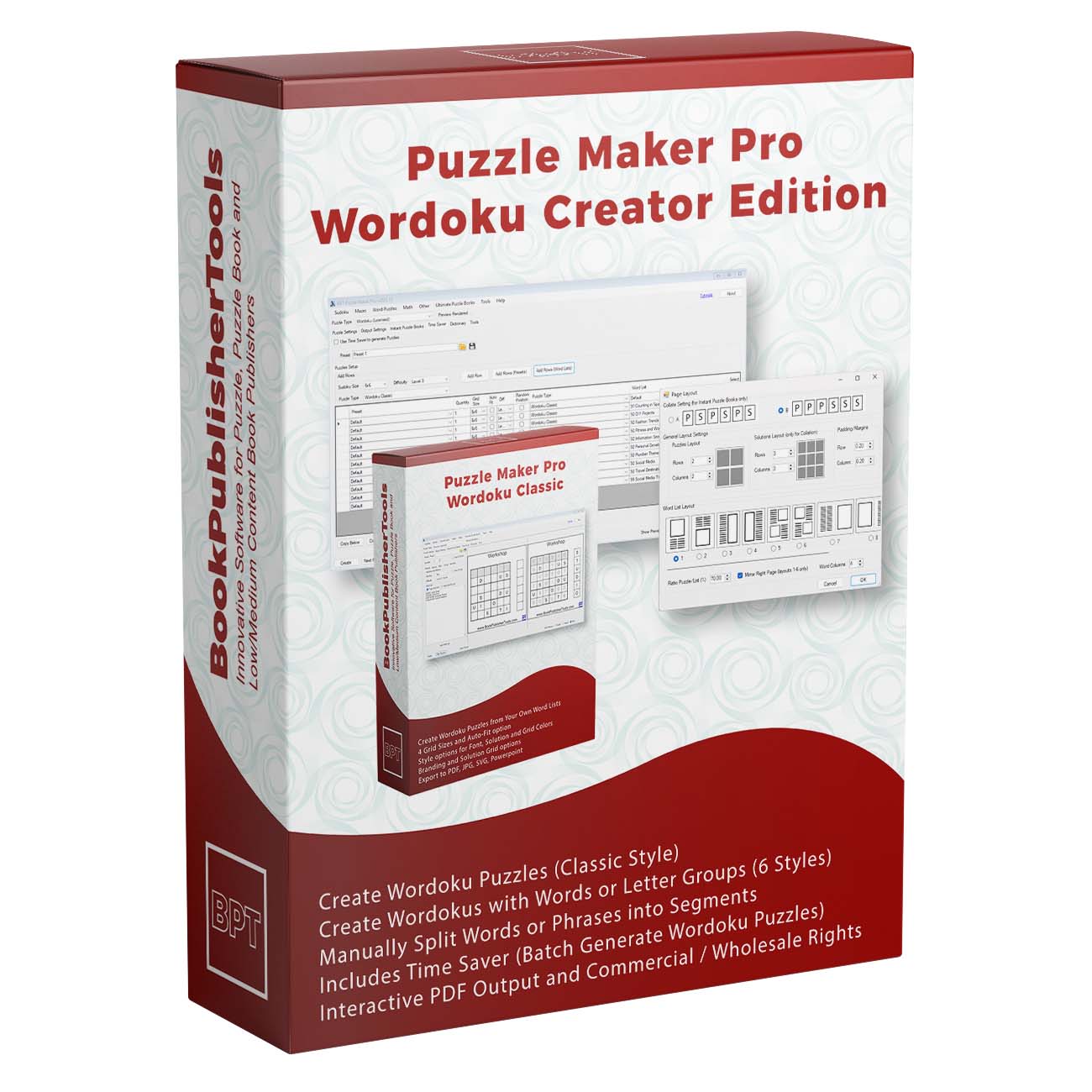
Wordoku Creator Edition adds the advanced publishing workflow: creator puzzle modes, larger word-list handling, Time Saver batch generation, Interactive PDF output, and commercial reseller/client workflow rights for finished puzzle products.
Start Creating Wordoku Puzzles
A Familiar Puzzle Format With a Fresh Word-Based Twist
Sudoku is already familiar to puzzle solvers. Wordoku keeps that familiar grid logic, but replaces numbers with letters.
That small change opens up a much wider publishing opportunity.
You can create puzzles around:
- Vocabulary words
- Spelling lists
- Language-learning themes
- Holiday terms
- Bible words
- Animal names
- Geography words
- Classroom topics
- Brand or event words
- Niche book themes
- ESL practice
- Printable activity packs
For solvers, Wordoku feels familiar but different.
For creators, it gives you a puzzle format that can connect directly to a theme, subject, lesson, or niche. That matters when you are creating puzzle books, worksheets, or printables that need more personality than a generic number puzzle.
A regular Sudoku page can be useful.
A Wordoku page can be useful and themed.
Why Wordoku Is Useful for Puzzle Publishers and Educators
Many puzzle creators start with source content: a list of words, a vocabulary theme, a classroom topic, or a niche idea for a book.
The challenge is turning that content into enough polished puzzle pages to make a real product.
Doing it manually is slow. You need to choose the word, check whether it fits the grid, build the puzzle, create the solution, format the output, and repeat the process again and again.
Wordoku turns that into a repeatable creation workflow.
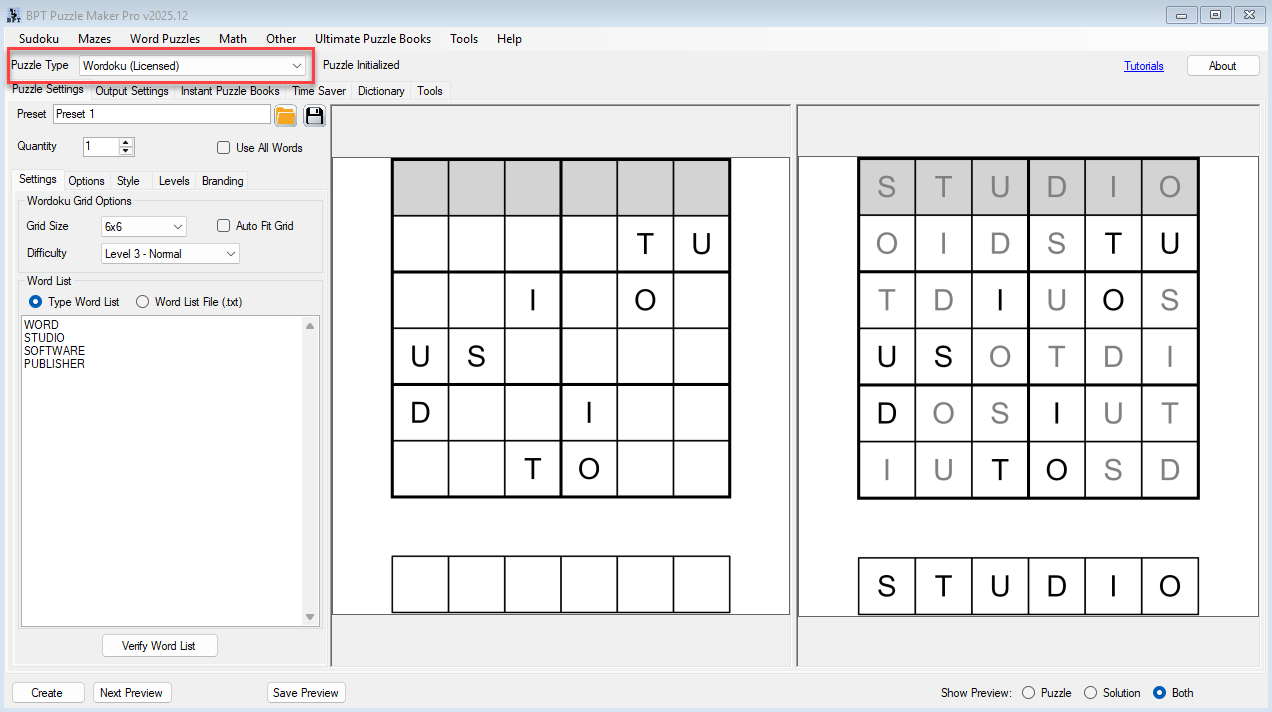
You add your words. You choose your grid size or use Auto-Fit. You generate puzzle pages and solutions. With Wordoku Creator Edition, you can scale the process with advanced puzzle modes and Time Saver batch generation.
That means Wordoku can support:
- One classroom worksheet
- A small printable puzzle pack
- A themed activity download
- A vocabulary review set
- A full KDP puzzle book
- A PLR or client-ready puzzle collection
- An interactive PDF puzzle product
The module is the starting point.
The workflow is where the production value appears.
Create Classic Wordoku Puzzles From Unique-Letter Words
Wordoku Classic is designed for regular Wordoku puzzles using words with unique letters.
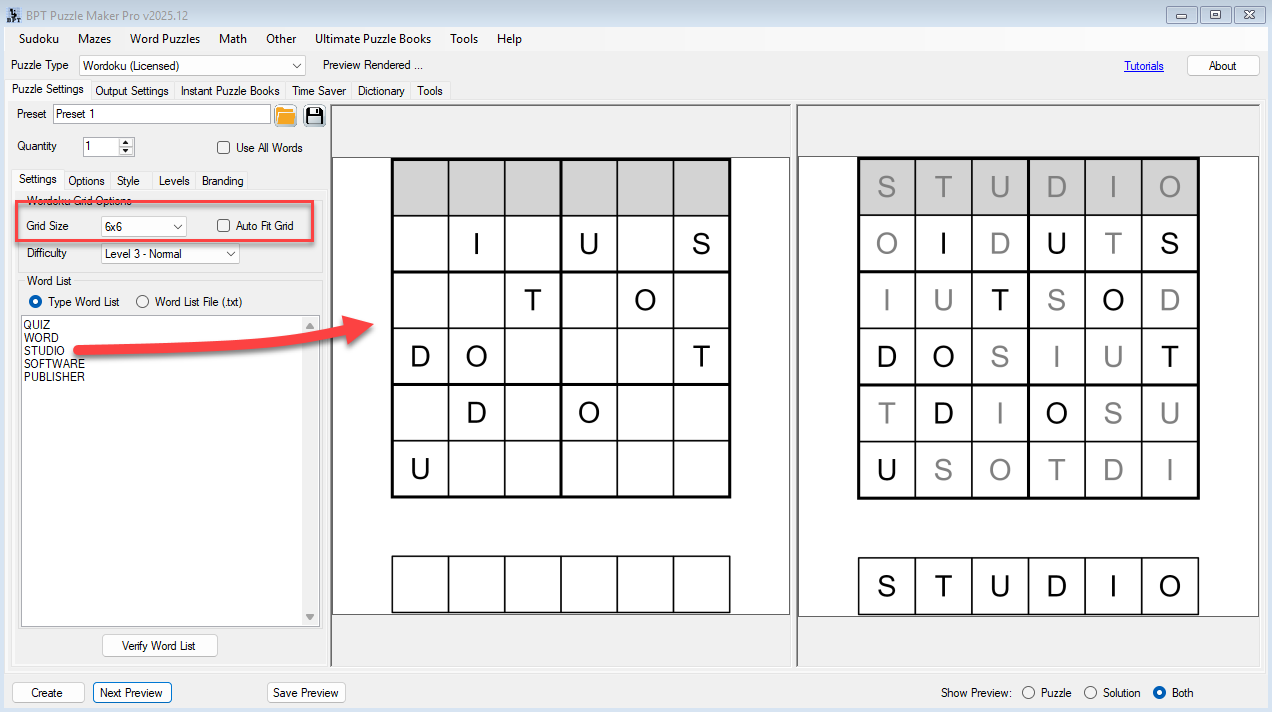
For example, a word like QUIZ can become a 4×4 Wordoku puzzle because each letter appears once. Longer unique-letter words can be used for larger grids.
Wordoku Classic supports:
- 4×4 grids
- 6×6 grids
- 8×8 grids
- 9×9 grids
- Auto-Fit grid selection
- Word-list verification
- Horizontal, vertical, or random word placement
- Puzzle and solution output
- Styling and branding options
- Standard Puzzle Maker Pro export formats, including PDF and SVG
This edition is ideal when you want a clean, direct Wordoku workflow.
A teacher can create vocabulary puzzles for a lesson.
A KDP publisher can generate themed puzzle pages for a book.
A printable seller can create small Wordoku packs for Etsy or TPT.
You do not need to manually test every word by trial and error. Wordoku can check whether words fit your selected settings and skip words that cannot create a valid puzzle.
That is especially useful when you are working with longer word lists.
Use Auto-Fit to Match Words to the Right Grid
Wordoku depends on the relationship between the word and the grid.
A short word may fit a 4×4 puzzle. A longer word may need a larger grid. If a word does not match the selected grid or puzzle mode, it may not be usable in that exact setup.
Auto-Fit helps reduce that friction.
Instead of forcing every word into one fixed grid size, you can let Wordoku choose a suitable grid when possible. This makes it easier to work through a list of words and create valid puzzles without stopping after every failed match.
That matters in real publishing workflows.
If you are building a 50-puzzle or 100-puzzle Wordoku book, you do not want to manually test every word, adjust every grid, and restart the process each time. You want a workflow that helps you move through source content efficiently.
Auto-Fit helps turn word lists into puzzle sets with less manual interruption.
Verify Your Word List Before You Generate
Word lists are powerful, but not every word works in every Wordoku setup.
Some words have repeated letters. Some are too short or too long for the selected grid. Some phrases need special handling. Some combinations work only in Creator Edition puzzle modes.
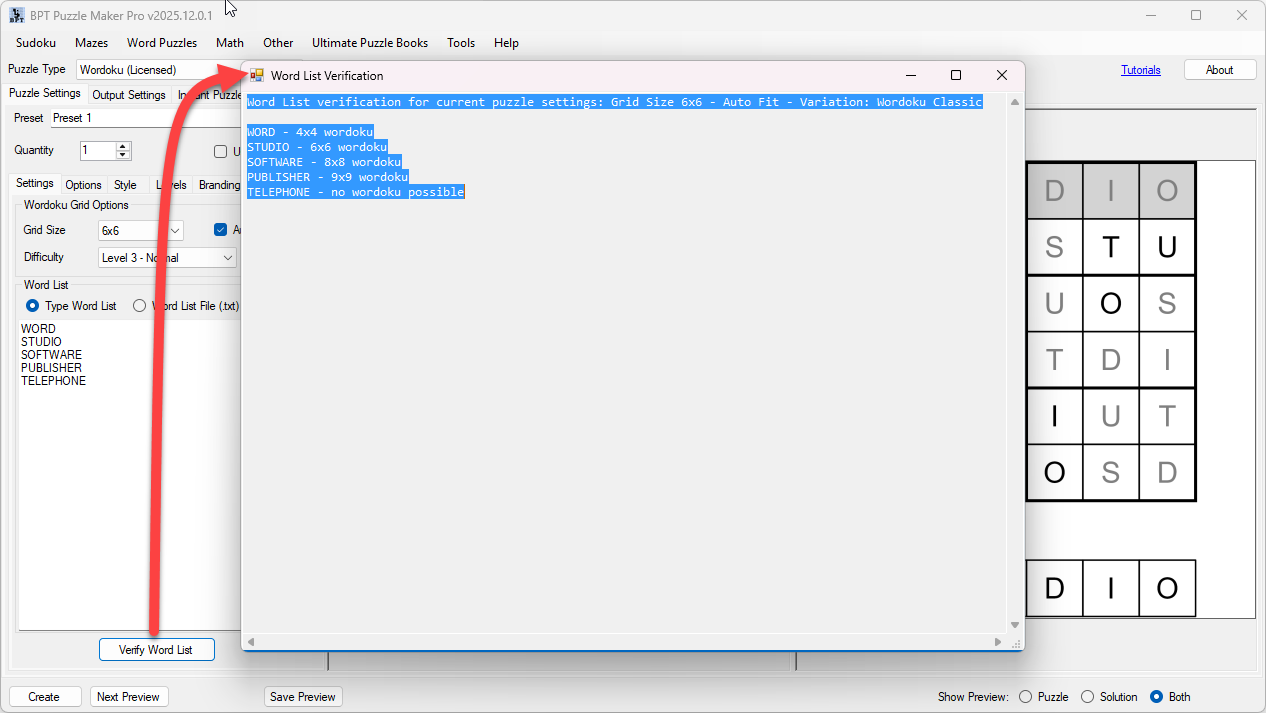
Wordoku includes word-list verification so you can check whether your words fit the current settings before generating your puzzle set.
This helps you avoid wasted time.
You can load a list of 50 to 100 words, test which words are suitable, and use the results to create a more reliable puzzle run. If a word cannot create a valid Wordoku puzzle under the selected rules, the module can report that no Wordoku is possible for that entry.
For publishers and teachers, this is practical. You can clean up your source list before generating pages. For larger workflows, it helps you build puzzle products with fewer surprises.
Show Solutions and Create Answer-Ready Pages
A useful puzzle product needs solutions.
Wordoku can create puzzle pages and solution-enhanced pages, so you can include answer keys in your books, worksheets, printables, and educational resources.
This is important for:
- Classroom handouts
- Teacher answer keys
- Homeschool review pages
- KDP puzzle books
- Etsy printable packs
- TPT resources
- PLR puzzle products
- Client-ready puzzle files
Without automatic solution output, every puzzle creates extra checking work. That slows down production and increases the risk of mistakes.
With Wordoku, puzzle pages and solutions become part of the same creation workflow. You can focus on the theme, structure, and publishing product instead of manually rebuilding answer pages.
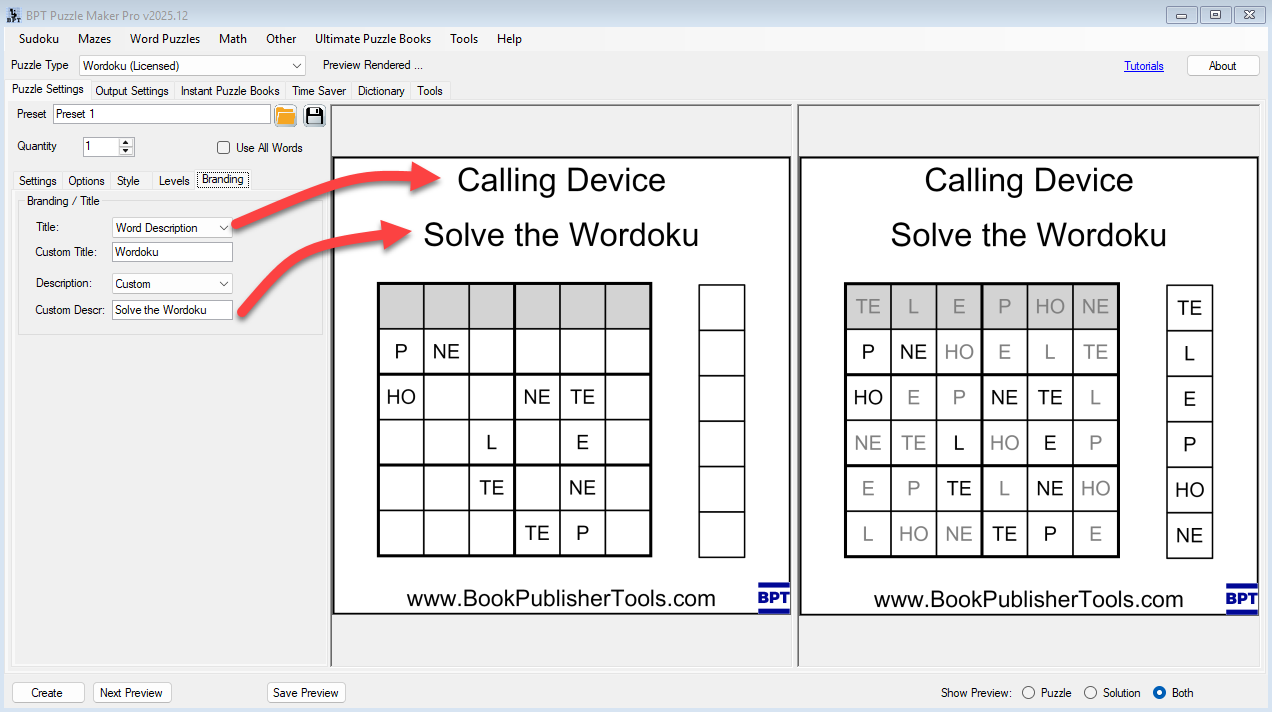
Add Difficulty Labels, Titles, and Branding Text
When you create more than a few puzzle pages, organization matters.
Wordoku includes difficulty labels and branding text options that help you label and structure your output. This can be useful when creating finished products such as puzzle books, educational packs, or printable collections.
You might create pages titled around:
- Easy Wordoku
- Holiday Wordoku
- Animal Wordoku
- ESL Vocabulary Wordoku
- 4×4 Beginner Wordoku
- 9×9 Challenge Wordoku
- Custom titles for your own book or brand
For teachers, clear labels help students understand the activity.
For publishers, titles and difficulty markers help the interior feel more structured.
For printable sellers, consistent naming makes the resource look more complete and professional.
Small details like this matter when you are creating products people will actually use, print, review, or buy.
Wordoku Creator Edition: Go Beyond Classic Unique-Letter Words
Classic Wordoku is useful, but traditional Wordoku has a natural limitation: regular Wordoku works best with unique-letter words.
That cuts out many useful words, phrases, quotations, names, and vocabulary items.
Wordoku Creator Edition is built for creators who need more flexibility.
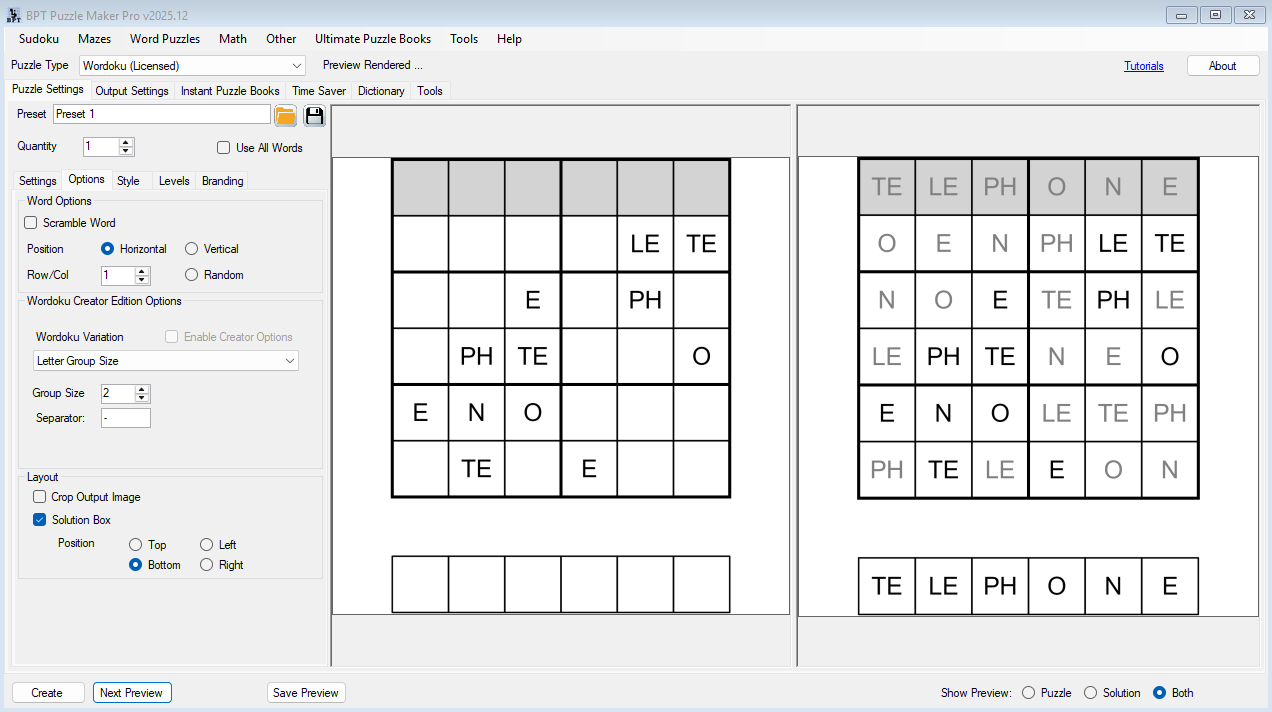
It adds advanced puzzle modes that let you work with more complex source content, including longer words, repeated letters, phrases, and controlled letter grouping.
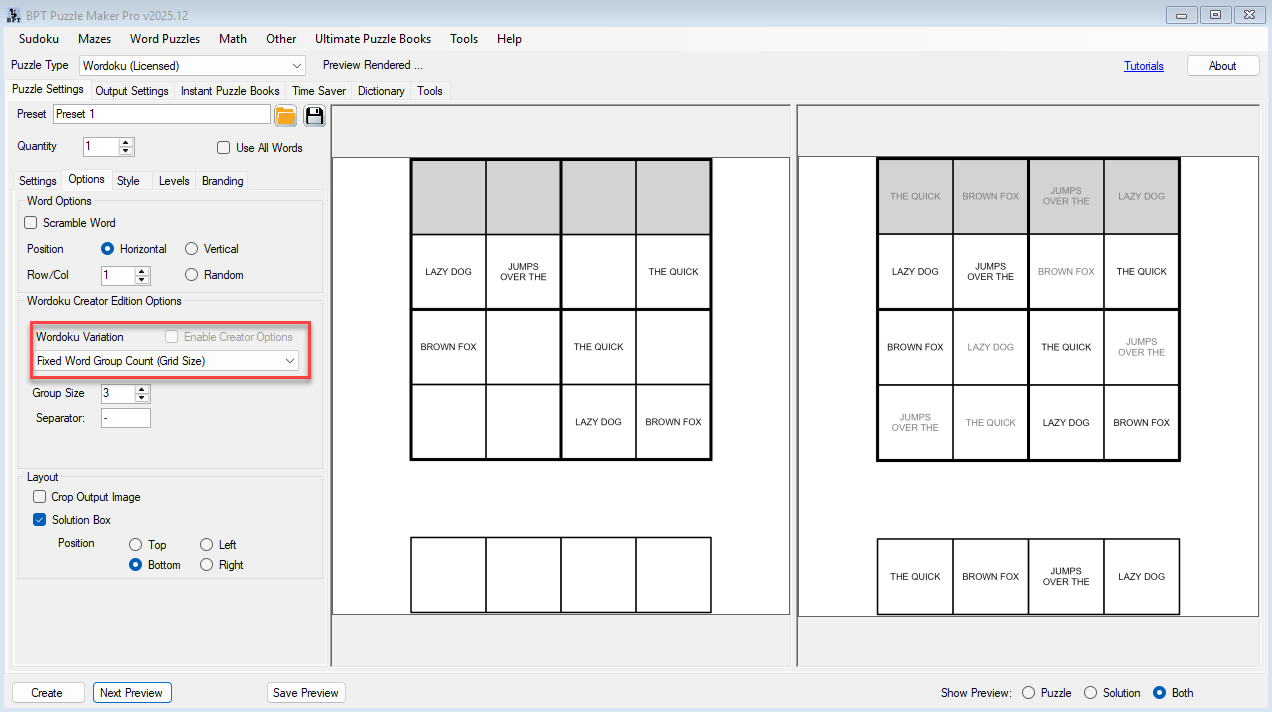
Creator Edition includes advanced modes such as:
- Fixed Group Size
- Fixed Group Count
- Unique Words
- Combine Words to Fit
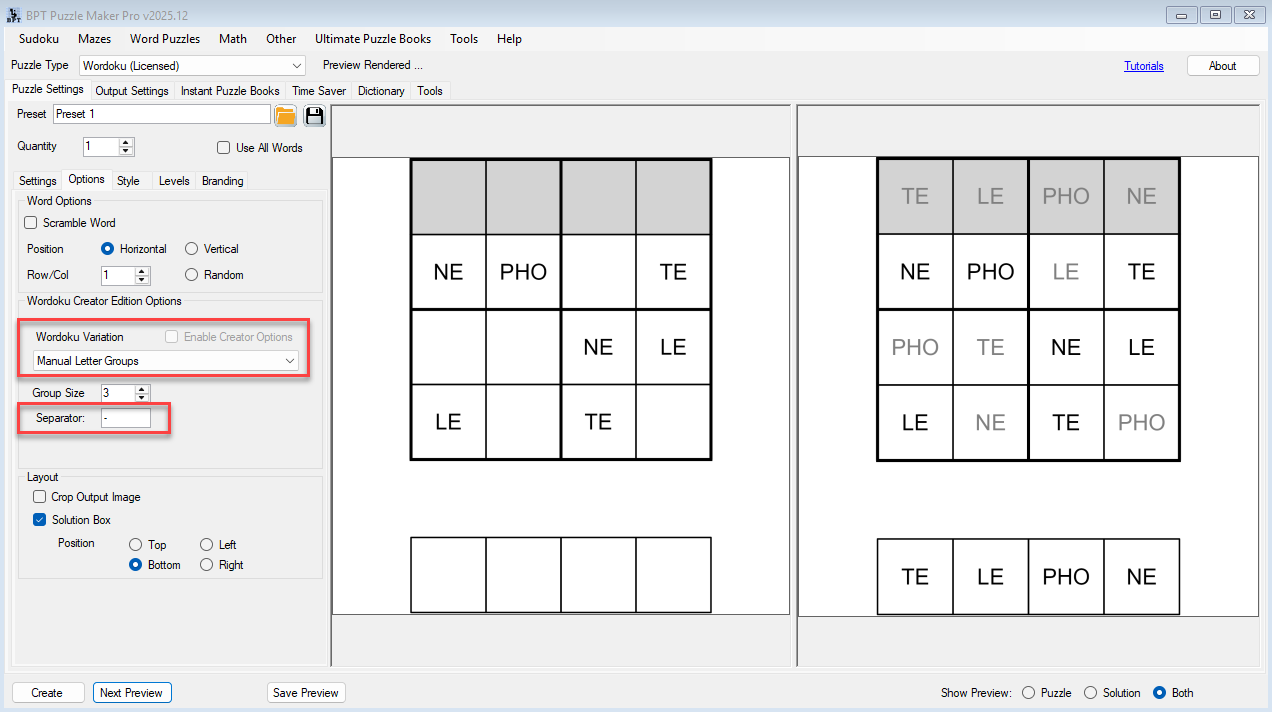
- Manual Split – Letters
- Manual Split – Phrase
These modes give you more ways to turn source text into a valid puzzle layout.
That matters when you are building themed books or educational resources. A word list rarely contains only perfect unique-letter words. A real vocabulary list may include repeated letters. A quote or phrase may need to be split into groups. A themed book may require words that do not fit classic rules cleanly.
Wordoku Creator Edition gives you more control over how those words and phrases become puzzles.
From One Puzzle to a Full Wordoku Book
You can use Wordoku in a simple way: add one word, create one puzzle, export it, and use it.
But the bigger value appears when you think in collections.
A practical Wordoku publishing workflow might look like this:
- Choose a theme, such as animals, travel, Bible words, science vocabulary, or holiday terms.
- Prepare a word list of 50 to 100 words.
- Use Auto-Fit and verification to identify suitable puzzle entries.
- Generate puzzle pages and solution pages.
- Add titles, difficulty labels, and consistent styling.
- Export the pages for print or digital use.
- Assemble the pages into a puzzle book, worksheet pack, or printable collection.
- Reuse the same workflow for another theme or audience.
That progression is important.
You are not just making one puzzle. You are creating a repeatable source-content-to-puzzle workflow.
A 50-word list can become a small puzzle book.
A 100-word list can become a larger themed collection.
A set of related word lists can become a series of books, printable packs, or classroom resources.
That is where Wordoku becomes more than a puzzle generator.
Use Time Saver to Generate Larger Wordoku Sets
For small projects, single puzzle generation may be enough.
For larger publishing workflows, Time Saver is the multiplier.
With Wordoku Creator Edition, Time Saver lets you create batch puzzle runs using stored row settings. Each row can use its own setup, such as quantity, grid size, Auto-Fit, difficulty, random position, puzzle mode, and optional word-list file.
This means you can plan a larger Wordoku product before generating it.
For example, one Time Saver setup might include:
- 20 easy 4×4 Wordoku puzzles
- 20 medium 6×6 Wordoku puzzles
- 20 advanced 8×8 Wordoku puzzles
- 20 challenge 9×9 Wordoku puzzles
- 20 phrase-based Creator Mode puzzles
Instead of manually changing settings again and again, you can structure the puzzle collection and generate larger sets more efficiently.
This is especially useful for:
- KDP puzzle book creators
- Etsy printable sellers
- TPT resource creators
- PLR puzzle sellers
- Client-work creators
- Publishers building repeatable puzzle products
The goal is not only to create faster.
The goal is to create in a way you can reuse.
Create Interactive PDF Wordoku Products
Wordoku Creator Edition adds Interactive PDF output.
This gives you another publishing option beyond static print files. Instead of only creating printable pages, you can create interactive Wordoku puzzle files for digital use.
Interactive PDF output is useful for:
- Digital activity packs
- Classroom computer activities
- Printable-plus-digital bundles
- Lead magnets
- Client engagement resources
- Educational digital downloads
- Premium versions of worksheet packs
For many creators, the ability to offer both printable and interactive versions makes a product feel more complete.
A teacher may want printed worksheets for class and interactive versions for independent practice.
A TPT seller may offer a printable pack plus a digital activity version.
A client may want branded puzzles that are easier to distribute digitally.
Wordoku Creator Edition gives you that additional output path.
Build Themed Puzzle Products Faster
Wordoku works especially well when you think in themes.
Because each puzzle is based on a word, your source list can shape the identity of the entire product.
You could create:
- Animal Wordoku puzzle books
- Christmas Wordoku printables
- Bible Wordoku activity books
- ESL vocabulary Wordoku worksheets
- Geography Wordoku packs
- Science vocabulary puzzle pages
- Kids spelling Wordoku sets
- Travel-themed puzzle books
- Wedding or event puzzle packs
- Branded client activity sheets
- Holiday classroom resources
- PLR Wordoku puzzle bundles
This makes Wordoku useful for marketplace differentiation.
A generic Sudoku book is built around numbers. A Wordoku book can be built around a niche. That gives you more creative room when designing book interiors, printable packs, educational resources, and themed puzzle products.
You can reuse the same workflow again and again with new source lists.
One workflow. Many possible products.
Real-World Ways to Use Wordoku
Create a KDP Wordoku Puzzle Book
Start with a themed list of 50 to 100 words. Use Wordoku to generate puzzle pages and solution pages, then assemble the results into a complete puzzle book workflow.
You might create an animal-themed Wordoku book, a travel Wordoku book, a Bible word puzzle book, or a kids vocabulary activity book.
Best for: KDP publishers and puzzle book creators
Output: Puzzle pages, solutions, and themed book-ready content
Build Classroom Vocabulary Worksheets
Turn weekly vocabulary, spelling words, or subject terms into Wordoku puzzles.
Students get a logic activity that also reinforces word recognition. Teachers get printable pages and solutions without building every puzzle by hand.
Best for: teachers, tutors, homeschool parents, ESL instructors
Output: classroom worksheets, review pages, vocabulary activities
Create Etsy or TPT Printable Packs
Use Wordoku to create themed worksheet bundles for holidays, seasons, classroom topics, or educational niches.
You can create printable packs with puzzle pages, solution pages, title labels, and consistent styling.
Best for: Etsy sellers, TPT sellers, educational printable creators
Output: downloadable puzzle packs and worksheet bundles
Produce PLR or Client-Ready Puzzle Sets
With Wordoku Creator Edition, you can create larger finished puzzle products for client, wholesale, PLR, or reseller workflows.
Use Time Saver to batch-generate puzzle sets, then package the finished files for the intended publishing use.
Best for: PLR sellers, agencies, service providers, commercial puzzle creators
Output: finished puzzle products for clients or reseller workflows
Add Digital Versions With Interactive PDF
Create interactive Wordoku puzzle files for digital delivery.
This is useful when you want to offer a digital version alongside printable puzzle pages or create activity products that are easier to use on-screen.
Best for: teachers, TPT sellers, client projects, digital printable creators
Output: Interactive PDF Wordoku activities
Built for Teachers, Publishers, and Printable Sellers
For KDP Puzzle Book Publishers
You need enough puzzle pages to create a real book, not just a handful of examples.
Wordoku helps you turn themed word lists into puzzle pages and solutions. With a list of 50 to 100 suitable words, you can generate enough content for a complete Wordoku puzzle book workflow.
Wordoku Creator Edition adds more flexibility for longer words, phrases, repeated letters, and batch creation, making it better suited for larger publishing projects.
The main value is repeatable production: build a workflow once, then reuse it for another niche, theme, or book idea.
For Teachers and Tutors
You need activities that support the lesson without taking hours to prepare.
Wordoku lets you create puzzle worksheets from vocabulary words, spelling lists, language-learning topics, or subject terms.
Students get a logic challenge. You get printable pages and solutions.
For quick classroom needs, Wordoku Classic may be enough. For larger sets, phrase-based content, or digital activities, Wordoku Creator Edition gives you more options.
For Etsy and TPT Sellers
Printable resources need to feel useful, organized, and different enough to sell.
Wordoku gives you a format that can be themed around specific audiences: kids, ESL learners, holidays, seasons, homeschool subjects, classroom units, or niche vocabulary packs.
You can create your own finished products for Etsy, TPT, Gumroad, or your own website. If you create finished puzzle products for clients or other sellers to resell, choose Wordoku Creator Edition.
For PLR Sellers and Client Work
Some creators need more than personal publishing rights.
Wordoku Creator Edition is designed for productivity-level workflows, including Time Saver batch generation, advanced puzzle modes, Interactive PDF output, and rights for finished puzzle products used in client, PLR, wholesale, or reseller workflows.
The software itself may not be resold, shared, repackaged, redistributed, or transferred. Reseller rights apply to finished puzzle products created with the software.
How Wordoku Fits Into Puzzle Maker Pro
Wordoku is one module inside the broader Puzzle Maker Pro workflow.
The module creates the puzzle pages. Word-list verification helps check whether your source content fits. Auto-Fit helps reduce setup friction. Creator modes expand what kind of words and phrases you can use. Time Saver helps generate larger sets. Puzzle Book Studio can help assemble puzzle pages into larger printable products and book-style layouts.
That means your workflow can move from:
one puzzle → word-list variations → printable pack → full puzzle book → reusable publishing system
This is the core advantage of Puzzle Maker Pro.
You are not limited to isolated puzzle pages. You can build repeatable puzzle workflows that help you create more consistent publishing products over time.
Wordoku Classic or Wordoku Creator Edition?
Choose the edition based on how you want to create and use your finished Wordoku products.
| Edition | Best For | Rights and Workflow |
|---|---|---|
| Wordoku Classic | Creating regular Wordoku puzzles from unique-letter words | Ideal for your own puzzle books, worksheets, printables, classroom use, KDP, Etsy, and TPT products |
| Wordoku Creator Edition | Larger workflows, advanced word/phrase handling, Time Saver, Interactive PDF, PLR/client/reseller workflows | Includes advanced puzzle modes, Time Saver batch generation, Interactive PDF output, and rights for finished puzzle products used in client, PLR, wholesale, or reseller workflows |
Choose Wordoku Classic if you want to:
- Create regular Wordoku puzzles
- Use unique-letter words
- Work with 4×4, 6×6, 8×8, and 9×9 grids
- Use Auto-Fit to help match words to grid size
- Verify whether words fit your selected settings
- Create your own puzzle books, worksheets, and printables
- Sell your own finished products on KDP, Etsy, TPT, Gumroad, or your own website
Choose Wordoku Creator Edition if you want to:
- Use advanced puzzle modes
- Create puzzles from longer words, phrases, or repeated-letter content
- Use Time Saver batch generation
- Generate larger puzzle sets faster
- Create Interactive PDF Wordoku activities
- Create finished puzzle products for clients
- Create PLR or wholesale puzzle packs
- Create finished products that another person or business can resell
Important: Wordoku Creator Edition rights apply to finished puzzle products only. The Puzzle Maker Pro software itself may not be resold, redistributed, shared, repackaged, sublicensed, or transferred.
Feature Comparison
| Feature | Wordoku Classic | Wordoku Creator Edition |
|---|---|---|
| Letter-based Sudoku-style puzzles | ✓ | ✓ |
| 4×4, 6×6, 8×8, and 9×9 grids | ✓ | ✓ |
| Auto-Fit grid selection | ✓ | ✓ |
| Word-list verification | ✓ | ✓ |
| Horizontal, vertical, and random placement | ✓ | ✓ |
| Difficulty labels | ✓ | ✓ |
| Puzzle and solution output | ✓ | ✓ |
| Styling and branding options | ✓ | ✓ |
| Standard export formats, including PDF and SVG | ✓ | ✓ |
| Advanced puzzle modes | — | ✓ |
| Longer words and phrase-based workflows | — | ✓ |
| Repeated-letter / grouped-letter workflows | — | ✓ |
| Time Saver batch generation | — | ✓ |
| Interactive PDF output | — | ✓ |
| PLR, client, wholesale, and reseller workflow rights for finished puzzle products | — | ✓ |
What You Can Create and Sell
With the appropriate edition, you can create finished Wordoku products such as:
- PDF puzzle books
- Printable Wordoku worksheets
- Classroom vocabulary puzzles
- ESL activity packs
- Homeschool puzzle resources
- Etsy printable puzzle packs
- TPT educational resources
- KDP Wordoku books
- Puzzle images
- Answer-key collections
- Interactive PDF puzzle activities
- PLR puzzle packs, with Wordoku Creator Edition
- Client-ready puzzle products, with Wordoku Creator Edition
- Wholesale or reseller-ready finished puzzle products, with Wordoku Creator Edition
Wordoku Classic is enough when you are creating and selling your own finished products directly to end users.
Wordoku Creator Edition is required when you are creating finished puzzle products that other people, clients, businesses, publishers, wholesale buyers, or PLR customers can resell.
Output Formats and Publishing Options
Wordoku supports the standard Puzzle Maker Pro export formats, including PDF and SVG.
That makes it useful for print and printable workflows such as:
- KDP puzzle books
- Etsy downloads
- TPT resources
- Classroom worksheets
- Homeschool activity packs
- Printable puzzle bundles
- Puzzle images for layout workflows
Wordoku Creator Edition adds Interactive PDF output for digital puzzle workflows.
That gives you another way to use your Wordoku content, especially when creating digital activity packs, interactive classroom materials, or premium printable-plus-digital products.
Technical Details
| Detail | Wordoku Information |
|---|---|
| Platform | Windows software |
| Internet | Works offline after installation |
| Demo | Free demo available |
| Demo limitations | Unlicensed modules create watermarked puzzle outputs |
| Delivery | Digital download from the member area after purchase |
| Updates | Lifetime updates included |
| Refunds | No refunds; use the free demo before purchasing |
| Wordoku Classic rights | Create your own finished puzzle books, worksheets, printables, and educational resources |
| Wordoku Creator Edition rights | Adds productivity-level workflow features and reseller/client rights for finished puzzle products |
| Software resale | Not allowed |
FAQ
What is Wordoku?
Wordoku is a Sudoku-style puzzle that uses letters instead of numbers. The puzzle follows Sudoku-style logic, while the hidden solution spells a word, phrase, or themed text depending on the edition and settings used.
What is the difference between Wordoku Classic and Wordoku Creator Edition?
Wordoku Classic is for regular Wordoku puzzles using unique-letter words. Wordoku Creator Edition adds advanced puzzle modes, Time Saver batch generation, Interactive PDF output, and rights for finished puzzle products used in PLR, client, wholesale, or reseller workflows.
Can I create a full puzzle book with Wordoku?
Yes. If you prepare a suitable word list of 50 to 100 words, you can generate enough Wordoku puzzle pages and solutions for a complete puzzle book workflow. You can then assemble the pages into your book or printable product.
Do all words work in Wordoku?
No. Wordoku depends on the selected grid size, puzzle mode, Auto-Fit setting, and word structure. Wordoku can verify whether words fit your selected settings, and Creator Edition gives you more options for phrases, repeated letters, and grouped-letter workflows.
Can I use non-English alphabets?
Yes. Wordoku works with most fonts, including Asian and Arabic character sets, depending on the fonts installed on your system and the characters used in your word list.
Can I sell Wordoku puzzles on KDP, Etsy, or TPT?
Yes. Wordoku Classic is suitable when you create your own finished puzzle books, worksheets, printables, or educational resources and sell them directly to end users.
Do I need Wordoku Creator Edition for KDP or Etsy?
Not if you are selling your own finished products directly to end users. Wordoku Classic can be enough for that workflow. Choose Wordoku Creator Edition if you need advanced puzzle modes, Time Saver, Interactive PDF output, or reseller/client workflow rights.
Can I create PLR puzzle packs or client products?
Yes, with Wordoku Creator Edition. Creator Edition is the correct choice when you create finished Wordoku puzzle products for PLR, clients, wholesale buyers, agencies, publishers, or other sellers who may resell the finished products.
Can I resell the software?
No. Reseller rights apply only to finished puzzle products created with the software. The Puzzle Maker Pro software itself may not be resold, redistributed, shared, repackaged, sublicensed, or transferred.
Does Wordoku include Interactive PDF output?
Interactive PDF output is included in Wordoku Creator Edition. Wordoku Classic supports the standard static export formats, including PDF and SVG.
Does the software work offline?
Yes. Puzzle Maker Pro is Windows desktop software and works offline after installation, except for account access, downloads, updates, and online resources.
Is there a free demo?
Yes. The free demo lets you test Puzzle Maker Pro modules before purchasing. Unlicensed modules create watermarked outputs, so you can evaluate the workflow before buying.
Are updates included?
Yes. Lifetime updates are included.
Do you offer refunds?
No. There are no refunds. Please download and test the free demo before purchasing to make sure the software works for your needs.
Start Creating Wordoku Puzzle Products
Wordoku gives you a practical way to turn word lists, vocabulary themes, and phrases into puzzle pages your audience can solve, print, use, or buy.
Start small with one puzzle.
Build a printable pack.
Generate a 50-puzzle or 100-puzzle book.
Use Creator Edition to scale into advanced, interactive, client-ready, or reseller-friendly workflows.
Choose the edition that matches your publishing goals and start creating Wordoku puzzles today.
Choose Your Wordoku Edition
Not sure yet? Download the free Puzzle Maker Pro demo and test the Wordoku workflow with watermarked output before purchasing.


