


Short Words Stay Blank. Long Words Show Letters by the Ratio.
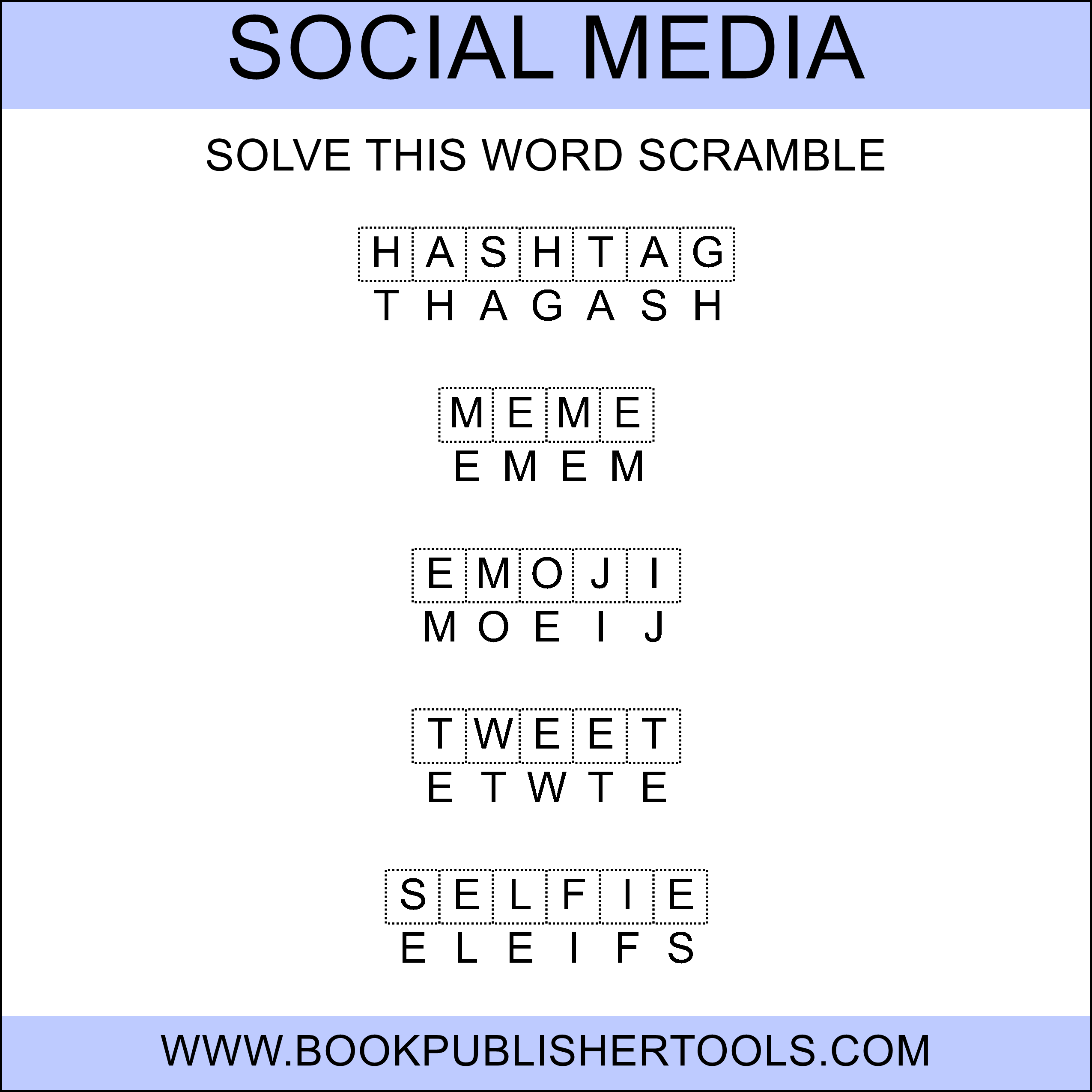
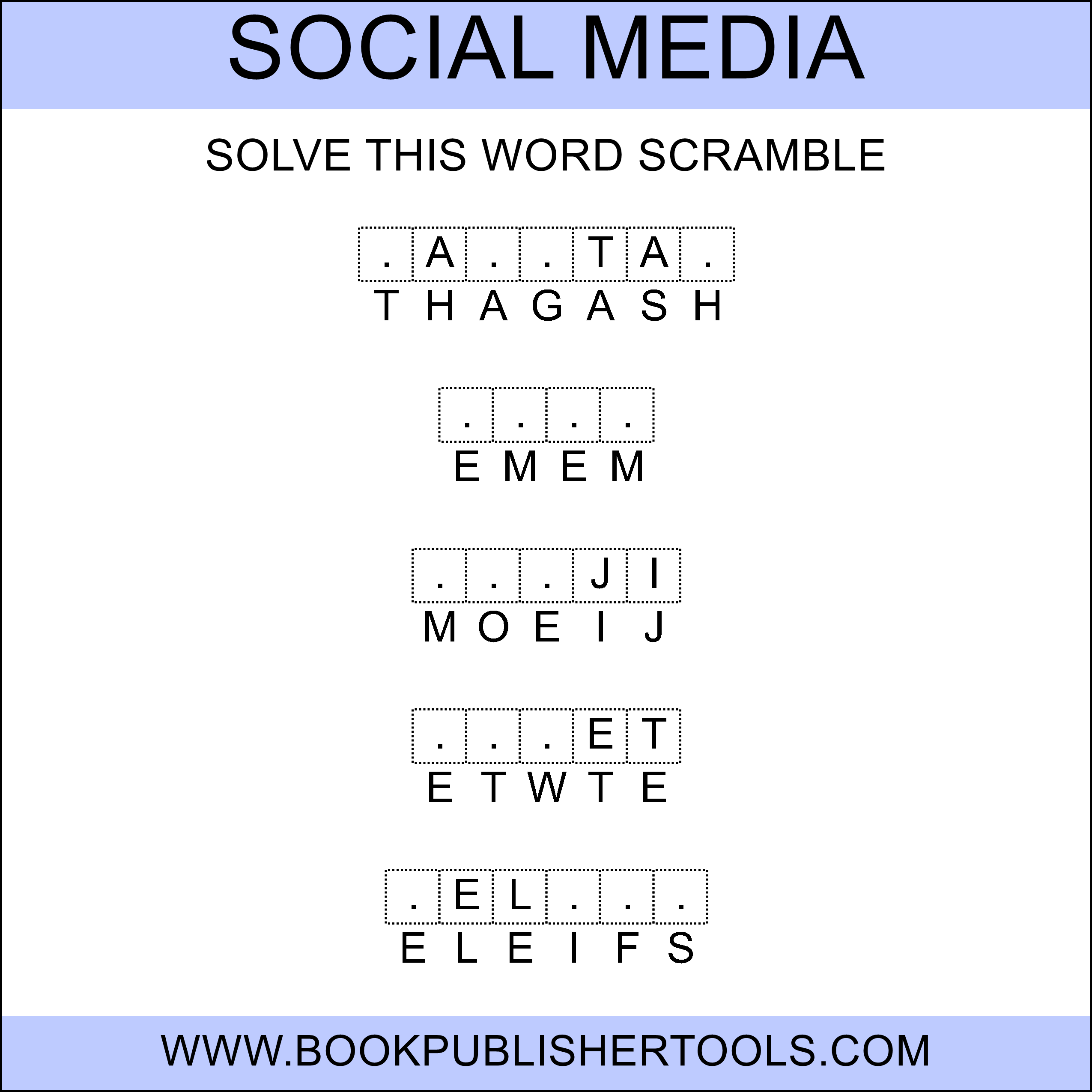
A five-letter word and a twelve-letter word are not the same puzzle. A flat hint count treats them as if they were. Turn hints on and Word Scramble reveals letters in proportion to length: one letter per stretch of the word, and only after the word clears the length you set. Words that are not longer than that length stay fully blank. The solver still has to put the letters back. The page does not hand over the word.
Paste the list. The scrambled row, the blanks, and the matching answer key build from that one setting. No letter-shuffling by hand. Fun Friday is still this week’s words. The ones already done get the cold sheet, not a different list.
Why a Scramble Book Earns the Next Slot
Everyone already knows the rule. Letters out of order. Write the word. That is why a scramble page still works as Fun Friday and as the early-finisher sheet that is still the week’s words. The listing dies when every page dumps the same hint count on every word, or reprints the same list until the shopper can finish it in seconds.
You set the hint ratio, how long a word has to be before any letter shows, and whether the page holds one word or a full row. Five is the usual start. Related words can stay in the order you typed. Or you shuffle the set when a reused sequence would read as a reprint.
The spelling book gets harder as the words get longer, without hiding letters by hand. Paste once. Short words stay blank. Long words carry the reveals. The rest of the interior is more list, not more work.
What You Can Create
- A spelling worksheet from this week’s list, hints on for the support group and off for the cold page.
- A themed vocabulary set (holiday, science, a unit you already teach). The AI Word Assistant can draft that list when you would rather start from a prompt.
- A mixed-skill classroom packet: same words, two hint settings, two sheets.
- A scramble chapter next to the word titles you already ship, at the trim you already keep.
One list handles all of that. Entire List (on by default) turns the whole list into pages at your words-per-image setting.
See the Output


Paste the List. The Ratio Does the Rest.
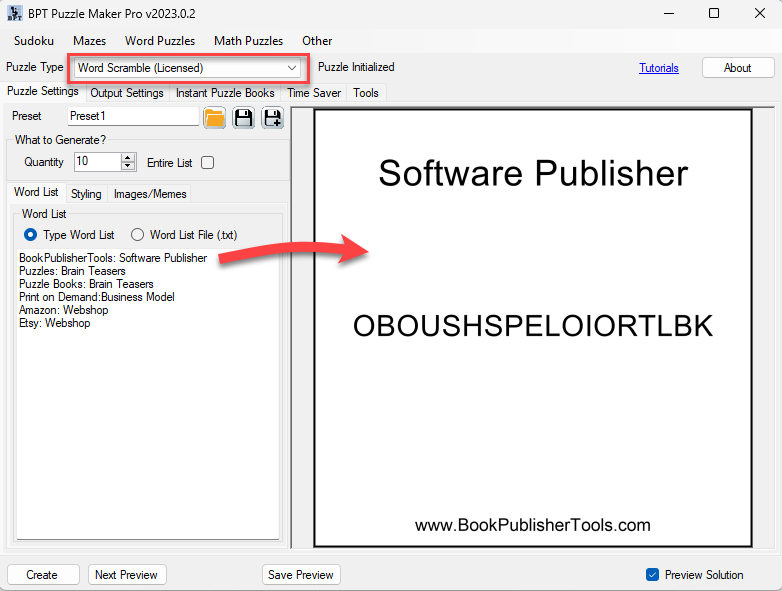
Type the words or load a .txt. Turn on hints when you want a reveal. The ratio follows each word’s length; words that do not clear the length you set stay blank.
Add a description beside a word when the sheet should read as a lesson, not a bare scramble. Blanks on top is the usual worksheet. Flip it when you want the mixed letters first. Style the two rows apart if the scrambled line should look like a different voice from the answer blanks.
Randomize word order inside a set, or the order of sets across pages, when a fixed sequence would let a shopper finish the Look Inside sample and already know page 40.
From One List to a Book You Can List
Entire List turns one file into the puzzle images. Instant Puzzle Books builds the interior from the page settings you already have: margins, trim, titles, page numbers, a title page, a table of contents, and a footer that points each puzzle at its solution page. Export that book as an interactive PDF book and the contents and those puzzle-to-solution links become clickable.
Puzzle Book Studio is on this product: fonts, titles, page numbers, layout. Instant Puzzle Books and Puzzle Book Studio both produce interactive PDF books.
Who This Is For
Publishers listing a word title. What the shopper sees is your list, your hint ratio, and a page that is not another word-search grid. One-time commercial-use license. Watermark-free files you can sell on KDP, Etsy, Teachers Pay Teachers, or your own store.
Teachers and Tutors. The ones who finish early still get this week’s words, just the cold sheet. Same list. Two sheets. Stack them by the tray.
Publishers already in Puzzle Maker Pro. You already keep trim and titles. Drop these scramble pages next to the word books you already ship.
If lining up hint letters by hand is why the listing never happened, paste the list and set the ratio once.
Try It Before You Buy
Run your own list in the free demo. Demo output is watermarked, one puzzle at a time. Paid files are watermark-free.
What Ships With Word Scramble
Word Scramble is this listing: your list, the hint ratio, Entire List, Instant Puzzle Books, and Puzzle Book Studio. Interactive PDF books come from either book builder.
You can add other Puzzle Maker Pro products later.
Licensing and Commercial Use
Word Scramble lets you sell the finished books, worksheets, and printable packs you make to your own readers and customers, on KDP, Etsy, Teachers Pay Teachers, or your own store. One-time commercial-use license. Watermark-free files.
The licence covers the finished books, worksheets, and packs you make for your own readers. If you add your own word lists, they need to be yours, or licensed for the store you sell on.
Product Details
| Product | Puzzle Maker Pro – Word Scramble |
| Platform | Windows desktop |
| Internet required | No for generating; yes for the optional AI Word Assistant |
| Hint system | Off by default. On: 1 hint per N letters (default 3, range 2-10), only for words longer than N (default 5) |
| Words per image | 1 to 15 (default 5) |
| Quantity | A quantity field (default 10), or Entire List (default on) |
| Layout | Puzzle-on-top (default) or scrambled-row-on-top. Optional word description per word |
| Output formats | JPG, PNG, transparent PNG |
| Solution pages | Yes, a matching answer key generated with every puzzle |
| Puzzle books | Instant Puzzle Books; Puzzle Book Studio; title page, table of contents, solution cross-references; interactive PDF books from Instant Puzzle Books or Puzzle Book Studio |
| Upgrades | You can add other Puzzle Maker Pro products later |
| Commercial license | Sell the finished books, worksheets, and packs you make to your own readers and customers |
| Free demo | Yes |
| Delivery | Immediate, in your member area |
Questions Before You Buy
Is there a free demo?
Yes. Puzzle Maker Pro has a free demo. Demo output is watermarked, one puzzle at a time.
Can I upgrade later?
Yes. You can add other Puzzle Maker Pro products after you buy. This page is Word Scramble.
How do the hints work?
They are a ratio, not a dumped answer. One letter per N letters, and only after the word clears the length you set. Shorter words stay fully blank. The solver still has to put the letters back.
Can I put more than one word on a page?
Yes. 1 to 15. Five is the usual start. One word is the large-type page.
Can I use my own word list?
Yes. Type it or load a .txt. The AI Word Assistant can draft a themed set when you want a start list.
Does every puzzle come with a solution?
Yes. Every puzzle writes a matching answer key.
Can I sell the finished books and worksheets I create?
Yes. Word Scramble lets you sell the finished books, worksheets, and printables you make to your own readers and customers.
Do I need the internet to generate?
No. Generation runs offline on Windows. The optional AI Word Assistant needs a connection.
Six Months From Now the Spelling Book and the Friday Packet Are Two Titles
New list, same book settings. Instant Puzzle Books staples the interior. Pick Word Scramble at the top of this page.
Try the free demo, then pick Word Scramble at the top of this page.
Word Scramble tunes hints to each word’s length: short words stay blank, long words show letters by the ratio. Your list, the matching key, Instant Puzzle Books. Try the free demo.


