
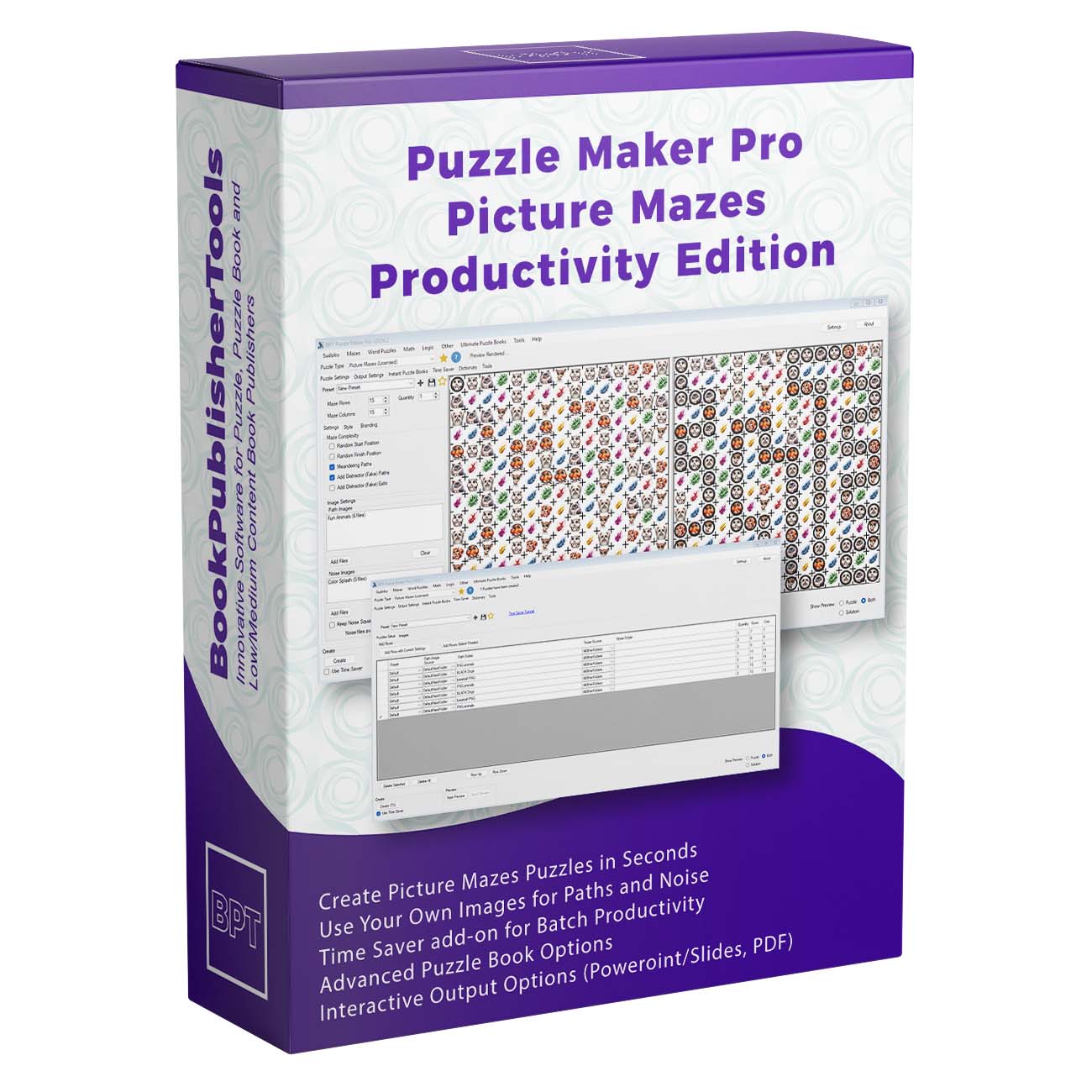




Puzzle Maker Pro – Picture Mazes
Create Visual Maze Puzzles from Image Folders — Then Turn Them into Printable Products
Most maze books rely on familiar line paths, grids, and start-to-finish routes.
They work, but they can also look repetitive — especially when you are trying to create activity books, printable packs, classroom resources, or niche puzzle products that stand out.
Puzzle Maker Pro – Picture Mazes gives creators a more visual way to build maze products. Instead of drawing every path by hand, you choose image folders, define the maze style, control the difficulty, and generate picture-based puzzles with matching solutions.
Use it to create animal mazes, holiday mazes, classroom worksheets, visual tracking activities, themed printable packs, puzzle books, slide activities, and reusable image-based puzzle workflows.

Turn Image Sets into Maze Activities
Picture Mazes turns visual themes into puzzle pages.
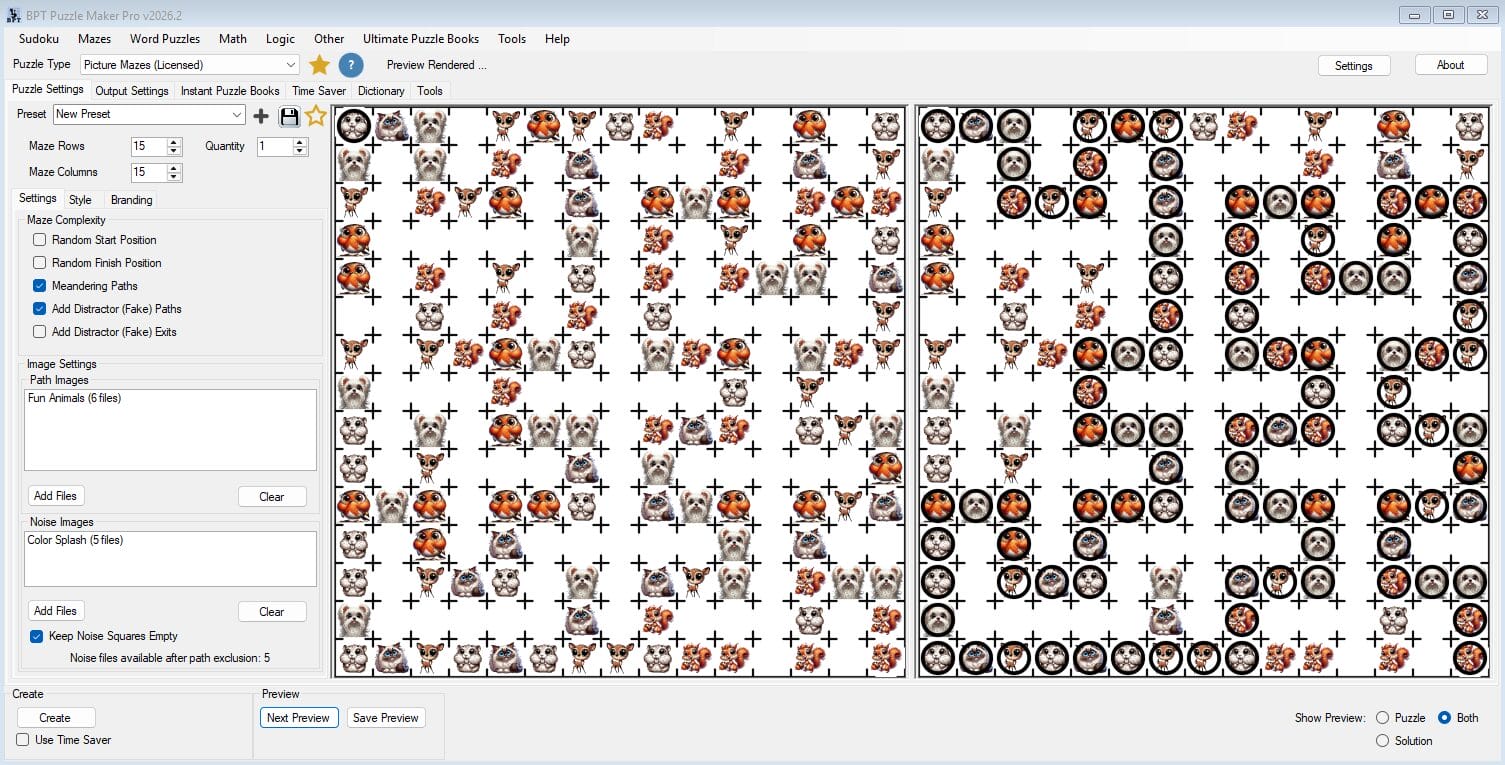
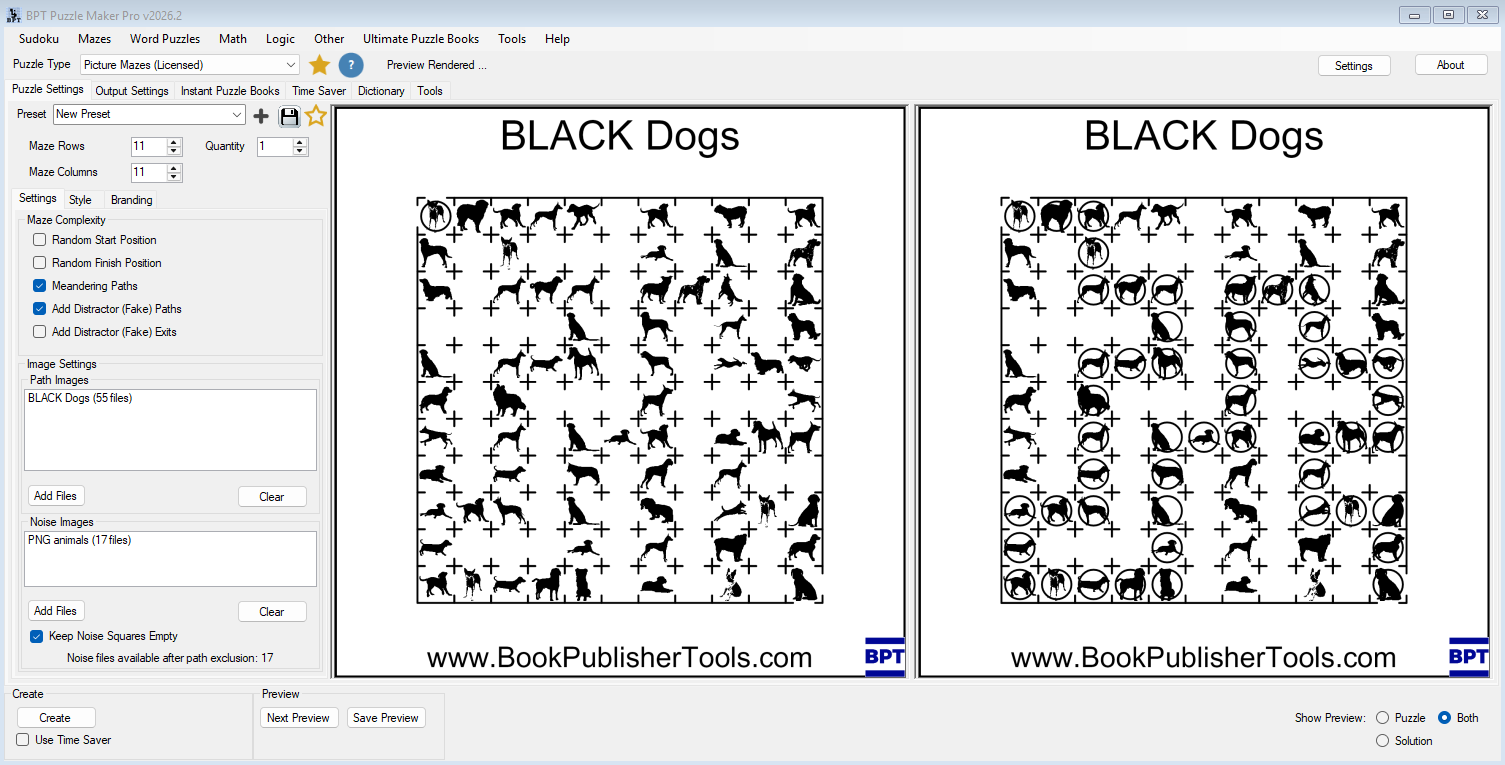
You provide images for the path, add optional noise images for distraction, choose the maze size, and generate a puzzle where solvers follow the correct visual route through the grid.
That simple idea opens up a lot of product possibilities.
A dog image folder can become a dog-themed puzzle pack. A set of ocean animals can become a printable activity bundle. Seasonal clipart can become holiday worksheets. Black-and-white icons can become classroom-friendly activity pages. The same workflow can support one puzzle, a small printable set, a complete workbook, or a larger publishing series.
This is where Picture Mazes becomes more than a maze generator.
It becomes a way to turn themed image collections into repeatable puzzle products.
Why Picture Mazes Are Useful for Publishers and Educators
Picture Mazes are easy to understand at a glance.
The solver does not need long instructions or advanced reading skills. They look for the correct image path and follow it through the maze while avoiding distractors, empty cells, or other image types.
That makes the format especially useful for:
- children’s puzzle books
- early learning activity pages
- classroom worksheets
- homeschool resources
- visual discrimination activities
- low-text puzzle products
- themed Etsy printables
- Teachers Pay Teachers resources
- seasonal and holiday activity packs
- niche KDP activity books
For publishers, the visual format helps create interiors that feel different from standard maze pages. For educators, it gives students an activity that feels playful while still supporting focus, visual tracking, attention, and problem-solving.
And because the puzzle is driven by reusable image folders and settings, you can create new variations without rebuilding every page from scratch.
Build the Puzzle with Path Images and Noise Images
Picture Mazes uses two main image groups.
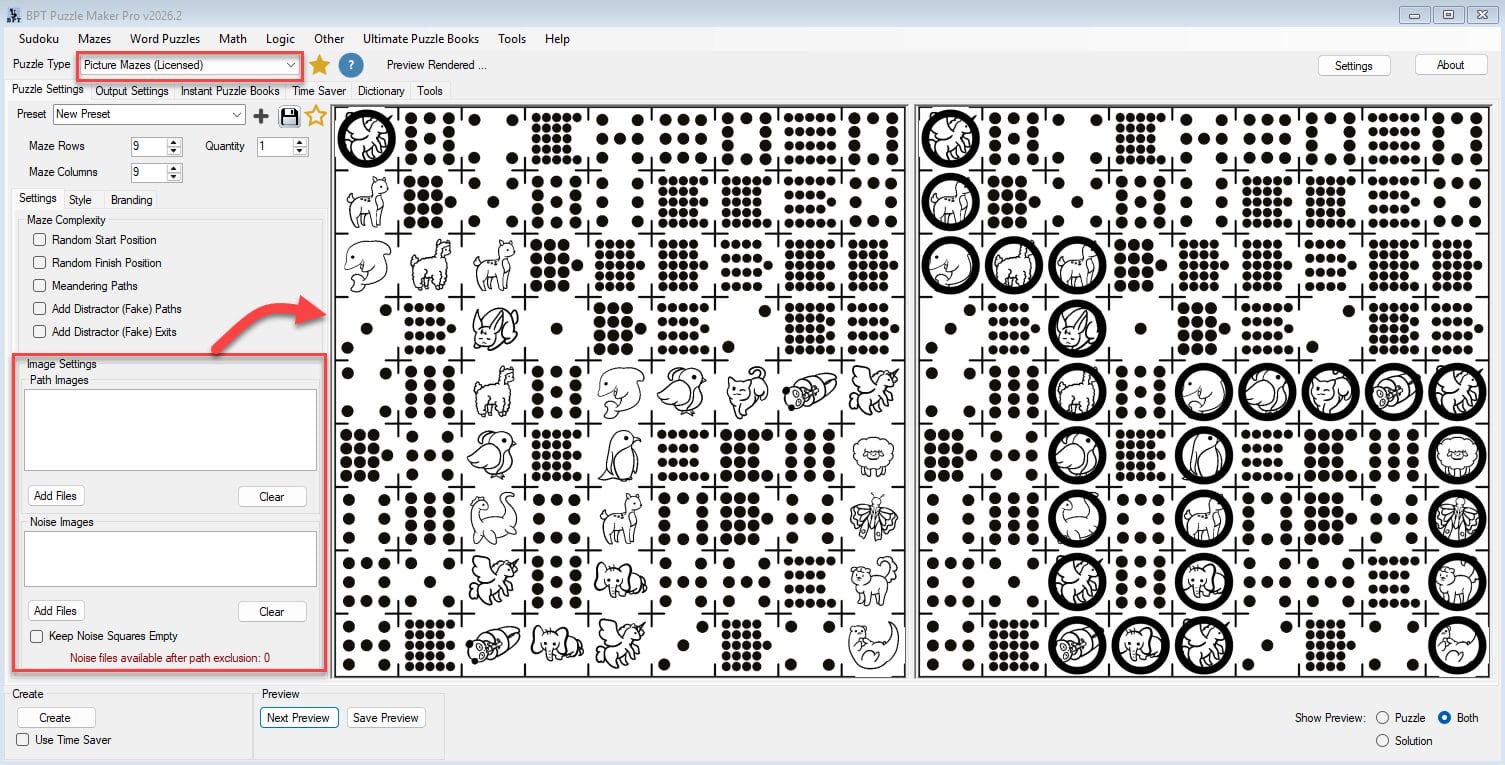
Path images are used on the correct maze route. These are the images the solver should follow.
Noise images are optional images used outside the correct path. These create distraction, variation, and challenge.
You can keep the puzzle simple by leaving noise squares empty, or make it more challenging by filling the grid with visual distractors. You can also use related image groups to create stronger themes — for example, dog silhouettes as the path images and mixed animals as the noise images.
The workflow is flexible enough for both simple worksheets and denser activity-book pages.

This path/noise structure is one of the reasons Picture Mazes works so well for themed publishing. You are not just generating random mazes. You are building puzzle pages from visual assets that match the topic of your product.
Control Difficulty Without Redesigning the Page
A Picture Maze can be quick and beginner-friendly, or it can become a more challenging visual puzzle.
You can adjust the maze rows and columns, randomize start and finish positions, add meandering paths, include fake paths, and add fake exits. Each setting changes how the puzzle feels to the solver.
For younger learners, you might use a smaller grid, cleaner spacing, and empty noise cells. For older children or puzzle book buyers, you might increase the grid size, add distractor paths, and use more visual noise.
This gives you a practical difficulty workflow:
- smaller grids for simple activities
- larger grids for advanced pages
- empty noise squares for cleaner worksheets
- noise images for visual challenge
- meandering paths for less obvious routes
- fake paths for harder puzzles
- fake exits for extra misdirection
Instead of creating each level manually, you adjust the workflow and generate new puzzle variations from the same visual theme.
Create Clean Worksheets or Rich Visual Puzzle Pages
Not every product needs the same visual density.
Some creators want busy, colorful activity pages with lots of visual detail. Others need clean black-and-white worksheets that are easy to print and simple for students to follow.
Picture Mazes supports both directions.
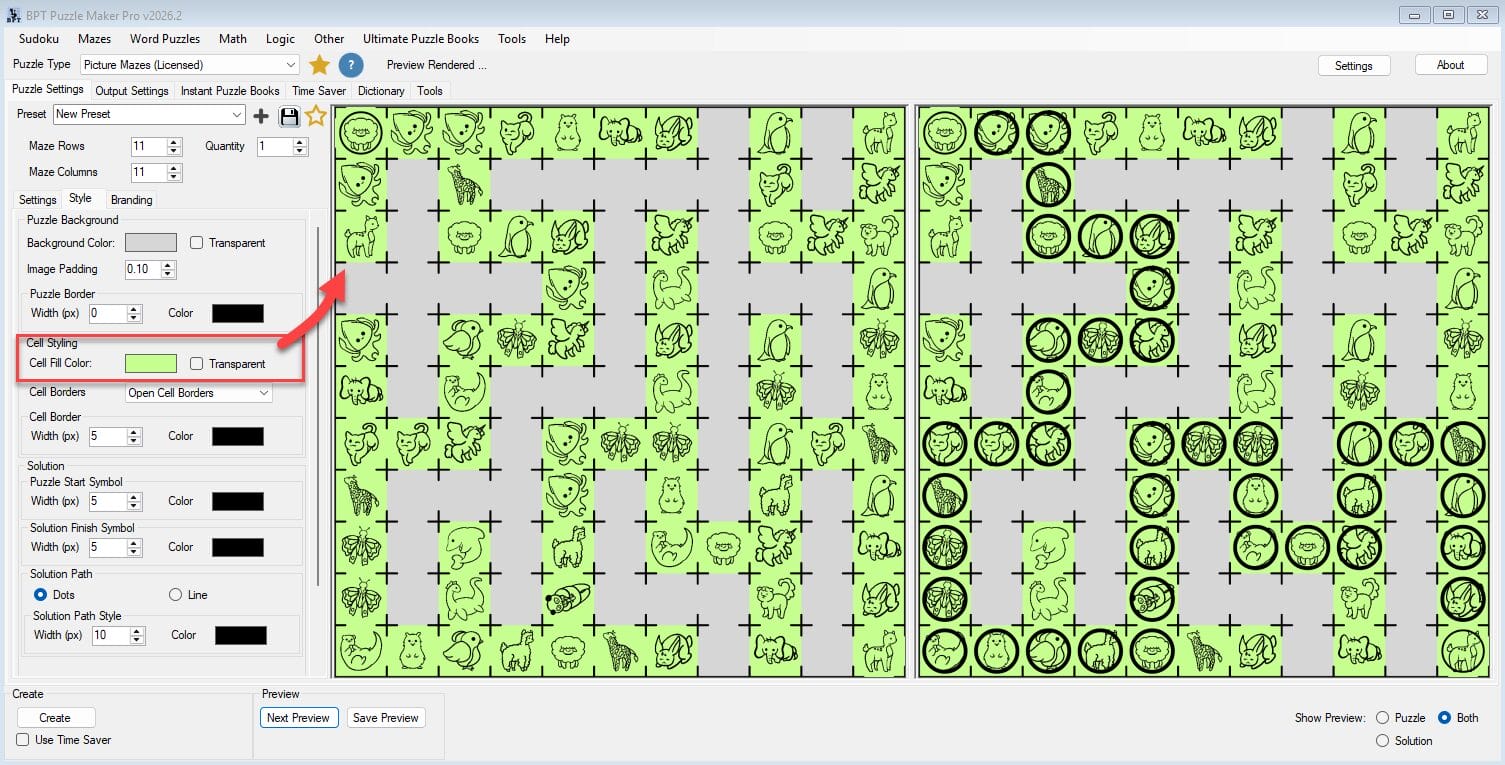
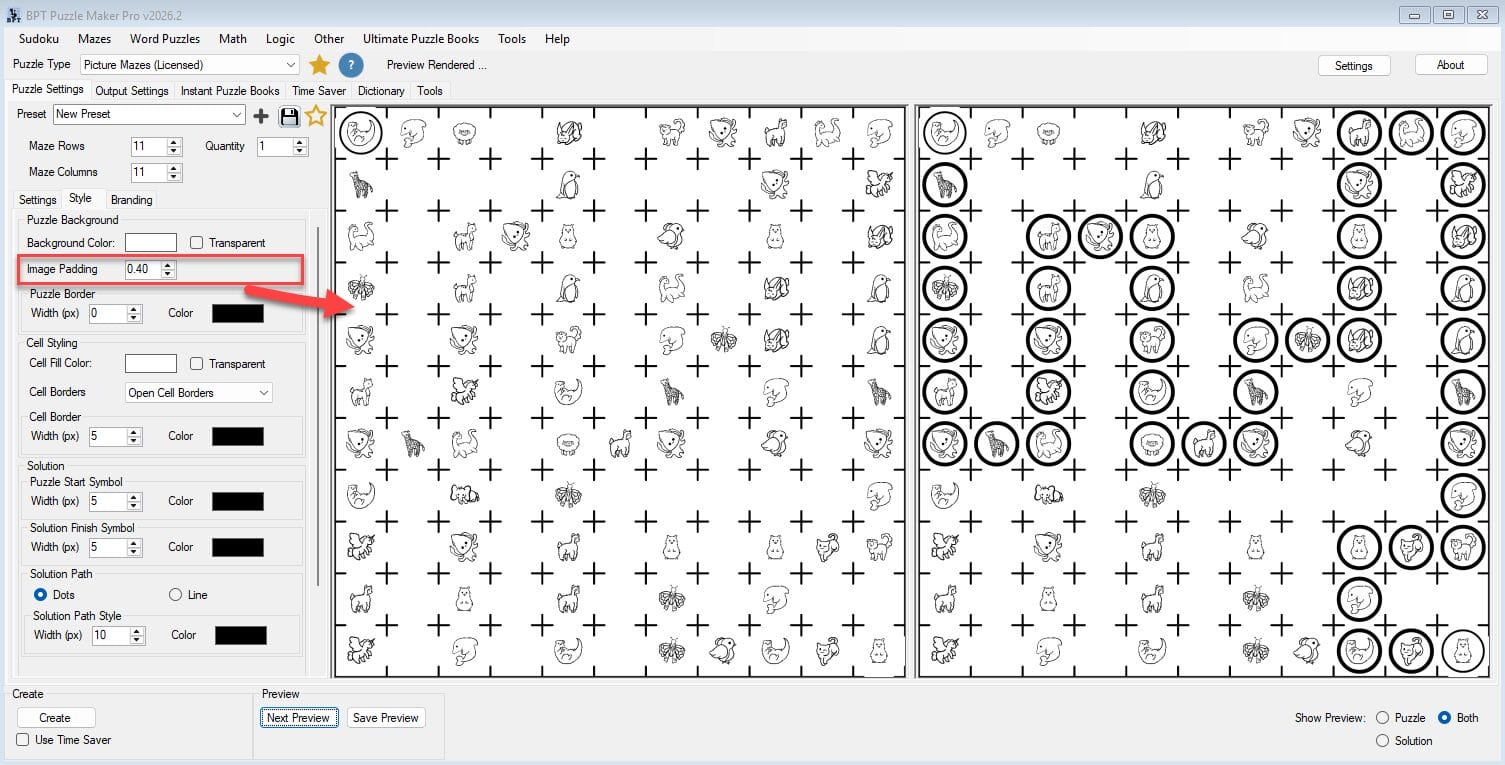
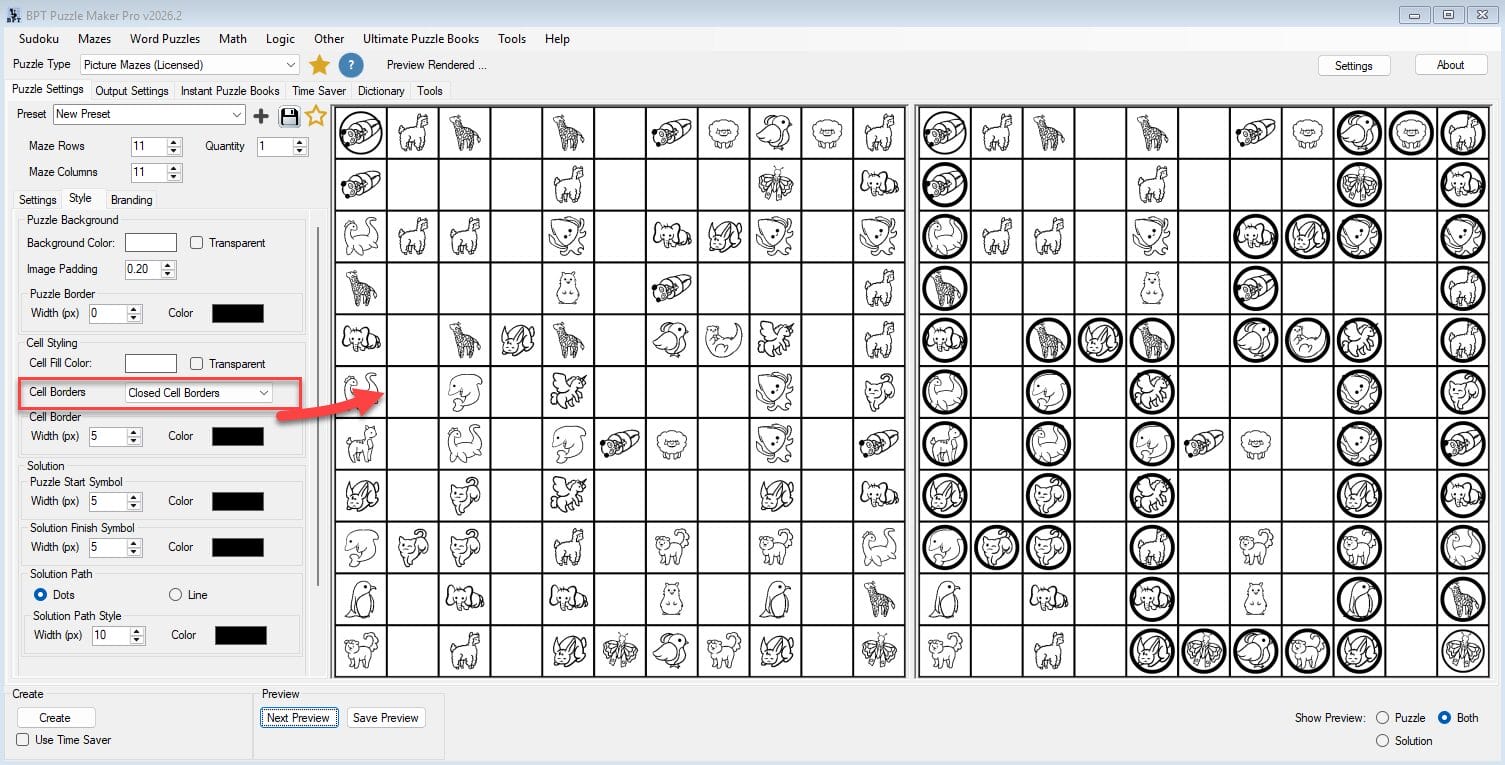
You can leave noise squares empty for a cleaner layout. You can add image padding to create more breathing room around icons. You can use closed cell borders for a worksheet-style grid, open borders for a more maze-like feel, or remove cell borders for a lighter visual result.
Solution styling is flexible too. You can show the answer path with dots or a connecting line, depending on the type of solution page you want to include.

These controls are not just cosmetic. They help you shape the puzzle for the product you are making.
A preschool printable may need clarity and white space. A puzzle book page may need denser visual challenge. A classroom resource may need a strong solution key. A themed book may need consistent styling across dozens of pages.
Picture Mazes gives you the controls to make those choices once, reuse them, and keep your output consistent.
Use Smart Titles for Themed Collections
When you are creating a single puzzle, titles are easy.
When you are creating dozens of themed puzzles, naming and organizing pages can become repetitive work.
Picture Mazes includes Smart Title and branding options that can use your image folder names. For example, your output can reference the path image folder, the noise image folder, both folder names, or custom title text.
That makes it easier to organize themed puzzle sets such as:
- black dog mazes
- farm animal mazes
- ocean animal mazes
- dinosaur mazes
- holiday icon mazes
- classroom topic mazes
- sports picture mazes
- seasonal activity pages
This is a small workflow feature with real publishing value. It helps keep generated puzzles connected to the theme, folder structure, and product plan you are building.
From One Puzzle to a Reusable Publishing Workflow
Picture Mazes can create individual puzzles, but its bigger value is in repeatable production.
A single output might become a classroom worksheet. A few variations might become a printable pack. A larger set can become a children’s activity book, a KDP puzzle interior, a TPT resource, or a seasonal workbook.
That workflow can scale naturally:
- Choose a visual theme.
- Add path and noise image folders.
- Set the maze size and difficulty.
- Style the puzzle and solution.
- Generate variations.
- Assemble the outputs into a printable product, book, slide activity, or interactive format.
This is the core advantage of Puzzle Maker Pro as a production system.
The module helps you generate the puzzle. The workflow helps you turn that puzzle into a product. The reusable setup helps you create the next product faster.
Scale Picture Maze Collections with Time Saver
For larger projects, Time Saver helps you create multiple Picture Maze setups in a row-based batch workflow.
Instead of changing folders, quantities, grid sizes, and presets one by one, you can set up rows for different themes and difficulty levels. Each row can use a path image source, noise source, quantity, rows, columns, and preset.
That makes it easier to plan structured products such as:
- easy, medium, and hard animal maze sets
- multiple puzzle themes in one activity book
- classroom worksheet packs by topic
- seasonal printable bundles
- KDP interiors with repeated layout rules
- mixed collections using different image folders
Time Saver is where the workflow becomes much more efficient.
You are no longer thinking only about the next puzzle. You are planning a product structure, generating batches, and building a repeatable system for future books and printables.
Output Options for Print, Slides, and Advanced Workflows
Picture Mazes supports practical output paths for different publishing needs.
Depending on your edition and workflow, you can create puzzle renderings, solution renderings, printable outputs, Interactive PDFs, Puzzle Slides / PowerPoint outputs, image exports, SVG exports, and JSON exports for advanced workflows.
That flexibility matters because many creators publish across more than one format.
A themed Picture Maze can become a printable worksheet. The same idea can become part of a PDF puzzle book. It can be used in a slide-based classroom activity. It can support an Interactive PDF workflow. Advanced creators can also use structured exports as part of broader production systems.
The important point is not just that you can export files.
The important point is that you can reuse the same creative setup across multiple product formats.
What You Can Create
Children’s Picture Maze Books
Build animal, holiday, dinosaur, ocean, farm, pet, sports, or seasonal maze books using themed image folders. Create puzzle pages and solution pages with a consistent visual style.
Classroom and Homeschool Worksheets
Create low-text activities for visual tracking, focus, attention, and early learning. Use clean grids, simple icons, empty noise squares, and clear solution keys.
Etsy Printable Packs
Turn themed image folders into printable activity sets for holidays, birthdays, travel, rainy days, quiet time, party favors, or children’s activity bundles.
Teachers Pay Teachers Resources
Create visual activities that fit lesson themes, seasonal units, classroom centers, morning work, early finisher activities, and printable resource packs.
Slide-Based Activities
Use Puzzle Slides / PowerPoint output to create digital classroom activities, presentation-style puzzle experiences, and slide resources that can fit modern teaching workflows.
Advanced Puzzle Workflows
Use JSON and other structured outputs when you need Picture Maze data for advanced publishing, automation, app, or custom workflow scenarios.
For KDP Publishers and Activity Book Creators
If you publish puzzle books, Picture Mazes gives you a way to add visual variety to your interiors.
Instead of relying only on common puzzle types, you can create picture-based maze pages around specific niches. Animal lovers, dinosaur themes, holiday activity books, early learning books, travel activity books, and kids’ puzzle collections can all benefit from a more visual puzzle format.
The advantage is not just speed. It is differentiation.
A Picture Maze page looks different from a standard line maze. It gives your book another visual texture, another activity type, and another reason for buyers to see the interior as more complete and engaging.
For Educators, TPT Sellers, and Homeschool Creators
Picture Mazes also works well for learning environments because it does not depend heavily on reading.
That makes it useful for younger students, visual learners, early finishers, centers, quiet activities, and thematic classroom resources.
You can create simple pages with empty noise squares, more challenging pages with distractors, or themed worksheets that match a unit or season. If you sell resources, you can use the same workflow to build polished printable packs for your own store or TPT shop.
The result is a flexible activity format that feels more custom than a generic worksheet, without requiring you to design every page manually.
Why Picture Mazes Exists
Image-based maze puzzles are appealing, but they are slow to build manually.
You have to choose images, place them into a grid, decide which images form the correct path, add distractions, create the answer key, format the page, and repeat the process for every variation.
That is manageable once.
It becomes frustrating when you want a complete product.
Picture Mazes turns that process into a reusable workflow. You bring the image theme. The software helps generate the puzzle structure, place the visuals, create the solution, and support larger publishing outputs.
That means creators can spend less time manually arranging pages and more time building themed products, testing niches, and expanding their publishing catalog.
Choose the Edition That Fits Your Workflow
Picture Mazes Creative Edition
Best for: creators who want to make their own Picture Maze worksheets, printables, activity packs, and puzzle products.
Choose Creative Edition if you want to create and sell your own finished puzzle products under your own brand. This includes KDP puzzle books, Etsy printables, TPT resources, classroom worksheets, homeschool materials, and PDF activity packs.
Creative Edition is a good fit when you need the Picture Mazes generator for your own publishing, teaching, or printable-product workflow.
Picture Mazes Productivity Edition
Best for: creators who want larger batch workflows, expanded publishing outputs, and reseller rights for finished puzzle products.
Choose Productivity Edition if you want to use Time Saver workflows, create larger structured batches, build more advanced output systems, or create finished puzzle products for clients, businesses, publishers, or other sellers to resell.
Productivity Edition is the better fit when Picture Mazes is part of a serious production workflow rather than occasional single-puzzle creation.
Creative vs Productivity at a Glance
| Feature / Use Case | Creative Edition | Productivity Edition |
|---|---|---|
| Create Picture Maze puzzles | ✓ | ✓ |
| Create puzzle and solution outputs | ✓ | ✓ |
| Use path and noise image folders | ✓ | ✓ |
| Adjust maze size and difficulty | ✓ | ✓ |
| Style puzzle borders, cells, padding, and solution paths | ✓ | ✓ |
| Create your own puzzle books and printables | ✓ | ✓ |
| Sell your own finished products on KDP, Etsy, TPT, or your site | ✓ | ✓ |
| Time Saver batch workflows | — | ✓ |
| Puzzle book and larger production workflows | Limited | ✓ |
| Puzzle Slides / PowerPoint workflows | — | ✓ |
| Interactive PDF workflows | — | ✓ |
| JSON / structured export workflows | — | ✓ |
| Create finished products for clients or other sellers to resell | — | ✓ |
Licensing in Plain English
Creative Edition is enough if you are creating your own finished puzzle products and selling them directly to end users.
That includes publishing your own puzzle books, selling printable packs, creating classroom resources, uploading to KDP, selling on Etsy, selling on Teachers Pay Teachers, or offering finished PDF products under your own brand.
Productivity Edition is for reseller and client workflows.
Choose Productivity Edition if you want to create finished puzzle products for other people, clients, businesses, publishers, or sellers who can resell those products under their own offer or brand.
Reseller rights apply to finished puzzle products only. The software itself may not be resold, redistributed, shared, repackaged, or transferred.
Technical and Delivery Details
| Detail | Information |
|---|---|
| Platform | Windows desktop software |
| Internet | Works offline after installation |
| Demo | Free demo available |
| Demo limitation | Unlicensed modules create watermarked outputs |
| Delivery | Digital download from your member area after purchase |
| Updates | Lifetime updates included |
| Refunds | No refunds; use the free demo before purchasing |
| Main workflow | Image-based Picture Maze generation with puzzle and solution output |
| Batch workflow | Time Saver row-based creation in Productivity Edition |
Frequently Asked Questions
Can I try Picture Mazes before buying?
Yes. The free Puzzle Maker Pro demo includes the puzzle modules and lets you test the workflow. Unlicensed modules create watermarked outputs, so you can see whether the software fits your needs before purchasing.
Can I sell the Picture Maze puzzles I create?
Yes. Creative Edition allows you to create and sell your own finished puzzle products, including puzzle books, worksheets, printable packs, and educational resources.
Can I use Picture Mazes for KDP, Etsy, or Teachers Pay Teachers?
Yes. Creative Edition is enough when you are selling your own finished products directly to end users on platforms such as KDP, Etsy, Teachers Pay Teachers, Gumroad, or your own website.
When do I need Productivity Edition?
Choose Productivity Edition when you need Time Saver batch workflows, expanded production outputs, or reseller rights for finished puzzle products created for clients, businesses, publishers, or other sellers.
Can I create puzzle slides?
Yes. Puzzle Slides / PowerPoint workflows are available as part of the expanded production workflow.
Can I create Interactive PDFs?
Yes. Picture Mazes supports Interactive PDF workflows in supported formats.
Does Picture Mazes support JSON export?
Yes. JSON export is available for advanced workflows where structured puzzle data is useful.
Does the software work offline?
Yes. Puzzle Maker Pro is Windows desktop software and works offline after installation.
Are updates included?
Yes. Lifetime updates are included.
Do you offer refunds?
No. There are no refunds, so you should use the free demo before purchasing to confirm that the software works for your needs.
Start Building Visual Maze Products
Picture Mazes gives you a practical way to turn image folders into themed puzzle products.
Create a single worksheet. Build a printable pack. Generate a puzzle book section. Produce slide activities. Reuse the same visual workflow across multiple products and themes.
If you want a maze format that feels more visual, more flexible, and more distinctive than standard line mazes, Picture Mazes gives you a reusable way to create it.
Choose your edition and start creating Picture Mazes today.
[IMAGE PLACEHOLDER 5: Final product mockup — Picture Maze book, printable pack, or multi-output collage]


