
Puzzle Maker Pro – Numberlink

Sale!

Price range: $ 77 through $ 177

Create visually distinctive Numberlink puzzle books, worksheets, and printable logic collections with flexible endpoint styles, scalable workflows, and publish-ready outputs.

Create Puzzles Immediately - on Your Own Computer

  • Secure Payment with FastSpring
  • Many Tutorials and Videos Available
  • Immediate Download from the Member Area
  • Customer Support Facebook Group
  • Windows Exclusive (Use Virtual Windows on Mac)

Puzzle Maker Pro – Numberlink

Create Numberlink Puzzle Books That Don’t Feel Generic

Most puzzle books rely on the same familiar layouts.

They work — but they also start to look interchangeable.

If you publish puzzle books on KDP, sell printables on Etsy, create classroom worksheets, or build activity packs for your own audience, visual sameness becomes a real problem. Readers scroll past interiors that feel repetitive. Printable collections lose personality. Puzzle pages start to blend together.

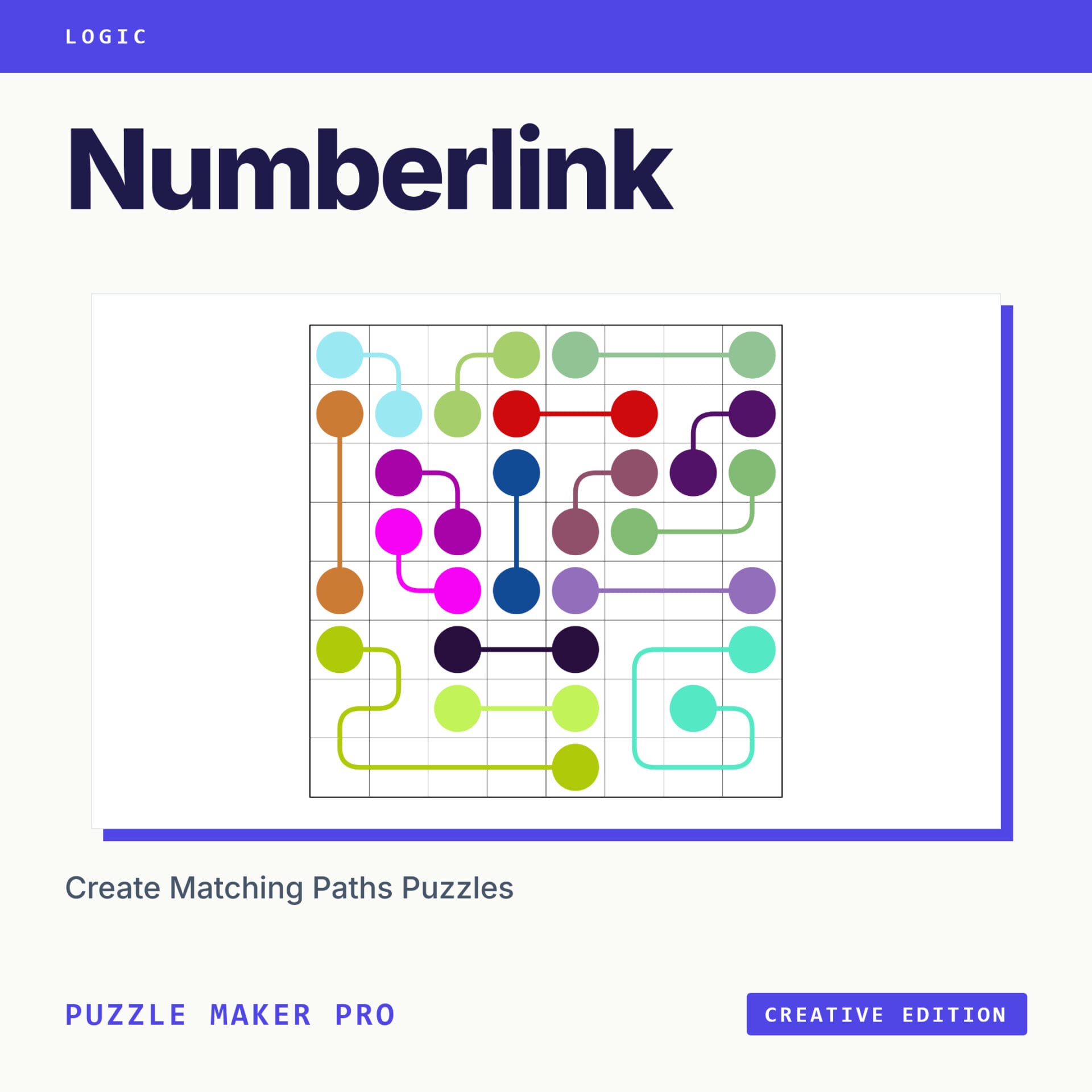
Puzzle Maker Pro – Numberlink gives you a visually distinctive logic puzzle workflow built around path-connection gameplay, flexible endpoint styles, reusable presets, and scalable publishing workflows.

Create classic numbered Numberlink puzzles, colorful visual variations, letter-based logic activities, themed image puzzles, reusable puzzle collections, and publish-ready puzzle books — all inside one connected workflow.

Start with a single puzzle preview.

Then scale into:

Visual variations
→ reusable presets
→ batch generation
→ assembled puzzle books
→ publish-ready outputs

This is not just a single puzzle generator.

It is a reusable Numberlink publishing workflow designed for creators, educators, and puzzle publishers.


A Visual Logic Puzzle with Publishing Potential

Numberlink puzzles are simple to understand but satisfying to solve.

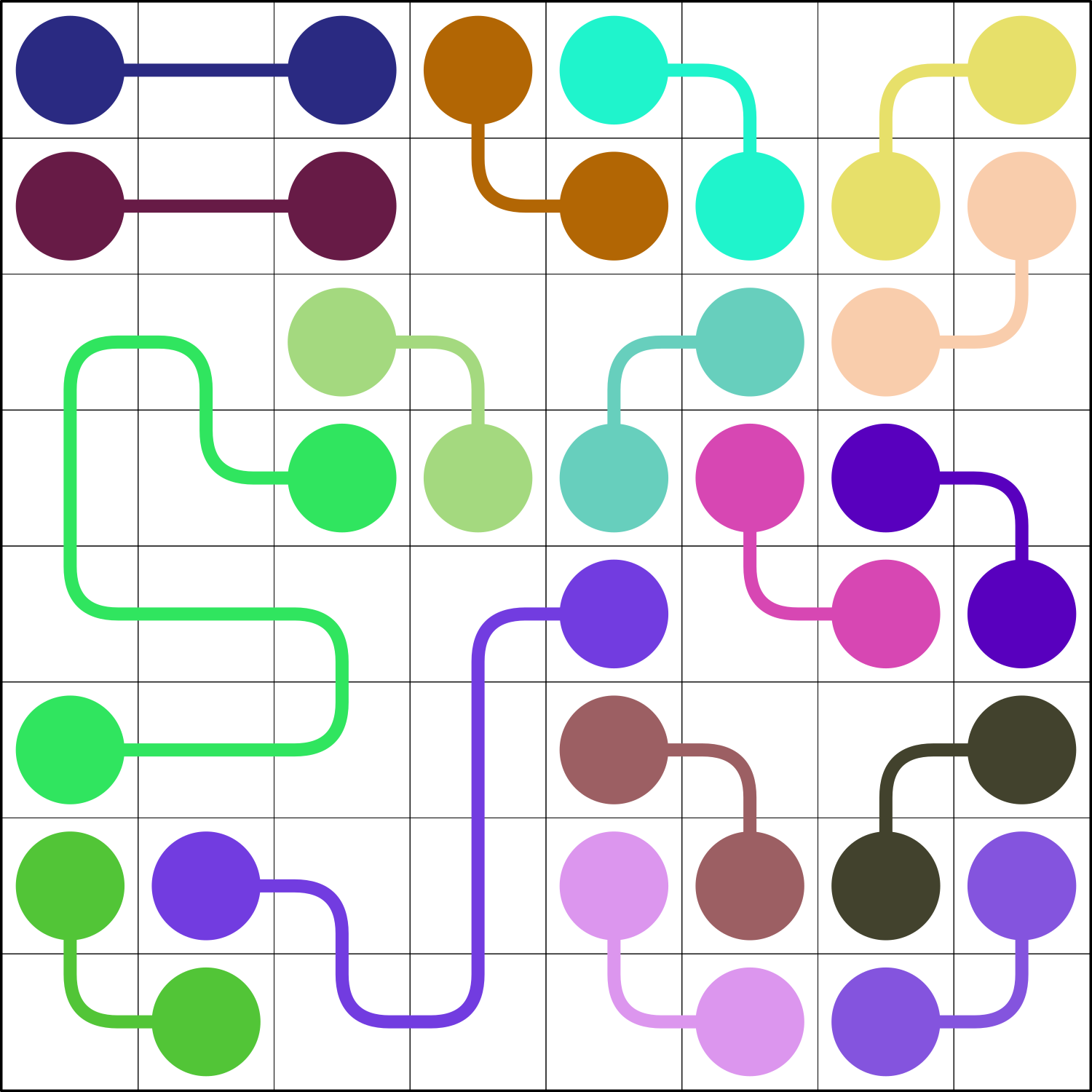
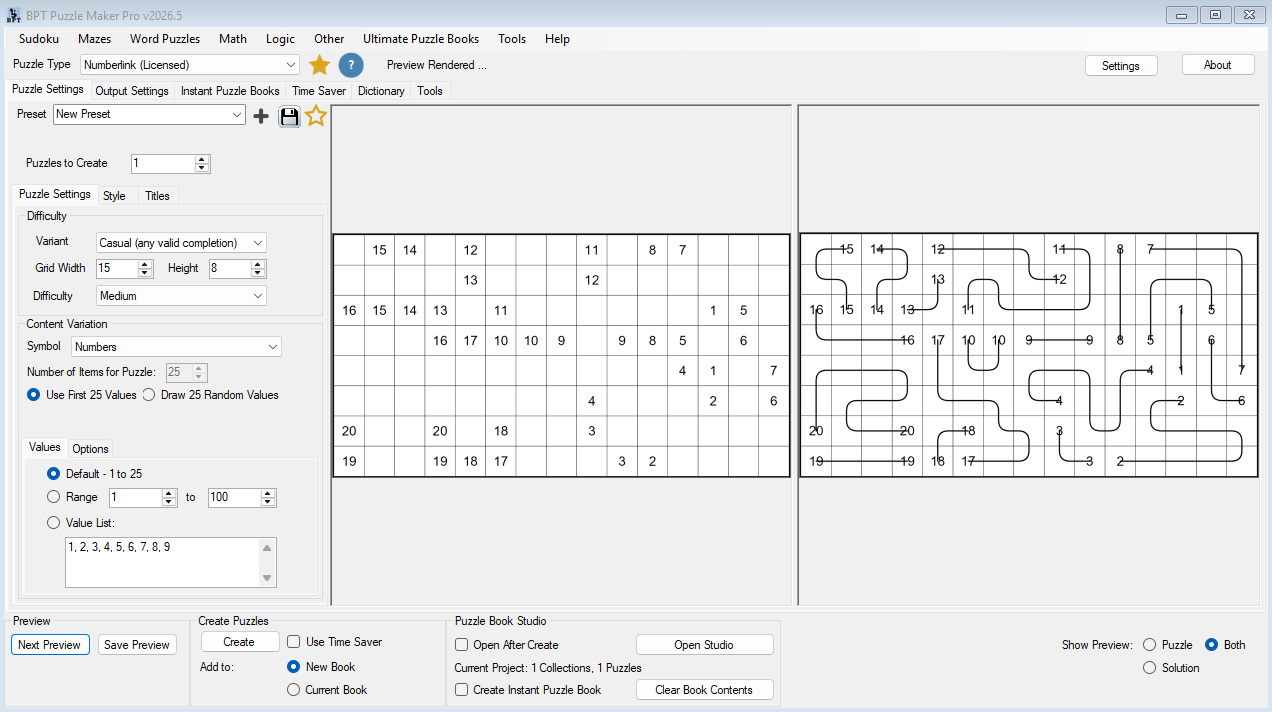
Each puzzle starts with matching endpoint pairs on a rectangular grid. The solver connects each pair using horizontal and vertical paths. The challenge is to complete all connections without crossing paths while filling the full grid.

That gives creators a clean, visual puzzle format that works well for:

  • printable puzzle books
  • classroom worksheets
  • themed activity pages
  • logic puzzle collections
  • kids’ puzzle books
  • KDP interiors
  • Etsy and TPT printable packs

The real value is not just that you can create a single Numberlink puzzle. The value is that you can turn Numberlink into a repeatable puzzle-production workflow.

You can create visual variations, generate puzzle and solution pages, organize larger batches, and assemble publish-ready books using Puzzle Maker Pro’s broader creation system.


See the Difference Immediately

Numberlink is naturally visual.

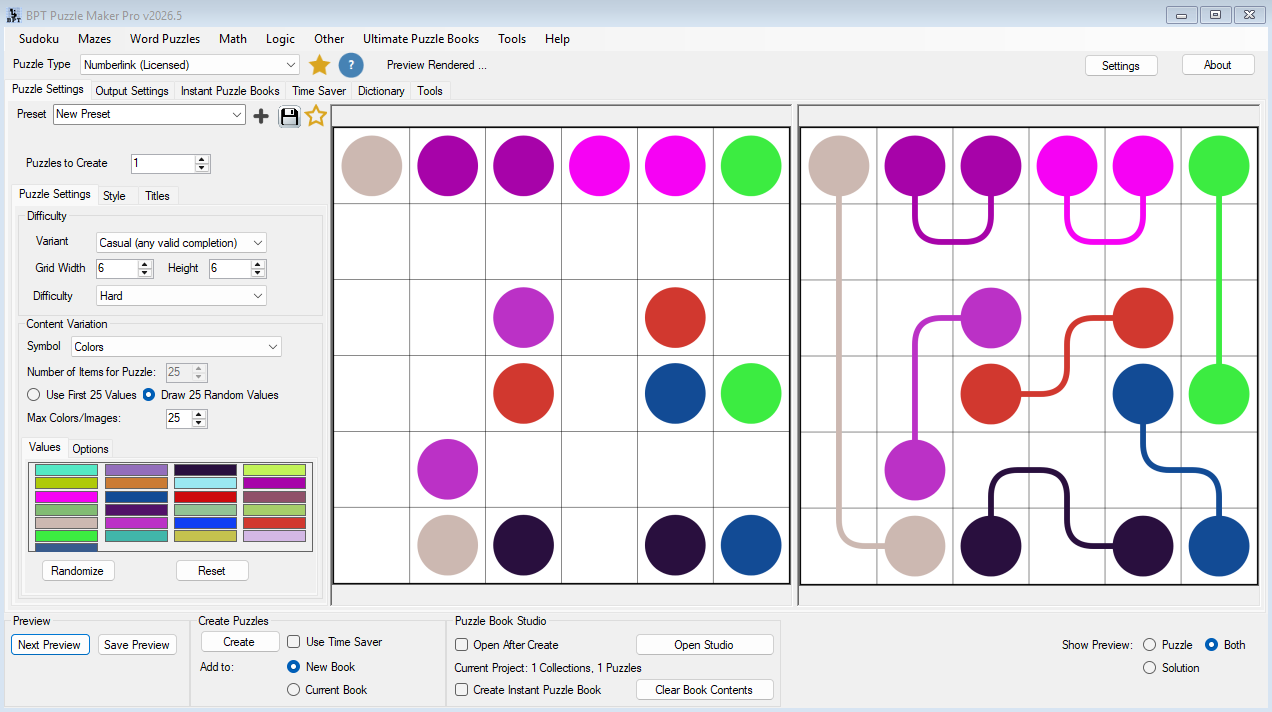
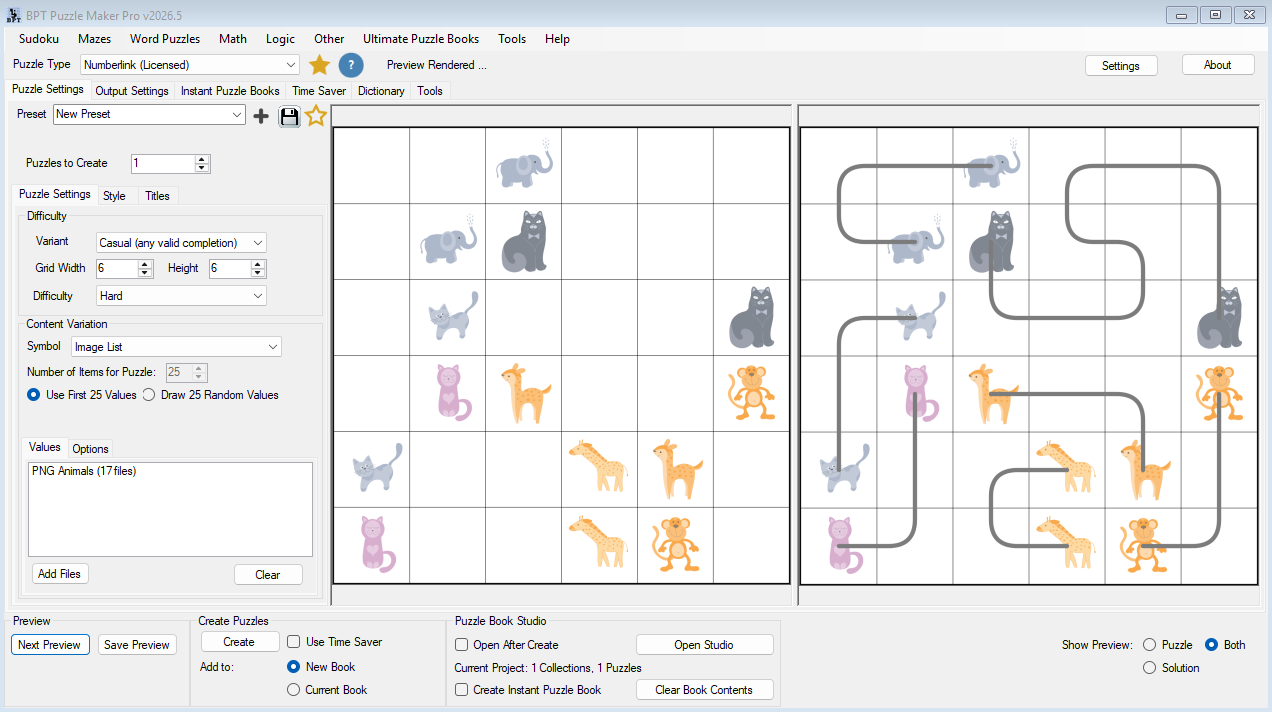
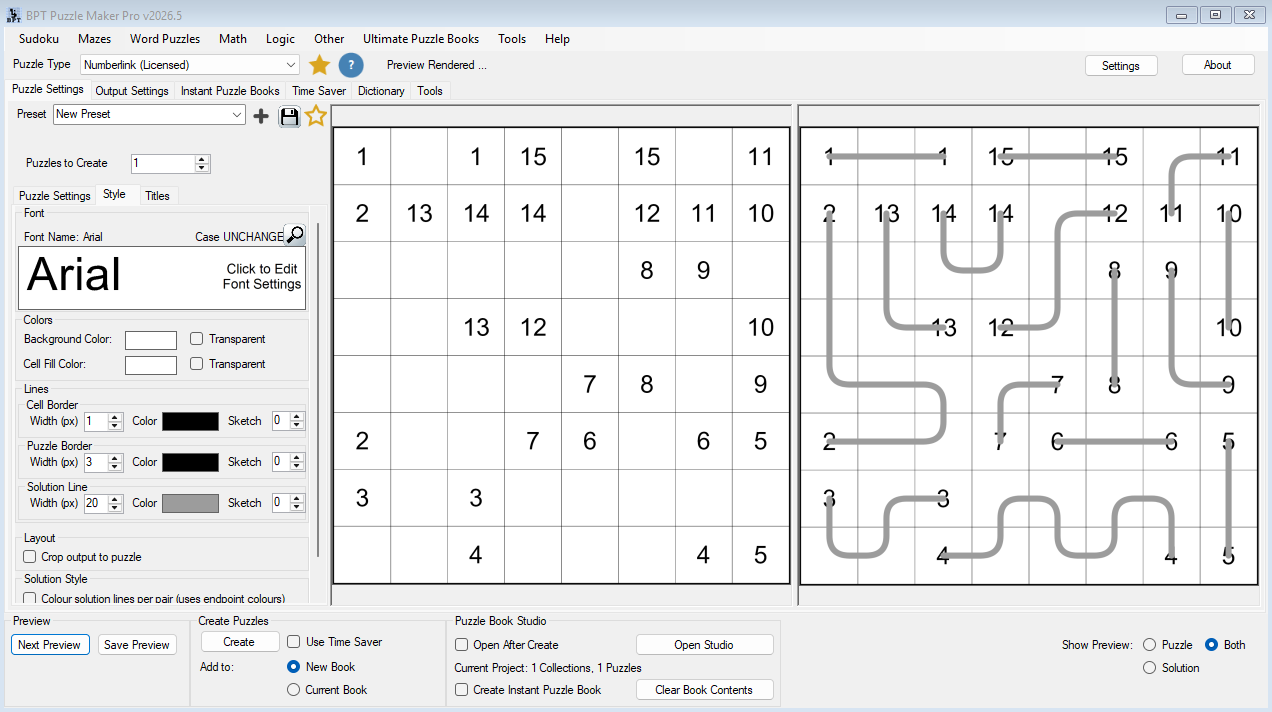
A classic numbered grid already looks different from a word search or sudoku page. But Puzzle Maker Pro adds another layer: you can change the endpoint content itself.

Instead of creating only numbered puzzles, you can create Numberlink pages with:

  • numbers
  • letters
  • Roman numerals
  • color and shape markers
  • image-based endpoint content
  • built-in image lists

This gives you a practical way to create puzzle books that feel less repetitive.

Why this matters

If you publish puzzle books or printables, visual variety helps your products feel more considered. A book with only one repeated visual style can quickly feel mechanical. A book with structured variation feels more polished.

You can use Numberlink variations to create different sections, difficulty progressions, classroom packs, or themed collections — all while keeping the same underlying puzzle workflow.


What You Can Create

With Puzzle Maker Pro – Numberlink, you can create:

  • classic Numberlink puzzles with numbered endpoints
  • Arukone-style logic puzzles
  • casual full-grid connection puzzles
  • letter-matching path puzzles
  • color and shape matching puzzles
  • themed image-based connection puzzles
  • printable puzzle worksheets
  • puzzle and solution page sets
  • puzzle-book collections
  • interactive PDF outputs where supported by edition and output workflow
  • PowerPoint-style Puzzle Slides where supported by edition and output workflow

This makes Numberlink useful as both a standalone puzzle module and as part of a larger publishing workflow.


Choose Casual or Strict Workflows

Puzzle Maker Pro – Numberlink includes two main puzzle-generation approaches.

Casual Numberlink

Casual puzzles are designed for flexible full-grid completion. They are often the best starting point for creators who want larger grids, smooth generation, and visually engaging puzzle pages.

Casual workflows support grids up to 15×15, making them useful for larger puzzle layouts and more varied publishing projects.

Use Casual when you want:

  • larger puzzle grids
  • faster workflow experimentation
  • kid-friendly or classroom-friendly puzzles
  • visually varied puzzle books
  • scalable publishing workflows

Strict Arukone

Strict Arukone puzzles focus on unique logical solutions. This is the more classic logic-puzzle direction and is best when you want tighter puzzle constraints.

Strict workflows support grids up to 8×8.

Use Strict when you want:

  • classic logic puzzle behavior
  • unique-solution style puzzles
  • smaller but more controlled grids
  • traditional Arukone-style puzzle sections

Together, these two workflows let you choose between flexible publishing-oriented generation and more constrained logic-puzzle generation.


Make Every Puzzle Style Your Own

A puzzle generator becomes much more valuable when it helps you create a recognizable product style.

Numberlink gives you several ways to shape the look and usefulness of your puzzles.

Endpoint Content Variations

Choose the content shown on each matching pair.

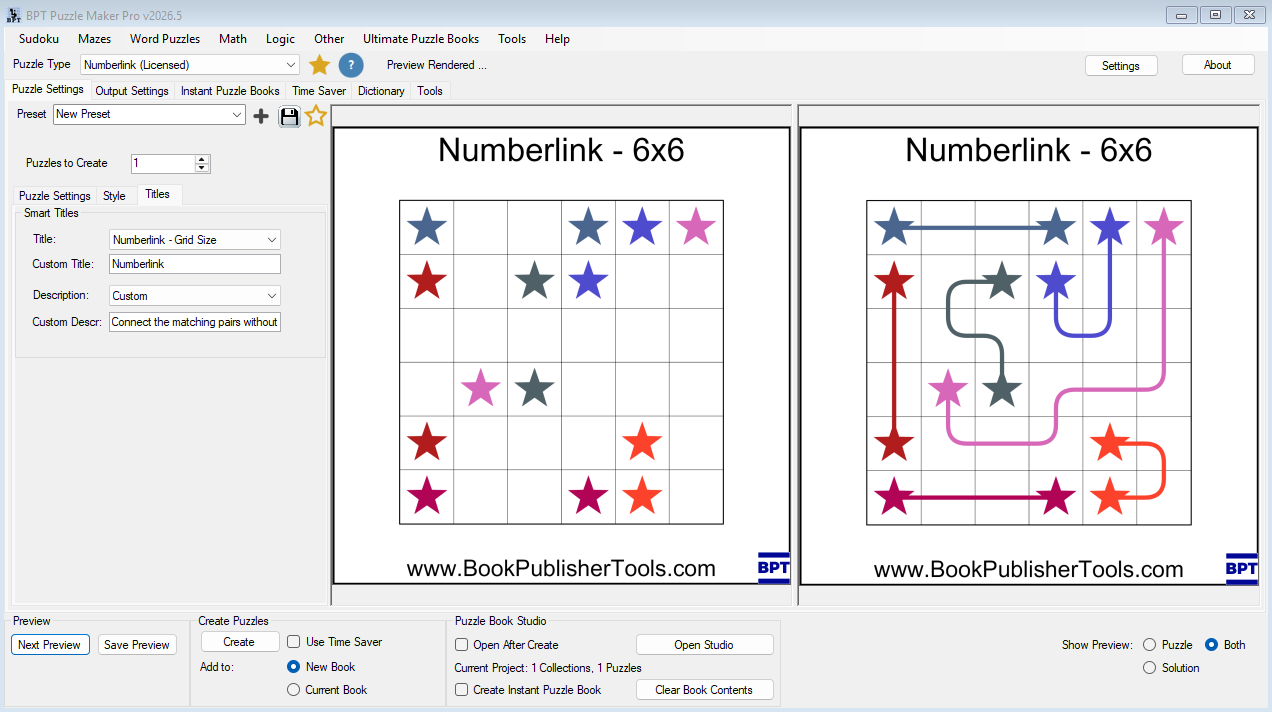
Numbers create the classic Numberlink style. Letters create a cleaner classroom or alphabet-friendly version. Roman numerals add a more stylized feel. ColorShapes and image-based content create more visual, kid-friendly, or themed activities.

This matters because visual variation helps you create different puzzle sections without switching to a completely different puzzle type.

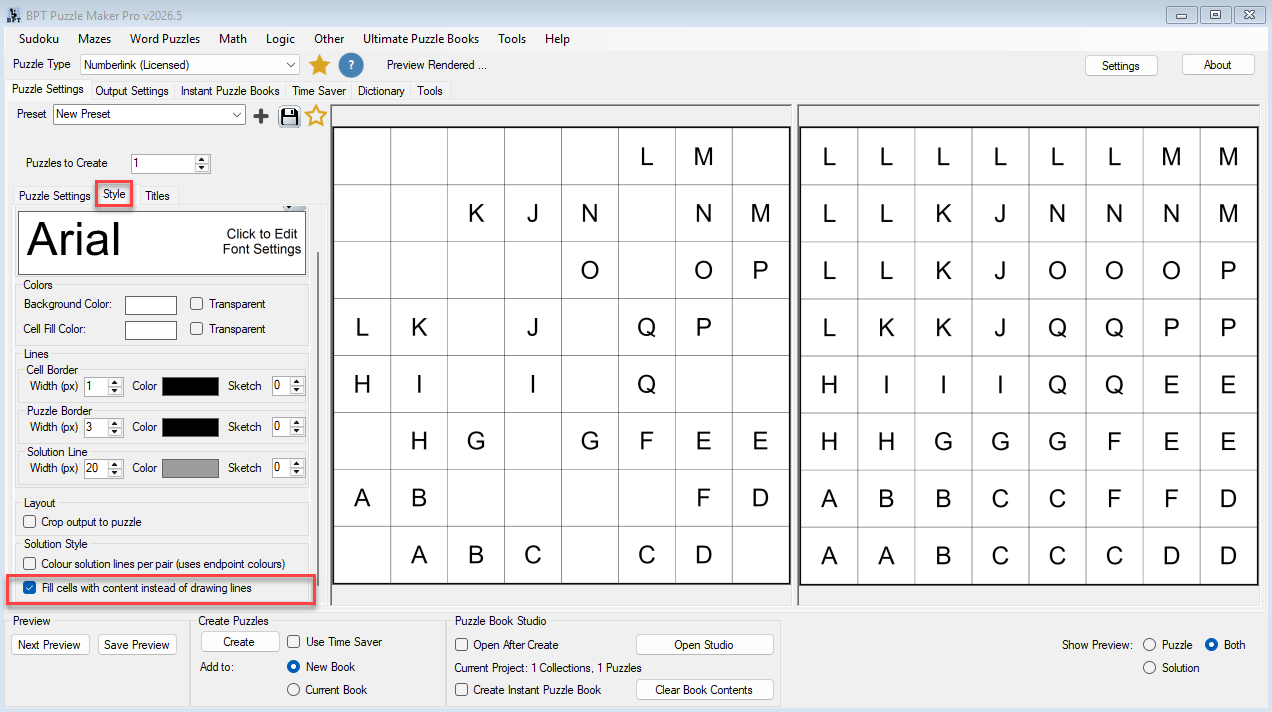
Puzzle and Solution Preview

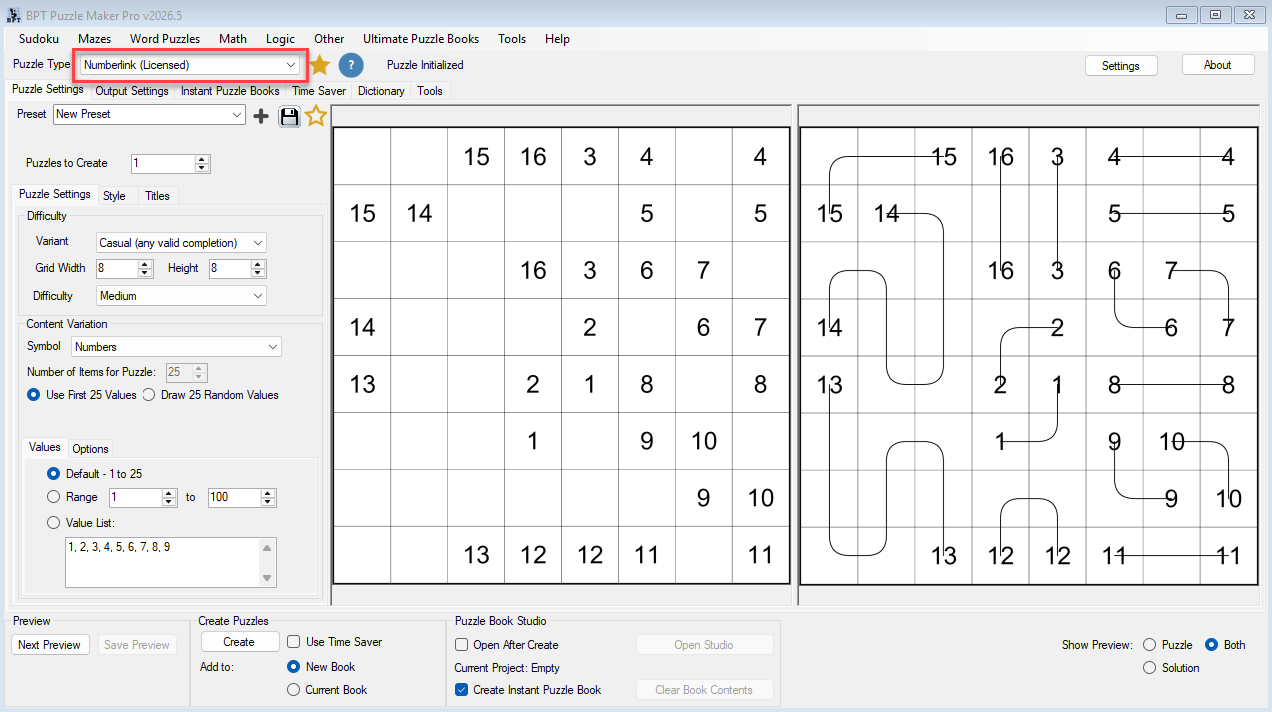
Use the preview workflow to inspect puzzle and solution pages before generating final output.

You can preview:

  • puzzle only
  • solution only
  • puzzle and solution together

This helps you test readability, compare visual styles, and avoid generating large batches before checking the result.

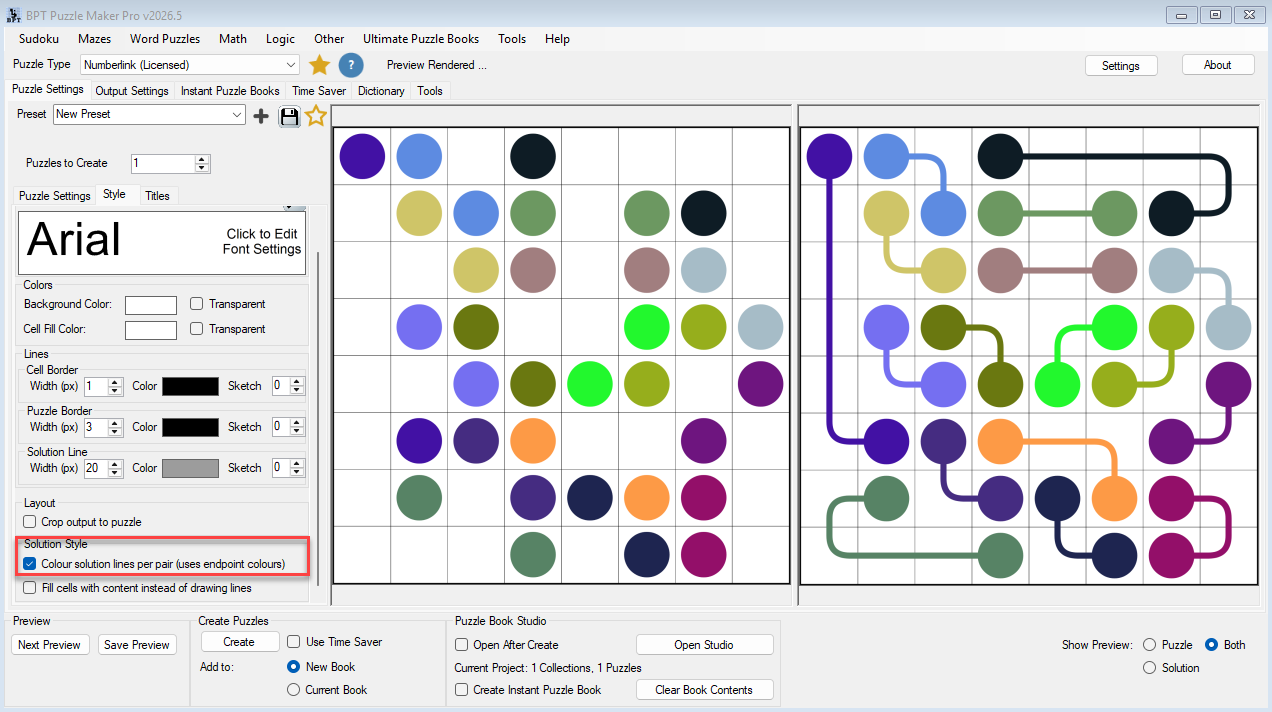
Solution Line Styling

Solution pages are part of the reader experience.

You can create answer keys using standard solution lines, colored solution paths, or filled-cell solution rendering. This gives you more control over how clear, visual, or decorative your solution pages feel.

Use standard lines for classic puzzle books. Use colored paths for clearer visual tracking. Use filled solutions for bold, child-friendly or highly visual answer pages.


From One Puzzle to a Complete Publishing Workflow

The basic workflow is simple:

  1. Choose the Numberlink module.
  2. Set the grid size, difficulty, and variant.
  3. Choose the endpoint style.
  4. Preview the puzzle and solution.
  5. Create your output.

That is enough for single puzzles and worksheets.

But the workflow can go much further.

As your project grows, you can move into:

  • reusable presets
  • batch generation
  • puzzle-book assembly
  • output rendering
  • collection management
  • scalable publishing systems

This is where Numberlink becomes more than a single puzzle generator.

It becomes part of the Puzzle Maker Pro production workflow.


Scale with Time Saver

For larger publishing projects, manually changing settings one by one becomes slow.

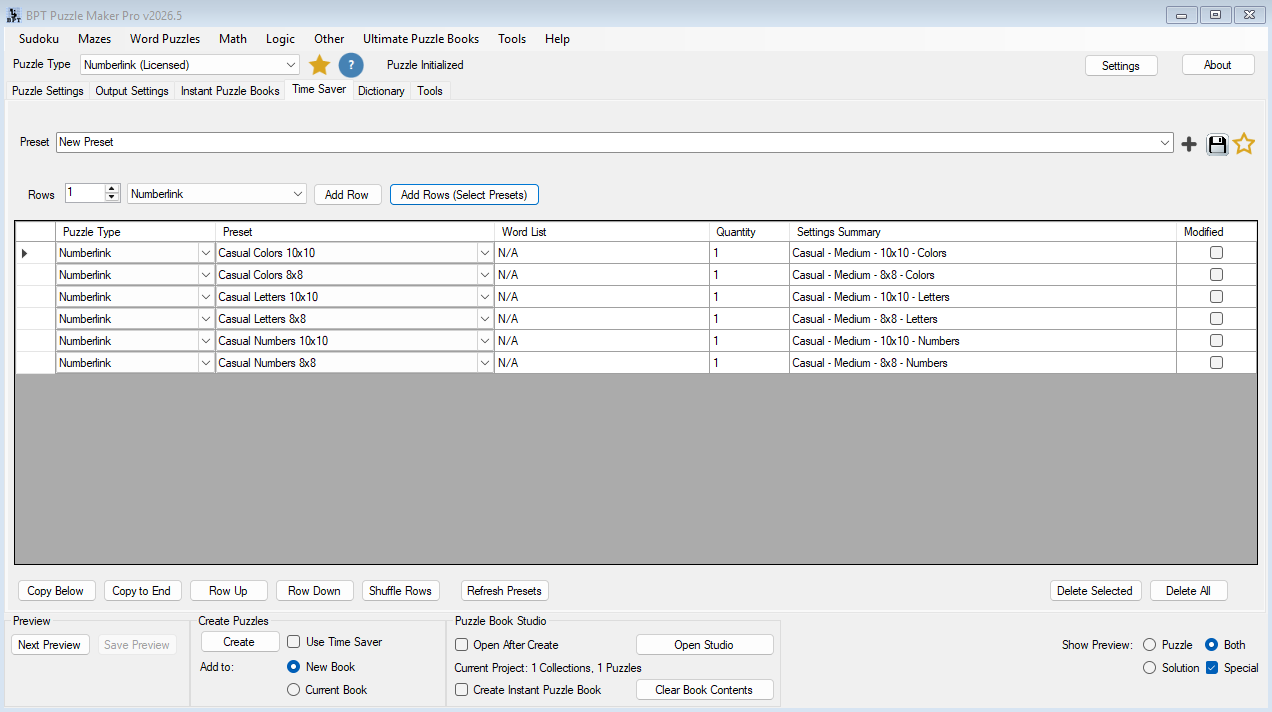
Time Saver helps you define multiple puzzle-generation rows and run them together. Each row can use a different preset, quantity, and settings summary.

That means one production run can include different Numberlink styles such as:

  • Easy 6×6 Numberlink with numbers
  • Medium 8×8 Numberlink with letters
  • Casual color-based puzzles
  • Strict Arukone logic sections
  • themed image-based connection puzzles

You can start from saved presets, or you can click the row summary, edit the settings directly, and save the finished setup as a preset later.

Time Saver is especially useful when you want to build:

  • larger puzzle collections
  • mixed-difficulty books
  • classroom activity packs
  • themed printable bundles
  • repeatable production systems


Assemble Books with Puzzle Book Studio

Puzzle Book Studio turns generated puzzle content into an assembled book workflow.

Instead of creating files and manually organizing everything outside the software, you can review and refine your puzzle-book structure visually.

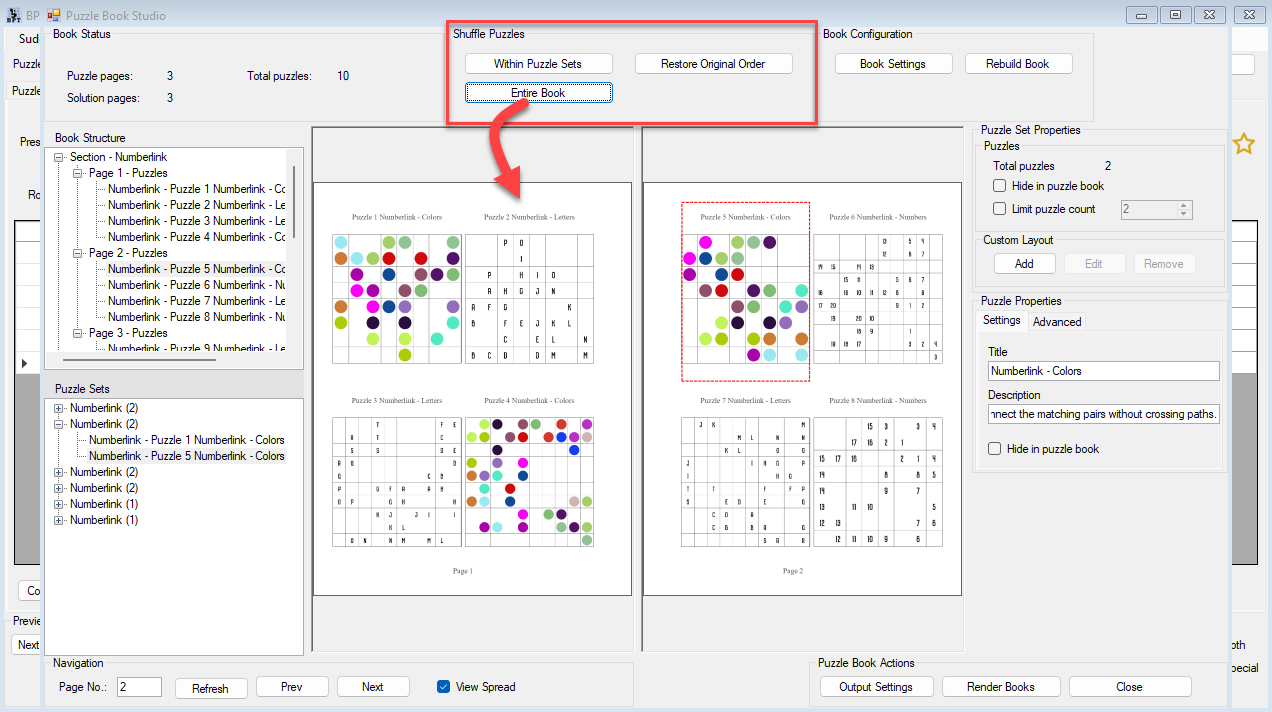
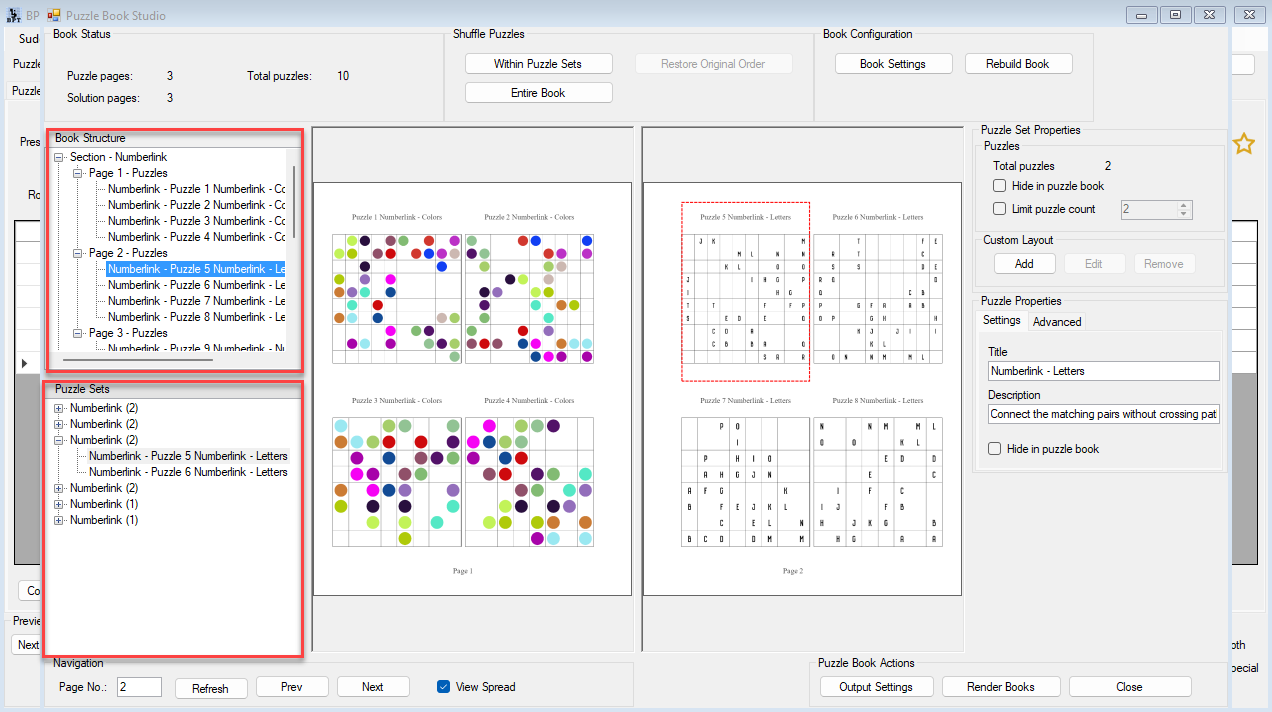
Puzzle Book Studio lets you:

  • review pages in single-page or facing-page spread mode
  • browse by Book Structure or Puzzle Sets
  • click directly on a puzzle in the preview to select it
  • edit puzzle titles and descriptions
  • hide individual puzzles or full collections
  • limit puzzle counts per collection
  • shuffle within sets or across the entire book
  • rebuild after changes
  • review warnings before rendering
  • render final books when the workflow is ready

This is where the workflow shifts from generation to composition.

You are no longer just making puzzle files. You are shaping a finished puzzle product.


Smart Titles and Organized Outputs

Numberlink supports title and description workflows that help organize generated puzzle content.

You can use title patterns such as:

  • Numberlink
  • Numberlink – Difficulty
  • Numberlink – Grid Size
  • Numberlink – Content
  • Arukone
  • Arukone – Difficulty
  • Arukone – Grid Size
  • Arukone – Content
  • Custom

This is useful when creating larger collections with different styles, difficulties, or content types.

Important workflow note: the Titles tab configures the metadata and title behavior. Smart Titles are applied during output generation after you configure the relevant output workflow, such as Output Settings or Puzzle Book Studio rendering.

Once activated through the output workflow, the selected title behavior can be applied automatically during rendering.


Real-World Ways to Use Numberlink

Create a Classic Logic Puzzle Book

Use Strict Arukone for smaller unique-solution puzzles, create a clean black-and-white style, preview puzzle and solution pages, then assemble the finished book in Puzzle Book Studio.

This works well for traditional logic-puzzle audiences who enjoy structured challenges.

Build a Kids’ Visual Puzzle Collection

Use Casual Numberlink with colors, shapes, or image-based endpoints. Add colored solution lines or filled-cell solutions for answer pages that are easier to follow.

This works well for children’s activity books, classroom packs, and themed printables.

Create Mixed Difficulty Sections

Build presets for easy, medium, hard, and expert Numberlink styles. Use Time Saver to generate different quantities for each section, then use Puzzle Book Studio to organize the book.

This gives your puzzle book a clear progression instead of a random set of pages.

Make Themed Printable Packs

Use letters, Roman numerals, or images to build themed worksheets. Combine puzzle pages with solution pages and export them for your own shop, classroom, or educational resource catalog.


Who Numberlink Is For

Indie Puzzle Publishers

If you publish puzzle books on Amazon KDP, Etsy, Gumroad, or your own storefront, Numberlink helps you create puzzle interiors that feel more visually distinctive than standard puzzle pages.

Instead of producing only one repetitive layout style, you can create:

  • numbered puzzle sections
  • letter-based variations
  • colorful activity pages
  • themed puzzle collections
  • visually differentiated answer pages
  • mixed-difficulty puzzle books

The workflow is especially strong for creators who want to:

  • publish faster
  • build larger catalogs
  • create reusable production systems
  • avoid repetitive-looking puzzle books
  • organize larger collections more efficiently

Educators and TPT Sellers

Numberlink also works well for classrooms and printable educational resources.

Smaller grids, visual endpoint styles, and flexible solution workflows make it useful for:

  • classroom logic activities
  • printable worksheet packs
  • homeschool resources
  • visual matching exercises
  • critical-thinking activities

Use letters for alphabet-friendly puzzles, colors and shapes for younger learners, or larger grids for more advanced logic activities.

Printable Creators

If you create printable activity products, Numberlink gives you a puzzle format that balances:

  • clean visual structure
  • recognizable gameplay
  • flexible styling
  • scalable production

This makes it easier to build themed printable collections that still feel consistent.

Productivity-Focused Creators

If you create many puzzle products, Numberlink becomes more powerful when combined with Time Saver and Puzzle Book Studio.

Create reusable presets, batch generate variations, assemble books, and render outputs through a repeatable workflow.


Creative or Productivity Edition?

Choose the edition based on what you want to do with the finished puzzle products.

Creative Edition

Choose Creative Edition if you want to create and sell your own finished puzzle products.

Creative Edition is suitable for:

  • publishing your own puzzle books on KDP
  • selling printable puzzle packs on Etsy
  • creating classroom worksheets
  • selling educational resources on Teachers Pay Teachers
  • creating puzzle products for your own brand, shop, classroom, or catalog

Creative Edition is the right choice for most creators who publish their own work directly to end users.

Productivity Edition

Choose Productivity Edition if you need reseller rights for finished puzzle products or want productivity workflow features such as Time Saver where available.

Productivity Edition is suitable for:

  • creating puzzle products for clients
  • creating wholesale puzzle content
  • creating puzzle books for another publisher
  • building commercial puzzle products that another business can resell
  • using advanced productivity workflows for larger-scale production

Productivity Edition reseller rights apply to finished puzzle products only. The Puzzle Maker Pro software itself may not be resold, redistributed, shared, licensed, or repackaged.


What You Can Do with Your Puzzles

With the appropriate edition, you can create finished puzzle products such as:

  • PDF puzzle books
  • printable worksheets
  • educational activity packs
  • puzzle images
  • classroom resources
  • print-on-demand interiors
  • client-ready puzzle files
  • themed activity collections

Creative Edition is enough when you sell your own finished products to end users.

Productivity Edition is required when you create finished puzzle products that other people, clients, businesses, or publishers can resell.


Technical Information

Detail Information
Platform Windows desktop software
Internet Works offline after installation and activation, except for downloads, account access, updates, and online resources
Delivery Digital download from your member area after purchase
Demo Free demo available
Demo limitations Unlicensed modules create watermarked outputs
Updates Lifetime updates included
Refunds No refunds; please test the free demo before purchasing
Core outputs Static puzzle outputs such as PDF and SVG, plus supported image/output workflows through Puzzle Maker Pro
Advanced outputs Customer JSON, Interactive PDF, and Puzzle Slides are available where supported by edition and output workflow
HTML output Numberlink does not include an interactive HTML output lane
Software resale Not allowed

Frequently Asked Questions

What is a Numberlink puzzle?

A Numberlink puzzle is a path-connection puzzle where solvers connect matching endpoint pairs across a grid without crossing paths. The completed paths fill the grid.

Is Numberlink the same as Arukone?

Arukone is one of the names commonly associated with this style of puzzle. Puzzle Maker Pro – Numberlink includes both Strict Arukone-style workflows and more flexible Casual workflows.

What is the difference between Casual and Strict?

Casual is designed for flexible full-grid completion and supports larger grids up to 15×15. Strict Arukone focuses on unique logical solutions and supports grids up to 8×8.

Can I create puzzles with letters or colors instead of numbers?

Yes. Numberlink supports multiple endpoint content styles, including numbers, letters, Roman numerals, ColorShapes, images, and image lists.

Can I create solution pages?

Yes. You can generate solution outputs and customize solution rendering with standard lines, colored paths, or filled-cell solution modes.

Can I create full puzzle books?

Yes. Numberlink works with the broader Puzzle Maker Pro workflow, including Instant Puzzle Book and Puzzle Book Studio workflows where available.

Does Numberlink work with Time Saver?

Yes, with the appropriate edition and entitlement. Time Saver lets you create row-based batch workflows using presets, quantities, and row-level settings.

Can I sell the puzzle books I create?

Yes. Creative Edition includes rights to create and sell your own finished puzzle products to end users, including puzzle books, printables, worksheets, and educational resources.

Do I need Productivity Edition for KDP or Etsy?

Not if you are selling your own products directly to end users. Creative Edition is enough for that. Productivity Edition is required when you create finished puzzle products that other people, clients, businesses, or publishers can resell.

Can I try the software before buying?

Yes. Puzzle Maker Pro has a free demo. Unlicensed modules create watermarked outputs, so you can test the workflow before purchasing.

Does the software work offline?

Yes. Puzzle Maker Pro is Windows desktop software and works offline after installation and activation, except where downloads, updates, account access, or online resources are involved.

Are refunds available?

No. There are no refunds, so please use the free demo to test the software before purchasing.


Part of the Puzzle Maker Pro Workflow System

Puzzle Maker Pro is not just a collection of isolated puzzle generators.

The larger goal is to help creators move from puzzle ideas to finished puzzle products through a coherent workflow.

Numberlink fits that system well because it can start as a simple visual logic puzzle and scale into:

  • visual puzzle variations
  • reusable presets
  • batch generation
  • solution workflows
  • organized puzzle books
  • publish-ready outputs

That is the real advantage: you are not only creating puzzles. You are building a reusable publishing workflow.


Start Creating Numberlink Puzzles

If you want a logic puzzle format that can grow from simple printable pages into reusable puzzle-book workflows, Puzzle Maker Pro – Numberlink gives you a practical system for building visually distinctive puzzle products.

Create classic Numberlink puzzles.

Build colorful variations.

Generate reusable presets.

Batch puzzle collections.

Assemble books visually.

Render publish-ready outputs.

The workflow can start with one puzzle.

But it is designed to scale into:

Repeatable puzzle production

for creators, educators, and puzzle publishers who want more than isolated puzzle generation.

Shopping Cart
Puzzle Maker Pro - NumberlinkPuzzle Maker Pro – Numberlink
Price range: $ 77 through $ 177Select options