Puzzle Maker Pro – Word Star
Turn Word Lists into Distinctive Word Star Puzzle Books, Worksheets, and Printable Packs
Most puzzle creators already have plenty of word-list ideas. The harder part is turning those words into finished puzzle pages that feel polished, varied, and useful enough to publish.
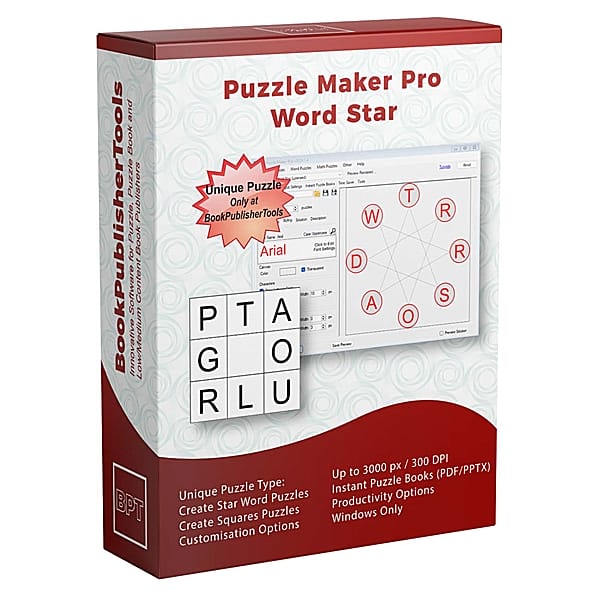
Puzzle Maker Pro – Word Star helps you create star-shaped word puzzles, Knight Move word puzzles, and matching solution pages from typed or imported word lists. Use it to build classroom worksheets, themed printable packs, niche puzzle books, educational resources, and mixed puzzle collections with a more distinctive visual format.
Create one puzzle when you need a quick activity. Reuse the same workflow when you want a full puzzle book, a printable product line, or a larger publishing system.
A Better Use for the Word Lists You Already Have
Word lists are easy to collect.
Animal names. Spelling words. Bible terms. Science vocabulary. Holiday phrases. Chess words. Language-learning lists. Geography names. History topics. Niche hobby terms.
The real production problem starts after the list is ready.
A plain vocabulary list is not a finished product. A basic worksheet can feel forgettable. A puzzle book built from the same familiar formats can become repetitive quickly.
Word Star gives those words a more visual puzzle structure. Instead of turning your list into another ordinary grid or worksheet, you can create star-shaped letter puzzles and Knight Move challenges that feel more intentional on the page.
That makes the module useful for single activities, but its real value appears when you repeat the workflow across topics, collections, and books.
What You Can Build with Word Star
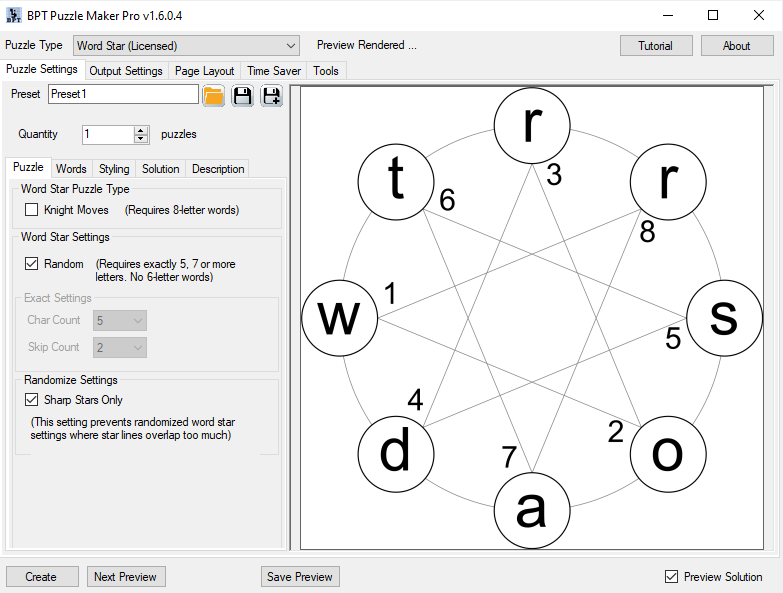
Word Star creates star-shaped letter puzzles from typed or imported words. It also creates matching solution pages and companion text or metadata outputs that support a more organized production workflow.
Use Word Star to create:
- Star-shaped word puzzle pages
- Knight Move word puzzles for a chess-like movement challenge
- Matching solution pages for answer keys
- Vocabulary worksheets for classrooms and homeschool lessons
- Printable activity packs for Etsy, Gumroad, or your own shop
- TPT resources with student pages and solutions
- KDP puzzle book interiors with more visual variety
- Mixed puzzle books that combine Word Star with other puzzle types
- Client-ready or reseller-ready finished products with the Productivity Edition
This is the practical progression: one word becomes one puzzle page, one list becomes a themed set, several lists become a collection, and repeated collections become a publishing workflow.
Why Word Star Works for Puzzle Creators
A good puzzle product needs more than content. It needs structure, variety, and a repeatable way to move from idea to finished pages.
Word Star helps with all three.
It gives your word-list content a clear puzzle format. It adds variety to books and printable packs that might otherwise rely on only common puzzle types. It also gives you a workflow you can return to whenever you have another list, theme, unit, or niche to publish.
For creators, that matters because scalable puzzle publishing is rarely about making one perfect page. It is about building a process that can produce many good pages consistently.
Word Star gives you another reusable process inside that larger Puzzle Maker Pro workflow.
Create Star-Shaped Puzzles That Look Different on the Page
Star Shape puzzles are the core Word Star format.
They turn words into a star-based letter challenge, giving your pages a stronger visual identity than a plain vocabulary exercise. This makes them useful when you want a puzzle format that stands apart from standard word searches, crosswords, and fill-in worksheets.
Use Star Shape puzzles when you want to create:
- Children’s activity pages
- Vocabulary practice puzzles
- Holiday word challenges
- Niche puzzle book pages
- Classroom review sheets
- Printable puzzle packs
- Mixed puzzle book sections
The benefit is not only that the puzzle looks different. The benefit is that the format gives you a fresh way to reuse the same kind of source content across more products.
Add Knight Move Puzzles for a More Strategic Challenge
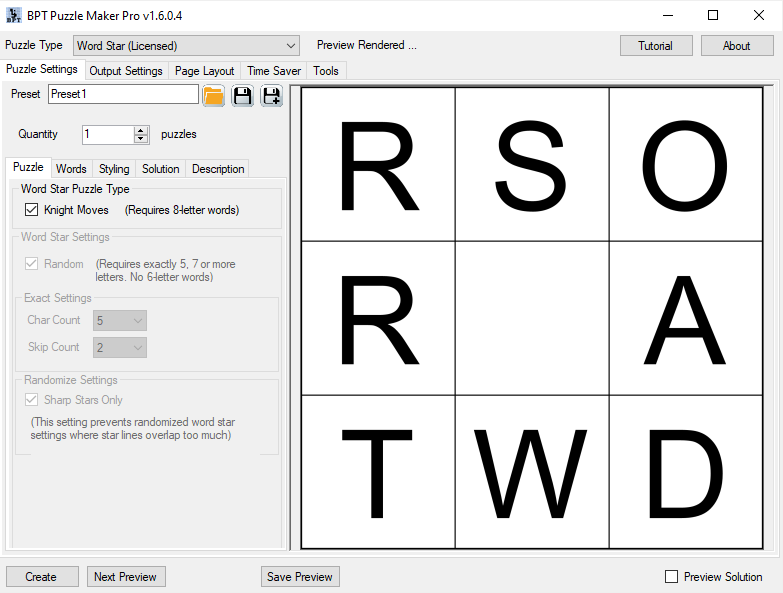
Word Star also includes a Knight Moves mode inspired by the movement of a chess knight.
This creates a different solving experience. Instead of following a simple visual path, solvers work through the word using a movement pattern that feels more strategic and puzzle-like.
Knight Move puzzles are especially useful for:
- Brain-training books
- Older student activities
- Chess-adjacent puzzle themes
- Strategy-themed puzzle packs
- More challenging vocabulary pages
- Mixed puzzle products that need difficulty variety
Knight Moves are intended for 8-letter words, so this mode works best when you prepare a focused word list for that format.
That limitation can become a useful creative constraint. Build 8-letter lists around a topic, then turn those lists into a distinctive puzzle section or product series.
Start Fast with Typed Words or Scale with Imported Lists
Word Star supports two practical creation paths.
For quick work, type words directly into the module. This is ideal when you need a worksheet, a sample puzzle, a classroom activity, or a small printable page.
For repeat production, load a prepared text word list. This is better when you are building a book, a collection, or a series of themed products.
That flexibility matters because different creators work at different scales:
- A teacher may need one vocabulary puzzle for tomorrow’s lesson.
- A TPT seller may need a full resource pack with multiple puzzle pages.
- A KDP publisher may need dozens of puzzles for a themed activity book.
- A Productivity Edition user may need Word Star pages mixed with other puzzle types in a larger book workflow.
The same module can support all of those use cases because the input workflow is simple: start with words, choose the puzzle behavior, style the page, and generate puzzle plus solution outputs.
Generate Puzzle and Solution Pages Together
A puzzle page is only half of a finished product.
Books need answer sections. Worksheets often need teacher copies. TPT resources need solutions so buyers can use them immediately. Client-ready or reseller-ready products need to feel complete before delivery.
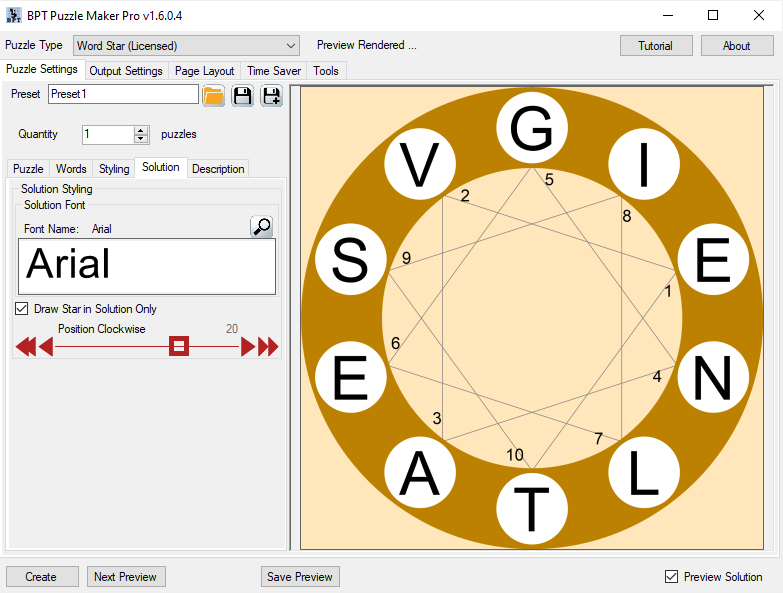
Word Star generates matching solution pages, which saves you from manually rebuilding answer keys after the puzzle is created.
This supports a cleaner production workflow:
- Create or import your word list.
- Generate the puzzle pages.
- Generate the matching solutions.
- Keep the puzzle and answer assets organized as part of the same product.
That is especially useful when you are producing more than one page. Manual solution work may feel manageable for a single puzzle, but it becomes a bottleneck when you create books, printable packs, or mixed collections.
Style Pages for Books, Worksheets, and Printables
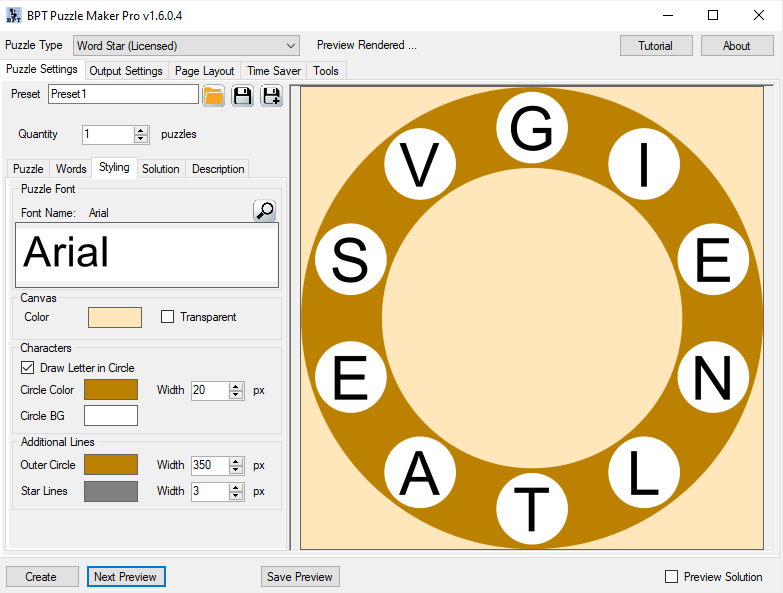
Word Star includes controls for canvas appearance, transparency, circle and line styling, puzzle fonts, solution fonts, and optional description behavior.
These controls help you match the puzzle page to the product you are building.
A KDP interior may need clean black-and-white pages. A classroom worksheet may need large readable type. A printable pack may need consistent styling across a themed collection. A branded resource may need a repeatable visual feel across multiple products.
The goal is not endless customization.
The goal is practical consistency: set a style that fits the product, then reuse that approach across more words, more pages, and more collections.
Add Context with Description Space
Some puzzles need more than the puzzle itself.
You may want to include a short instruction, topic label, lesson note, section title, or explanation. Word Star supports optional description printing with reserved space, so the puzzle page can include supporting text when the product needs it.
This is helpful for:
- Classroom worksheets with instructions
- Vocabulary pages with topic labels
- Printable packs with themed titles
- Educational resources with short context
- Puzzle books with section descriptions
It brings the page closer to finished-product form before you move into final assembly.
Keep Production Moving with Word Checks
Real word lists are rarely perfect.
Some words may not fit the selected puzzle mode. Some modes work best with specific word lengths. Random layout behavior has word-length requirements, and Knight Moves are intended for 8-letter words.
Word Star helps by checking words and warning you when some do not fit. In supported workflows, you can continue generation with the valid words only.
That matters in production.
Instead of stopping your entire workflow because one list contains unsuitable words, you can generate the pages that work, review the results, and refine your list for the next run.
Good publishing workflows do not only help when everything is perfect. They help you keep moving when real content needs cleanup.
From One Activity to a Reusable Publishing System
Word Star is useful for quick puzzle creation, but it becomes more valuable when you treat it as part of a repeatable publishing workflow.
A simple Word Star workflow looks like this:
- Choose a topic, lesson, theme, or niche.
- Prepare a word list that fits the puzzle style.
- Type the words or load a text file.
- Choose Star Shape, Random layout behavior, exact layout controls, or Knight Moves.
- Adjust styling, fonts, and description behavior.
- Generate puzzle and solution pages.
- Repeat the process for more topics, lessons, or product sections.
- Combine the finished outputs into worksheets, printables, books, or mixed collections.
That progression is the real value.
You are not only making one puzzle. You are building a reusable way to turn source words into finished puzzle assets.
How Word Star Fits Larger Puzzle Books
Many puzzle books become stronger when they include a mix of puzzle types.
A book made only from one format can work, but variety helps the interior feel richer. Word Star gives you a visually different word-based puzzle type that can sit alongside other puzzles inside a larger activity book.
Use Word Star as:
- A recurring section in a vocabulary puzzle book
- A bonus challenge after standard word puzzles
- A themed activity inside a children’s workbook
- A visual variety page inside a mixed puzzle book
- A lesson reinforcement activity inside an educational collection
This is where Puzzle Maker Pro’s broader workflow matters. Word Star generates the puzzle assets, and your publishing workflow turns those assets into finished products.
Productivity Edition: Faster Mixed Puzzle Book Workflows
Choose the Productivity Edition when Word Star is part of a larger production workflow.
The Productivity Edition includes Time Saver, which helps you build larger puzzle books more efficiently and makes it easier to mix Word Star puzzles with other Puzzle Maker Pro puzzle types.
That is important when your goal is not just a single Word Star worksheet, but a more complete puzzle product.
With Productivity Edition, Word Star can become one part of a larger book-building process:
- Create Word Star sections inside mixed puzzle books.
- Combine Word Star with other puzzle types for more variety.
- Build larger activity books with less repetitive setup work.
- Prepare client-ready or reseller-ready finished puzzle products.
- Use Time Saver to support broader production workflows.
This keeps the positioning practical. Productivity Edition is not only “more features.” It is for creators who need more workflow leverage.
Real-World Product Ideas
A KDP Animal Word Puzzle Book
Create word lists for mammals, birds, reptiles, sea animals, insects, and pets. Turn each list into Word Star puzzles with matching solution pages. Use Word Star as the main format or mix it with other puzzle types for a more varied activity book.
Best fit: Creative Edition for your own book, Productivity Edition if you are building mixed books faster or creating finished products for another seller.
A Classroom Vocabulary Review Pack
Use weekly spelling words, science terms, geography names, or history vocabulary. Create student puzzle pages and matching solutions for quick checking.
Best fit: Creative Edition for your own classroom or educational products.
A Seasonal Printable Bundle
Build themed word lists for Halloween, Christmas, Easter, summer break, back-to-school, or party activities. Create printable puzzle pages and answer keys that can become a downloadable activity pack.
Best fit: Creative Edition for your own shop, Productivity Edition for client or reseller-ready packs.
A Mixed Brain-Training Puzzle Book
Use Word Star for visual word challenges, Knight Moves for strategic word puzzles, and other Puzzle Maker Pro modules for additional puzzle variety.
Best fit: Productivity Edition when mixed book production and Time Saver workflow matter.
Who Word Star Is For
KDP and Activity Book Publishers
You want puzzle pages that add variety to your interiors and help your books feel less repetitive.
Word Star lets you turn niche word lists into distinctive puzzle pages with matching solutions. Use it for standalone Word Star books, themed activity books, or mixed puzzle interiors.
Good uses include:
- Children’s activity books
- Holiday puzzle books
- Vocabulary puzzle books
- Bible activity books
- Brain-training collections
- Hobby or niche puzzle books
- Mixed puzzle interiors
Teachers and Homeschool Creators
You need quick educational activities that connect directly to the words your students are learning.
Word Star helps you create vocabulary puzzles, spelling review pages, topic-based activities, and answer keys without designing each worksheet manually.
Good uses include:
- Weekly vocabulary review
- Spelling practice
- Science and history terms
- Language learning
- Early finisher activities
- Homeschool lesson packs
Etsy and Printable Sellers
You need printable products that feel themed, complete, and visually more interesting than a plain worksheet.
Word Star helps you create puzzle pages and solution pages from seasonal, educational, party, hobby, or niche word lists.
Good uses include:
- Holiday printables
- Kids’ activity packs
- Party games
- Homeschool resources
- Niche puzzle bundles
- Downloadable PDF products
TPT Sellers and Educational Publishers
You need classroom-ready resources that teachers can understand and use quickly.
Word Star turns curriculum-aligned word lists into student puzzle pages and answer keys, making it useful for sellable vocabulary resources and supplemental classroom packs.
Good uses include:
- Vocabulary units
- Themed worksheet sets
- Review activities
- Supplemental resources
- Seasonal classroom packs
- Educational printables
Client and Reseller Product Creators
You need to create finished puzzle products that another person, business, publisher, or seller can use commercially.
The Productivity Edition is the right fit when you are creating finished Word Star products for clients, wholesale buyers, agencies, publishers, or other sellers who can resell the finished product.
Good uses include:
- Client puzzle books
- Wholesale puzzle packs
- Publisher-ready activity content
- Reseller-ready worksheet bundles
- Commercial service workflows
Choose the Edition That Fits Your Workflow
Creative Edition
Choose Creative Edition if you want to create and sell your own finished Word Star products.
Creative Edition is the right fit when you are publishing under your own brand, selling your own printables, creating your own educational resources, or building puzzle products for your own audience.
Use Creative Edition for:
- Your own KDP puzzle books
- Your own Etsy printables
- Your own TPT resources
- Your own classroom worksheets
- Your own homeschool materials
- Your own branded puzzle products
- Finished products you sell directly to end users
Simple decision: Choose Creative Edition when the finished products are yours to sell or use.
Productivity Edition
Choose Productivity Edition if you want Word Star as part of a faster, broader, more commercially flexible production workflow.
Productivity Edition includes Time Saver and reseller rights for finished puzzle products. It is the better fit when you want to build mixed puzzle books, reduce repetitive book-production work, or create finished puzzle products for clients, businesses, publishers, wholesale buyers, or other sellers.
Use Productivity Edition for:
- Mixed puzzle books using Word Star and other puzzle types
- Larger puzzle publishing workflows
- Client-ready puzzle products
- Wholesale puzzle packs
- Publisher-ready activity content
- Finished puzzle products another business can resell
- Commercial puzzle creation services
Simple decision: Choose Productivity Edition when workflow speed, mixed puzzle book creation, or reseller/client rights matter.
Productivity reseller rights apply to finished puzzle products only. The Puzzle Maker Pro software itself may not be resold, redistributed, shared, sublicensed, repackaged, or transferred.
Creative vs. Productivity at a Glance
| Need | Creative Edition | Productivity Edition |
|---|---|---|
| Create Word Star puzzles | Yes | Yes |
| Create puzzle and solution pages | Yes | Yes |
| Sell your own finished products | Yes | Yes |
| Publish your own KDP books | Yes | Yes |
| Sell your own Etsy or TPT resources | Yes | Yes |
| Use Time Saver | No | Yes |
| Mix Word Star into larger puzzle book workflows more easily | Limited | Yes |
| Create finished products for clients or other sellers to resell | No | Yes |
| Resell or redistribute the software | No | No |
Workflow Summary
| Step | What You Do | Why It Matters |
|---|---|---|
| 1 | Prepare a themed word list | Gives the puzzle a clear product direction |
| 2 | Type words or import a text file | Supports quick work and larger projects |
| 3 | Choose Star Shape or Knight Move behavior | Matches the puzzle style to your product |
| 4 | Adjust fonts, lines, canvas, and descriptions | Keeps pages consistent and publishable |
| 5 | Generate puzzle and solution outputs | Creates the assets needed for finished products |
| 6 | Repeat across topics or sections | Turns one workflow into a collection system |
| 7 | Combine pages into books or printables | Moves from puzzle creation to product creation |
| 8 | Use Productivity Edition for larger mixed books | Adds workflow leverage when scale matters |
Technical Details
| Detail | Information |
|---|---|
| Product | Puzzle Maker Pro – Word Star |
| Platform | Windows desktop software |
| Internet required | Works offline after installation |
| Source content | Typed words or imported text word lists |
| Main puzzle styles | Star Shape and Knight Move word puzzles |
| Outputs | Puzzle pages, solution pages, used-word text output, metadata output |
| Styling | Canvas, transparency, circle and line styling, puzzle fonts, solution fonts |
| Description support | Optional description printing with reserved page space |
| Creative Edition | For your own finished puzzle products sold directly to end users |
| Productivity Edition | Includes Time Saver and reseller rights for finished puzzle products |
| Demo | Free demo available |
| Demo limitation | Unlicensed modules generate watermarked outputs |
| Delivery | Digital download from the member area after purchase |
| Updates | Lifetime updates included |
| Refunds | No refunds; use the free demo before purchasing |
Important Word List Notes
Word Star checks whether words fit the selected puzzle behavior.
Random mode supports valid word lengths for its layout behavior and may reject unsupported words. Knight Move mode is intended for 8-letter words. If some words do not pass the checks, Word Star can warn you and continue generation with the valid words only.
For best results, prepare word lists that match the puzzle style you want to create.
Frequently Asked Questions
What does Word Star create?
Word Star creates star-shaped word puzzle pages from typed or imported word lists. It can also create Knight Move puzzles, solution pages, used-word text output, and metadata output.
Can I use my own words?
Yes. You can type words directly or load a text-based word list. This makes Word Star useful for niche topics, classroom vocabulary, spelling lists, holiday themes, and publishing projects.
What is the difference between Star Shape and Knight Move puzzles?
Star Shape puzzles use a visual star-shaped structure. Knight Move puzzles use a movement pattern inspired by the chess knight and are intended for 8-letter words.
Does Word Star create solution pages?
Yes. Word Star can generate matching solution outputs, which is useful for puzzle books, worksheets, classroom materials, and sellable printable products.
Can I create full puzzle books with Word Star?
Yes. Word Star creates puzzle and solution outputs that can be used in books, worksheets, printables, and activity collections. Productivity Edition is especially useful when you want Word Star inside larger mixed puzzle books with other puzzle types.
Can I mix Word Star puzzles with other puzzles?
Yes. Word Star can be part of a mixed puzzle book workflow. Productivity Edition includes Time Saver, which makes this especially useful when you want to combine Word Star with other puzzle types in larger books.
Can I sell the puzzles I create?
Yes. Creative Edition allows you to create and sell your own finished puzzle products to end users, including books, worksheets, printables, and educational resources.
Do I need Productivity Edition for KDP, Etsy, or TPT?
Not if you are selling your own products directly to end users. Creative Edition is enough for your own KDP books, Etsy printables, TPT resources, Gumroad products, or branded puzzle products.
You need Productivity Edition when you create finished puzzle products for clients, businesses, publishers, wholesale buyers, or other sellers who can resell the finished products.
What does Productivity Edition add?
Productivity Edition includes Time Saver and reseller rights for finished puzzle products. It is intended for creators who want faster mixed puzzle book workflows, client work, wholesale products, or finished puzzle products that another person or business can resell.
Can I resell the software?
No. You may sell finished puzzle products according to your license, but the software itself may not be resold, redistributed, shared, licensed, repackaged, or transferred.
Is there a demo version?
Yes. The free demo lets you test Puzzle Maker Pro modules and explore the workflow before purchasing. Unlicensed modules create watermarked puzzle outputs.
Does Word Star work offline?
Yes. Puzzle Maker Pro is Windows desktop software and works offline after installation, apart from account access, downloads, updates, or online resources.
Are updates included?
Yes. Lifetime updates are included.
Do you offer refunds?
No. There are no refunds, so download and test the free demo before purchasing to make sure the software fits your needs.
Create Word Star Pages Once. Reuse the Workflow Again and Again.
Word Star helps you turn word lists into distinctive puzzle pages, matching solutions, and reusable publishing assets.
Use it for one worksheet, a themed printable pack, a KDP puzzle book, or a mixed puzzle collection. Choose Creative Edition when you are building your own finished products. Choose Productivity Edition when you want Time Saver, mixed puzzle book workflow leverage, and reseller rights for finished puzzle products.
Your words are the source. Word Star creates the puzzle assets. Your workflow turns them into finished products.