



Four Sliders. Zero Drawing Skill. A Maze That Looks Hand-Inked.
Open ten square-grid maze books and you get ten identical pages: corridors ruled dead straight, the unmistakable look of software that has never once touched a pencil. A shopper’s thumb knows that look on sight, and it keeps moving down the row.
You do not sketch anything, trace anything, or hire an illustrator to change that. Move four sliders, and the grid lines bow and every corner nudges out of true before a single wall is drawn, so the finished page reads like it came off a drafting table, not a printer, while the maze underneath still solves exactly like the plain square grid your readers already know.
This runs on the same proven maze engine behind dozens of puzzle types in Puzzle Maker Pro: a rendering choice on a proven generator, not a one-off experiment. See it in the gallery above, or try the free demo and slant a few yourself before you spend a cent.
The Grid Looks Off. The Logic Never Is.
Everyone already knows how to solve a maze, so what makes someone pick up your book comes down to one thing: whether the page itself earns a second look. Nobody needs the rules explained. What earns the second look is what is different about the object in their hands, so here is exactly what that is.
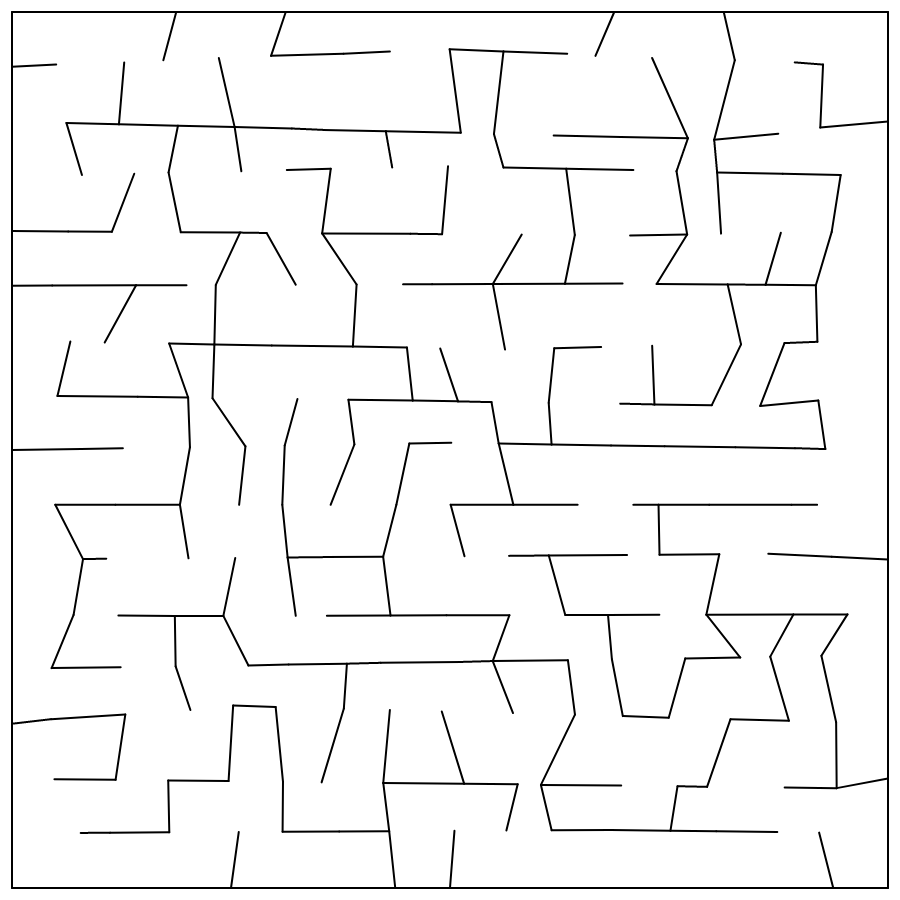
“Oblique” describes the geometry, not the puzzle. Before the maze is carved, the grid’s interior corners are randomly displaced and the lines bowed, one cell at a time, while the outer edge stays locked to the page, so the whole grid stays watertight and prints clean at any size. What comes out the other side is a field of uneven, slightly leaning squares hiding one honest route from Start to Finish. Nothing about the connectivity changes underneath: every cell still only opens to its up, down, left, and right neighbours, exactly like a plain square maze, so a solver who has ever finished one of those can finish this one just as fast. Only the look is new. (Curious exactly how the displacement works under the hood? How Oblique Mazes Work walks through it.)
That distinction is the whole sale. You are not asking a buyer to learn a puzzle they have never seen. You are handing them a puzzle they already trust, wearing a look nobody else’s grid has.

What a Finished Oblique Page Looks Like
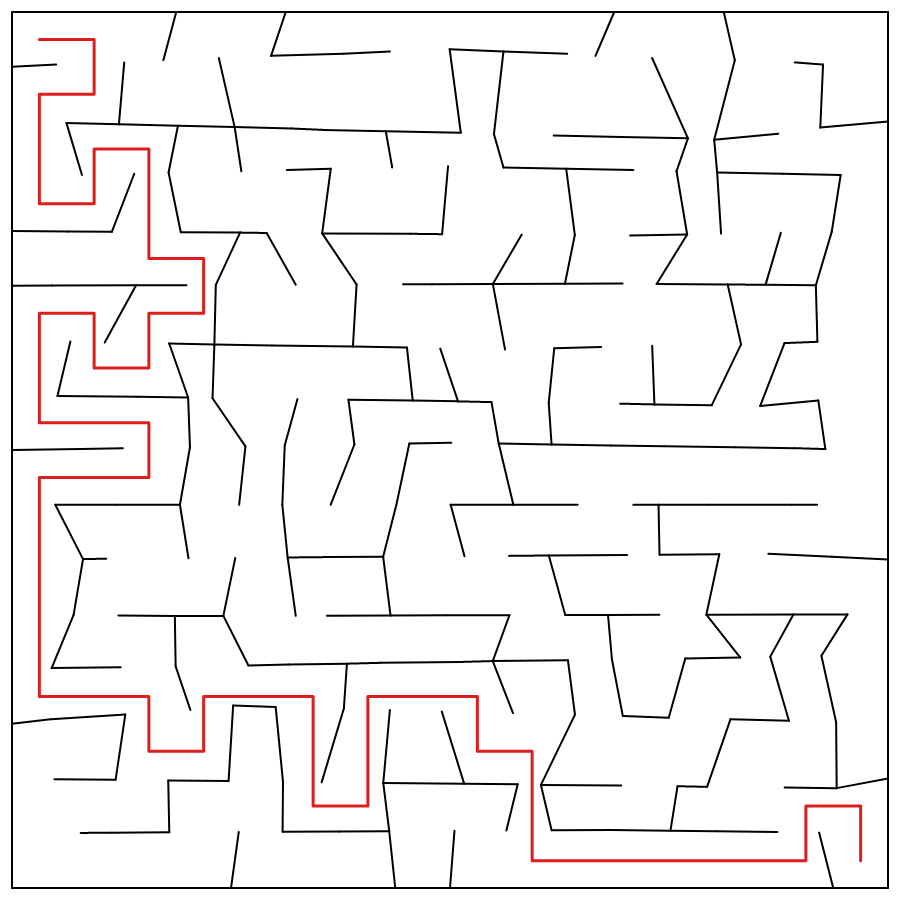
Here is the proof: the same tilted grid, next to its answer key, one honest route traced clean from Start to Finish. Every wall is genuinely displaced, not a filter laid over a straight grid after the fact, which is why it still looks intentional at any zoom level, on a phone screen or a full-bleed print.

Every maze ships with that solution generated in the same pass. You never trace a route by hand to be sure the page works, and neither does your reader.
What You Can Create
Set the slant once and it pays off in seven directions: the same grid becomes a book, a worksheet, a giveaway, a classroom page, and a browser game. The same setup produces:
- Standalone Oblique Mazes puzzle books for KDP and other print-on-demand platforms
- Worksheets, activity sheets, and printables for Etsy or your own site
- A stand-apart maze inside a mixed logic or activity book, styled to look nothing like the square-grid page next to it
- Themed or seasonal collections, ramped from a gentle warm-up grid to a large, dense showpiece, or poured into a silhouette mask (Creative and up) for a jack-o-lantern, a mitten, or a mascot
- A branded giveaway or activity-program handout, with your own Start and Finish marker art
- Classroom logic worksheets, leveled by grid size and complexity for the grade, with the slant eased off for a calmer page on early grades
- Interactive web puzzles that play in the browser on your own site, with Creative Interactive or Productivity Interactive Edition
Why Create It with Puzzle Maker Pro?
The slant is not a texture pasted over a maze afterward. It is built into how the maze is generated, which is what makes it hold up under real production, not just a single pretty preview.
Four independent slant controls, two that bow whole grid lines and two that jitter individual corners, let you tune the effect from a bare hint of unevenness to a full hand-drawn wobble, so one module covers a subtle activity page and a loud, unmistakably artisanal cover feature. Every maze is still a perfect maze underneath: you generate and solve it on the same reliable grid logic as any square maze, one guaranteed route, no loops, so you never hand-check a grid before it goes to print. And because the generator redraws the displacement fresh every time you hit generate, no two mazes lean the same way, so a themed collection reads as individually inked from page to page, not stamped from a single template and repeated.
Key Creation Workflows
Dial the Wobble From Barely-There to Full Hand-Drawn
Push two sliders and whole grid lines bow into long, sweeping curves. Push the other two and individual corners jitter out of true. Move them all toward zero and the grid tightens back into an ordinary square maze; push them up and the page grows progressively more crooked and hand-drawn. You decide how loud the effect gets, from a page that just feels slightly organic to one that unmistakably looks sketched, and the same four controls apply whether you are shaping one maze or an entire book’s worth.
Batch a Book Where No Two Pages Lean the Same Way
Set your slant, size, and style once, then run the batch: Instant Puzzle Books turns a same-settings run into a finished PDF or PowerPoint on every edition, and Time Saver (Productivity) runs flexible multi-row batches for bigger, mixed collections. Because the generator redraws the displacement fresh for every maze, the results come out individually crooked, not one wobble copied down the book. Puzzle Book Studio adds full book design on Creative and up, with multiple sets combined together on Productivity.
Send the Route Wherever Your Layout Needs It
Start and Finish do not have to sit in the corners. Choose the default top-left-to-bottom-right route for a fast setup, ask for the longest possible path when you want a harder puzzle out of the same grid, randomize it, set fixed anchors, or right-click straight on the puzzle preview to drop your own Start and Finish exactly where you want them. None of the five path modes are locked to a paid tier, so you get full control over where the route runs from the first maze you ever generate.
Give Start and Finish Their Own Icons
The default S and E markers are clean text glyphs, styled to match the rest of your page. Swap in your own uploaded images instead, a paw print and a bone, a flag and a trophy, whatever fits the book, and the maze carries a small branded or themed touch. (Try it in the free demo alongside the silhouette mask below.)
Pour a Slanted Grid Into Any Silhouette You Load
Load a picture on the Masks tab (Creative edition and up) and the maze fills that outline instead of a rectangle: a mitten, a jack-o-lantern, a mascot, a client’s logo. Because an Oblique maze carves the same square grid as a Square Maze underneath its slant, the mask holds its shape without stretching or distorting your art, exactly like the plain square version, so you get the hand-drawn look and a themed silhouette from the same setup. Load your own image in the free demo above and check the fit before you commit to an edition.
Keep the Wobble Honest at Any Size
The outer edge of every Oblique maze stays locked to the page no matter how hard you push the slant, so the grid never tears or gaps at the border, and it exports clean as PNG, JPG, SVG, and PDF, sharp from a pocket-sized activity page to a full-bleed cover. The hand-drawn look is a rendering choice, not a fragile effect, so it survives your actual print run.
From One Puzzle to a Full Book
One Oblique maze is a sample. A whole book of them, each leaning its own way, is the product. Every edition turns a same-settings run into a finished PDF or PowerPoint with Instant Puzzle Books, no layout work on your end; add Puzzle Book Studio on Creative and up and you control the fonts, titles, page numbers, layout, and trim size around a set of your mazes. On Productivity, Time Saver runs batch after batch across whatever settings you choose, so a full, varied collection lays itself out while you do something else. Start after breakfast, and by the afternoon you are holding a full book of individually-leaning mazes, not a folder of loose exports.
Ready to give your next maze book a look shoppers notice? Choose your edition above, or push the four sliders around in the free demo first.
Play It on the Web
Paper is not the only place an Oblique maze can live. Add the Creative Interactive or Productivity Interactive edition and export a set as playable HTML to put it on your own site, where a visitor solves the maze right in the browser with a mouse or a finger. Getting there is an upload, not a coding project: you export the set and upload it (or the ZIP) to your WordPress site with the free BookPublisherTools plugin, and the hosted player takes it from there. (The exported files themselves are static; the play happens in the hosted player, so there is no code for you to maintain.) You choose the presentation:
- A puzzle list. Visitors pick a maze from a dropdown and solve it, the fastest way to put a playable Oblique maze on your page.
- A leveled game. The same set becomes a path of levels that unlock in order, with progress and stars saved in the visitor’s browser, and a finish screen that shows a button in your own words, like “Get the full book.”
Post a short free set, a handful of mazes, and the moment a visitor clears the last one, your own message and button appear. It is a sample that teaches the puzzle, a reason for a visitor to stay and come back, and a quiet nudge toward the book, all from one export.
Try the free demo and see how it plays before you choose an edition.
Which Edition Should You Choose?
Here is the part that usually trips people up on a “special look” maze product, so it is worth saying plainly: the slant is not a paid upgrade. It is a plain setting, on every edition, including the cheapest one. Lite already makes the exact same hand-drawn-looking grid every other edition does. What the higher editions add is shaping, scale, and output, not the look itself: Creative adds the silhouette mask, Productivity adds batch production, and Creative Interactive or Productivity Interactive adds JSON and web play. None of it makes the grid any more hand-drawn.
- Lite: the Oblique shape with all four slant controls, plus Instant Puzzle Books for same-settings collections. The complete visual trick, at the lowest price of entry.
- Creative: adds the silhouette mask (pour the slanted grid into any picture shape, same mechanism as Square Mazes) plus Puzzle Book Studio, full control over fonts, titles, page numbers, layout, and trim size for a single set of mazes.
- Productivity: adds Time Saver batch creation and Puzzle Book Studio with multiple sets combined into one project. Choose this if you are producing print runs at volume.
- Creative Interactive: adds JSON output and HTML for interactive web play on top of Creative (silhouette mask included), so a set can also run as a playable game on your own site. Choose this if you want the look, the shaping, and online play without needing batch volume.
- Productivity Interactive: everything in Productivity’s batch scale, plus that same JSON output and web play. Choose this if you want both volume production and online play in one edition.
| What you want to do | Lite | Creative | Productivity | Creative Interactive | Productivity Interactive |
|---|---|---|---|---|---|
| Create Oblique mazes with all four slant controls | Yes | Yes | Yes | Yes | Yes |
| Export PNG, JPG, SVG, PDF (puzzle + solution) | Yes | Yes | Yes | Yes | Yes |
| Instant Puzzle Books (same-settings collections) | Yes | Yes | Yes | Yes | Yes |
| Custom Start/Finish marker images | Yes | Yes | Yes | Yes | Yes |
| Silhouette masking (shape the maze) | No | Yes | Yes | Yes | Yes |
| Puzzle Book Studio (full book design, one set) | No | Yes | Yes (+ multiple sets) | Yes | Yes (+ multiple sets) |
| Time Saver batch creation | No | No | Yes | No | Yes |
| JSON output | No | No | No | Yes | Yes |
| Play on the web (list or leveled game) | No | No | No | Yes | Yes |
One thing worth knowing before you pick a row: Interactive is an add-on, not a bigger rung on the ladder. Creative Interactive carries Creative’s scope, silhouette masking and one set in Puzzle Book Studio, no Time Saver, plus JSON and web play layered on top. Productivity Interactive carries Productivity’s full batch scope plus that same pair. Want online play specifically? You need one of the two Interactive editions, not plain Productivity.
Made up your mind? Pick your edition above.
Who This Is For
POD and KDP publishers tired of shipping the same square grid as every other maze title on the shelf. Turn one setup into a book that photographs differently in a thumbnail and reads differently in a browse.
Existing Puzzle Maker Pro customers adding a new look to a workflow you already know. It is the same Settings, Style, and Titles Creator screen as the rest of the maze family, plus one new Oblique slant tab, so batch it with Time Saver, reuse your saved presets, and drop it into a mixed book without learning a new interface.
Teachers and classroom creators who want a maze that still looks fresh in a worksheet stack. Shrink the grid and ease off the complexity for a quick win with early finishers, size it up for an older grade’s challenge page, and set the slant purely by how playful you want the page to look. It never changes how the maze solves.
Site owners and course creators who want a free, playable maze to keep visitors on the page longer, with Creative Interactive or Productivity Interactive Edition’s web output pointing finishers straight at the book.
Try It Before You Buy
You do not have to take any of this on faith. Every Puzzle Maker Pro module includes a free demo. Try Oblique Mazes free, push the sliders around, generate a page, and judge the look yourself before you choose an edition. Want the full walkthrough first? How to Create Oblique Mazes covers every setting from grid size to export.
Licensing and Commercial Use
Lite, Creative, and Creative Interactive include the standard B2C license. You may sell finished books, worksheets, printables, and classroom resources made with your Oblique Mazes directly to end customers through KDP, Etsy, Teachers Pay Teachers, your own store, and similar channels.
Productivity and Productivity Interactive include the standard B2B license. In addition to your own B2C products, you may create and supply finished maze content to clients, publishers, agencies, and other businesses or sellers.
Product Details
| Product | Puzzle Maker Pro – Oblique Mazes |
| Shape | Oblique (single-shape SKU; square 4-neighbour connectivity, slanted/displaced grid) |
| Editions | Lite, Creative, Productivity, Creative Interactive, Productivity Interactive |
| Platform | Windows desktop |
| Internet required | No (creation is offline; web publishing optional, Interactive editions) |
| Outputs | PNG, JPG, SVG, PDF (puzzle + solution); JSON + HTML/online play (Creative Interactive, Productivity Interactive) |
| Shape masking | Silhouette masking (Creative and up) |
| Solution pages | Yes, generated with every maze |
| Puzzle books | Instant Puzzle Books (all editions); Puzzle Book Studio (Creative and up; multiple sets on Productivity and up) |
| Time Saver | Productivity, Productivity Interactive |
| Commercial license | Sell to consumers with Lite, Creative, and Creative Interactive; sell to publishers and businesses with Productivity and Productivity Interactive |
| Free demo | Yes |
| Delivery | Immediate, in your member area |
Questions Before You Buy
Doesn’t every maze look basically the same? What’s actually different here?
The puzzle logic is the familiar one, but the grid is not. Before the maze is drawn, the grid’s own lines and corners are randomly displaced, so every cell comes out a little crooked instead of a perfect square. Nothing else about a maze changes, only the geometry it is drawn on.
Does the slanted grid make the maze harder to solve, or feel unfair?
No. The slant changes how the grid looks, not how the cells connect. Every route still runs strictly up, down, left, or right, with no diagonal shortcuts the lean might suggest, so if you can solve a square maze, you can solve this one.
Is every maze actually solvable, with an answer key?
Yes. Every Oblique maze is a perfect maze: exactly one route from Start to Finish, no loops, no second answer, and you get the matching solution in the same pass.
Can I shape this into a heart, an animal, or a logo, like some other maze products?
Yes, on the Creative edition and up. Load a picture on the Masks tab and the maze fills that outline instead of a rectangle, without stretching or distorting the image, same as the Square Mazes module, since an Oblique maze carves the identical square cell grid under its slant.
Will every maze in a batch lean the same way, or does each one look different?
Each maze draws its own random slant when you generate it, so a batch comes out individually crooked, not stamped from one repeated pattern.
Which edition do I need? Is the hand-drawn look locked behind a paid tier?
No, the look is on every edition, including Lite. Creative adds silhouette masking and Puzzle Book Studio for full book design; Productivity adds Time Saver batch creation for scale; Creative Interactive and Productivity Interactive add JSON and web play on top of their base tier, for online publishing rather than a better-looking maze.
Is there a free demo?
Yes. Every module includes a free demo, so you can try Oblique Mazes and judge the look before buying.
Can I make a whole book quickly?
Yes. Instant Puzzle Books turns a same-settings run into a finished book on every edition. With Productivity, Time Saver batches out a full run and Puzzle Book Studio assembles multiple sets into one project.
Can people play these on my website?
Yes, with a Creative Interactive or Productivity Interactive edition. Export the set and publish it through the free BookPublisherTools WordPress plugin as a puzzle list or a leveled game, with a finish screen that points solvers at your book.
Can I use the puzzles in books I sell?
Yes. Lite, Creative, and Creative Interactive include the standard B2C license for finished books, worksheets, printables, and classroom resources sold to end customers. Productivity and Productivity Interactive add the standard B2B license for supplying finished maze content to clients, publishers, agencies, and other sellers.
Give the Next Thumb Something to Stop On
Publish another maze ruled perfectly straight and it lands in the same row as every other one, where the only thing left to compete on is price. Break that pattern on sight, with nothing more than four sliders and the geometry doing the work.
Six months from now, your shelf could hold a run of Oblique titles that photograph like nobody else’s maze book, each page leaning its own way, still as fair and solvable as the plain grid underneath. Start with the free demo, slant a few, and see whether that page is the one your next book has been missing.


