Puzzle Maker Pro Feature Guides

Unlock the full potential of Puzzle Maker Pro by mastering its core features and shared tools. These tutorials show you how to customize layouts, adjust fonts, and work with advanced settings that apply across multiple puzzle types. Perfect for creators who want to streamline their process and ensure professional results every time.

How to use the Word List Editor for Puzzle Maker Pro?

This tutorial shows how to use the Word List Editor for Puzzle Maker Pro. The basic functionality is included in: Advanced options, using main and custom word lists, is available as a separate add-on: Introduction A requirement for all Crossword style puzzle is that they have clues. It’s best to vary the clues between puzzles, […]

How to use the Word List Editor for Puzzle Maker Pro? Read More »
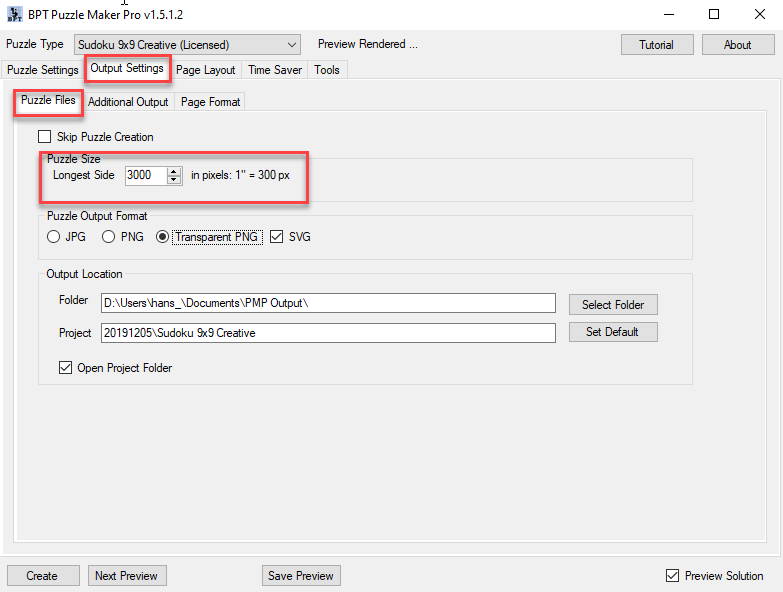
How to create puzzles and puzzle books with Puzzle Maker Pro

Puzzle Maker Pro can create puzzles, and additionally create puzzles books from these puzzles. It is a two-step approach on purpose: How to create Puzzles The primary function of Puzzle Maker Pro is to create puzzles for you. You can set the the resulting image size and file format on the Output Settings / Puzzle

How to create puzzles and puzzle books with Puzzle Maker Pro Read More »

How can I create a Puzzle Book without using the Time Saver in Puzzle Maker Pro?

Create Puzzle Books with Puzzle Maker Pro There are several ways to create puzzle books with Puzzle Maker Pro. With ‘puzzle book’ we mean a PDF or Powerpoint file that can be used as an interior for KDP books, or as a printable on e.g. Etsy. Single Puzzle Type Single Puzzle Type in this case

How can I create a Puzzle Book without using the Time Saver in Puzzle Maker Pro? Read More »

Shopping Cart