Puzzle Maker Pro

Interactive Puzzle Page Styling โ€“ Customize Colors, Fonts, and Layout

Interactive Puzzle Page Styling: Customize Colors, Fonts & Layout (CSS) Overview Make your interactive puzzle pages look on-brandโ€”without touching the puzzle logic. In this tutorial youโ€™ll style the page with custom.css to change colors, fonts, spacing, and buttons while keeping all required HTML and JavaScript intact. Great for KDP/Etsy publishers showcasing samples, or educators matching

Interactive Puzzle Page Styling โ€“ Customize Colors, Fonts, and Layout Read More ยป

Interactive Puzzle Gallery: Publish Multiple Puzzles Online

Interactive Puzzle Gallery: Publish Multiple Puzzles Online Overview Interactive puzzles donโ€™t just attract attention โ€” they keep visitors engaged on your website. With Puzzle Maker Pro, you can publish a gallery of puzzles on a single page, allowing readers to switch between different puzzles in a dropdown menu. This setup is ideal if you want

Interactive Puzzle Gallery: Publish Multiple Puzzles Online Read More ยป

Interactive Puzzles: Publish a Single Puzzle Online

Interactive Puzzles: Publish a Single Puzzle Online Overview Interactive puzzles are a powerful way to attract and engage visitors on your website. By publishing a Puzzle Maker Pro puzzle as an interactive HTML page, you give readers the chance to try a puzzle instantlyโ€”perfect for showing samples, promoting your books, or keeping your audience engaged.

Interactive Puzzles: Publish a Single Puzzle Online Read More ยป

Skyscraper Batch Creation with Time Saver

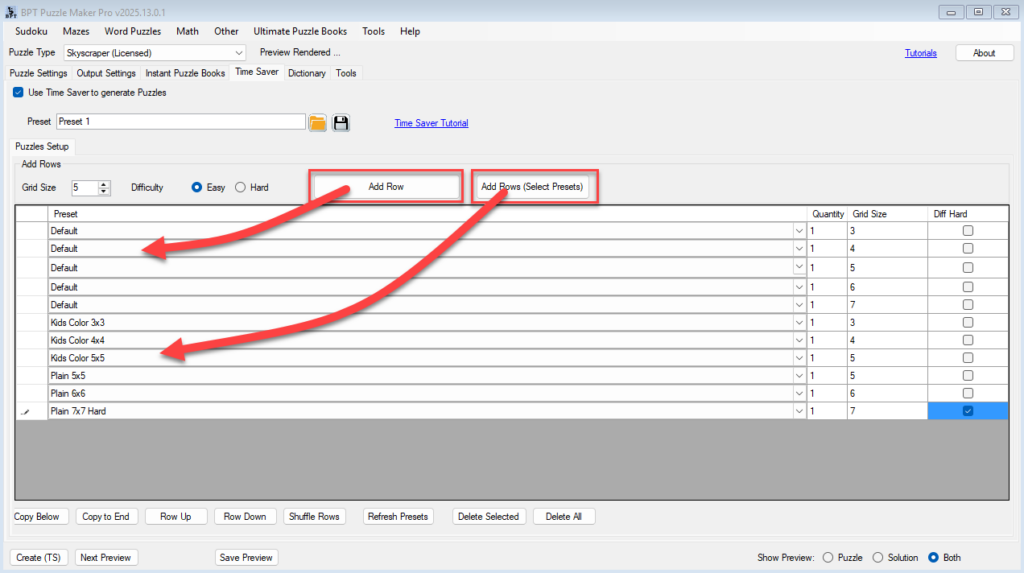
โšก Batch Creation with Time Saver (Skyscraper โ€“ Creator Edition) Quickly generate multiple puzzles with different grid sizes and difficulties โ€” all in one go. ๐Ÿ—‚๏ธ Required Module ๐Ÿ› ๏ธ Preparation Before using Time Saver: ๐Ÿ”ข Step-by-Step Instructions 1. Enable Time Saver Mode 2. Add Puzzles to the Table โžค Option A: Add a Default Row

Skyscraper Batch Creation with Time Saver Read More ยป

Styling and Branding for Skyscraper Puzzles

๐Ÿ–‹๏ธ Styling and Branding for Skyscraper Puzzles Make your numeric logic puzzles look polished and professional โ€” with titles, borders, logos, and more. ๐Ÿ”— URL:https://www.bookpublishertools.com/tutorials/skyscraper-styling-branding ๐Ÿ—‚๏ธ Required Module ๐Ÿ› ๏ธ Preparation Before you begin: ๐Ÿ”ข Step-by-Step Instructions 1. Adjust Grid Style and Font Use Next Preview to instantly see your changes. 2. Enable Branding 3. Customize

Styling and Branding for Skyscraper Puzzles Read More ยป

Getting Started with Skyscraper Puzzles

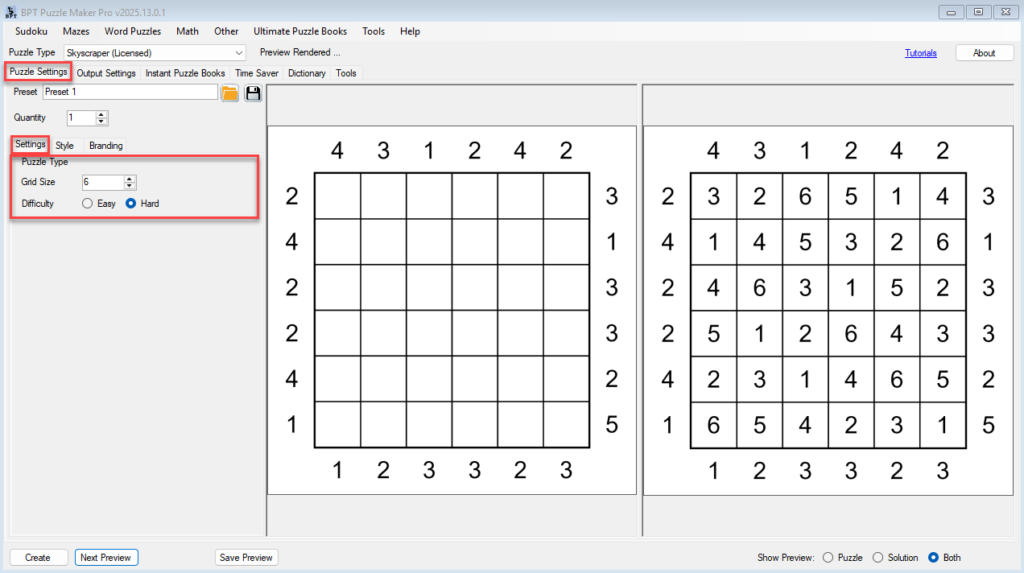
๐Ÿงฑ Getting Started with Skyscraper Puzzles Create your first numeric logic puzzle with clean layout and professional output. ๐Ÿ—‚๏ธ Required Module ๐Ÿ› ๏ธ Preparation Before you begin: ๐Ÿ”ข Step-by-Step Instructions 1. Select the Skyscraper Module 2. Configure Puzzle Settings Go to the Puzzle Settings tab: 3. Adjust Output Settings Switch to the Output Settings tab: 4.

Getting Started with Skyscraper Puzzles Read More ยป

Tents and Trees – Batch Creation (Creator Edition)

โšก Time Saver & Batch Creation (Creator Edition) Quickly generate multiple themed puzzles with different settings โ€” all in one go. ๐Ÿ—‚๏ธ Required Module ๐Ÿ› ๏ธ Preparation Before using Time Saver: ๐Ÿ”ข Step-by-Step Instructions 1. Enable Time Saver Mode 2. Add Puzzles to the Batch Table โžค Option A: Add Default Row โžค Option B: Add

Tents and Trees – Batch Creation (Creator Edition) Read More ยป

Tents and Trees Styling and Branding for Print or Digital

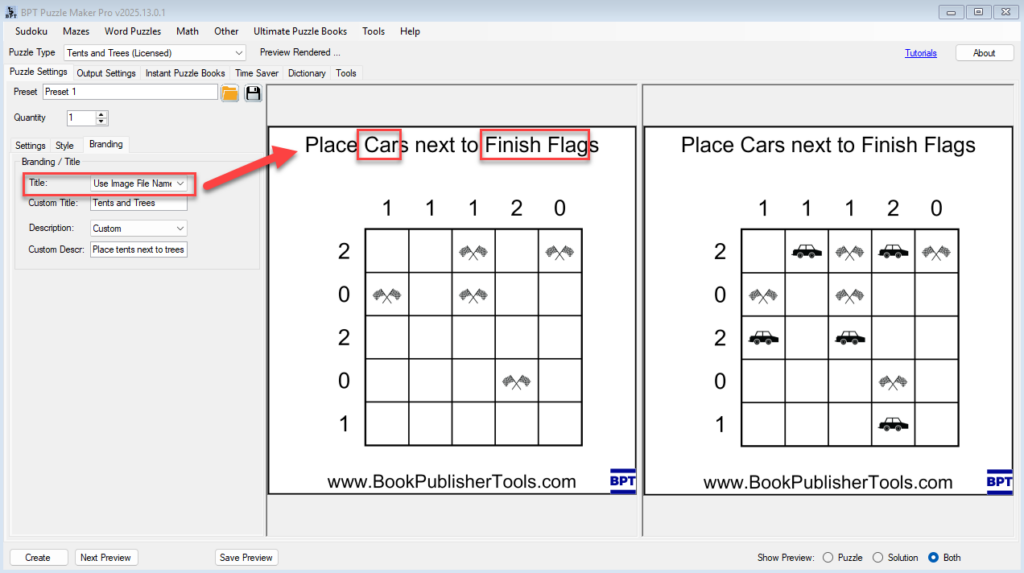
๐ŸŽจ Styling & Branding for Print or Digital Make your Tents and Trees puzzles match your brand, theme, or publishing style. ๐Ÿ—‚๏ธ Required Module ๐Ÿ› ๏ธ Preparation Before you begin: ๐Ÿ”ข Step-by-Step Instructions 1. Open the Tents and Trees Module 2. Set Your Font and Grid Styling Go to the Style tab: Use Next Preview to

Tents and Trees Styling and Branding for Print or Digital Read More ยป

Shopping Cart